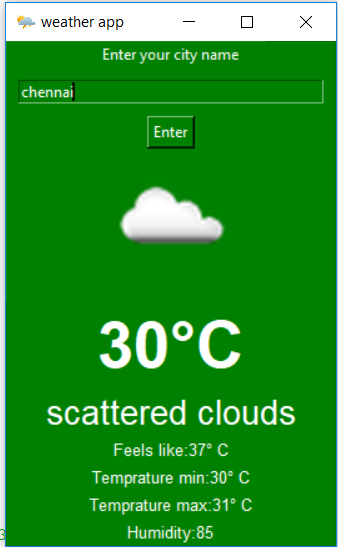
Weather application are used to find weather condition in certain region . In this blog we are gonna see about how to create a weather application using python
To create a weather application using python
First it get city information from the user then it will send api request to open weather map .
First we have to visit => https://openweathermap.org/api . Then we have register a account . Then we have to got to =>https://openweathermap.org/price . Then get free api key.
from tkinter import *
from PIL import ImageTk,Image
import requests
import json
import urllib.request
Tkinter is used for Graphical user interface PIL is used for images Requests is used for downloading information JSON is used to extract json data Urllib is used for api request
def weather():
    global la
    global img1
    global mylabe0
    global glcolor
    mylabe0.grid_forget()

    api_request=requests.get("http://api.openweathermap.org/data/2.5/weather?q="+e.get()+"&appid=<<INSERT API KEY HERE>>")
    api=json.loads(api_request.content)
    icondata=api['weather'][0]['icon']
    path="C:/Users/New/Desktop/python projects/weather app/w1.png"
    urllib.request.urlretrieve("http://openweathermap.org/img/w/"+icondata+".png",path)
    img=Image.open("w1.png")
    resized=img.resize((120,120),Image.ANTIALIAS)
    img1=ImageTk.PhotoImage(resized)
    la=Label(image=img1,bg=glcolor)
    la.grid(row=3,column=0)
    temp=str(int(api['main']['temp']-273))+"°C"
    temp_feel="Feels like:"+str(int(api['main']['feels_like']-273))+"° C"
    temp_min="Temprature min:"+str(int(api['main']['temp_min']-273))+"° C"
    temp_max="Temprature max:"+str(int(api['main']['temp_max']-273))+"° C"
    humid="Humidity:"+str(int(api['main']['humidity']))
    desc=api['weather'][0]['description']
    mylabe0=Label(root,text=desc,bg=glcolor,fg="white",font=('arial',20))
    mylabe0.grid(row=5,column=0)

    mylabel=Label(root,text=temp,bg=glcolor,fg="white",font=('arial',40,'bold'))
    mylabel.grid(row=4,column=0)
    mylabel1=Label(root,text=temp_feel,bg=glcolor,fg="white",font=('arial',10))
    mylabel1.grid(row=6,column=0)
    mylabel2=Label(root,text=temp_min,bg=glcolor,fg="white",font=('arial',10))
    mylabel2.grid(row=7,column=0)
    mylabel3=Label(root,text=temp_max,bg=glcolor,fg="white",font=('arial',10))
    mylabel3.grid(row=8,column=0)
    mylabel4=Label(root,text=humid,bg=glcolor,fg="white",font=('arial',10))
    mylabel4.grid(row=9,column=0)
This function will give api request to openweather map then after receiveing back from the api request information then it extract the necessary details from it and download weather icon for the application . Then display it in the application
glcolor="green"
root=Tk()
root.configure(bg="green")
root.title("weather app")
root.iconbitmap('weather_128.ico')

img=Image.open("w1.png")
resized=img.resize((120,120),Image.ANTIALIAS)
img1=ImageTk.PhotoImage(resized)

la=Label(image=img1,bg=glcolor)
la.grid(row=3,column=0)

mylabe=Label(root,text="Enter your city name",bg=glcolor,fg="white")
mylabe.grid(row=0,column=0)
mylabe0=Label(root,text="",bg=glcolor,fg="white",font=('arial',20,'italic'))
mylabe0.grid(row=5,column=0)


e=Entry(root,width=40,bg=glcolor,fg="white")
e.grid(row=1,column=0,padx=10,pady=10)
but=Button(root,text="Enter",command=weather,bg=glcolor,fg="white")
but.grid(row=2,column=0)
root.mainloop()
First we are having dummy image before any request as "w1.png" after any api request it will get overridden by downloaded weather image . Labels is used to display information in the application and Entry i used for getting information from the user.