Getting started in React
Before I started with React I did a little research on how to code in React. This can be read on this page.
After this research I decided to use the functional components with Hooks in React. One of the reasons for this was that I once worked with classes (and therefore OOP) in a backend language and that it seemed interesting to learn something new by getting started with Hooks. My teacher Laurens also indicated that it is good to work with Hooks as this would be more in line with the earlier Functional Programming course that I followed.
But now the big question was of course: How do I start starting a React application. First, I started watching movies online to see what React Hooks are and how to start starting my own React project (Source). After this I looked at the React documentation. The React documentation lists several ways how React can be used:
- Not using a set of programming tools by implementing React in a <script></script> tag.
- Using recommended sets of programming tools like the 'Create React App'
- Set up a set of programming tools (like a bundler, compiler) yourself.
Since I don't know much about the differences between the different bundlers and compilers yet and I didn't want to make use of loading React in a script tag, I thought it would be wise to choose the recommended set of programming tools. I chose the 'Create React App' because I wanted to make a single page anyway.
Since I followed the Tech block in the 2nd grade of CMD, I already had npm installed on my laptop. For this reason I just had to install React in a new project. I did this by throwing the code below into the terminal in the appropriate directory:
$ npm create-react-app
Then I typed npm start into the terminal and a new link automatically opened in my browser at localhost//:3000 containing an intro to React. Fortunately, this immediately went according to plan and I did not run into any problems.
Before I started coding, I wanted to have a structure within my repository so that my code would be easy to find and understand later on. Coincidentally I once saw the Atomic Web Design structure by Brad Frost and I thought it would be useful to get started. Later in a lecture that Laurens gave, he also mentioned this, which also convinced me to work with it.
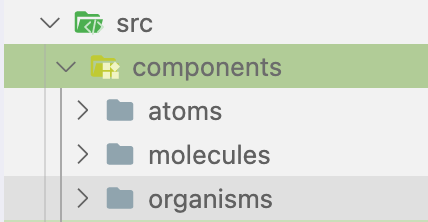
The Atomic Web Design literally means that you create a structure based on biology: from atoms to molecules to organisms etc. In my src folder I created a components folder containing the different folders:
- atoms
- molecules
- organisms
My folder structure is shown below as a screenshot:
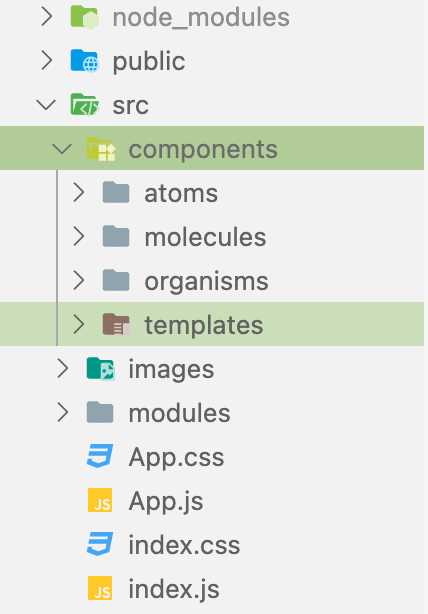
Later on I also started using modules and images and I also made separate folders for this. For example, my total folder structure can be seen below:
After structuring my folders I started deleting all unnecessary files and code. This was mainly the code in the HTML and CSS files. This code was about a title, the rotating React SVG, a paragraph and its styling. Then I got the below error in my code:
Manifest: Line: 1, column: 1, Syntax error on Chrome browser
At first I had no idea what this meant or how to fix it. By searching online, I found out through StackOverflow - Manifest line 1 column 1 syntax error on chrome browser that this had to do with the manifest.json file that I also deleted because I thought it could be deleted in my code. With the help of StackOverflow I then retrieved the manifest.json file and I did not get this error anymore. Now I could finally start coding and fetching the data.