The layout is missing a style #4282

Description

- I have searched the issues of this repository and believe that this is not a duplicate.
Version
2.1.6
Environment
"@ant-design/icons": "^4.6.2",
"ant-design-vue": "^2.1.6",
"axios": "^0.21.1",
"vue": "^3.0.0",
"vue-router": "^4.0.0-0",
"vuex": "^4.0.0-0"
Reproduction link
https://2x.antdv.com/components/layout-cn
Steps to reproduce
版本是2.1.6!
我在使用https://2x.antdv.com/components/layout-cn处的【顶部-侧边布局-通栏】组件,代码:
<template>
<a-layout >
<a-layout-sider width="200" style="background: #fff">
<a-menu
:style="{ height: '100%', borderRight: 0 }"
@click="handleClick"
:openKeys="openKeys"
>
<a-menu-item  @click="handleQueryEbook">
<MailOutlined />
<span>欢迎</span>
</a-menu-item>
<a-sub-menu v-for="item in level1" :key="item.id" >
<template v-slot:title>
<span><user-outlined />{{item.name}}</span>
</template>
<a-menu-item v-for="child in item.children" :key="child.id">
<MailOutlined /><span>{{child.name}}</span>
</a-menu-item>
</a-sub-menu>
<a-menu-item key="tip" :disabled="true">
<span>以上菜单在分类管理配置</span>
</a-menu-item>
</a-menu>
</a-layout-sider>
<a-layout-content
:style="{ background: '#fff', padding: '24px', margin: 0, minHeight: '280px' }"
>
<a-list item-layout="vertical" size="large" :pagination="pagination" :data-source="ebooks" :grid="{ gutter: 16, column: 4 }" >
<template #renderItem="{ item }">
<a-list-item key="item.name">
<template #actions>
<span v-for="{ type, text } in actions" :key="type">
<component v-bind:is="type" style="margin-right: 8px" />
{{ text }}
</span>
</template>
<a-list-item-meta :description="item.description">
<template #title>
<a :href="item.href">{{ item.name }}</a>
</template>
<template #avatar><a-avatar :src="item.avatar" />
</template>
</a-list-item-meta>
{{ item.content }}
</a-list-item>
</template>
</a-list>
</a-layout-content>
</a-layout>
</template>
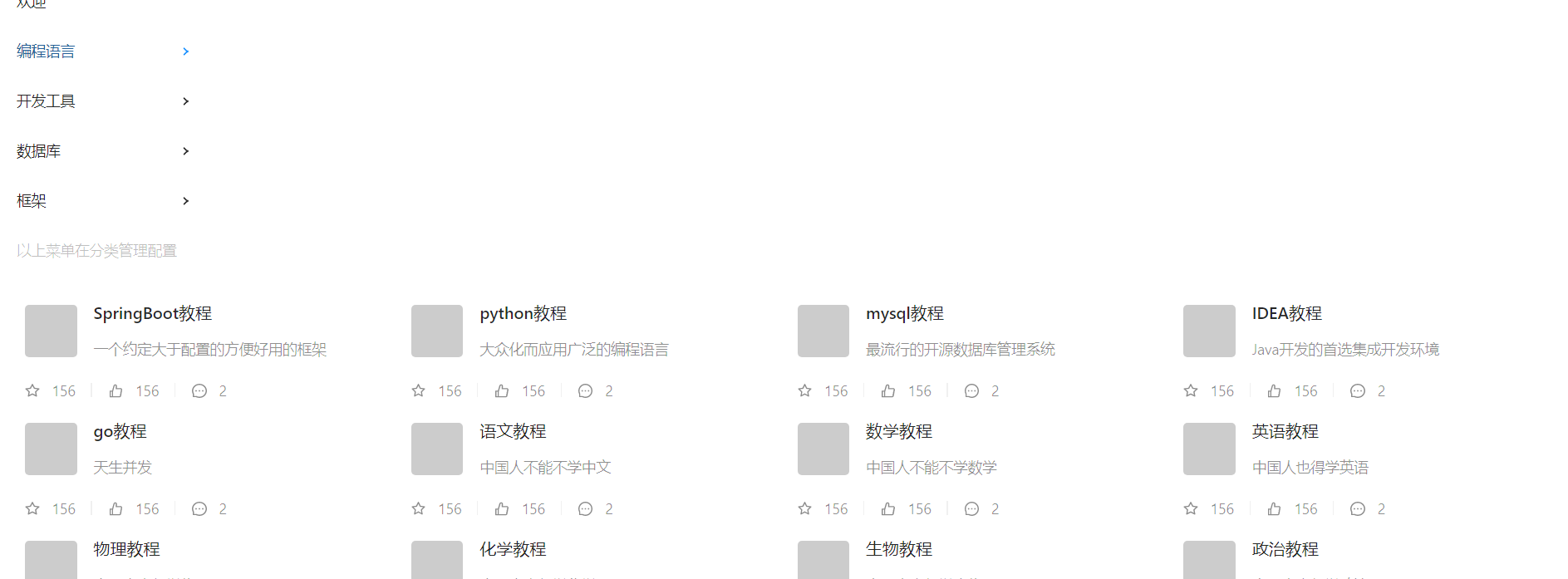
但是启动后布局为上下布局,而不是左右布局!<aside在上,<main在下方!
但是我查看了html源码,这俩是同级的!
我看了下样式,发现<aside和<main都用到了flex,但是他们的上一级<section没有任何css!
我在源码中加上了 <a-layout style="display: flex",于是布局就变成正常的左右了!但是子菜单样式又不对了
依赖的版本:
"@ant-design/icons": "^4.6.2",
"ant-design-vue": "^2.1.6",
"axios": "^0.21.1",
"vue": "^3.0.0",
"vue-router": "^4.0.0-0",
"vuex": "^4.0.0-0",
What is expected?
左右布局恢复正常
What is actually happening?
左右布局变成上下布局
小白第一次给大项目提issue,不足之处请大佬多多包涵!
-
修改前:上下排列
-
修改后:左右排列
