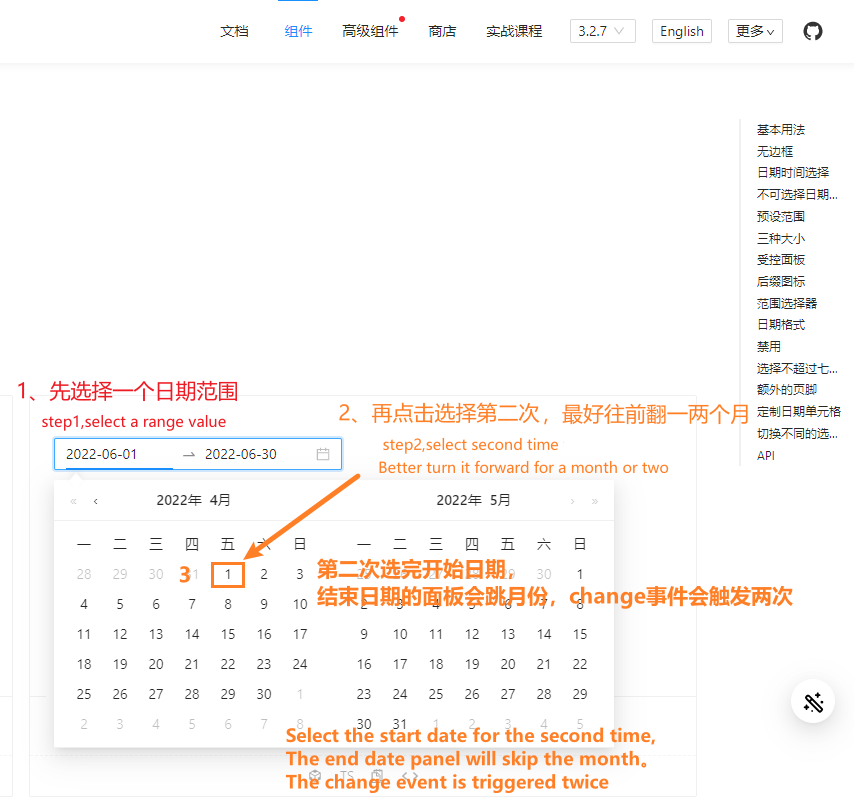
ant3.2.7 range-picker第二次选择结束日期面板跳转,非常影响体验。When the ant3.2.7 range-picker date component is selected for the second time, the panel jumps, which greatly affects the experience. #5742

Description

- I have searched the issues of this repository and believe that this is not a duplicate.
Version
3.2.6
Environment
vue3.x、ant-design-vue 3.2.7
Reproduction link
https://www.antdv.com/components/date-picker-cn
Steps to reproduce
1、range-picker日期类型,先选择一个日期范围,比如2022-06-01-2022-06-30。2、点击第二次选择,把月份往前翻一两个月,比如选择2022-04-01,选完开始日期,日历面板就会改变(结束日期似乎和第一次的结束日期有关联),非常影响体验,请修复
- Range-picker datetype: first select a date range, such as 2022-06-01-2022-06-30. 2. Click the second selection to turn the month forward by oneortwo months. For example, select 2022-04-01. After selecting the start date, the calendar panel will change (the end date seems to be related to the first end date),It greatly affects the experience, please repair it.
What is expected?
修复问题。repair it
What is actually happening?
影响体验