在声明的全局组件中封装tag、CheckBox标签,表单页面调用组件时用v-decorator校验不通过&&无法向后台传参 #771

Description

- I have searched the issues of this repository and believe that this is not a duplicate.
Version
1.3.8
Environment
win10 qq浏览器10.2.1/360安全浏览器10 ant-design-vue1.3.8 vue2.x
Reproduction link

Steps to reproduce
jDicSelectTag组件声明
import T from './JDictSelectTag.vue'

const JDictSelectTag = {
install: function(Vue) {
Vue.component('JDictSelectTag', T)
}
}

export default JDictSelectTag;
表单页面使用包含 的组件
<j-dict-select-tag component-type="checkbox" v-decorator="['tags', {rules: [{ required: true, message: '请选择标签!' }]}]"></j-dict-select-tag>
JDictSelectTag.vue文件部分内容:
<div v-else-if="componentType === 'checkbox'">
<a-checkbox-group>
<a-checkbox value="A">A</a-checkbox>
<a-checkbox value="B">B</a-checkbox>
<a-checkbox value="C">C</a-checkbox>
<a-checkbox value="D">D</a-checkbox>
<a-checkbox value="E">E</a-checkbox>
</a-checkbox-group>
</div>
页面截图:
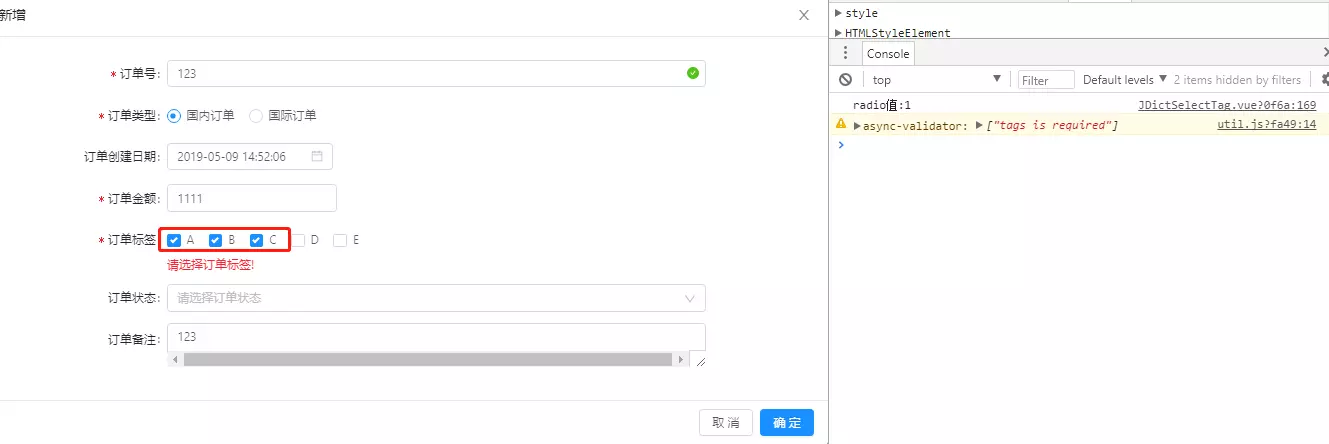
另:将组件直接写在表单页面并添加v-decorator="['tags', {rules: [{ required: true, message: '请选择标签!' }]}]"后可以正常使用
What is expected?
使用在公共组件内封装的 并添加向后台传参
What is actually happening?
使用封装了 并添加的公共组件向后台传参时,获取不到v-decorator="['tags', {rules: [{ required: true, message: '请选择标签!' }]}]"声明的属性值"tags",required验证无法通过