Repository navigation
v4.0 — Profiles, Scheduling & 3D Fonts

v4.0 — Profiles, Scheduling & 3D Fonts
Stable release for ESP8266 and ESP32. v4.0 brings display profiles,
scheduling, animated progress bars, display rotation and PixelFonts 3D to
wledPixel. It includes the ESP8266 weather and web/MQTT stability fixes from
the v4.0 beta releases.
New PixelFonts 3D font
Give your messages and clock an outlined, shadowed pixel style with
PixelFonts 3D (Latin), based on pixelfont_3d_5x5_thin from
mcer12/PixelFonts.
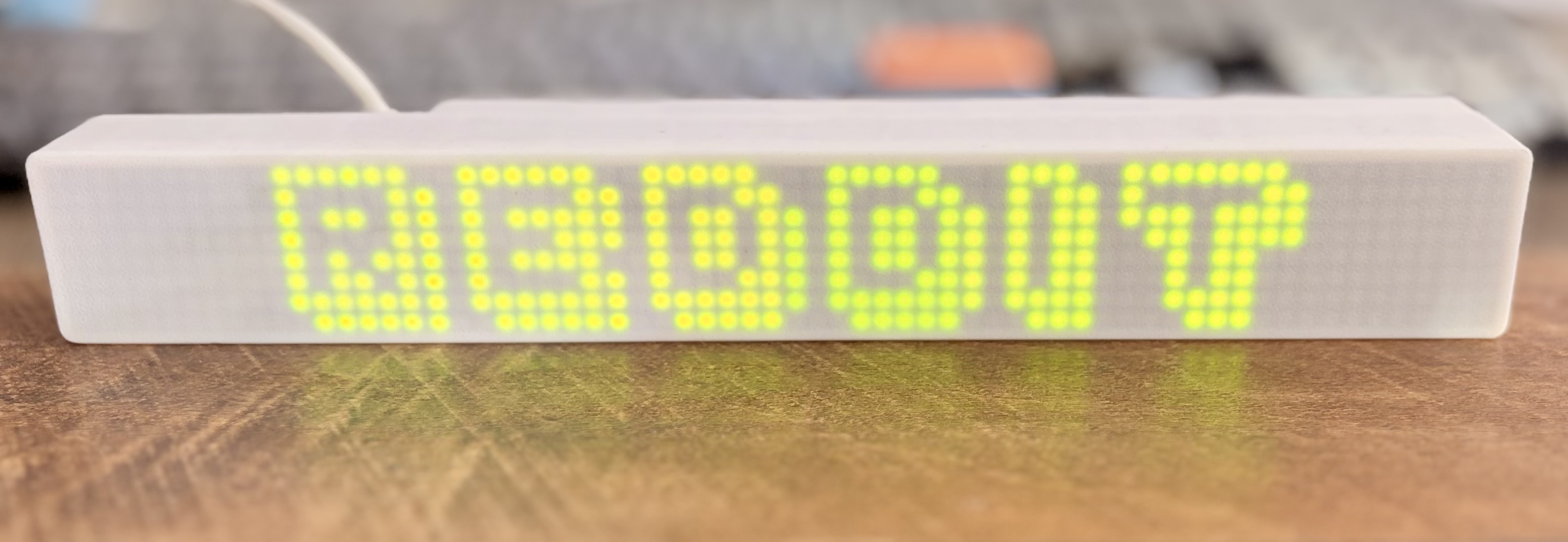
- Fits the full 8-pixel display height, including the outline and shadow.
- Supports ASCII letters, digits, punctuation and the euro sign. Cyrillic and
accented letters are not included; unsupported characters display?. - Keeps the existing degree sign for temperatures and arrows for stock prices.
Blinking clock separators keep the same width. - Select Profiles → zone → Font → PixelFonts 3D (Latin), then Apply Now.
On a 32-column zone, set Character spacing = 0 to fit a 24-hourHH:MMclock. - The font uses about 1.8 KB of flash and is distributed under the MIT license
with attribution. The README includes a pixel preview and a real-device photo.
Display profiles and scheduling
- Store 4 profiles on ESP8266 or 8 on ESP32, including the default profile.
- Override selected settings per profile: power, brightness, zone layout, modes,
fonts, scrolling, clocks, weather, MQTT/HA sources, countdowns, stock tickers
and progress bars. No change preserves the active value. - Schedule profiles by hour, minute, days of the week and days of the month,
using synchronized NTP time and the configured time-zone offset. - Apply Now saves and activates a profile. Saving alone stores it. Apply or
schedule the default profile explicitly to return to the baseline. - Profile edits use isolated drafts. A profile and its progress bars commit
together, and the UI reports storage errors before confirming the save.
Progress bars, rotation and clocks
- Regular progress bars show HA/MQTT values or time-based progress.
- Dynamic progress bars provide 16 animations and two configurable
HA/MQTT value rules, with separate animation speeds and per-profile settings. - Service Settings → System settings → Rotate display 180° rotates the
entire display, including zones, text, animations and progress bars. This
global setting is saved across reboots and shared by all profiles. - Choose 12-hour clocks with or without am/pm, alongside the 24-hour formats.
Reliability improvements
- ESP8266 weather polling uses a secondary IRAM heap for TLS contexts and record
buffers, with DRAM/IRAM checks before requests. Compact TLS records are used
only when the server confirms support. Invalid or incomplete weather responses
preserve the previous reading. - MQTT disconnects, buffer resizing and subscription changes run from the
foreground loop on ESP8266, avoiding reentrant socket operations. - API responses capture changing runtime values before streaming. Complete
backups load each profile and progress-bar record once while streaming. - ESP32 profile/bar records use compact LittleFS storage; redundant settings no
longer consume NVS entries. Existing partition layouts are preserved. - Settings restore retains missing, empty and No change values correctly.
DS18B20 conversion is non-blocking; countdown input, UTF-8 encoding and stock
ticker allocation handling are also hardened.
Updating and compatibility
- Download a settings backup before updating and keep it private: it contains
credentials. Retain your previous firmware separately for rollback. - Install
wledPixel-v4.0_ESP8266.binorwledPixel-v4.0_ESP32.binfor
your board through the existing firmware-update workflow. These are
application images, not merged ESP32 factory images. Verify downloads using
SHA256SUMS. - After reboot, confirm v4.0, check your profiles and integrations, then
select the new font where wanted. Save a fresh settings backup afterward.
v4.0 beta backups remain supported, and their font IDs are unchanged. v3.6
backups restore settings present in those files; they cannot supply newer
profile settings. A settings backup contains no firmware. To downgrade, install
the target firmware and restore a backup made with that version.
Validation and operational limits
- Native tests run with AddressSanitizer and UndefinedBehaviorSanitizer,
including real MD_MAX72XX font decoding, glyph orientation, punctuation
alignment, fixed-width clock blinking, UTF-8 conversion and profile restore. - Python checks cover web assets, JavaScript syntax, OTA guards and backup
comparisons. Normal and HIL firmware builds are checked for both platforms;
only normal firmware images are distributed. - The ESP8266 release image is checked through OTA, reboot and comparison with
the saved complete settings backup. The new 3D font has also been photographed
on a physical display, as shown above. ESP32 validation for this release is
through builds and native tests. - ESP8266 has limited heap: browser activity can temporarily disconnect MQTT
and postpone background polling. Incoming MQTT payloads are limited to
512 bytes; work-mode and scroll-effect command topics remain available,
but new HA discovery entries for those controls are omitted on ESP8266. - The ESP32 image uses about 97% of the default application partition.
- Full-settings restore is not one transaction. Atomic storage covers a
profile and its progress bars; an interrupted full restore may be partial.