GitHub Workflows
This page includes some guidelines when using GitHub in a team setting. They aren't rules or laws, but suggestions and a perspective on how teams in the industry function. Some of this (like issue cycle time) is specific to this project.
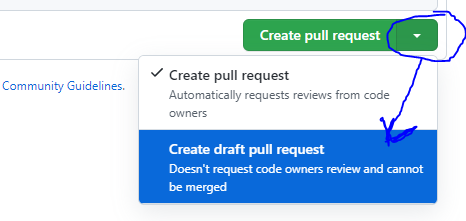
- The moment you open a PR, it will tag everyone for a review (they will get an email), and they will also get emails for every subsequent push you make to that branch. For this reason, it's recommended to use Draft PRs at first so you can create the PR, make any final edits (automated tests will still run), then mark it as "Ready to review" once ready. You can make a draft PR by clicking on the dropdown menu next to the create button.
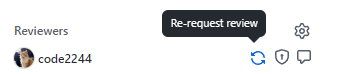
- If you get a review, then you make changes, then you want that person to re-review it, click the "Re-request review" button next to their name
- Leave an emoji react on comments to acknowledge them, and resolve conversations once they've been fixed/addressed.
- If linting/tests are failing, be sure to run the same tests on your local repo to ensure they pass before pushing it up to run on CI.
- When reviewing a PR and leaving comments, use the "Start a review" feature rather than "Add single comment". Using the review feature will send a single email with all comments, rather than an email per comment.
- When leaving a review, use the following guidelines:
- Comment is for when you feel like it may be incomplete, or if you have general questions, or if you have comments about the implementation without being confident that it can be merged.
- Approve is meant to say that the code looks good, even if you have non-blocking comments or requests for changes. For example, "LGTM, but remove that one rogue console.log".
- Request Changes should be used only when there's something in the PR that you feel like shouldn't be merged until it's addressed. Doing so will block the author from merging until re-reviewed or if the review is dismissed.
- Be kind! Writing code is hard. 😉
- Assign yourself an issue if you are working on it
- Generally, avoid assigning issues to people until the issue is available (i.e. unblocked by other issues).
- The exception here is if there is a specific person who needs to work on a particular task
- We'd like to aim for a 7-day cycle time for issues - meaning,
- Be proactive and communicative about the status of your issue - via Discord or on the issue itself.
- It's okay to un-assign yourself from a ticket if you no longer have the bandwidth! It will not prevent you from taking on work in the future 😄