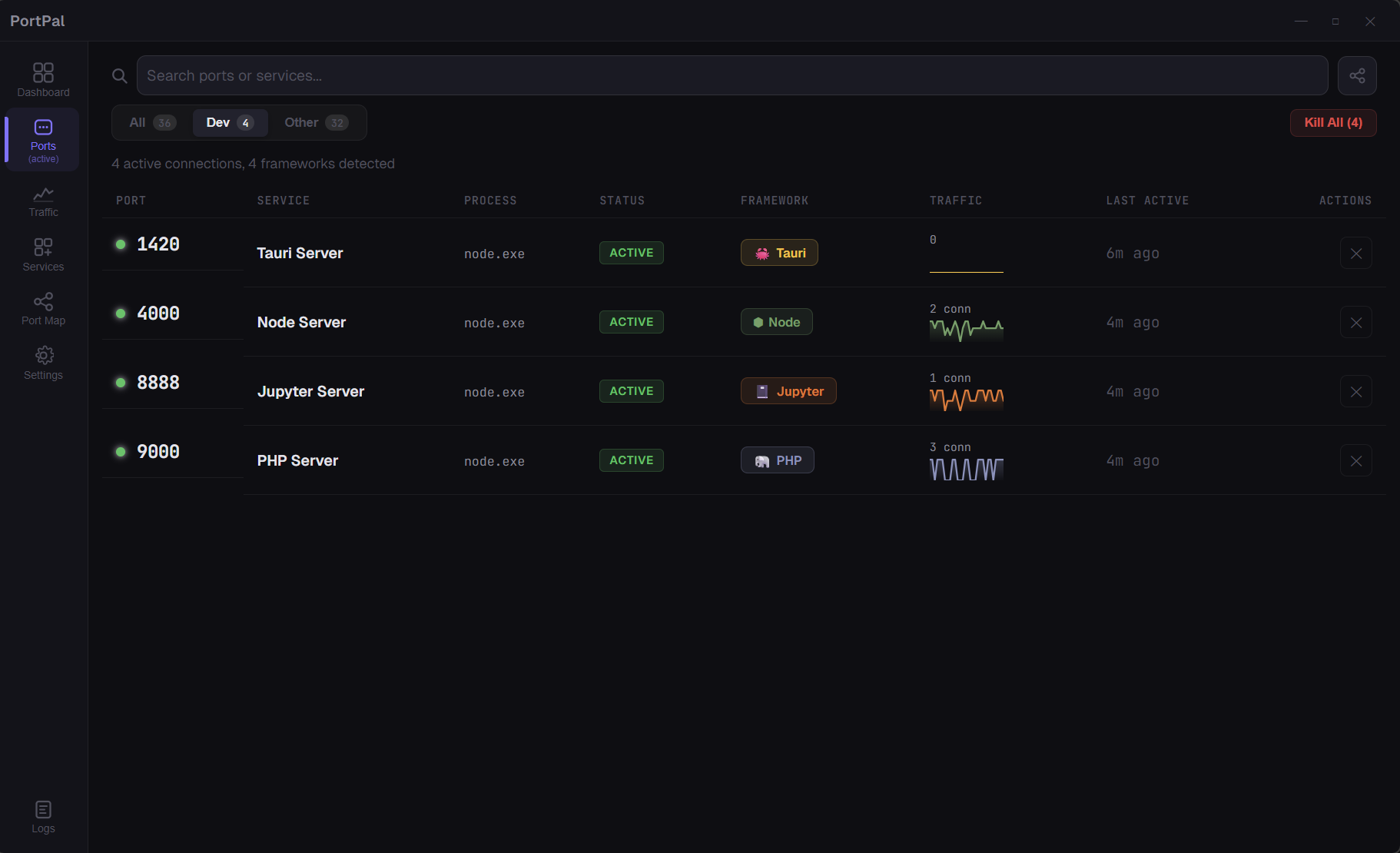
Know what's running. Kill what's blocking. See how it's connected.
A blazing-fast, native desktop dashboard built for modern developers. Stop playing detective with netstat and lsof. PortPal watches your ports, tracks traffic, and visualizes network topology — so you can just write code.




Every developer knows the pain:
Error: listen EADDRINUSE: address already in use :::3000
You open a project and something is already squatting on the port. Now you're hunting for PIDs and copy-pasting kill commands. Every. Single. Time.
PortPal ends that.
We've evolved from a simple port list to a full Developer Command Center:
- 📈 Traffic Sparklines: Watch real-time connection activity with beautiful, animated SVG mini-charts natively embedded in your metrics.
- 📋 Historical Event Logging: A dedicated logs page tracks every process start, stop, and connection spike along with timestamps and framework contexts.
- 📦 Categorized Services: PortPal automatically groups active ports into cleanly contained UI cards by project and framework.
- 🗂️ Dev vs. System Isolation: Quickly filter ports by 'Dev Frameworks' or 'Other System Apps', complete with a Kill All panic button.
- 🎨 Windowless Chrome: Frameless application design with integrated native UI controls for a hyper-modern feel.
See every listening port on your machine at a glance — process name, PID, connections, framework detection, and project identification.
Hover over any port and click ✕ to kill it instantly. If PortPal knows the start command, hit ↻ to restart it directly in a new terminal. Dead processes show a "stopped" badge with a persistent restart button.
The crown jewel of PortPal. A D3.js-powered network topology visualization that shows precisely how your services are communicating.
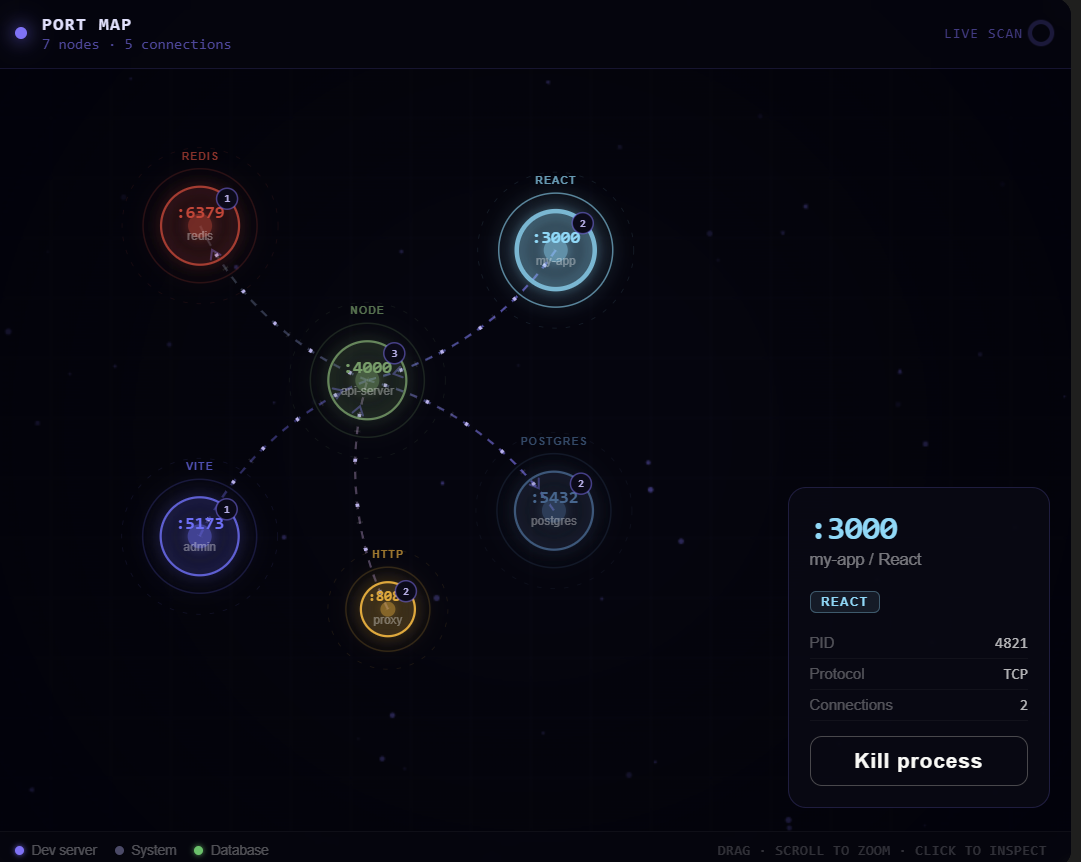
- Drag & Collide simulation for physical manipulation
- Scroll to zoom in and navigate
- Node Caching & Real-time updates without screen flickering
- Framework-colored nodes and connection metrics
PortPal lives quietly in your system tray:
- Traffic light icon immediately alerts you to conflicts and statuses
- A background thread quietly builds a historical log of all backend activity while the window is closed
PortPal isn't just a basic netstat wrapper — it understands what you build:
- Framework Detection — Recognizes React, Vite, Angular, Django, Node, and more via default ports.
- Project Context — Crawls for
package.json,Cargo.toml, orgo.modto name your running servers.
| 🪟 Windows | 🍎 macOS | 🐧 Linux |
.msi installer.exe setup
|
.dmg Apple Silicon.dmg Intel
|
.deb / .AppImage
|
| Tool | Version | Install |
|---|---|---|
| Node.js | ≥ 18 | nodejs.org |
| Rust | ≥ 1.70 | rustup.rs |
| Tauri CLI | v2 | Included |
# Clone
git clone https://github.com/wisher567/Portpal.git
cd portpal

# Install & Run
npm install
npm run tauri dev
Note: The app will launch with Vite HMR — you can freely edit React components and observe changes instantly alongside the Rust backend watcher.
PortPal auto-detects these frameworks out-of-the-box:
| Port | Framework | Color |
|---|---|---|
| 3000 | React | 🔵 Cyan |
| 4200 | Angular | 🔴 Red |
| 5173 | Vite | 🟣 Purple |
| 4000 | Node.js | 🟢 Green |
| 8000 | Django | 🟢 Emerald |
| 8080 | HTTP | 🟡 Amber |
| 5432 | Postgres | 🔵 Steel Blue |
| 6379 | Redis | 🔴 Crimson |
| 3306 | MySQL | 🔵 Blue |
| 27017 | MongoDB | 🟢 Forest |
| 1420 | Tauri | 🟡 Gold |
| Layer | Technology |
|---|---|
| Runtime | Tauri 2 — Rust backend, native webview |
| Frontend | React 19 + TypeScript + Vite 7 |
| Visualization | D3.js v7 — Force-directed graph simulation |
| Styling | Vanilla CSS — Custom Glassmorphism |
| Port Engine | Custom native scanner via sysinfo + standard OS tools |
| Data Pipelines | Singleton thread-safe event logger lazy_static |
Contributions are heavily welcomed to make PortPal even more intelligent.
- Fork the repository
- Create a feature branch:
git checkout -b feat/amazing-feature - Commit your changes:
git commit -m 'Add amazing feature' - Push to the branch:
git push origin feat/amazing-feature - Open a Pull Request
- 🌐 Expanding supported framework signatures
- 🎨 Theme customization & light mode support
- 📦 Homebrew/Winget verification
- 🧪 Expanding unit and integration tests
This project is licensed under the MIT License — see the LICENSE file for details.
If PortPal saved you from one more EADDRINUSE, give it a ⭐
Made with 🦀 Rust + ⚛️ React + 💜 by wisher