Super-fast Runtime type checker and JSON.stringify() functions, with only one line.





- Github: https://github.com/samchon/typescript-json
- NPM: https://www.npmjs.com/package/typescript-json
- Guide Documents: https://github.com/samchon/typescript-json/wiki
import TSON from "typescript-json";

//----
// MAIN FUNCTIONS
//----
TSON.assertType<T>(input); // runtime type checker throwing exception
TSON.is<T>(input); // runtime type checker returning boolean
TSON.stringify<T>(input); // 5x faster JSON.stringify()

//----
// APPENDIX FUNCTIONS
//----
TSON.application<[T, U, V], "swagger">(); // JSON schema application generator
TSON.create<T>(input); // 2x faster object creator (only one-time construction)
typescript-json is a transformer library providing JSON related functions.
- Powerful Runtime type checkers:
- Performed by only one line,
TSON.assertType<T>(input) - Does not require any JSON schema definition
- Only one library which can validate union type
- Performed by only one line,
- 5x faster
JSON.stringify()function:- Performed by only one line:
TSON.stringify<T>(input) - Does not require any JSON schema definition
- 10,000x faster optimizer construction time than similar libraries
- Performed by only one line:

Measured on AMD R7 5800HS, ASUS ROG FLOW X13 (numeric option:
false)
At first, install this typescript-json by the npm install command.
Also, you need additional devDependencies to compile the TypeScript code with transformation. Therefore, install those all libraries typescript, ttypescript and ts-node. Inform that, ttypescript is not mis-writing. Therefore, do not forget to install the ttypescript.
npm install --save typescript-json

# ENSURE THOSE PACKAGES ARE INSTALLED
npm install --save-dev typescript
npm install --save-dev ttypescript
npm install --save-dev ts-nodeAfter the installation, you've to configure the tsconfig.json file like below.
Add the new property transform and its value typescript-json/lib/transform into the compilerOptions.plugins array. When configuring, I recommend you to use the strict option, to enforce developers to distinguish whether each property is nullable or undefindable.
Also, you can configure additional properties like numeric and functional. The first, numeric is an option whether to test Number.isNaN() and Number.isFinite() to numeric value or not. The second, functional is an option whether to test function type or not. Default values of those options are all true.
{
  "compilerOptions": {
    "strict": true,
    "plugins": [
      {
        "transform": "typescript-json/lib/transform",
        // "functional": false, // test function type
        // "numeric": false, // test `isNaN()` and `isFinite()`
      }
    ]
  }
}
After the tsconfig.json definition, you can compile typescript-json utilized code by using ttypescript. If you want to run your TypeScript file through ts-node, use -C ttypescript argument like below:
# COMPILE
npx ttsc

# WITH TS-NODE
npx ts-node -C ttypescriptIf you're using a webpack with ts-loader, configure the webpack.config.js file like below:
const transform = require("typescript-json/lib/transform").default;

module.exports = {
    // I am hiding the rest of the webpack config
    module: {
        rules: [
            {
                test: /\.ts$/,
                exclude: /node_modules/,
                loader: 'ts-loader',
                options: {
                    getCustomTransformers: program => ({
                        before: [transform(program)]
                        // before: [
                        //     transform(program, {
                        //         functional: true,
                        //         numeric: true
                        // })
                        // ]
                    })
                }
            }
        ]
    }
};export function assertType<T>(input: T): T;
export function is<T>(input: T): boolean;typescript-json provides two runtime type checker functions, assertType() and is().
The first, assertType() is a function throwing TypeGuardError when an input value is different with its type, generic argument T. The other function, is() returns a boolean value meaning whether matched or not.
Comparing those assertType() and is() functions with other similar libraries, typescript-json is much easier than other libraries, except only typescript-is. For example, ajv requires complicate JSON schema definition that is different with the TypeScript type. Besides, typescript-json requires only one line.
Also, only typescript-json can validate union typed structure exactly. All the other simliar validator libraries can check simple object type, however, none of them can validate implicit union type. The fun thing is, ajv requires JSON schema definition for validation, but it can't validate the JSON schema type. How contradict it is.
| Components | TSON |
T.IS |
ajv |
io-ts |
C.V. |
|---|---|---|---|---|---|
| Easy to use | ✔ | ✔ | ❌ | ❌ | ❌ |
| Object (simple) | ✔ | ✔ | ✔ | ✔ | ✔ |
| Object (hierarchical) | ✔ | ✔ | ❌ | ✔ | ✔ |
| Object (recursive) | ✔ | ✔ | ✔ | ✔ | ✔ |
| Object (union, implicit) | ✅ | ❌ | ❌ | ❌ | ❌ |
| Object (union, explicit) | ✔ | ❌ | ✔ | ✔ | ❌ |
| Array (hierarchical) | ✔ | ✔ | ❌ | ✔ | ✔ |
| Array (recursive) | ✔ | ✔ | ❌ | ✔ | ✔ |
| Array (recursive, union) | ✔ | ✔ | ❌ | ❌ | ❌ |
| Array (R+U, implicit) | ✅ | ❌ | ❌ | ❌ | ❌ |
| Ultimate Union Type | ✅ | ❌ | ❌ | ❌ | ❌ |
- TSON:
typescript-json- T.IS:
typescript-is- C.V.:
class-validator
Furthermore, when union type comes, typescript-json is extremely faster than others.
As you can see from the above table, ajv and typescript-is are fallen in the most union type cases. Also, they're even showing a huge different from typescript-json, in the time benchmark that does not care whether the validation is exact or not.
The extreme different is shown in the "ultimate union" type, when validating JSON schema.
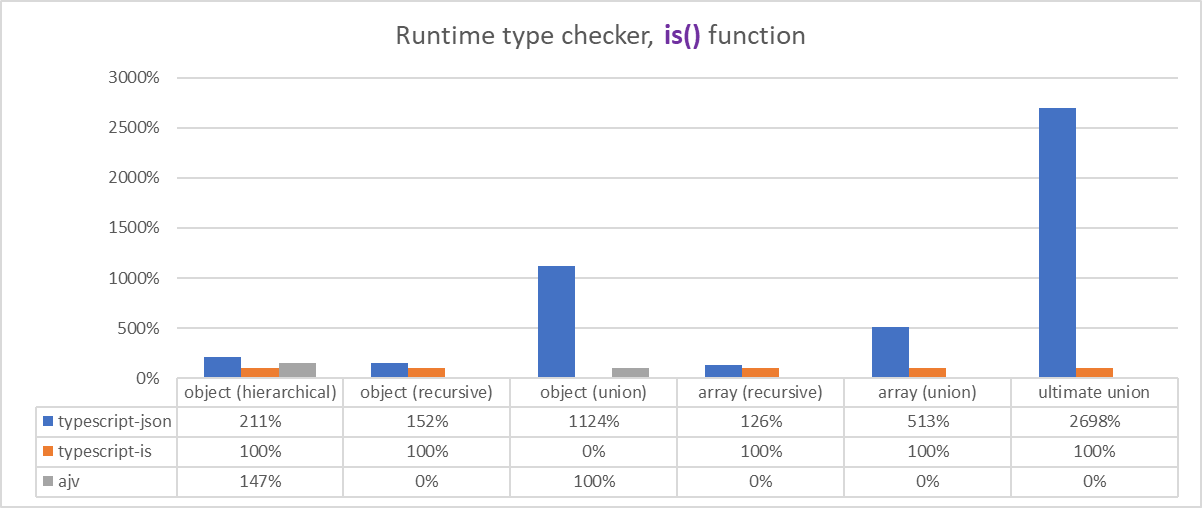
Measured on Intel i5-1135g7, Surface Pro 8
export function stringify<T>(input: T): string;Super-fast JSON string conversion function.
If you call TSON.stringify() function instead of the native JSON.stringify(), the JSON conversion time would be 5x times faster. Also, you can perform such super-fast JSON string conversion very easily, by only one line: TSON.stringify<T>(input).
On the other side, other similary library like fast-json-stringify requires complicate JSON schema definition. Furthermore, typescript-json can convert complicate structured data that fast-json-stringify cannot convert.
Comparing performance, typescript-json is about 5x times faster when comparing only JSON string conversion time. If compare optimizer construction time with only one call, typescript-json is even 10,000x times faster.

AMD CPU shows dramatic improvement
export function application<
    Types extends unknown[],
    Purpose extends "swagger" | "ajv" = "swagger",
    Prefix extends string = Purpose extends "swagger"
        ? "#/components/schemas"
        : "components#/schemas",
>(): IJsonApplication;
typescript-json even supports JSON schema application generation.
When you need to share your TypeScript types to other language, this application() function would be useful. It generates JSON schema definition by analyzing your Types. Therefore, with typescript-json and its application() function, you don't need to write JSON schema definition manually.
By the way, the reason why you're using this application() is for generating a swagger documents, I recommend you to use my another library nestia. It will automate the swagger documents generation, by analyzing your entire backend server code.
My other library using this
typescript-json.
https://github.com/samchon/nestia
Automatic SDK and Swagger generator for NestJS, evolved than ever.
nestia is an evolved SDK and Swagger generator, which analyzes your NestJS server code in the compilation level. With nestia and compilation level analyzer, you don't need to write any swagger or class-validator decorators.
Reading below table and example code, feel how the "compilation level" makes nestia stronger.
| Components | nestia::SDK |
nestia::swagger |
@nestjs/swagger |
|---|---|---|---|
| Pure DTO interface | ✔ | ✔ | ❌ |
| Description comments | ✔ | ✔ | ❌ |
| Simple structure | ✔ | ✔ | ✔ |
| Generic type | ✔ | ✔ | ❌ |
| Union type | ✔ | ✔ | ▲ |
| Intersection type | ✔ | ✔ | ▲ |
| Conditional type | ✔ | ▲ | ❌ |
| Auto completion | ✔ | ❌ | ❌ |
| Type hints | ✔ | ❌ | ❌ |
5x faster JSON.stringify() |
✔ | ❌ | ❌ |
| Ensure type safety | ✅ | ❌ | ❌ |
// IMPORT SDK LIBRARY GENERATED BY NESTIA
import api from "@samchon/shopping-api";
import { IPage } from "@samchon/shopping-api/lib/structures/IPage";
import { ISale } from "@samchon/shopping-api/lib/structures/ISale";
import { ISaleArticleComment } from "@samchon/shopping-api/lib/structures/ISaleArticleComment";
import { ISaleQuestion } from "@samchon/shopping-api/lib/structures/ISaleQuestion";

export async function trace_sale_question_and_comment
    (connection: api.IConnection): Promise<void>
{
    // LIST UP SALE SUMMARIES
    const index: IPage<ISale.ISummary> = await api.functional.shoppings.sales.index
    (
        connection,
        "general",
        { limit: 100, page: 1 }
    );

    // PICK A SALE
    const sale: ISale = await api.functional.shoppings.sales.at
    (
        connection,
        index.data[0].id
    );
    console.log("sale", sale);

    // WRITE A QUESTION
    const question: ISaleQuestion = await api.functional.shoppings.sales.questions.store
    (
        connection,
        "general",
        sale.id,
        {
            title: "How to use this product?",
            body: "The description is not fully enough. Can you introduce me more?",
            files: []
        }
    );
    console.log("question", question);

    // WRITE A COMMENT
    const comment: ISaleArticleComment = await api.functional.shoppings.sales.comments.store
    (
        connection,
        "general",
        sale.id,
        question.id,
        {
            body: "p.s) Can you send me a detailed catalogue?",
            anonymous: false
        }
    );
    console.log("comment", comment);
}My another library, using this
typescript-json, too.
https://github.com/samchon/nestia-helper
Boost up JSON.stringify() function, of the API responses, 5x times faster.
nestia-helper is a helper library of NestJS, which can boost up the JSON.stringify() function 5x times faster about the API responses. Just by installing and utilizing this nestia-helper, your NestJS developed backend server will convert JSON string 5x times faster.
import helper from "nestia-helper";
import * as nest from "@nestjs/common";

@nest.Controller("bbs/articles")
export class BbsArticlesController
{
    // JSON.stringify() would be 5x times faster
    @helper.TypedRoute.Get()
    public get(): Promise<IPage<IBbsArticle.ISummary>>;
}I have special thanks to the Archidraw, where I'm working for.
The Archidraw is a great IT company developing 3D interior editor and lots of solutions based on the 3D assets. Also, the Archidraw is the first company who had adopted typescript-json on their commercial backend project, even typescript-json was in the alpha level.
저희 회사 "아키드로우" 에서, 삼촌과 함께 일할 프론트 개발자 분들을, 최고의 대우로 모십니다.
"아키드로우" 는 3D (인테리어) 에디터 및 이에 관한 파생 솔루션들을 만드는 회사입니다. 다만 저희 회사의 주력 제품이 3D 에디터라 하여, 반드시 3D 내지 랜더링에 능숙해야 하는 것은 아니니, 일반적인 프론트 개발자 분들도 망설임없이 지원해주십시오.
그리고 저희 회사는 분위기가 다들 친하고 즐겁게 지내는 분위기입니다. 더하여 위 nestia 나 typescript-json 및 payments 등, 제법 합리적(?)이고 재미난 프로젝트들을 다양하게 체험해보실 수 있습니다.
- 회사소개서: archidraw.pdf
- 기술 스택: React + TypeScript
- 이력서: 자유 양식
- 지원처: samchon@archisketch.com