Repository navigation

QK4 Mobile v1.0.5
QK4 Mobile v1.0.5 adds native FT8/FT4 operation, a shared ADIF logbook with
QRZ integration, digital-mode TX calibration and protection, and improvements
to CTR2-MIDI control, navigation, macros, and panadapter behavior.
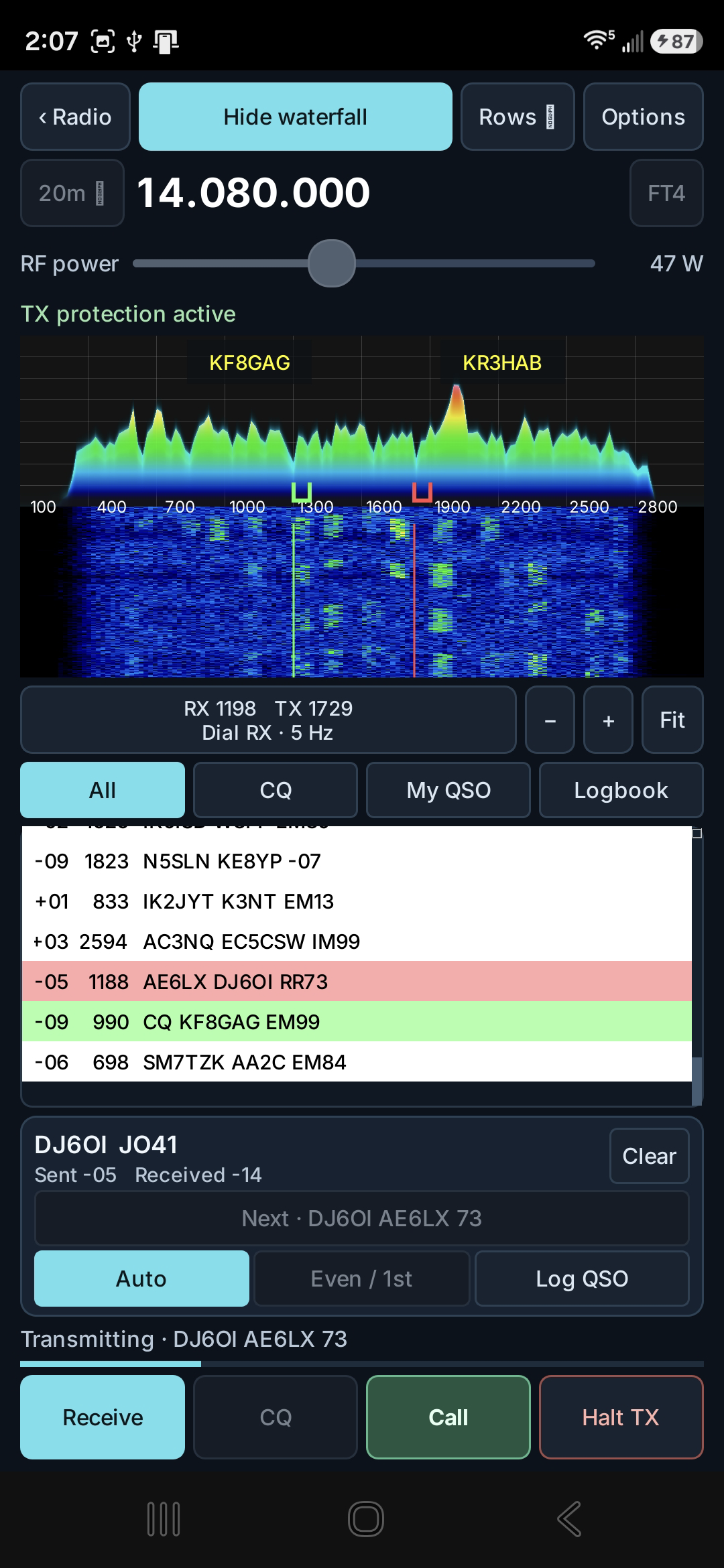
A confirmed FT4 QSO with DJ6OI at 14.080 MHz, showing measured reports, RR73, the live spectrum/waterfall, TX protection, and integrated logging.
FT8 and FT4
- Receive and decode FT8/FT4 from the K4 Main RX audio stream.
- Call stations or send CQ using standard timed transmissions.
- Calculate signal reports automatically using the WSJT-X method.
- Use the live spectrum/waterfall, independent RX and TX tone selection,
received-traffic and My QSO views, common working frequencies, custom
frequency entry, and RF power control. - Automatically select DATA-A, retain it while changing bands, and restore the
operator's previous radio mode on exit. - Complete standard exchanges and log confirmed contacts.
Shared logbook and QRZ
- Use one ADIF logbook from FT8/FT4, SSTV, and the main radio screen.
- Review and edit callsigns before logging FT8/FT4 or SSTV contacts.
- Long-press DXLIST to open the logbook from the radio console.
- Add or edit contacts manually and import or export ADIF.
- Configure automatic QRZ Logbook uploads or manually send unsent contacts.
- Store QRZ credentials securely using Android Keystore encryption.
- Record confirmed QRZ upload status and export the standard QRZ ADIF fields.
Digital-mode TX calibration and protection
- Share one TX audio calibration between FT8 and FT4 for the same radio and
audio-input setup. - Maintain a separate SSTV calibration.
- Automatically adjust and remember program-audio drive using K4 ALC feedback.
- Monitor K4 metering and audio headroom during transmission, reducing drive or
stopping safely when required.
CTR2-MIDI and interface
- Assign FT8/FT4: Switch RX/TX tone to a button's short press and
FT8/FT4: Set tone frequency to its long press. - Use the assigned wheel to preview the selected RX or TX tone, then long-press
the button to set it. Setting RX focuses My QSO; setting TX enables
Hold TX. - Protect radio-frequency and tuning-step controls from accidental changes while
adjusting digital tones. - Provide more activity-list space and selectable traffic density.
- Make Android Back return through setup pages and nested editors without
closing the application.
Radio display and synchronization
- Refresh the complete displayed K4 state after an app or CTR2 macro.
- Improve GPU panadapter rendering reliability.
- Make touch input on Pan A tune VFO A and touch input on Pan B tune VFO B.
The QRhi rendering and per-pan touch-tuning corrections adapted from PR #3 were contributed by Fred Klassen.
Validation and scope
The release-signed ARM64 build uses Android version code 32. It has been tested
on a Samsung Galaxy S26 Ultra with a live Elecraft K4. The captured FT4 screen
documents a completed on-air exchange and the integrated logging workflow.
The Android tablet control layout and iPhone/iPad port derived from PR #3 remain
in separate development branches pending their own build and physical-device
acceptance. They are not included in the v1.0.5 Android phone APK.