Repository navigation
Releases
QK4 Mobile v1.0.5

QK4 Mobile v1.0.5
QK4 Mobile v1.0.5 adds native FT8/FT4 operation, a shared ADIF logbook with
QRZ integration, digital-mode TX calibration and protection, and improvements
to CTR2-MIDI control, navigation, macros, and panadapter behavior.
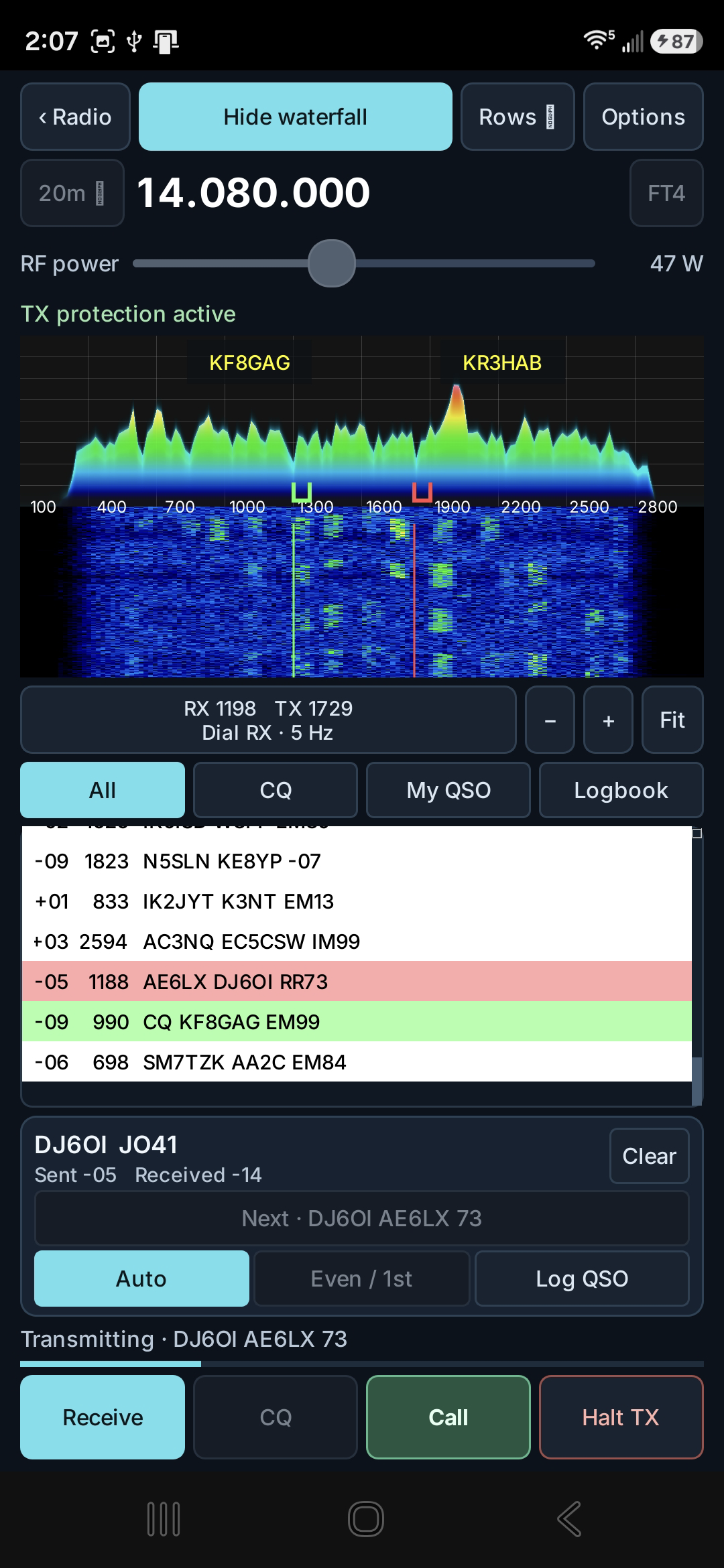
A confirmed FT4 QSO with DJ6OI at 14.080 MHz, showing measured reports, RR73, the live spectrum/waterfall, TX protection, and integrated logging.
FT8 and FT4
- Receive and decode FT8/FT4 from the K4 Main RX audio stream.
- Call stations or send CQ using standard timed transmissions.
- Calculate signal reports automatically using the WSJT-X method.
- Use the live spectrum/waterfall, independent RX and TX tone selection,
received-traffic and My QSO views, common working frequencies, custom
frequency entry, and RF power control. - Automatically select DATA-A, retain it while changing bands, and restore the
operator's previous radio mode on exit. - Complete standard exchanges and log confirmed contacts.
Shared logbook and QRZ
- Use one ADIF logbook from FT8/FT4, SSTV, and the main radio screen.
- Review and edit callsigns before logging FT8/FT4 or SSTV contacts.
- Long-press DXLIST to open the logbook from the radio console.
- Add or edit contacts manually and import or export ADIF.
- Configure automatic QRZ Logbook uploads or manually send unsent contacts.
- Store QRZ credentials securely using Android Keystore encryption.
- Record confirmed QRZ upload status and export the standard QRZ ADIF fields.
Digital-mode TX calibration and protection
- Share one TX audio calibration between FT8 and FT4 for the same radio and
audio-input setup. - Maintain a separate SSTV calibration.
- Automatically adjust and remember program-audio drive using K4 ALC feedback.
- Monitor K4 metering and audio headroom during transmission, reducing drive or
stopping safely when required.
CTR2-MIDI and interface
- Assign FT8/FT4: Switch RX/TX tone to a button's short press and
FT8/FT4: Set tone frequency to its long press. - Use the assigned wheel to preview the selected RX or TX tone, then long-press
the button to set it. Setting RX focuses My QSO; setting TX enables
Hold TX. - Protect radio-frequency and tuning-step controls from accidental changes while
adjusting digital tones. - Provide more activity-list space and selectable traffic density.
- Make Android Back return through setup pages and nested editors without
closing the application.
Radio display and synchronization
- Refresh the complete displayed K4 state after an app or CTR2 macro.
- Improve GPU panadapter rendering reliability.
- Make touch input on Pan A tune VFO A and touch input on Pan B tune VFO B.
The QRhi rendering and per-pan touch-tuning corrections adapted from PR #3 were contributed by Fred Klassen.
Validation and scope
The release-signed ARM64 build uses Android version code 32. It has been tested
on a Samsung Galaxy S26 Ultra with a live Elecraft K4. The captured FT4 screen
documents a completed on-air exchange and the integrated logging workflow.
The Android tablet control layout and iPhone/iPad port derived from PR #3 remain
in separate development branches pending their own build and physical-device
acceptance. They are not included in the v1.0.5 Android phone APK.
QK4 Mobile v1.0.4.1
QK4 Mobile v1.0.4.1
QK4 Mobile v1.0.4.1 refines CTR2-MIDI Extended Button Mode and improves the
local sidetone used with straight keys and external keyers.
CTR2 Extended Button Mode
- Use all 48 mode-specific short and long button assignments provided by
CTR2-MIDI Extended BTN Mode. - Keep the existing 12 Normal-mode assignments under Home when Extended Button
Mode is enabled. The 36 newly available Knob mode 1–3 assignments start
disabled so actions are not unexpectedly duplicated. - Retain the documented directional knob-note ranges when changing modes:
notes 40–55 in Normal Button Mode and notes 60–75 in Extended Button Mode. - Preserve notes 40–48 for the corresponding physical CTR2 buttons while
Extended Button Mode is active.
User-editable mapping files
- Save whether the mapping uses Normal or Extended Button Mode.
- Identify every button by its physical label, MIDI note, short or long press,
knob mode, and assigned action or K4 command. - Include guidance for Wheel A, Wheel B, Slider A, Slider B, and directional
Button output so the file can be edited confidently on a PC. - Automatically correct the exact duplicated button layout created by the
earlier 1.0.4.1 test candidate while preserving operator-customized layouts.
Straight-key sidetone
- Improve the continuity of the locally generated sidetone for straight keys,
bugs, and external keyers to reduce rasp caused by Android audio timing.
QK4 Mobile v1.0.4
QK4 Mobile v1.0.4
QK4 Mobile v1.0.4 adds extensive support for the CTR2-MIDI controller, new
straight-key options, and portable controller and function-key settings.
CTR2-MIDI control
- Connect a CTR2-MIDI controller by USB or Bluetooth LE from its own dedicated
CTR2 setup page. - Use the CTR2 at the same time as a separate TinyMIDI, HaliKey MIDI, or custom
MIDI device connected through the CW Keyer page. - Start with a ready-to-use K4-Control-style mapping, then customize all eight
knob modes and every button. - Assign different actions to short and long button presses.
- Control frequently used radio functions including VFO A and B, volume,
filters, NR, NB, RIT/XIT, squelch, RF power, CW speed, and panadapter zoom. - Mapped controls interact with the QK4 Mobile interface, not just the radio:
when possible, pressing a button opens the corresponding on-screen control
and shows visible feedback for the selected action. - Use the knob like a radio multifunction control: press a mapped button to
open and select an adjustment such as NR, NB, filter bandwidth, or RIT/XIT,
then turn the knob while watching the setting change on screen. - Assign buttons to built-in actions such as TX/RX, Rate, KHZ, and band changes,
or enter supported K4 Programmer's Reference commands and command sequences. - Choose the normal or extended CTR2 button layout.
Portable controller settings
- Save a complete CTR2 setup to a user-accessible mapping file on the phone
and load it again later. - Copy CTR2 mapping files from the phone to a PC, edit or share their
documented, human-readable contents, copy them back to the phone, and load
them into QK4 Mobile. - Save and load complete F1-F8 function-key configurations, including both
button labels and K4 commands. These files can also be copied to a PC,
edited, shared, and copied back to the phone. - Receive a prompt before leaving a setup page or replacing a configuration
when there are unsaved changes.
Additional CTR2 operation
- Tune either VFO in the expected direction using that VFO's selected tuning
step. - Make smooth, fine adjustments to radio controls and CW speed.
- Zoom across the full panadapter range while keeping the tuned signal in
place. - Disconnect and reconnect USB or Bluetooth MIDI devices without restarting
QK4 Mobile.
Straight-key and external-keyer support
- Use a straight key or external keyer with TinyMIDI, HaliKey MIDI, a learnable
custom MIDI device, or CTR2-MIDI. - Hear a locally generated sidetone while using a straight key or external
keyer. - Continue using the established Iambic paddle setup with its orientation,
mode, weight, CW speed, sidetone, and paddle-test controls. - Use two connected MIDI devices as CW inputs without one device interfering
with the other.
QK4 Mobile v1.0.3
QK4 Mobile v1.0.3
QK4 Mobile v1.0.3 improves SSTV receive reliability, corrects the SSTV
transmit layout in landscape mode, and adds low-latency CW sidetone hot-plug
routing.
What's new
Improved SSTV reception
- Better acquisition of weak, noisy, frequency-offset, or partially damaged
SSTV headers. - Retains recovery when the beginning of a transmission is clipped.
- Requires three correctly timed line-sync pulses before accepting a
recovery-only mode detection, substantially reducing false decodes. - Unconfirmed detections return silently to AUTO RX without announcing a mode
or starting an image. - Expanded automated coverage across all 22 supported SSTV modes.
- Ten captured false-trigger recordings replay with no mode detections or
completed images.
CW sidetone audio routing
- Sidetone now follows connections and disconnections between the phone
speaker, Bluetooth earphones, USB-C headphones, and Android hearing aids
exposed asTYPE_HEARING_AID. - Preserves the original low-latency sidetone path.
- Correctly returns sidetone to the phone speaker after Bluetooth or USB-C
headphones disconnect. - Speaker, Bluetooth, and USB-C transitions were physically tested with
TinyMIDI on a Samsung Galaxy S26 Ultra. - Hearing-aid sidetone routing is implemented but still awaiting physical
hardware validation.
SSTV transmit-screen layout
- In landscape mode, FSK ID, CW ID, and CW speed now appear on a second row
below MY CALL. - MY CALL remains left-aligned beneath its label.
- The existing portrait layout remains unchanged.
Compatibility
- Android 8.0 or later
- ARM64 Android devices
- Android version code 29
- Installs in place over v1.0.2 while preserving application data
Scope notes
- Hearing-aid sidetone routing still requires physical validation.
QK4 Mobile v1.0.2
QK4 Mobile v1.0.2
QK4 Mobile v1.0.2 expands SSTV template capabilities and improves Android
stability for SSTV editing and TinyMIDI CW operation.
New features
Complete SSTV templates
- SSTV transmit templates can now optionally include a background image.
- Images can be selected directly from the Android gallery while creating or
editing a template. - Image-enabled templates preserve the picture, crop, zoom, position, text,
and markup. - Applying an image-enabled template automatically replaces the current TX
image and restores the complete composition. - Layout-only templates remain available for applying text and markup over the
image currently selected for transmission. - Image-enabled templates are identified with an
IMAGElabel in the template
selector. - Built-in CQ, REPORT, and 73 templates can now be customized and saved
directly under their original names. RESET TEMPLATESrestores the original factory versions of the built-in
templates.
Fixes & refinements
SSTV template workflow
- Selecting a template and tapping
USEnow applies the complete template
immediately without requiring a redundant checkbox or second action. SAVE TEMPLATEin the template editor now completes the save operation
directly.- Simplified the main template controls by removing the redundant Apply
button. - Improved template image framing with independent pan, pinch zoom, slider
zoom, and centering inside the template editor. - Improved the visibility of image-inclusion checkboxes.
- Deleting or resetting a template now also removes its associated stored
image. - Enlarged the
CLEAR RX HISTORYconfirmation dialog to match other SSTV
dialogs.
SSTV selector stability
- Replaced Android's separate native popup windows for SSTV mode, font,
template, and retention selectors with touch-scrollable in-window selection
panels. - Prevents the Android EGL-surface crash that could occur when opening or
dismissing the font or template selector. - Provides consistent sizing, scrolling, selection highlighting, and
Cancel/Use actions.
TinyMIDI CW stability
- Corrected a crash that could occur after connecting a TinyMIDI device and
using the test dit/dah controls. - Hardened local sidetone audio handling against Android audio-route and
lifecycle changes. - Automatically rebuilds the sidetone output if Android invalidates or stops
the underlying audio device.
Validation
- TinyMIDI connection and test dit/dah operation passed on the physical
Android device. - Complete SSTV templates with stored images were tested successfully.
- The release-signed ARM64 APK was built, signature-verified, and installed in
place on the Samsung Galaxy S26 Ultra.
Version and compatibility
- Version: 1.0.2
- Android version code: 28
- Package:
com.w9wdx.qk4phone - ABI: ARM64 (
arm64-v8a) - Minimum Android version: Android 8.0 / API 26
QK4 Mobile v1.0.1
QK4 Mobile v1.0.1
QK4 Mobile v1.0.1 adds K4-style reverse operation for digital modes and
substantially refines SSTV image and template editing.
New Digital-Mode Feature
Digital-mode REV operation
- Added reverse operation for DATA, AFSK, FSK, and PSK.
- Tapping the currently selected digital-mode button again toggles normal and
reverse operation. - The affected VFO displays
DATA-R,AFSK-R,FSK-R, orPSK-R. - The selected digital submode remains unchanged when REV is toggled.
- Main VFO and B SET operation use the appropriate K4
MDandDTcommands. - Panadapter and mini-pan passbands, secondary-VFO passbands, frequency
direction, and manual-notch placement follow the correct LSB-like
orientation in reverse modes.
SSTV Refinements
Image and template editing
- Expanded both SSTV editors to support selection and continued editing of
text, freehand drawing, lines, arrows, rectangles, and ellipses. - Selected objects can be moved, deleted, recolored, resized, and rotated in
45-degree increments. - Added true undo and redo actions with conventional mirrored icons.
- Standardized rotate controls and behavior across both editors.
- Added stretchable rectangles and circular or elliptical shapes.
- Added independent outline and fill colors for shapes.
- Added adjustable outlines for text, freehand drawing, lines, and arrows.
- Refined text-outline rendering to follow the exterior of complete
characters. - Refined arrow drawing so the arrowhead appears at the finger-release
endpoint. - Size changes apply immediately to the selected text, line, drawing, arrow,
or shape. - Expanded the shared text-size range to 12-112 pixels in both editors.
- Expanded available font and color choices.
- Added direct
{MY_CALL}and{TO_CALL}insertion controls. - Callsign variables remain dynamic in saved templates and resolve from the
current MY CALL and TO CALL fields. - Transmission is held until every required callsign variable has a value.
- Improved pinch-to-zoom interaction alongside the zoom slider.
- Refined portrait and landscape template-editor layouts to preserve a larger
image workspace. - Reorganized editing controls into consistent, compact rows with improved
spacing, alignment, sizing, and labeling. - Retained compatibility with existing version-1 and version-2 SSTV templates.
Validation
- Release-signed ARM64 build installed and tested successfully on the Samsung
Galaxy S26 Ultra. - Digital-mode REV and SSTV editing workflows passed device testing.
- All 16 focused SSTV composer regression tests passed.
Version and Compatibility
- Version: 1.0.1
- Android version code: 27
- Package:
com.w9wdx.qk4phone - ABI: ARM64 (
arm64-v8a) - Minimum Android version: Android 8.0 / API 26
QK4 Mobile v1.0
QK4 Mobile v1.0
QK4 Mobile v1.0 is the first complete QK4 Mobile release with integrated CW
device support and integrated SSTV.
New Features
1. Complete SSTV Transmit and Receive Module
QK4 Mobile now includes a complete Slow Scan Television operating environment
for transmitting and receiving images directly through an Elecraft K4.
Transmit
- Select an image from the Android gallery or take a photograph with the
camera. - Select the SSTV mode before editing so the canvas shows the exact transmitted
resolution and aspect ratio. - Crop, fill, pan, rotate, center, zoom, and pinch-zoom images.
- Add editable text with multiple fonts, sizes, styles, and an expanded color
palette. - Draw freehand or add lines, arrows, rectangles, and ellipses.
- Move, edit, recolor, rotate, delete, undo, redo, and reset composition
objects. - Start with built-in CQ, report, and 73 layouts or create reusable custom
templates. - Save complete compositions in the SSTV Image Gallery and automatically
restore unfinished transmit drafts. - Store the operator's callsign and apply it dynamically to templates.
- Enter an optional destination callsign for directed transmissions and
replies. - Append FSK ID, CW ID, or both after the image, with adjustable CW
identification speed from 5-40 WPM. - Adjust and synchronize K4 transmit power from the SSTV screen.
- Preview the exact completed image before keying the radio.
- Follow visible progress through image transmission, FSK ID, CW ID, and
completion. - Immediately terminate transmission using the persistent STOP SSTV control.
- Automatically return to AUTO RX after transmission.


Receive
- AUTO RX starts whenever the SSTV screen opens and resumes automatically after
transmitting. - Progressive image display during reception.
- Automatic VIS detection, mode selection, frequency correction, and slant
correction. - Weak-signal processing with streaming filtering, AFC tracking,
impulse-resistant synchronization, and robust pixel estimation. - Support for 22 SSTV modes: Robot 36; Martin M1, M2, M3, and M4; Scottie S1,
S2, DX, S3, and S4; PD-50, PD-90, PD-120, PD-160, PD-180, PD-240, and PD-290;
Wraase SC2-120 and SC2-180; and Pasokon P3, P5, and P7. - Correct Robot 36 paired-chroma decoding and encoding.
- Detect received callsigns from checksum-validated FSK ID, with CW ID as a
secondary source. - Prioritize FSK ID when both identification methods are detected.
- Manually enter or correct a callsign when automatic identification is
unavailable. - Use REPLY to transfer the received callsign and SSTV mode into the transmitter
without keying the radio. - Retain received images as lossless PNG files with time, frequency, mode,
slant, and callsign metadata. - Configurable receive-history retention with starring, sharing, deletion, and
protected history clearing.

Mobile Integration
- Dedicated opaque SSTV workspace provides a standalone operating environment.
- Supports portrait and landscape orientation while preserving the active
image and editing state. - RX and TX frequency and radio mode remain visible in the SSTV header.
- BACK TO RADIO closes SSTV and restores the normal QK4 console.
Live Testing and Validation
The SSTV module underwent thorough live-device testing while remotely connected
to an Elecraft K4. Receive testing included extended live monitoring and
interactive debugging while receiving a variety of real-world SSTV
transmissions, including strong, weak, fading, and partially impaired signals.
Transmit testing used over-the-air recordings captured by a remote WebSDR while
QK4 Mobile transmitted through the K4. The captured WAV files were then
processed through a local SSTV decoder to verify that the complete transmitted
signal--including the leader, VIS header, image data, and ending sequence--could
be successfully received and decoded.
2. DX Prefix List
The FN menu's DX LIST button now opens a complete international prefix
reference.
- Naturally sorted with numeric prefixes followed by A-Z.
- Search by prefix, country, territory, or alternate prefix.
- Touch-scrollable list with previous and next match navigation.
- Android keyboard handling submits the search and closes the keyboard
correctly. - Read-only reference that does not change any K4 settings.
3. New Android Application Identity
- The Android application ID is now
com.w9wdx.qk4phone. - A guarded development-device migration utility can transfer settings and
SSTV data from the former package. - Migrated files are verified before the old development package can be
removed.
Fixes & Refinements
Touch and Layout
- Improved touch scrolling throughout the mobile interface.
- Reduced accidental button and menu activation during vertical gestures.
- Standardized control icons and compact touch geometry.
- Improved slider responsiveness and tap-to-position behavior.
- Corrected clipped, oversized, or off-screen controls in portrait and
landscape layouts. - Improved the sizing and readability of confirmation dialogs, labels, and
actions. - Improved callsign, CW-speed, template, TX-power, receive-history, and
reply-control alignment.
Application Behavior
- Keeps the screen awake while QK4 Mobile is running in the foreground and
releases the request when the app is paused, without changing the device's
system-wide screen-timeout setting.
Main QK4 Controls
- Removed the MON control because delayed remote monitor audio does not provide
useful real-time transmit monitoring. - Removed BAL from the mobile control drawer; A AF and B AF remain independent
receiver-volume controls. - M.RF and S.SQL can no longer be replaced by a BAL overlay.
- M.RF alternates only with M.SQL, and S.SQL alternates only with S.RF.
- Moved NORM beside the bandwidth and shift controls it affects.
Version and Compatibility
- Version: 1.0
- Android version code: 26
- Package:
com.w9wdx.qk4phone - ABI: ARM64 (
arm64-v8a) - Minimum Android version: Android 8.0 / API 26
Because the Android package identity changed, Android installs v1.0 separately
from releases using com.ai5qk.qk4phone. The guarded one-time migration tool is
available for debuggable development installations; normal public Android
package isolation does not permit an in-place settings migration from the old
application identity.
QK4 Mobile v0.8.3
QK4 Mobile v0.8.3
QK4 Mobile v0.8.3 improves transverter frequency display and simplifies
direct VFO frequency entry.
Improvements
- Fixed transverter frequencies losing their leading digit. Frequencies such
as144.200.000now display correctly instead of appearing as
44.200.000. - Expanded the VFO display to support higher transverter frequencies,
including values such as1.296.000.000. - Simplified direct frequency entry for both VFO A and VFO B. Trailing zeros
are now implied:7.2tunes to7.200.000.7.215tunes to7.215.000.144.2tunes to144.200.000.
- Full grouped input such as
7.215.000remains supported. - Raw frequency entry in hertz remains supported.
- Updated frequency-entry instructions and validation messages.
Version and compatibility
- Version: 0.8.3
- Android version code: 25
- Package:
com.ai5qk.qk4phone - ABI: ARM64 (
arm64-v8a) - Minimum Android version: Android 8.0 / API 26
The release-signed APK was signature-verified and installed as an in-place
update on the Samsung Galaxy S26 Ultra with existing application data
preserved. Automated parser and display-format tests passed. Final operating
validation with the K4 and a configured transverter remains pending.
QK4 Mobile v0.8.2
QK4 Mobile v0.8.2
QK4 Mobile v0.8.2 improves received-audio quality on Android, particularly
for CW and digital signals, but also on phone modes. It also smooths out the waterfall display.
Improvements
- Eliminated the raspy or rough sound previously noticeable on steady CW and
digital tones. - Added continuous 12 kHz to 48 kHz resampling across K4 audio-packet
boundaries. - Prevented partial Android audio writes from dropping received samples.
- Preserved audio packet order when Android's playback buffer temporarily
accepts only part of a packet. - Improved RX audio continuity without changing K4 radio settings, network
protocol behavior, or operator controls.
Version and compatibility
- Version: 0.8.2
- Android version code: 24
- Package:
com.ai5qk.qk4phone - ABI: ARM64 (
arm64-v8a) - Minimum Android version: Android 8.0 / API 26
The release-signed APK was signature-verified, installed as an in-place update
over v0.8.1 on the Samsung Galaxy S26 Ultra, and launched with existing
application data preserved. The RX audio improvement was confirmed while
receiving CW on the connected K4.
QK4 Mobile v0.8.1
QK4 Mobile v0.8.1
QK4 Mobile v0.8.1 expands the external CW keyer setup to support standard
USB MIDI paddle interfaces alongside the existing Bluetooth LE MIDI path.
CW keyer MIDI discovery
- The CW Keyer screen no longer starts an eight-second BLE scan merely because
the screen was opened. - SCAN now enumerates attached USB MIDI devices immediately while also
discovering nearby BLE MIDI devices. - USB and BLE devices appear together in the device selector with their
transport clearly identified. - The selected transport is stored with the device selection, so a remembered
USB device reconnects through Android USB MIDI rather than being treated as
Bluetooth. - USB selections use the device's USB identity properties instead of Android's
temporary MIDI service ID, which changes when a device is unplugged. - Previously saved BLE device addresses remain compatible.
HaliKey MIDI
- HaliKey MIDI is supported through its class-compliant USB MIDI interface.
- The built-in HaliKey profile retains the documented MIDI note assignments:
note 20 for the left/DIT paddle and note 21 for the right/DAH paddle. - TinyMIDI, HaliKey MIDI, and custom learned mappings remain selectable
independently of whether the device transport is USB or BLE.
Version and compatibility
- Version: 0.8.1
- Android version code: 23
- Package:
com.ai5qk.qk4phone - ABI: ARM64 (
arm64-v8a) - Minimum Android version: Android 8.0 / API 26
The release-signed APK was built successfully, signature-verified, installed
as an in-place update over v0.8.0 on the Samsung Galaxy S26 Ultra, and launched
with existing application data preserved. Physical input testing with an
attached HaliKey MIDI remains dependent on access to that device.