Repository navigation
Test Button
The test button is in the middle of the panel, marked with a black dot. No phone or Wi-Fi needed.
| Press | Result |
|---|---|
| Tap | A test page, or a cable test when the printer isn't ready |
| Tap during a test page | Stops the test page |
| Hold 8 seconds | Factory reset |
| Hold while plugging in | Factory reset, back to the last firmware that printed |
Tap the button for a full test page: every font, pitch and style, the colors, the halftones, a ruler and four one-inch squares. On a black ribbon the colors print in gray.
The page prints on the ImageWriter. With no ImageWriter connected, it prints on your first LaserWriter.
What to check:
- Squares. One inch each, measured with a ruler.
- Solid black. No white line. A white line means a pin of the print head is out.
- Gray block. Even, with no bands. Bands mean uneven paper feed.
The panel plays the print head pattern while the page prints. Tap again to stop it.

A tap during another job flashes two orange rings around the test button and does nothing else.
Only a crossover cable works with the ImageWriter, and many cables sold for it are wired straight through. To check one:
- Unplug the cable from the printer.
- Plug one end into AirWriter's printer port and the other into its AppleTalk port.
- Tap the test button.
| Panel | Cable | |
|---|---|---|
 |
Green sweep along the bottom, then a green glow | Crossover. Ready to use. |
 |
Red sweep along the bottom, then two red blinks | Straight-through, broken or not fully plugged in. |
 |
Two red blinks by the AppleTalk port, no sweep | No result. See Without the LocalTalk chip. |
Test Cable… on the ImageWriter's page under Printers on the settings page runs the same test.
The cable test needs TashTalk on the LocalTalk chip. The settings page shows one of these:
- No LocalTalk chip. The socket is empty, or the chip is loose or backwards.
- The LocalTalk chip needs TashTalk. Press Flash TashTalk on the AppleTalk Port card under AppleTalk, then test again.
- The LocalTalk chip isn’t responding. Restart AirWriter and test again.
See LocalTalk Chip (TashTalk). AirPrint works without the chip.
A factory reset erases your Wi-Fi network, printers and settings, and starts setup again. See Setup.
While AirWriter is running
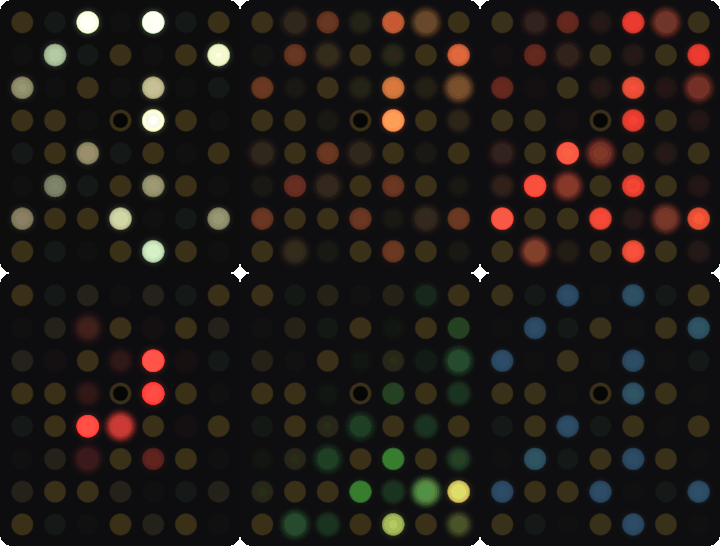
- Hold the test button. An orange sweep fills the panel and turns red.
- To cancel, let go before it's full.
- At about 8 seconds the panel flashes white and red. Your settings are erased.
- Let go. AirWriter restarts into setup, with a blue double blink.

When AirWriter won't start
- Unplug the USB-C cable.
- Hold the test button.
- Plug the cable back in, keep holding for about 6 seconds until the panel lights up, then let go.
AirWriter starts in setup, on the last firmware version that finished a print. Updates never overwrite that version.

Turn on DIP switch 4 for a test page each time AirWriter starts.
This documentation is licensed under CC-BY-SA-4.0.