Unity Editor tool for extracting all the individual parts of a texture, saving them to their own files. Such as extracting all sprites from a Texture2D or Sprite Atlas, or all the elements of a Texture2DArray.
This is meant to be a tool to aid development inside the Unity Editor, but it is not an advanced image processing tool. The format implementations are functional, yet rudimentary. There are better solutions out there with more control over visual fidelity and wider support for image formats. Quality can only be guaranteed when working exclusively with RGBA32 texture formats.
- PNG
- JPG
- EXR (output only)
- TGA
- 2022.2 (untested)
- 2021.3
- 2020.3 (untested)
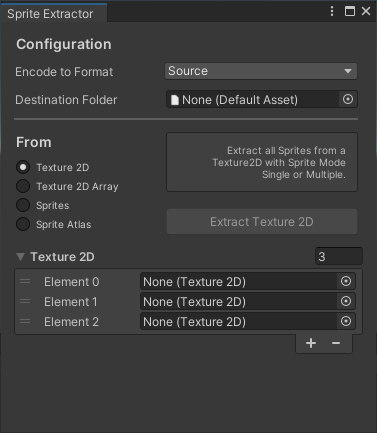
Menu: Window > 2D > Editor Sprite Extractor
Encode To Format: Output file format.
Destination Folder: Select a folder from Project View. (Non-folders can be seen in the list, but cannot be selected)
Texture2D: Extract all Sprites from a Texture2D with Sprite Mode: Single or Multiple.
Texture2DArray: Extract all elements from a Texture2DArray with predefined Columns and Rows.
Sprites: Extract Sprites from their source Texture2D files.
SpriteAtlas: Extract all Sprites in a Sprite Atlas, from their respective Texture2D files.
I was not able to successfully implement this format. Therefore this tool does not support reading EXR files, but it can create them from any of the other supported formats, with RGBAFloat (32bit) as the output texture format. (It can be hardcoded to RGBAHalf, 16bit)