- Use Flask-Migrate to manage changes to a database schema.
- Create migrations for different types of schema modifications.
- Upgrade a schema from an old version to a newer version.
- Roll back, or downgrade a schema from a newer version to an older one.
- Schema: the blueprint of a database. Describes how data relates to other data in tables, columns, and relationships between them.
- Schema Migration: the process of moving a schema from one version to another.
In the previous lesson, we used Flask-Migrate (which uses Alembic behind the scenes) to create an initial version of a database schema that defined a single table. But we often need to make additional changes to a schema after it has been defined. For example, we may need to add new tables, add new columns to existing tables, rename columns, add or change column constraints, etc. Flask-Migrate is a powerful tool that can generate migrations for many of the common changes we might make to a database schema, including:
- Creating and dropping tables.
- Creating and dropping columns.
- Most indexing tasks.
- Renaming keys.
That being said, there are certain tasks that Flask-Migrate can help us with but cannot carry out on its own:
- Table name changes.
- Column name changes.
- Adding, removing, or changing unnamed constraints.
- Converting Python data types that are not supported by the database.
In this lesson, we will explore various types of schema migrations and how to roll back, or downgrade, migrations that were unnecessary or went awry.
To check out the full list of supported commands, make sure you follow the setup
instructions and then type flask db --help in the terminal.
This lesson is a code-along, so fork and clone the repo.
Run pipenv install to install the dependencies and pipenv shell to enter
your virtual environment before running your code.
$ pipenv install
$ pipenv shell
Change into the server directory and configure the FLASK_APP and
FLASK_RUN_PORT environment variables:
$ cd server
$ export FLASK_APP=app.py
$ export FLASK_RUN_PORT=5555└── server
├── app.py
├── models.py
└── testing
└── codegrade_test.py
The server directory contains models.py, which defines an Employee model:
from flask_sqlalchemy import SQLAlchemy
from sqlalchemy import MetaData

# contains definitions of tables and associated schema constructs
metadata = MetaData()

# create the Flask SQLAlchemy extension
db = SQLAlchemy(metadata=metadata)

# define a model class by inheriting from db.Model.


class Employee(db.Model):
    __tablename__ = 'employees'

    id = db.Column(db.Integer, primary_key=True)
    name = db.Column(db.String, nullable=False)
    salary = db.Column(db.Integer)

    def __repr__(self):
        return f'<Employee {self.id}, {self.name}, {self.salary}>'
Let's perform an initial migration to create the database app.db with an
employees table as described by the Employee model.
Make sure you are in the server directory, then enter the following commands:
$ flask db init$ flask db migrate -m "Initial migration."At this point, you will see a new migration script ###_initial_migration.py
show up in the server/migrations/versions directory (your version number will
be different):
.
├── app.py
├── instance
│   └── app.db
├── migrations
│   ├── README
│   ├── alembic.ini
│   ├── env.py
│   ├── script.py.mako
│   └── versions
│       └── 15537423c56d_initial_migration.py
├── models.py
└── testing
    └── codegrade_test.py
As a reminder, the ###_initial_migration.py script contains two functions
upgrade() and downgrade(). We can see the upgrade() function will create
the employees table, while the downgrade() script drops it.
def upgrade():
    # ### commands auto generated by Alembic - please adjust! ###
    op.create_table('employees',
    sa.Column('id', sa.Integer(), nullable=False),
    sa.Column('name', sa.String(), nullable=False),
    sa.Column('salary', sa.Integer(), nullable=True),
    sa.PrimaryKeyConstraint('id')
    )
    # ### end Alembic commands ###


def downgrade():
    # ### commands auto generated by Alembic - please adjust! ###
    op.drop_table('employees')
    # ### end Alembic commands ###
Let's execute the upgrade() function to create the table.
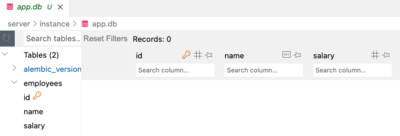
$ flask db upgrade headOpen the database file server/instance/app.db using SQLite Viewer (or any
other SQLite extension) and confirm the newly created employees table:
Let's use the Flask shell to add a few employees:
$ flask shell
>>> from models import db, Employee
>>> db.session.add( Employee(name = "Kai Uri", salary = 89000))
>>> db.session.add( Employee(name = "Alena Lee", salary = 125000))
>>> db.session.commit()
>>> Employee.query.all()
[<Employee 1, Kai Uri, 89000>, <Employee 2, Alena Lee, 125000>]
>>> exit()In this next step, we will update models.py to add a Department model. We'll
intensionally make a mistake in assigning the singular table name department,
then see how to fix this in a subsequent migration.
Update models.py to add the Department class as shown:
from flask_sqlalchemy import SQLAlchemy
from sqlalchemy import MetaData

# contains definitions of tables and associated schema constructs
metadata = MetaData()

# create the Flask SQLAlchemy extension
db = SQLAlchemy(metadata=metadata)

# define a model class by inheriting from db.Model.


class Employee(db.Model):
    __tablename__ = 'employees'

    id = db.Column(db.Integer, primary_key=True)
    name = db.Column(db.String, nullable=False)
    salary = db.Column(db.Integer)

    def __repr__(self):
        return f'<Employee {self.id}, {self.name}, {self.salary}>'


class Department(db.Model):
    __tablename__ = 'department'

    id = db.Column(db.Integer, primary_key=True)
    name = db.Column(db.String, nullable=False)
    address = db.Column(db.String)

    def __repr__(self):
        return f'<Department {self.id}, {self.name}, {self.address}>'
Adding a new model means we need to add a new table to the database.
Since we've already inserted some rows into the employees table, we don't
want to delete the database and recreate the initial migration because we
would lose that data (imagine we inserted millions of rows rather than just
two).
We will migrate the database schema by generating a second migration script to
add the new department table, while leaving the existing employees table
unmodified. Run flask db migrate with a descriptive message that explains the
new change to the schema:
$ flask db migrate -m 'add Department'A new migration script appears in the migrations/versions directory (once
again, your version numbers will be different):
.
├── app.py
├── instance
│   └── app.db
├── migrations
│   ├── README
│   ├── alembic.ini
│   ├── env.py
│   ├── script.py.mako
│   └── versions
│       ├── 15537423c56d_initial_migration.py
│       └── 51f20aa4768b_add_department.py
├── models.py
└── testing
    └── codegrade_test.py
Take a look at the ###_add_department.py migration script. The upgrade() and
downgrade() functions will add and drop the department table. Notice also
the down_revision variable references the version id of the initial migration
script.
"""add Department

Revision ID: 51f20aa4768b
Revises: 15537423c56d
Create Date: 2023-08-02 17:33:01.228058

"""
from alembic import op
import sqlalchemy as sa

# revision identifiers, used by Alembic.
revision = '51f20aa4768b'
down_revision = '15537423c56d'
branch_labels = None
depends_on = None

def upgrade():
    # ### commands auto generated by Alembic - please adjust! ###
    op.create_table('department',
    sa.Column('id', sa.Integer(), nullable=False),
    sa.Column('name', sa.String(), nullable=False),
    sa.Column('address', sa.String(), nullable=True),
    sa.PrimaryKeyConstraint('id')
    )
    # ### end Alembic commands ###

def downgrade():
    # ### commands auto generated by Alembic - please adjust! ###
    op.drop_table('department')
    # ### end Alembic commands ###
Let's execute this most recent migration script to add the new table by
executing the upgrade() function. Recall that head refers to the most recent
migration version. Type the following command to execute the
###_add_department.py script (i.e. the most recent version).
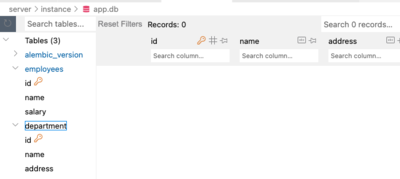
$ flask db upgrade headConfirm the new department table has been added to the database:
Now add some departments using Flask shell:
$ flask shell
>>> from models import Department
>>> db.session.add( Department(name = "Payroll", address = "Building A, 4th Floor"))
>>> db.session.add( Department(name = "Human Resources", address = "Building C, 1st Floor"))
>>> db.session.commit()
>>> Department.query.all()
[<Department 1, Payroll, Building A, 4th Floor>, <Department 2, Human Resources, Building C, 1st Floor>]
>>> exit()Let's fix the error we made in naming the table. Edit models.py to change the
table name from department to departments:
class Department(db.Model):
    __tablename__ = 'departments'

    id = db.Column(db.Integer, primary_key=True)
    name = db.Column(db.String, nullable=False)
    address = db.Column(db.String)

    def __repr__(self):
        return f'<Department {self.id}, {self.name}, {self.address}>'
This represents a necessary change to the schema. In SQL we would execute an
ALTER TABLE command. However, we can try to have Flask-Migrate do the work for
us.
Type the following to generate a new migration script:
flask db migrate -m "rename department"This results in a new script in migrations/versions:
.
├── app.py
├── instance
│   └── app.db
├── migrations
│   ├── README
│   ├── alembic.ini
│   ├── env.py
│   ├── script.py.mako
│   └── versions
│       ├── 15537423c56d_initial_migration.py
│       ├── 1694ecedb24d_rename_department.py
│       └── 51f20aa4768b_add_department.py
├── models.py
└── testing
    └── codegrade_test.py
DON'T run flask db upgrade head yet!
It is always a good idea to check the migration script before performing a
migration. Open up the new migration script ###_rename_department.py:
"""rename department

Revision ID: 1694ecedb24d
Revises: 51f20aa4768b
Create Date: 2023-08-02 18:19:06.373953

"""
from alembic import op
import sqlalchemy as sa


# revision identifiers, used by Alembic.
revision = '1694ecedb24d'
down_revision = '51f20aa4768b'
branch_labels = None
depends_on = None


def upgrade():
    # ### commands auto generated by Alembic - please adjust! ###
    op.create_table('departments',
    sa.Column('id', sa.Integer(), nullable=False),
    sa.Column('name', sa.String(), nullable=False),
    sa.Column('address', sa.String(), nullable=True),
    sa.PrimaryKeyConstraint('id')
    )
    op.drop_table('department')
    # ### end Alembic commands ###


def downgrade():
    # ### commands auto generated by Alembic - please adjust! ###
    op.create_table('department',
    sa.Column('id', sa.INTEGER(), nullable=False),
    sa.Column('name', sa.VARCHAR(), nullable=False),
    sa.Column('address', sa.VARCHAR(), nullable=True),
    sa.PrimaryKeyConstraint('id')
    )
    op.drop_table('departments')
    # ### end Alembic commands ###
Notice the upgrade() function wants to drop the existing department table
and create a new departments table. This is not what we want since we already
added rows to the department table.
We want to rename the existing table, not drop and create a new one. In SQL, we
would use the ALTER TABLE statement. We can achieve the same thing by calling
the Alembic function rename_table().
Edit the upgrade() and downgrade() functions as shown. The rename_table()
function takes two parameters, the old table name and the new table name:
def upgrade():
    # ### commands auto generated by Alembic - please adjust! ###
    op.rename_table('department', 'departments')
    # ### end Alembic commands ###


def downgrade():
    # ### commands auto generated by Alembic - please adjust! ###
    op.rename_table('departments', 'department')
    # ### end Alembic commands ###
Save the file, then run the upgrade command:
flask db upgrade headConfirm the table has been renamed from department to departments and that
the 2 rows are still in the table:

We saw that Flask-Migrate generates correct migration code when we added a new
model Department to the schema. Flask-Migrate also generates correct code if
we add a new column to an existing model.
However,renaming a column will require a manual update to the migration script, similar to renaming a table.
Let's rename the address column as location. Edit models.py to change the
attribute name (and update __repr__):
class Department(db.Model):
    __tablename__ = 'departments'

    id = db.Column(db.Integer, primary_key=True)
    name = db.Column(db.String, nullable=False)
    location = db.Column(db.String, nullable=False)

    def __repr__(self):
        return f'<Department {self.id}, {self.name} {self.location}>'
Generate a new migration script:
flask db migrate -m "rename address".
├── app.py
├── instance
│ └── app.db
├── migrations
│ ├── README
│ ├── alembic.ini
│ ├── env.py
│ ├── script.py.mako
│ └── versions
│ ├── 15537423c56d_initial_migration.py
│ ├── 1694ecedb24d_rename_department.py
│ ├── 51f20aa4768b_add_department.py
│ └── 76f31678b786_rename_address.py
├── models.py
└── testing
└── codegrade_test.pyOpen the new ###_rename_address.py file to see the auto-generated upgrade()
and downgrade() functions:
def upgrade():
    # ### commands auto generated by Alembic - please adjust! ###
    with op.batch_alter_table('departments', schema=None) as batch_op:
        batch_op.add_column(sa.Column('location', sa.String(), nullable=True))
        batch_op.drop_column('address')

    # ### end Alembic commands ###


def downgrade():
    # ### commands auto generated by Alembic - please adjust! ###
    with op.batch_alter_table('departments', schema=None) as batch_op:
        batch_op.add_column(sa.Column('address', sa.VARCHAR(), nullable=True))
        batch_op.drop_column('location')
The batch_alter_table function is called to execute the add_column() and
drop_column() functions as a transaction.
But we don't want to drop the column at all since that will cause us to lose the
data in the 2 existing rows! Instead, we will rename the column from address
to location using the alter_column() function. Edit the migration script to
call alter_column() as shown:
def upgrade():
    # ### commands auto generated by Alembic - please adjust! ###
    op.alter_column('departments', 'address',  new_column_name='location')
    # ### end Alembic commands ###


def downgrade():
    # ### commands auto generated by Alembic - please adjust! ###
    op.alter_column('departments', 'location',  new_column_name='address')
    # ### end Alembic commands ###
Now we can upgrade the schema to rename the column from address to location:
flask db upgrade head
Sometimes we might want to undo a schema migration and return to a previous version.
This was the order of the migration versions that we performed:
- ###_initial_migration.py
- ###_add_department.py
- ###_rename_department.py
- ###_rename_address.py
Suppose we decide to revert the column name from location back to address.
We would like to undue the most recent changes performed by
###_rename_address.py and return the schema to the state it was in the
previous version ###_rename_department.py
Open the most recent version ###_rename_address.py and look at the value of
the variable down_revision. Your number will be different:
"""rename address

Revision ID: 76f31678b786
Revises: 1694ecedb24d
Create Date: 2023-08-02 18:52:31.603713

"""
from alembic import op
import sqlalchemy as sa


# revision identifiers, used by Alembic.
revision = '76f31678b786'
down_revision = '1694ecedb24d'
branch_labels = None
depends_on = None


def upgrade():
    # ### commands auto generated by Alembic - please adjust! ###
    op.alter_column('departments', 'address',  new_column_name='location')
    # ### end Alembic commands ###


def downgrade():
    # ### commands auto generated by Alembic - please adjust! ###
    op.alter_column('departments', 'location',  new_column_name='address')
    # ### end Alembic commands ###
The downgrade() function will basically undo the column renaming and return us
to the previous version as defined by down_revision.
Execute the following command (substituting ### for the version number specified
by down_version):
flask db downgrade ###This should rename the location column back to address.
You may need to hit the refresh button to see that change:
Note: You should also update models.py to rename the variable back to the
original address (and revert __repr__).
You should now have a basic idea of how to make a variety of changes to database schemas using Flask-SQLAlchemy, Flask-Migrate and Alembic. If you'd like to know more about what alembic can autogenerate and what it cannot, check out their documentation here
- SQLAlchemy ORM Documentation
- SQLAlchemy ORM Column Elements and Expressions
- Tutorial - Alembic
- Operation Reference - Alembic
The final version of models.py:
from flask_sqlalchemy import SQLAlchemy
from sqlalchemy import MetaData

# contains definitions of tables and associated schema constructs
metadata = MetaData()

# create the Flask SQLAlchemy extension
db = SQLAlchemy(metadata=metadata)

# define a model class by inheriting from db.Model.


class Employee(db.Model):
    __tablename__ = 'employees'

    id = db.Column(db.Integer, primary_key=True)
    name = db.Column(db.String, nullable=False)
    salary = db.Column(db.Integer)

    def __repr__(self):
        return f'<Employee {self.id}, {self.name}, {self.salary}>'

class Department(db.Model):
    __tablename__ = 'departments'

    id = db.Column(db.Integer, primary_key=True)
    name = db.Column(db.String, nullable=False)
    address = db.Column(db.String)

    def __repr__(self):
        return f'<Department {self.id}, {self.name}, {self.address}>'