CSS Box Model #115

Description

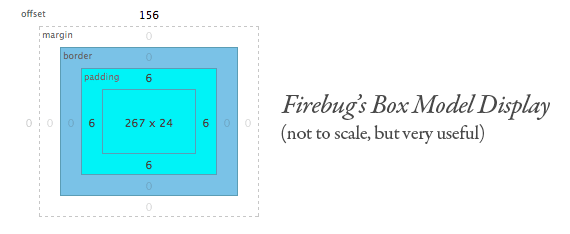
前提: box-sizing: content-box;
Width = width + padding-left + padding-right + border-left + border-right
Height = height + padding-top + padding-bottom + border-top + border-bottom
The Default Width of Block Level Boxes
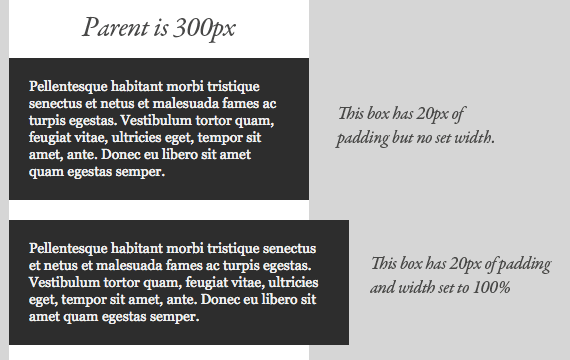
If you don't declare a width, and the box has static or relative positioning, the width will remain 100% in width and the padding and border will push inwards instead of outward. But if you explicitly set the width of the box to be 100%, the padding will push the box outward as normal.
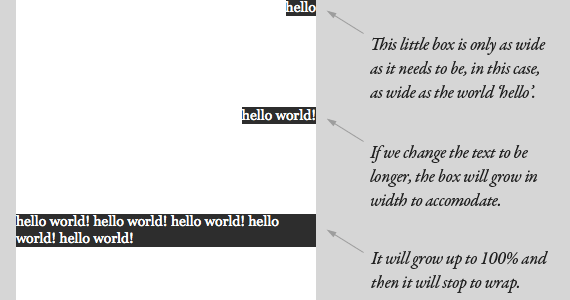
Absolute Boxes with No Width
Absolutely positioned boxes that have no width set on them behave a bit strangely. Their width is only as wide as it needs to be to hold the content. So if the box contains a single word, the box is only as wide as that word renders. If it grows to two words, it'll grow that wide.
Inline Elements are Boxes Too
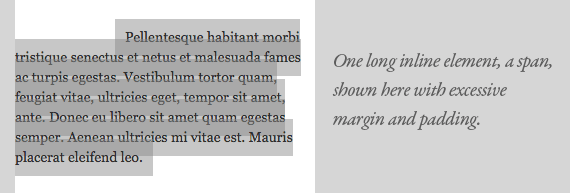
We've been kind of focusing on boxes as block-level elements here. It's easy to think of block-level elements as boxes, but inline elements are boxes too. Think of them as really really long and skinny rectangles, that just so happen to wrap at every line. They are able to have margin, padding, borders just like any other box.
The wrapping is what makes it confusing. A left margin as shown above pushes the box to the right as you would suspect, but only the first line, as that is the beginning of the box. Padding is applied above and below the text like it should be, and when it wraps it ignores the line above its padding and begins where the line-height dictates it should begin. The background was applied with transparency to see how it works more clearly.
conclusions
行内元素: margin-left, padding-left 作用第一行开头, margin-right, padding-right 作用最后一行末尾
Margin properties specify the width of the margin area of a box. The 'margin' shorthand property sets the margin for all four sides while the other margin properties only set their respective side. These properties apply to all elements, but vertical margins will not have any effect on non-replaced inline elements.
You can add padding to the top and bottom of inline element, but the padding doesn’t affect the spacing of the other inline elements around it, so the padding will overlap other inline elements