Full configuration
This page covers the advanced topics for Greed, like template definition, hidden config keys, custom renderers.
Greed uses a 3rd-party config library typesafe-config.
It's a very powerful config library with a flexible DSL for the users.
For advanced config file writing, refer to its documentation and the default.conf in Greed.
Each of Greed's configuration key corresponds to a class in the source file, which is kind of like ORM mapping, and is a new feature in the backend of 2.0. I'll point to the class in each of the following section for you to better understand the configuration semantics.
Class: greed.conf.schema.LoggingConfig
Greed has a mechanism for logging, which is turned off by default.
You can turn it on by setting greed.logging.logLevel = INFO
and it will log to the Logs directory under your workspace by default.
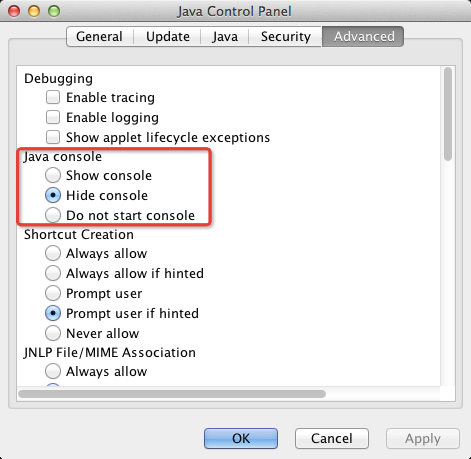
You can also see the logs from the java console, when the arena starts.
The way to enable the console is through java control panel, usually.
Both the config file and the template file have many data bound when rendering. I'm going to describe how to refer to them in config and templates.
Before that, please note that, although the config library and the template engine
uses the same syntax for resolving data, ${key}, they're of different implementations and have
different semantics.
In the config file, ${a.b.c} means the value of a.b.c following the path from the root of the config file.
However, in the template file, ${a.b.c} simply binds to the value inside a map m, which is
m.get("a").get("b").get("c"). This is the core difference.
Sometimes (often) Greed needs to specify some data in the template file, like ${Problem.Name} in the config file, for example, to specify the output file name. And we must prevent the config library to resolve this reference. We achieve this by putting the value in quotation, that's why you'll see a lot of "" in the default.conf.
This section should be put in the next page, but you need to know this to understand the following table.
The model available to the template engine when rendering is a map.
When rendering a data like ${a.xyz.uvw}, the template engine usually do the following:
- Find a key in the map called
a, if not present, returns"". - If present, check its value
- If it's an object
o, try the following until meets one available:o.getXyz(),o.isXyz(),o.xyz(public field) - If it's another map, goto 1
- Otherwise, returns
""
- If it's an object
When it hits the final key in the path, uvw in this case, and now the value is o, the result is
- If
ois of a primitive type, returns its string representation - If
ois an raw object, first find a typed renderer based on its class - If not found, call its
toString
Like in the following table, Contest is an object of type greed.model.Contest, hence
${Contest.Name} represents the full contest name.
It's also possible to have named renderers, in this format ${data;name_of_renderer(param)}.
These renderers define custom functions to render the data, according to its param.
Available named renderers in Greed:
-
zeroval, no params, whose data must be a type (greed.model.Type), and it returns a string representing its zero value in the current language. -
stringis a generic string transformation renderer, the data is a String, and its params is also a string which is a list of actions to perform on the input, and they are concatenated with commas. The actions are applied one by one, in sequential order. The available actions are:-
lower- to lower case -
upfirst- uppercase the first letter and lowercase the rest -
unquote- remove the surrounding"in the string, if any -
abbr- abbreviate the input, by transforming all its all-uppercase tokens to its first letter and then joining them together
-
-
parseris only available for java and python language, whose data is of typegreed.model.Type, and its param is a string. It returns a parsing expression in that language, which parses the param to its input type. Like in Java,${type;parser(numBeans)}transforms toInteger.parseInt(numBeans)if type is of integer.
You can use these renderers to write your template. The string renderer is especially useful
for things like changing the ContestName to lowercase, or to its abbreviation.
Here's a table for all the keys and their values with their available scopes.
| Key Name | Value | Scope | Class/Type |
|---|---|---|---|
| Contest | The contest object | config + template | greed.model.Contest |
| Problem | The current problem object | config + template | greed.model.Problem |
| ClassName | The class name for the current problem | config + template | String |
| Method | The method name | config + template | String |
| Examples | The list of samples given | template | greed.model.Testcase |
| NumOfExamples | The number of samples | template | String |
| ReturnsArray | Whether the method returns an array | template | Boolean |
| HasArray | Whether the method returns an array or one of the parameter is an array | template | Boolean |
| ReturnsString | Whether the method returns a string | template | Boolean |
| HasString | Similar to HasArray
|
template | Boolean |
| CreateTime | A timetag when the code is created, to calc the score | template | Long |
| CutBegin | The begin-cut mark for the current language | template | String |
| CutEnd | The end-cut mark | template | String |
| GeneratedFileName | The generated file name | afterFileGen |
String |
| GeneratedFilePath | The generated file path | afterFileGen |
String |
Class: greed.conf.schema.TemplateConfig
Greed gives the users power to define their own templates, according to the following schema.
Let's continue with the templateDef config key and start with an example.
greed.language.java.templateDef {
  unittest {
    override = false
    templateFile = "builtin unittest/junit.java.tmpl"
    outputKey = UnitTestCode
    outputFile = "${Contest.Name}/${Problem.Name}-WrongName"
    transformers = [ empty-block, cont-blank-line ]

    afterFileGen {
      execute = mv
      arguments = [ "${GeneratedFileName}", "${Contest.Name}/${Problem.Name}Test.java" ]
    }
  }
}
This example may look somewhat stupid, because it gives the output a wrong name and then rename it. But it covers all the possible keys of a template def.
-
override, iffalse, greed will skip the file if already exists.
However, if user clickRegenerate codein the UI, it will be force override. Don't worry, the old files will be backuped. -
templateFilespecify the path to the template file use by the template engine to render to the output.
The prefixbuiltinshows that this template is located in the distributed jar of Greed, ingreed.jar:/templates. - If
outputKeyis set, the rendered output will be bound to a key, in this caseUnitTestCode, and available for the later templates (in thetemplatessequence) to use as a key in their template files. Note this does not conflict withoutputFile. -
outputFileand[ outputFileName, outputFileExtension ]conflict with each other and must not be set at the same time! Or Greed will raise an error of config exception. The former set the whole name while the latter specify the two parts of the file name separately. -
transformersspecify a list of actions to transform the code after the code is generated. Right now there're only two available.-
empty-blockremoves empty cutting block (surrounded bycutBeginandcutEnd) to cleanup the output code. -
cont-blank-linemerges continuous blank lines to single one blank line.
-
-
afterFileGenis an external command executed after the file is generated (no output file, no action!). You can specify any scripts or programs to run.
BTW, this is corresponding to the class greed.conf.schema.CommandConfig
This part is basically the details of the template engine, and is covered separately in another page Play with templates.
If you're interested in customizing your own template, go ahead!