Full configuration
This page covers the advanced topics for Greed, like template definition, hidden config keys, custom renderers.
Greed uses a 3rd-party config library typesafe-config.
It's a very powerful config library with a flexible DSL for the users.
For advanced config file writing, refer to its documentation and the default.conf in Greed.
Each of Greed's configuration key corresponds to a class in the source file, which is kind of like ORM mapping, and is a new feature in the backend of 2.0. I'll point to the class in each of the following section for you to better understand the configuration semantics.
Class: greed.conf.schema.LoggingConfig
Greed has a mechanism for logging, which is turned off by default.
You can turn it on by setting greed.logging.logLevel = INFO
and it will log to the Logs directory under your workspace by default.
You can also see the logs from the java console, when the arena starts.
The way to enable the console is through java control panel, usually.
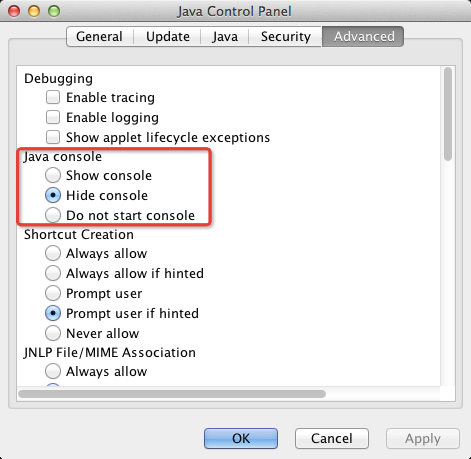
Class: greed.conf.schema.TemplateConfig
Greed gives the users power to define their own templates, according to the following schema.
Let's continue with the templateDef config key and start with an example.
greed.language.java.templateDef {
  unittest {
    override = false
    templateFile = "builtin unittest/junit.java.tmpl"
    outputKey = UnitTestCode
    outputFile = "${Contest.Name}/${Problem.Name}-WrongName"
    transformers = [ empty-block, cont-blank-line ]

    afterFileGen {
      execute = mv
      arguments = [ "${GeneratedFileName}", "${Contest.Name}/${Problem.Name}Test.java" ]
    }
  }
}
This example may look somewhat stupid, because it gives the output a wrong name and then rename it. But it covers all the possible keys of a template def.
-
override, iffalse, greed will skip the file if already exists.
However, if user clickRegenerate codein the UI, it will be force override. Don't worry, the old files will be backuped. -
templateFilespecify the path to the template file use by the template engine to render to the output.
The prefixbuiltinshows that this template is located in the distributed jar of Greed, ingreed.jar:/templates. - If
outputKeyis set, the rendered output will be bound to a key, in this caseUnitTestCode, and available for the later templates (in thetemplatessequence) to use as a key in their template files. Note this does not conflict withoutputFile. -
outputFileand[ outputFileName, outputFileExtension ]conflict with each other and must not be set at the same time! Or Greed will raise an error of config exception. The former set the whole name while the latter specify the two parts of the file name separately. -
transformersspecify a list of actions to transform the code after the code is generated. Right now there're only two available.-
empty-blockremoves empty cutting block (surrounded bycutBeginandcutEnd) to cleanup the output code. -
cont-blank-linemerges continuous blank lines to single one blank line.
-
-
afterFileGenis an external command executed after the file is generated (no output file, no action!). You can specify any scripts or programs to run.
BTW, this is corresponding to the class greed.conf.schema.CommandConfig
You have seen a lot of ${key} in the config, this data will be substituted and rendered by the template engine (or the config library, and they're different).
To see which keys are available, read the section about key-values in the next tutorial.
This part is basically the details of the template engine, and is covered separately in another page Play with templates.
If you're interested in customizing your own template, go ahead!