Repository navigation
Releases
360AI 2.8 - Find your next answer

360AI 2.8 - Find your next answer
Browse the instant assistant's 250 replies with fewer keyboard trips.
- Answer topics: press BACK in Starter answers to choose one of 15 topics, All answers, or Recently asked. A opens your choice; B returns without changing your list.
- Recently asked: revisit up to 12 different starter questions asked with right-stick click, newest first. Reasking moves a question to the front when you reopen the list. X on Recently asked in the picker clears recents for this app session.
- Keep your place: topic/recent lists page by six with D-pad Left/Right. B from an asked question returns to the same displayed list and selection. Y clears a filter, while cancelled or invalid searches keep it.
- Less repeated search work: normalized question/reply/category text is cached after the first nonempty search. Whole-word matching, exact-first ranking and query limits are preserved; lower-priority fields are skipped after a word matches.
Recents use no personal-answer slots or disk writes. All 250 starters, the existing 106 phrase variants, personal replies and four bundled models remain included. This update improves native browsing/search; GGUF generation speed is unchanged.
Already on 2.1-2.7? Open START on Home > Updates for the small app-only download. For a first installation or 2.0/older, extract 360AI-2.8-USB.zip and copy its entire 360AI folder to your drive. App-only updates preserve models, notes, personal answers, settings and custom rules.
Validation: Xbox SDK app/installer builds; native assistant/Hub/engine/updater/controller regressions; all 250 replies and exact search ranks; every topic, empty/bounded/deduplicated recents, clearing, scoped paging, overrides, cancellation and diagonal/back input; tokenizer/protocol/package checks; native UI captures; full package/model hashes and a previous-version install/recovery trial. Physical Xbox menus, keyboard, persistence, networking and inference remain hardware validation tasks.
Made by ZuhaGames & Canyons. Forked from Canyons' gemma.xex. AI tools assisted development, debugging and documentation.
SHA-256 (360AI-2.8-USB.zip): 50c7266902a3b789ca000eb54e155316d862022aef544d4834aaec3b2bb0742a
SHA-256 (360AI-2.8-Update.zip): 39e93646fc061769601cf947dcefb87276aee5c90f8428379067e163d16c1d70
360AI 2.7 - 100 more offline replies
360AI 2.7 - 100 more offline replies
Exactly 100 new predefined answers bring the starter pack to 250.
- Five new topics: gaming ideas, tech basics, creative prompts, planning and conversation, with 20 original replies each.
- Find and ask: open Home > Y > Saved answers, click the left stick for Starter answers, then START to search. Click the right stick to ask the selected question; B returns to your results.
- Controller browsing: D-pad Left/Right now follows actual category boundaries, so the original groups of 15 and new groups of 20 all work together.
- Instant local replies: additions share the existing exact-phrase index without loading model weights. Your 16 personal-answer slots remain separate; existing custom replies keep their normal priority.
The original 150 starters, 106 phrase variants and four bundled model weights remain included. This update expands the instant assistant; GGUF generation speed is unchanged.
Already on 2.1-2.6? Open START on Home > Updates for the small app-only download. For a first installation or 2.0/older, extract 360AI-2.7-USB.zip and copy its entire 360AI folder to your drive. App-only updates preserve models, notes, personal answers, settings and custom rules.
Validation: Xbox SDK app/installer builds; native assistant/Hub/engine/updater/controller regressions; all 250 exact replies and search ranks, case/punctuation handling, no-action behavior, new-category searches and variable-size category boundaries; tokenizer/protocol/package checks; native UI captures; package/model hashes and a previous-version install/recovery trial. Physical Xbox menus, keyboard, persistence, networking and inference remain hardware validation tasks.
Made by ZuhaGames & Canyons. Forked from Canyons' gemma.xex. AI tools assisted development, debugging and documentation.
SHA-256 (360AI-2.7-USB.zip): 4986c415a0ce01441fd675a845d2a38abc4d45c84914e00481f5420dcc4b2b5a
SHA-256 (360AI-2.7-Update.zip): 967c6ea2fee33799014a331bbb043ae53ca8614fa5c6cc3bb741346be5c78e09
360AI 2.6 - Find an answer faster
360AI 2.6 - Find an answer faster
Find useful offline replies among the 150 starter answers with less controller typing.
- Search: press START in Starter answers, or type
find answers timer/search answers notesin Assistant. Search matches whole words across questions, replies and categories, with exact questions ranked first. - Ask immediately: click the right stick on a starter question to ask it in Assistant. B returns to the same result list, selection and search. Personal and file-based overrides follow normal chat priority.
- Navigate results: Y clears the filter; D-pad Left/Right pages filtered results in groups of six. Without a filter, Left/Right still jumps categories.
- Keep personal tools: My answers retains right-stick text preview, START undo, edit/delete confirmations and background saving. Starter customization uses the selected filtered result's actual phrase.
- Debugging: search is bounded to 96 bytes/16 distinct words. Invalid searches keep previous results, cancelled keyboards leave filters untouched, and empty results cannot ask or customize a different answer. Matching runs on query submission; clearing the search skips reply scanning.
All 150 starter replies and four bundled model weights remain included. This update improves browsing and instant-assistant use; GGUF generation speed is unchanged.
Already on 2.1–2.5? Open START on Home → Updates for the small app-only download. For a first installation or 2.0/older, extract 360AI-2.6-USB.zip and copy its entire 360AI folder to your drive. App-only updates preserve models, notes, personal answers, settings and custom rules.
Validation: Xbox SDK app/installer builds; native assistant/Hub/engine/updater/controller regressions; every starter's exact search rank, keyword matching, bounds, filtered customization, empty-result safety, direct asking and back navigation; tokenizer/protocol/package checks; native UI captures; package/model hashes and a previous-version install/recovery trial. Physical Xbox menus, keyboard, persistence, networking and inference remain hardware validation tasks.
Made by ZuhaGames & Canyons. Forked from Canyons' gemma.xex. AI tools assisted development, debugging and documentation.
SHA-256
- 360AI-2.6-USB.zip: c80d38da10e79a375dcb0c55c229934a1c22d137e6ba8dc41798407694154094
- 360AI-2.6-Update.zip: b8d8fc6a8ad2e82f58e8ae0a3d4379913a2e5adb54e8681ec921d9368f92cd95
360AI 2.5 - 150 more ready-made answers
360AI 2.5 - 150 more ready-made answers
Adds exactly 150 new starter questions and written replies, available offline with no model loading.
- Ten categories, 15 answers each: getting started, notes, timers, personal answers, local models, performance, model downloads, updates, chat controls and everyday conversation.
- Browse them on Xbox: Home → Y Quick tools → Saved answers. Click the left stick to switch Starter/My answers; D-pad Left/Right jumps categories. Select a question to read its complete wording and reply.
- Instant matching: starter questions use the existing once-built exact-phrase index. Case and ordinary punctuation are ignored. Unrelated sentences do not trigger a starter merely because they contain its question.
- Make one yours: A opens a starter reply for customization. Saving uses one of the existing 16 personal slots; cancelling changes nothing. Existing overrides edit in place, and deleting one restores the original starter reply.
- Personal data preserved: the 150 starters are compiled into the app, do not consume personal slots and are not written over your save. They remain available even with all personal slots full. The existing 106 phrase variants remain.
- Debugging: every new question/reply is checked for exact count, unique normalized wording, valid bounds, category counts, case/punctuation handling and no app actions. Controller checks cover category jumps, preview, cancelled copies, overrides, deletion/undo and full personal-slot behavior.
Already on 2.1–2.4? Open START on Home → Updates for the small app-only download. For a first installation or 2.0/older, extract 360AI-2.5-USB.zip and copy its entire 360AI folder to your drive. All four existing model weights and their notices are included. Personal data and models are preserved by app-only updates.
These are predefined text replies, not neural training or new model capabilities. GGUF inference speed is unchanged.
Validation: native assistant/Hub/engine/updater/controller checks, Xbox SDK app/installer builds, tokenizer/protocol/package regressions, native UI captures, complete package/model checksums and a previous-version installer/recovery trial. Physical Xbox menus, keyboard, persistence, networking and inference remain hardware validation tasks.
Made by ZuhaGames & Canyons. Forked from Canyons' gemma.xex. AI tools assisted development, debugging and documentation.
SHA-256
- 360AI-2.5-USB.zip: 5ea1916bc6a5121fc77a28c6eb3b451b8fc72299f9d4feff3b83cf8343296cf5
- 360AI-2.5-Update.zip: cb506ce616a29df1794afd7461dd488b954bba11ab69f0f6c4dd8fa2d7145753
360AI 2.4 - Your own instant replies
360AI 2.4 - Your own instant replies
Personalize the offline assistant from a native controller screen, without loading a language model.
- Saved answers: open Home → Y Quick tools → Saved answers, or type
open saved answers. - Add or edit: X asks for a phrase and then its reply; A edits an existing response. Duplicate phrases point to the existing entry. Cancelling either keyboard keeps saved data unchanged.
- Preview matches: click the right stick and enter a sentence. The preview shows the longest matching saved phrase and its literal reply, without executing any command. Chat still gives built-in commands priority; the preview covers saved text only.
- Manage safely: Y confirms deletion; START undoes the latest saved-data change. LB/RB scroll long replies. Existing taught answers appear automatically, with the same limits and background save/backup system.
- Debugging: bounded input, valid UTF-8/control checks, capacity tests, cancelled drafts, duplicate phrases, literal command-like/multiline replies, preview isolation, delete/cancel/undo and persistence round-trips.
Already on 2.1–2.3? Open START on Home → Updates for the small app-only download. For a first installation or 2.0/older, extract 360AI-2.4-USB.zip and copy its entire 360AI folder to your drive. All four model weights and their notices remain included. App-only updates preserve your models, notes, answers, settings and custom rules.
Saved answers are explicit text replies, not neural training or general reasoning. This release does not change GGUF inference speed or add model architectures.
Validation: native assistant/Hub/engine/updater/controller checks, Xbox SDK app/installer builds, tokenizer/protocol/package regressions, native UI captures, complete model/package checksums and an actual previous-version installer/recovery trial. Physical Xbox UI, keyboard, persistence, networking and inference remain hardware validation tasks.
Made by ZuhaGames & Canyons. Forked from Canyons' gemma.xex. AI tools assisted development, debugging and documentation.
SHA-256
- 360AI-2.4-USB.zip: c319a3996f4da92cc64d9ec319978c333449a93b38aa2fe0d3293bd91cdc12ee
- 360AI-2.4-Update.zip: aefd441a42829d369d1b94c26054c233ba8b9bb8f08855a7ff983c7b74bec9a2
360AI 2.3 - Less typing, easier model browsing
360AI 2.3 - Less typing, easier model browsing
Find smaller local models and browse the native Hugging Face library with fewer keyboard entries.
- Family presets: press START in Model library to cycle SmolLM2, TinyStories, Qwen2.5, Llama and Gemma searches. Presets choose candidate filtering and a 200M/1B parameter limit; compatibility still depends on each GGUF.
- Remembered searches: search text, parameter limit and candidate filter survive restarts. Saved exact
owner/repositorysearches reopen through repository details. - Cached browsing: D-pad Left goes back; RB or D-pad Right goes forward. The last eight search pages stay in RAM, so revisiting them needs no network request. Changing the search/filter clears them. A failed next-page request keeps the current results available to retry.
- Clearer downloads: percentage, average transfer speed, approximate remaining transfer time and a progress bar. Verification remains a separate step; reused shards and local hashing do not inflate the network speed estimate.
- Local model sorting: LB switches smallest-first/name order while keeping the selected model. The preference is saved; list sorting now uses
std::sort. - Regression coverage: cache reuse/eviction, failed-page recovery, stale-query clearing, saved settings validation, transfer/reuse statistics and controller selection.
Already on 2.1 or 2.2? Open START on Home → Updates for the small app-only download. For a fresh installation or 2.0/older, extract 360AI-2.3-USB.zip and copy its entire 360AI folder to your drive. All four bundled model weights and their notices remain included. App-only updates preserve models, notes, settings and custom rules.
This update improves browsing and download feedback. It does not change model inference speed or add support for new architectures. HDD streaming still needs RAM and larger models can be extremely slow.
Validation: native assistant/engine/Hub/updater/controller checks, Xbox SDK app/installer builds, tokenizer/protocol/package regressions, UI captures and package/model checksums. Physical Xbox networking, large downloads, FATX behavior and inference remain hardware validation tasks.
Made by ZuhaGames & Canyons. Forked from Canyons' gemma.xex. AI tools assisted development, debugging and documentation.
SHA-256
- 360AI-2.3-USB.zip: 0a372d7f7f14b40e97dcd881c39766bf3b7ea054aeb033f8486535902288108d
- 360AI-2.3-Update.zip: 734eb9b81b8a20aa6892460f9ae211a1baa1831edd28afa4a8d272c3dd22d493
360AI 2.2 - A model library on your Xbox
360AI 2.2 - A model library on your Xbox
Browse and download compatible candidate GGUF models directly from Hugging Face.
- Open Models and press Y, or type
find modelsin Assistant. - Search and filter: public GGUF text-generation repositories, parameter presets (200M / 500M / 1B / 3B / Any), candidate/all-family toggle and next-page browsing. Search accepts a model name or exact owner/repository. Parameter filters use Hub metadata; unknown counts are hidden unless Any is selected.
- Inspect individual files: quantizations, combined split-file size, architecture, license label and required free space.
- Size labels: under 200 MB = green Comfortable; 200-300 MB = yellow Tight; 300 MB or more = orange Disk stream. These describe file size, not guaranteed RAM fit or speed. Compatibility is shown separately.
- Download on Xbox: pinned repository revisions, free-space checks, TLS, LFS SHA-256 verification on disk, FATX-safe names and cancellable streaming to the drive. Models keep a source receipt with revision, file names and hashes. No PC bridge or website is added.
- Split models: download all shards together, publish the first shard last and reuse matching previously completed shards. A single file must be smaller than 4 GiB; a download group is capped at 32 GiB. Incomplete groups, unavailable checksums and unsupported formats are marked.
- Use your download: completed models appear in the local list. Selecting a larger downloaded model chooses HDD streaming in setup; it uses the existing 8 MB weight cache. Working memory, tokenizer and KV cache still need RAM.
- Debugging: bounded GGUF metadata allocations, guarded paths, preservation of existing files, partial-file cleanup, selectable size colors and orderly download shutdown before an app-update restart.
This does not make every Hugging Face model runnable. The engine supports compatible dense Llama, SmolLM2, Qwen2/2.5 and Gemma 2/3 GGUFs. Unsupported architectures such as GLM/MoE and unsupported quantizations remain unsupported. Larger models may be extremely slow or fail memory/tokenizer checks at load time. Account login and gated/private-model downloads are not implemented.
Already on 2.1? Open START on Home → Updates to get the small app-only update. The existing 2.1 installer is compatible. For a fresh installation or 2.0/older, use 360AI-2.2-USB.zip; all four bundled models remain included. Models, notes, settings and custom rules are preserved by app-only updates.
Validation: Xbox SDK app/installer builds; native Hub/parser/controller tests; offline checksum/cancellation/malformed-model/existing-file tests; updater/inference/protocol/tokenizer/package regressions; live native HTTPS search and a verified TinyStories download. Physical-console networking, large downloads, FATX behavior and new-model inference still need hardware testing.
Made by ZuhaGames & Canyons. Forked from Canyons' gemma.xex. AI tools assisted development, debugging and documentation.
SHA-256:
- USB ZIP: 82e6b6b2881b4f5bc53ea5c5d3c9bf08beb649479b54b23f3d79828cf53522bb
- Update ZIP: d2c2d4513f9fad13f6091666f73c676c17b7956c05f0c2ce608fffd9430f6691
360AI 2.1 - Updates on your Xbox
360AI 2.1 - Updates on your Xbox
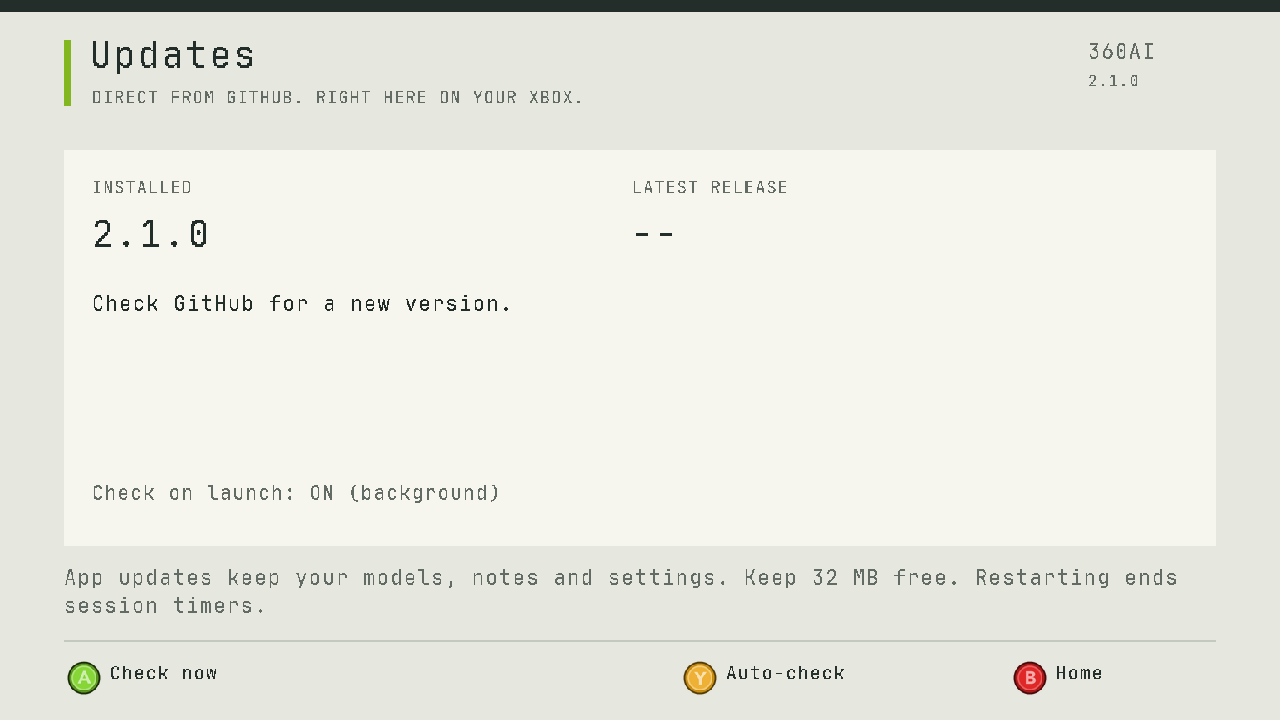
Get future app updates directly from GitHub without moving your drive back to a PC.
- Updates screen: press START on Home, or type
open updatesin Assistant. - Automatic checks: a background worker checks the latest stable release on launch. Y saves an auto-check preference. A checks or downloads; X cancels or discards a staged update.
- Small downloads: app-only update ZIPs contain just the XEX. Your models, notes, settings, rules and exports stay in place.
- Verified installation: TLS 1.2 certificate/hostname/time checks, GitHub SHA-256, ZIP/CRC checks and a staged XEX. Press A after verification to restart into the separate installer.
- Recovery: the installer retains
360AI-previous.xex, checks the staged files again, attempts rollback on failure and can resume an interrupted installation. No unattended restart; session timers end at restart. - Network handling: updater and model API share a reference-counted XNet/Winsock lifetime. The updater runs at below-normal priority and does not block the UI on socket reads.
Coming from 2.0 or earlier? Download 360AI-2.1-USB.zip, copy the whole 360AI folder onto your drive, and keep 360AI-updater.xex beside 360AI.xex. All four models remain included. Preserve your personal settings/notes if upgrading an existing folder. This first manual install adds the updater for future compatible releases.
360AI-2.1-Update.zip is the small app-only package used by the updater; use the USB ZIP for a first installation. Keep 32 MB free, a correct console clock and Internet/DNS access. GitHub rate limits or DashLaunch/router blocking can prevent a check. See UPDATES.txt for troubleshooting and recovery.
Xbox SDK app/installer builds, native updater/assistant/controller tests, malformed and tampered ZIP cases, rollback/interrupted-install recovery, personal-file preservation, protocol/tokenizer/package tests, live GitHub HTTPS and release ZIP verification are checked on the host. Physical Xbox HTTPS, file replacement, power-loss behavior and relaunch still require hardware testing; no model-inference speedup is claimed.
Made by ZuhaGames & Canyons, expanded from Canyons' gemma.xex. AI tools assisted development, debugging and documentation.
SHA-256:
- USB ZIP: 15dce8b32523ee97588fc881dff4a59e2cbf1288096fbfdc7567adb481d3613e
- Update ZIP: 5f15e651c783de87667498a25d9046011dd7a266b4a7a75acba73bad62819b0c
360AI 2.0 — At your service
360AI 2.0 — At your service
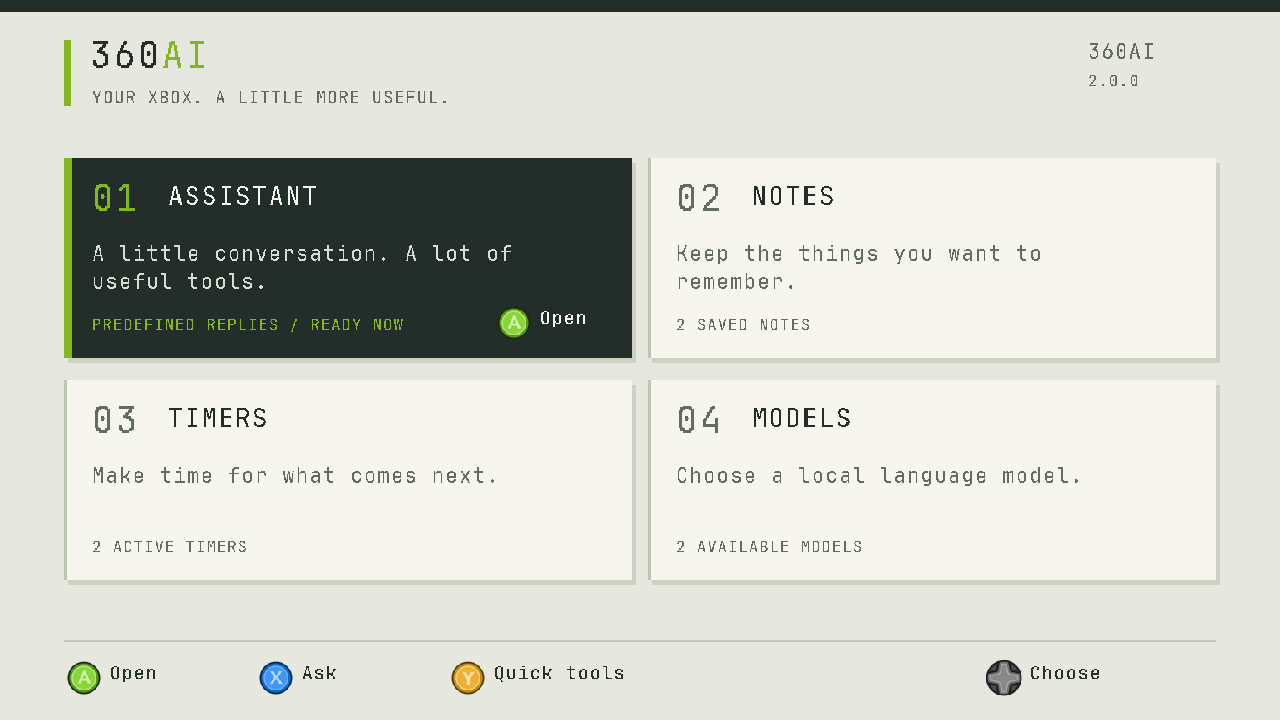
360AI now opens to a native console dashboard with Assistant, Notes, Timers and Models. Warm gray panels, numbered sections, sharp edges, green highlights and real Xbox 360 controller prompts give the app its own identity.
- Predefined answers: 106 exact phrase variants cover greetings, thanks, everyday conversation and common questions. Say
hellofor an immediate fixed answer. No model is loaded for these replies. Matching uses a small index built once; ordinary phrases are not mistaken for commands. Saved custom answers remain available. - Quick tools: open calculations, conversions, a new timer, a new note, taught answers or the command guide from controller menus.
- Notes screen: read, page through, create, edit, confirm deletion and undo using the controller. Note content is treated literally, including text such as
status?. - Timers screen: live countdowns, pause/resume, add one minute, restart and confirm cancellation. Timers require 360AI to remain open and are not system alarms.
- Faster native drawing: text and prompts share a 512 KiB texture and batched quads. The previous renderer submitted many small draws per glyph. Chat layout refreshes when the transcript or generation state changes; word wrapping keeps ordinary words intact.
- Background saves: one bounded worker coalesces assistant-data changes into the latest snapshot. Saving/Saved/Not saved is visible; failures retain in-memory data. A stale completion cannot mark newer edits as saved. Existing notes/name/taught answers migrate automatically, with validated JSON, atomic replacement and a valid backup.
- Xbox button artwork: Xelu's CC0 Xbox 360 prompts are embedded in the XEX. No external icon downloads or runtime asset folder is needed. Source/license details are in INPUT_ICONS.txt.
- Models: the ZIP still includes SmolLM2 135M, Gemma 3 270M and two TinyStories models. Model chat, OpenAI-compatible endpoints and MCP remain available through Models. GPU acceleration remains experimental; no new model-inference speedup is claimed.
Copy the entire 360AI folder from 360AI-2.0-USB.zip to your USB/HDD and launch 360AI.xex. Select Assistant for predefined replies, or Models for a GGUF. On Home, X opens the input keyboard and Y opens Quick tools. Updates exclude personal notes, settings, exports and custom rules. Wait for Saved before closing after an edit.
Validation includes the Xbox SDK build, native assistant/inference tests, 2,000 malformed-input cases, 78 follow-up interruption pairs, all 106 fixed-reply variants, background-save coalescing/failure handling, controller navigation and native UI captures, plus protocol/tokenizer/package checks and ZIP XEX/model checksums. Host UI captures use the same layout/atlas code; physical Xbox shader rendering, guide keyboard, controller feel and drive behavior still need hardware validation. Desktop timing does not establish Xbox latency or FPS.
Made by ZuhaGames & Canyons, expanded from Canyons' gemma.xex. AI tools assisted development, debugging and documentation.
360AI 1.5
360AI 1.5
Download 360AI-1.5-USB.zip, extract it and copy the 360AI folder to USB/HDD. Launch 360AI.xex on your modded Xbox 360. All four models and their required notices are included. This update runs in the native Xbox app.
Smaller models for less waiting
- TinyStories 15M Q4_0 — 19 MB: a much smaller English story-completion toy. Try
Once upon a time. It is very limited and has a 128-token context; it is not an instruction/chat assistant. - TinyStories 260K F32 — 1.2 MB: an even smaller toy for experimenting with minimal computation. Expect nonsense and poor answers.
- SmolLM2 135M remains the recommended chat model, with Gemma 3 270M also included. Both existing model files are unchanged.
TinyStories uses plain text continuation instead of Llama Chat instruction markers. The model menu and keyboard describe this mode, and the cache respects each model's context limit. Model downloads are pinned and checksummed; TinyStories includes MIT license and provenance notices.
Native performance changes
- Fresh installs use 256 context / 48 reply tokens and highlight SmolLM2. Shorter replies reduce total waiting. Existing saved preferences are preserved; select Reply preset: Quick to apply shorter budgets and Auto compute/storage.
- A paired-row Q8 CPU candidate shares input-vector loads. Each input width gets a one-time numerical/timing check against the original kernel; paired rows are selected only when they measure at least 10% faster. Otherwise the original kernel stays active. Initial calibration adds work once per shape.
- F32 matrices on Xenon swap GGUF floats directly in VMX registers, avoiding a full scratch-row conversion. Float dot products use independent accumulators.
- Keep compute/storage Auto. Unnecessary HDD streaming and forced GPU uploads/readbacks can add substantial latency to every token.
Validation and updating
Xbox 360 SDK build, native checks and all eight protocol/tokenizer/package groups pass. Tests cover raw story formatting, model context limits, distinct quantized rows and float matrix tails. Real GGUF generation, RAM/streamed output parity and conversation cache reuse are checked on the host.
Actual Xbox response times and VMX speed still require console testing. No tokens/second multiplier is promised. TinyStories reduces model workload by sacrificing most capabilities; it does not offer SmolLM2-quality chat. Large HDD models remain extremely slow.
Copy the entire new folder over the previous installation. Settings, backup settings and chat exports are not bundled. Choose Quick after updating if old settings still use a large context, long replies, forced GPU or HDD streaming.
One USB ZIP includes the executable, four models, model catalog/downloader, guides and required notices. Made by ZuhaGames & Canyons. A fork of Canyons' gemma.xex, expanded beyond Gemma. AI tools assisted with development, debugging and documentation.
USB ZIP SHA-256:
c320a597f8ebba9f56c9d03a1f7ddc99207dbae8ef237da154a08069be883a22
Source: commit af0245c.