Repository navigation
360AI 2.0 — At your service

360AI 2.0 — At your service
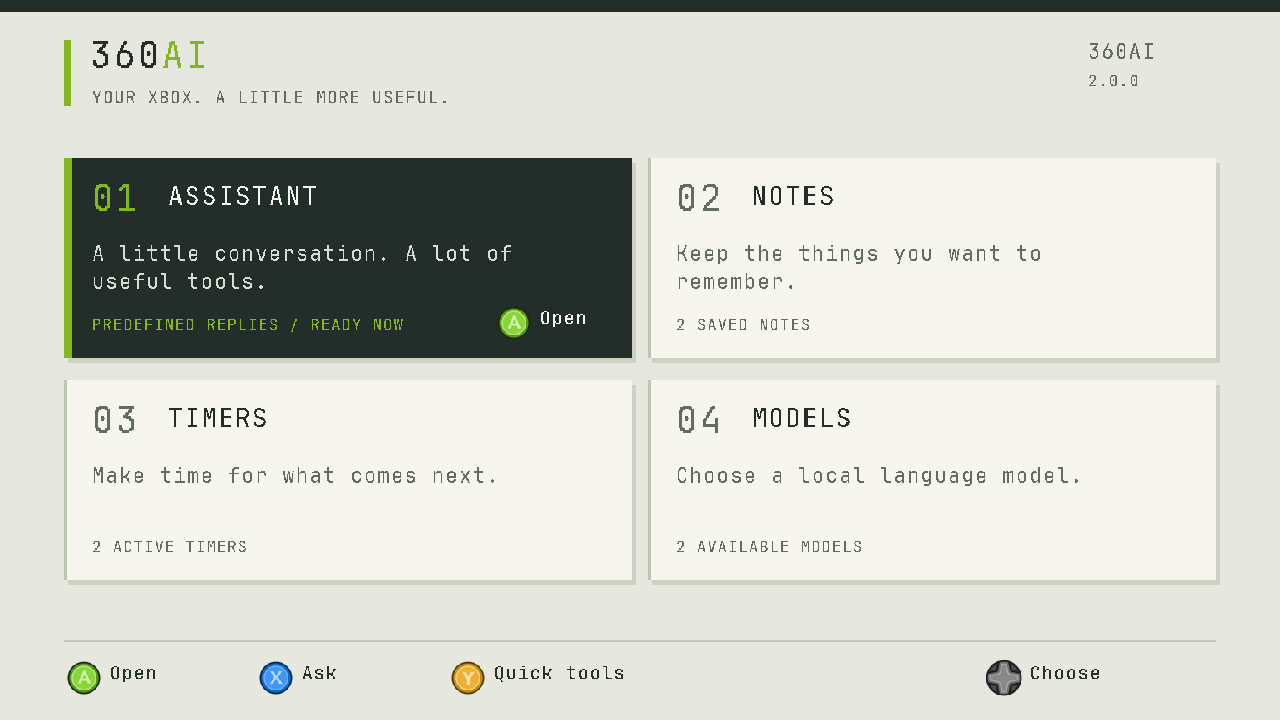
360AI now opens to a native console dashboard with Assistant, Notes, Timers and Models. Warm gray panels, numbered sections, sharp edges, green highlights and real Xbox 360 controller prompts give the app its own identity.
- Predefined answers: 106 exact phrase variants cover greetings, thanks, everyday conversation and common questions. Say
hellofor an immediate fixed answer. No model is loaded for these replies. Matching uses a small index built once; ordinary phrases are not mistaken for commands. Saved custom answers remain available. - Quick tools: open calculations, conversions, a new timer, a new note, taught answers or the command guide from controller menus.
- Notes screen: read, page through, create, edit, confirm deletion and undo using the controller. Note content is treated literally, including text such as
status?. - Timers screen: live countdowns, pause/resume, add one minute, restart and confirm cancellation. Timers require 360AI to remain open and are not system alarms.
- Faster native drawing: text and prompts share a 512 KiB texture and batched quads. The previous renderer submitted many small draws per glyph. Chat layout refreshes when the transcript or generation state changes; word wrapping keeps ordinary words intact.
- Background saves: one bounded worker coalesces assistant-data changes into the latest snapshot. Saving/Saved/Not saved is visible; failures retain in-memory data. A stale completion cannot mark newer edits as saved. Existing notes/name/taught answers migrate automatically, with validated JSON, atomic replacement and a valid backup.
- Xbox button artwork: Xelu's CC0 Xbox 360 prompts are embedded in the XEX. No external icon downloads or runtime asset folder is needed. Source/license details are in INPUT_ICONS.txt.
- Models: the ZIP still includes SmolLM2 135M, Gemma 3 270M and two TinyStories models. Model chat, OpenAI-compatible endpoints and MCP remain available through Models. GPU acceleration remains experimental; no new model-inference speedup is claimed.
Copy the entire 360AI folder from 360AI-2.0-USB.zip to your USB/HDD and launch 360AI.xex. Select Assistant for predefined replies, or Models for a GGUF. On Home, X opens the input keyboard and Y opens Quick tools. Updates exclude personal notes, settings, exports and custom rules. Wait for Saved before closing after an edit.
Validation includes the Xbox SDK build, native assistant/inference tests, 2,000 malformed-input cases, 78 follow-up interruption pairs, all 106 fixed-reply variants, background-save coalescing/failure handling, controller navigation and native UI captures, plus protocol/tokenizer/package checks and ZIP XEX/model checksums. Host UI captures use the same layout/atlas code; physical Xbox shader rendering, guide keyboard, controller feel and drive behavior still need hardware validation. Desktop timing does not establish Xbox latency or FPS.
Made by ZuhaGames & Canyons, expanded from Canyons' gemma.xex. AI tools assisted development, debugging and documentation.