A modular and reproducible research framework for adaptive deep reinforcement learning–based optimization in vehicular edge computing environments.
MEOCI is designed to explore joint optimization of model partitioning and early-exit point selection under resource-constrained vehicular edge systems.
It integrates multi-exit neural networks, ADP-D3QN-based agents, and a dynamic vehicular-edge simulation environment for real-time, distributed inference optimization.
Key Features:
- ADP-D3QN agent with dual replay buffers and adaptive epsilon scheduling
- Multi-exit CNN architectures (AlexNet, VGG16, ResNet50, YOLOv10)
- Integrated vehicular-edge simulation with dynamic bandwidth, latency, and mobility
- Full visualization suite reproducing latency, energy, and accuracy figures (Fig.7–Fig.16)
- Modular experiment scripts and YAML-based configuration system
MEOCI/
│
├── core/                                      # Core algorithm and model logic
│   ├── agent/                                 # ADP-D3QN reinforcement learning module
│   │   ├── network.py
│   │   ├── replay_buffer.py
│   │   ├── epsilon_scheduler.py
│   │   ├── agent_adp_d3qn.py
│   │   ├── agent_baselines.py
│   │   └── __init__.py
│   │
│   ├── environment/                           # Vehicular-edge dynamic simulation
│   │   ├── vec_env.py
│   │   ├── vehicle_node.py
│   │   ├── edge_server.py
│   │   ├── network_channel.py
│   │   ├── mobility_model.py
│   │   ├── workload_generator.py
│   │   └── __init__.py
│   │
│   ├── optimization/                          # Joint optimization of partition and early-exit
│   │   ├── partition_optimizer.py
│   │   ├── early_exit_selector.py
│   │   ├── resource_allocator.py
│   │   ├── reward_function.py
│   │   └── __init__.py
│   │
│   ├── model_zoo/                             # Multi-exit neural network architectures
│   │   ├── base_multi_exit.py
│   │   ├── alexnet_me.py
│   │   ├── vgg16_me.py
│   │   ├── resnet50_me.py
│   │   └── yolov10_me.py
│   │
│   ├── simulation/                            # Edge network simulation modules
│   │   ├── vehicular_network_sim.py
│   │   ├── edge_cluster_manager.py
│   │   ├── latency_estimator.py
│   │   └── __init__.py
│   │
│   └── __init__.py
│
├── datasets/                                  # Dataset loaders and preprocessing
│   ├── bdd100k_loader.py
│   ├── augmentation.py
│   ├── data_preprocessor.py
│   ├── split_dataset.py
│   └── __init__.py
│
├── utils/                                     # Utility tools and helpers
│   ├── metrics.py
│   ├── logger.py
│   ├── checkpoint.py
│   ├── seed_utils.py
│   ├── visualization.py
│   ├── profiler.py
│   ├── registry.py
│   └── __init__.py
│
├── configs/                                   # YAML / JSON configuration files
│   ├── meoci_alexnet.yaml
│   ├── meoci_vgg16.yaml
│   ├── meoci_resnet50.yaml
│   ├── env_cluster.yaml
│   ├── train_hyperparams.yaml
│   ├── ablation_scenarios.yaml
│   └── __init__.py
│
├── experiments/                               # Reproducible experiment scripts
│   ├── train_agent.py
│   ├── evaluate_latency.py
│   ├── analyze_energy.py
│   ├── test_multi_exit.py
│   ├── ablation_study.py
│   ├── heterogeneity_eval.py
│   ├── scalability_test.py
│   ├── parameter_sensitivity.py
│   ├── distributed_training.py
│   └── __init__.py
│
├── visualization/                             # Figure reproduction
│   ├── ablation/
│   ├── exit_analysis/
│   ├── heterogeneous/
│   ├── accuracy_cdf/
│   ├── vehicle_effect/
│   ├── transmission_effect/
│   ├── delay_constraints/
│   ├── energy_constraints/
│   ├── scalability/
│   ├── shared_styles/
│   ├── data_csv/
│   ├── export_all_figures.py
│   └── __init__.py
│
├── deployment/                                # Dockerized runtime and monitoring system
│   ├── docker/
│   │   ├── Dockerfile.vehicle
│   │   ├── Dockerfile.edge
│   │   ├── docker-compose.yml
│   │   └── README.md
│   │
│   ├── scripts/
│   │   ├── run_local.sh
│   │   ├── run_cluster.sh
│   │   ├── evaluate_all.sh
│   │   ├── export_figures.sh
│   │   └── README.md
│   │
│   ├── monitoring/
│   │   ├── dashboard.py
│   │   ├── influx_client.py
│   │   ├── prometheus_exporter.py
│   │   └── __init__.py
│   │
│   └── __init__.py
│
├── results/                                   # Logs, CSV outputs, and plots
│   ├── logs/
│   ├── csv/
│   └── plots/
│
├── run.py                                     # Project entry point (train / eval / visualize)
├── config.py                                  # Global settings and defaults
├── setup.py                                   # Installation script (pip install -e .)
├── requirements.txt                           # Dependencies list
└── LICENSEgit clone https://github.com/Ryan-ZRD/MEOCI.git
cd MEOCIconda create -n meoci python=3.9 -y
conda activate meocipip install -r requirements.txtor (recommended for developers):
pip install -e .python experiments/train_agent.py --config configs/meoci_vgg16.yamlpython experiments/evaluate_latency.py
python experiments/analyze_energy.pypython experiments/test_multi_exit.pypython experiments/ablation_study.py
python experiments/parameter_sensitivity.pyAll experimental figures (Fig.7–Fig.16) can be reproduced using the scripts in the visualization/ directory.
Since .csv result files are not included in the repository, they can be automatically generated by the provided data generator scripts before plotting.
Before running any plotting script, please first generate the experimental data using the data generator modules.
Each figure directory contains a corresponding *_data_generator.py or *_data_loader.py script that creates the required CSV files under visualization/data_csv/.
# Generate data for ablation experiments (Fig.7)
python visualization/ablation/ablation_data_generator.py

# Generate data for early-exit analysis (Fig.8)
python visualization/exit_analysis/exit_data_generator.py

# Generate data for heterogeneous device evaluation (Fig.9)
python visualization/heterogeneous/heterogeneity_data_loader.py

# Generate data for scalability and energy analysis (Fig.13–Fig.16)
python visualization/energy_constraints/energy_data_loader.py
python visualization/scalability/scalability_utils.py
After running these scripts, the folder visualization/data_csv/ will be populated automatically with generated .csv files such as:
visualization/data_csv/
├── ablation_reward.csv
├── exit_alexnet.csv
├── heterogeneous_latency.csv
├── energy_constraints.csv
└── scalability.csv
Once the .csv data is ready, you can reproduce each figure by running the corresponding plot_*.py scripts.
# Ablation Study (Fig.7)
python visualization/ablation/plot_ablation_convergence.py
python visualization/ablation/plot_ablation_delay.py

# Early-Exit Analysis (Fig.8)
python visualization/exit_analysis/plot_exit_probability_alexnet.py
python visualization/exit_analysis/plot_exit_probability_vgg16.py

# Heterogeneous Performance (Fig.9)
python visualization/heterogeneous/plot_latency_alexnet.py
python visualization/heterogeneous/plot_latency_vgg16.py

# Scalability and Energy (Fig.13–16)
python visualization/energy_constraints/plot_latency_vs_energy.py
python visualization/scalability/plot_vehicle_scalability.py
Each plotting script will save results automatically under results/plots/.
If you wish to generate all figures in a single step:
python visualization/export_all_figures.pyThis script automatically:
- Generates all necessary
.csvdata files (if not found); - Calls each
plot_*.pymodule; - Exports all figures into
results/plots/.
The corresponding experimental result figures are shown below
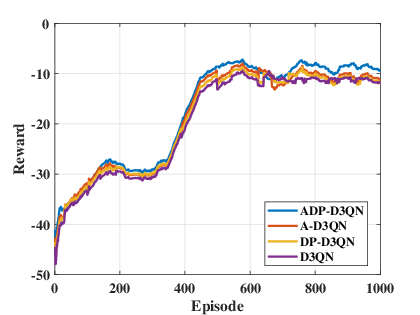 (a) Reward |
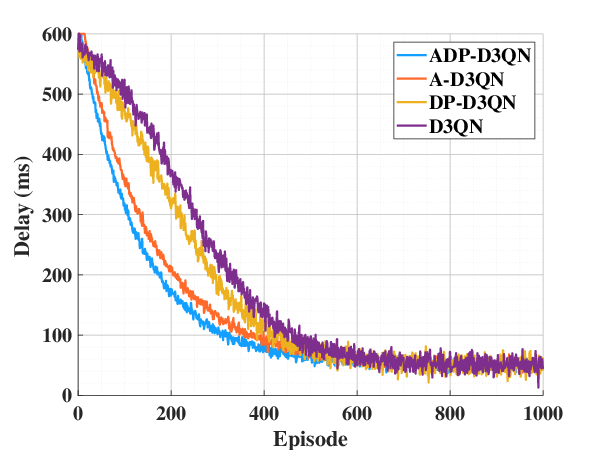 (b) Latency |
Fig. 7. Algorithm Ablation Studies.
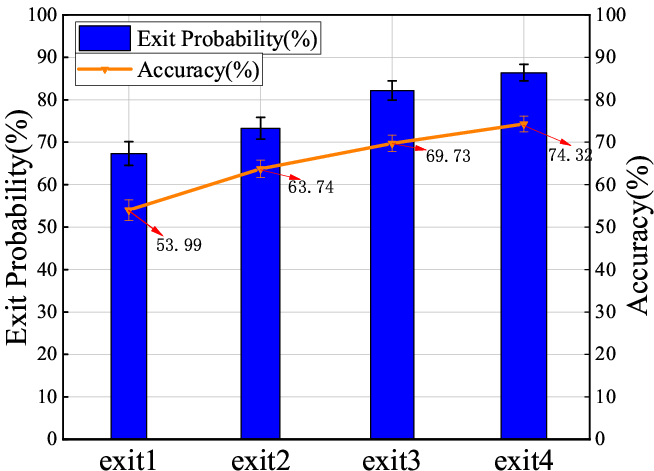 (a) AlexNet |
(b) VGG16 |
Fig. 8. The accuracy and probability of early exit of multi-exit DNN models.
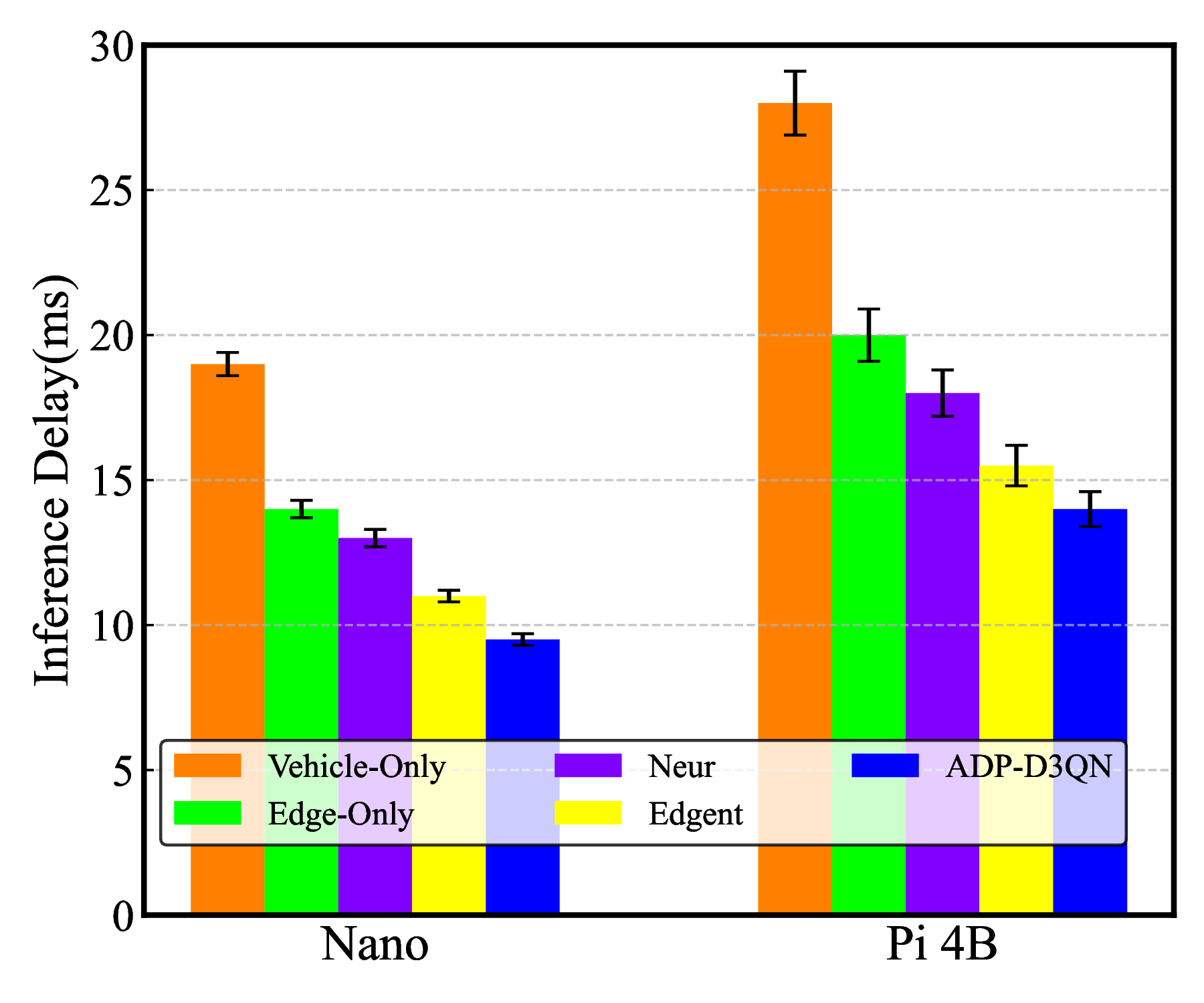 (a) AlexNet |
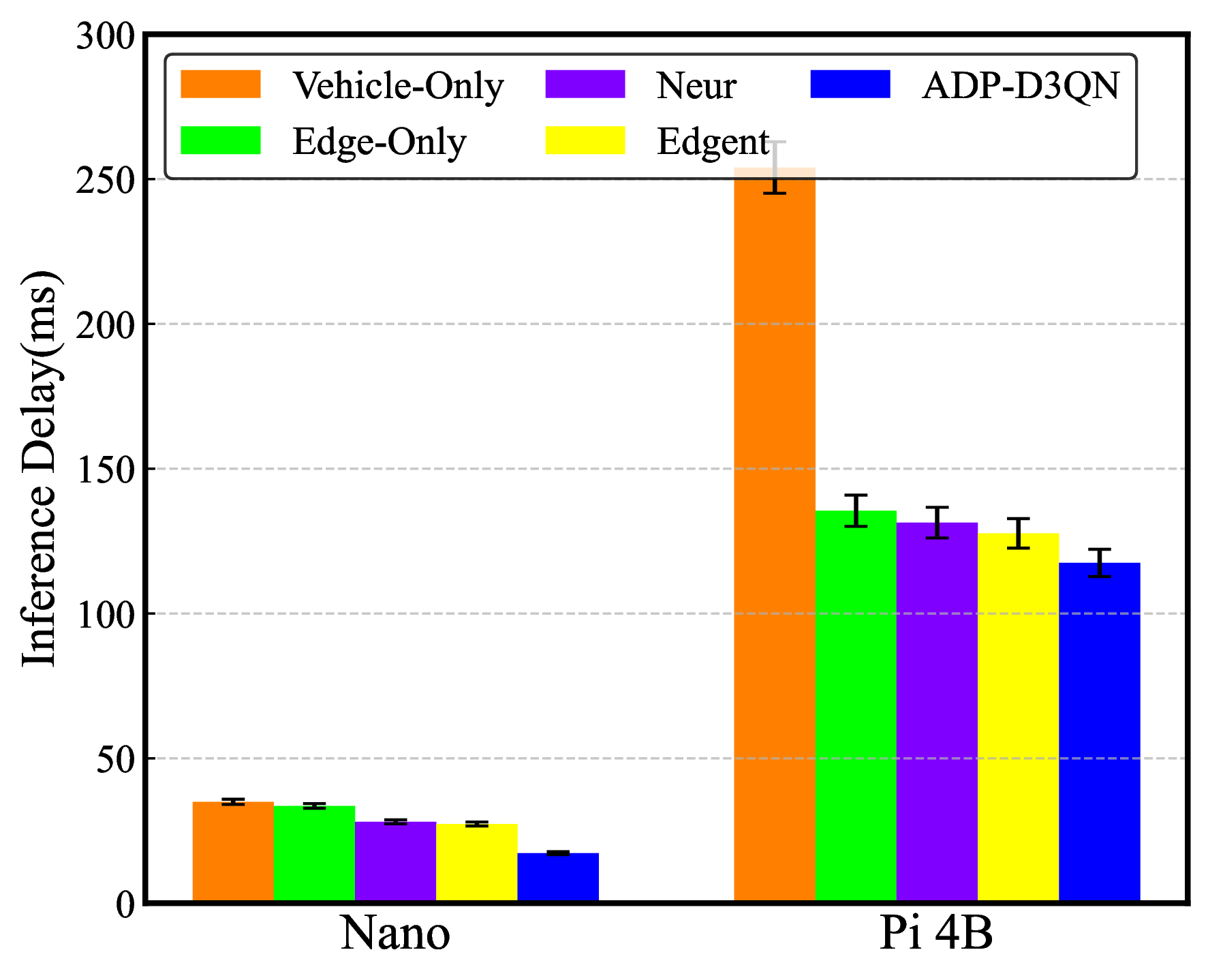 (b) VGG16 |
Fig. 9. Performance of heterogeneous vehicles in multi-exit DNN models.
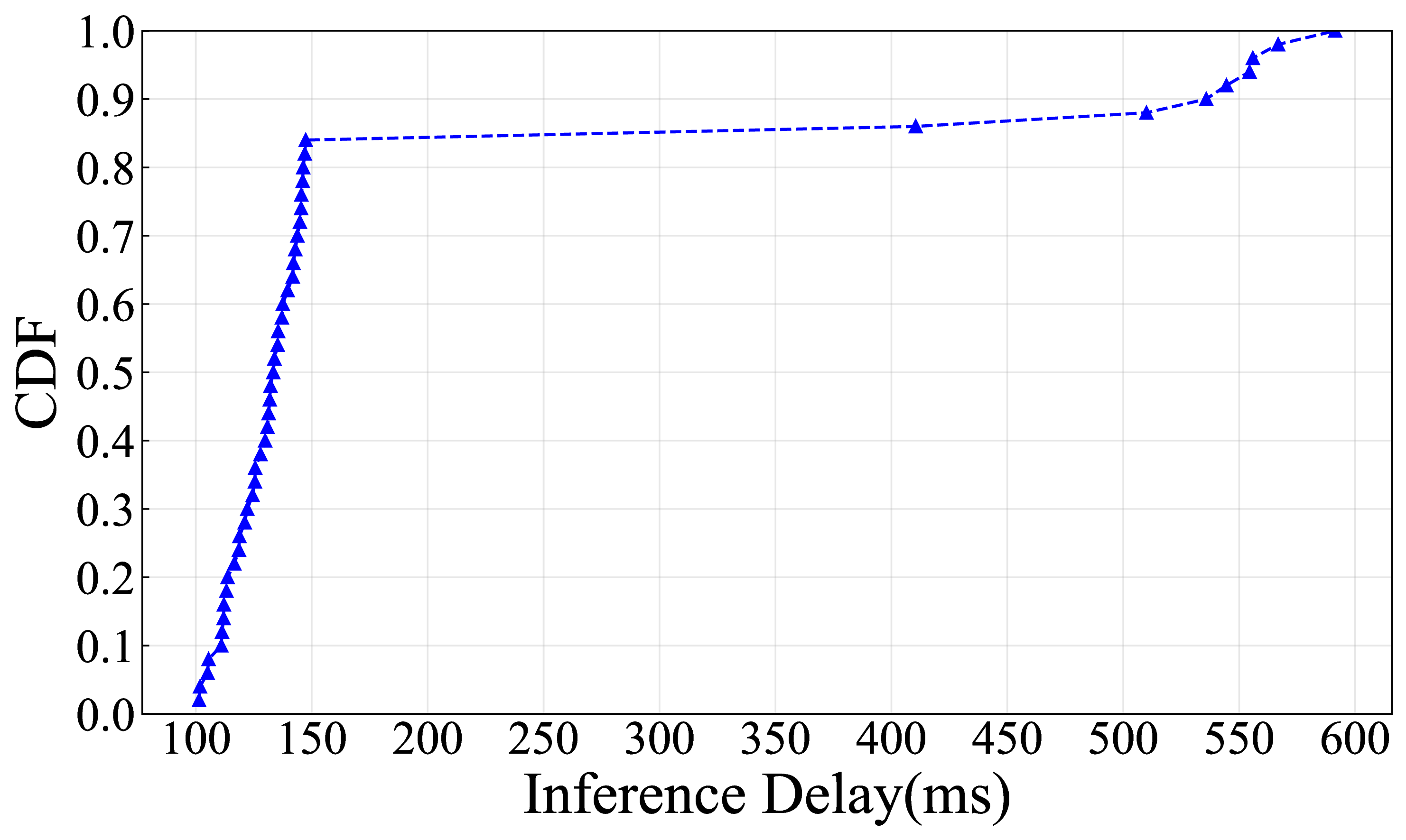 |
Fig. 11. The delay distribution the ADP-D3QN algorithm.
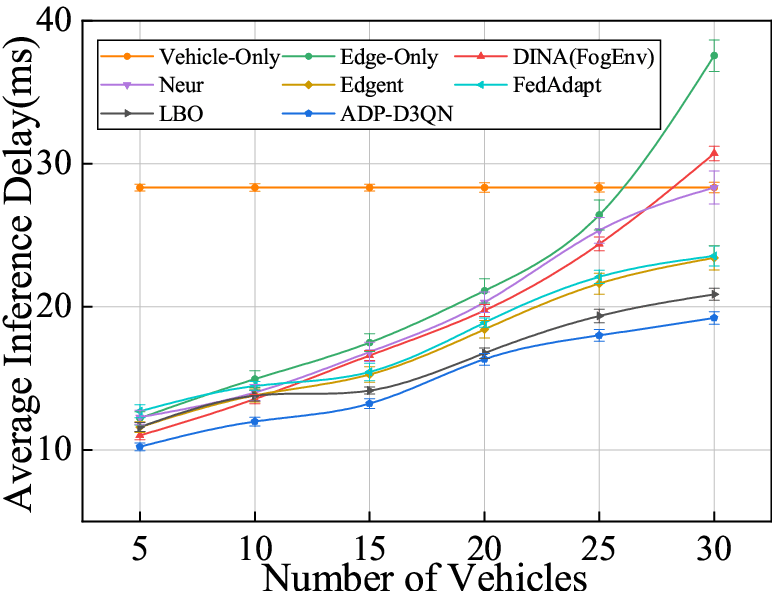 (a) Average inference delay in AlexNet |
(b) Average inference delay in VGG16 |
Fig. 12. Effect of number of vehicles.
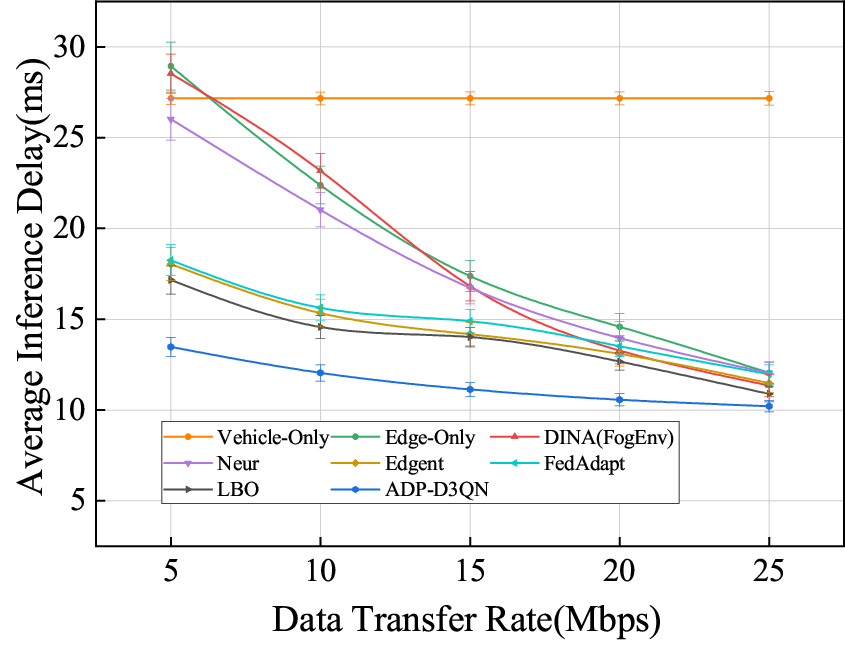 (a) Average inference delay in AlexNet |
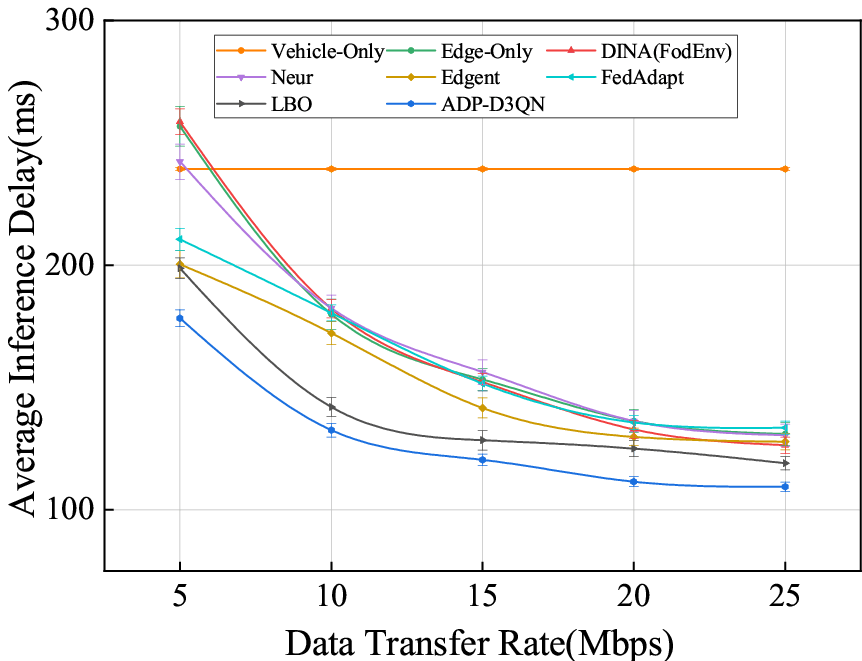 (b) Average inference delay in VGG16 |
Fig. 13. Effect of data transfer rate.
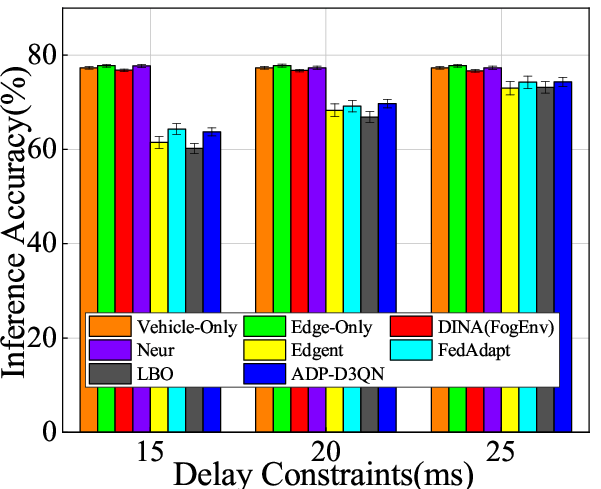 (a) Inference accuracy in AlexNet |
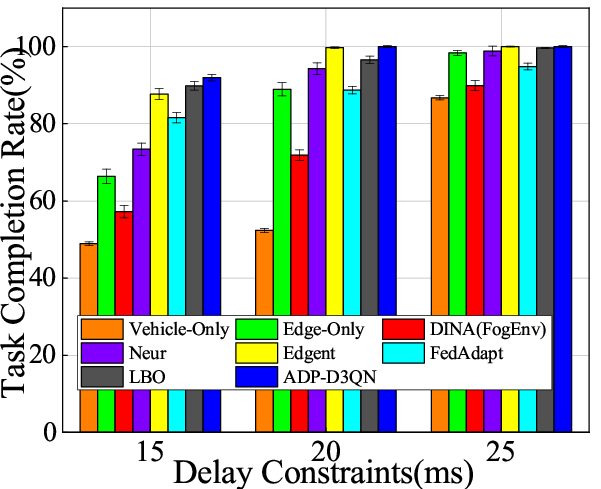 (b) Task completion rate in AlexNet |
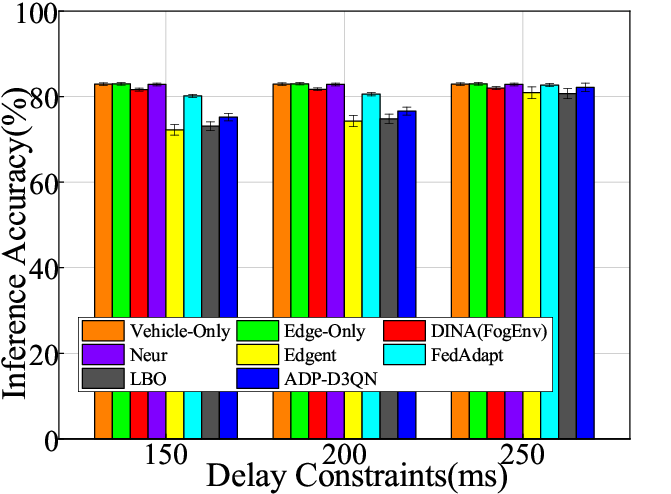 (c) Inference accuracy in VGG16 |
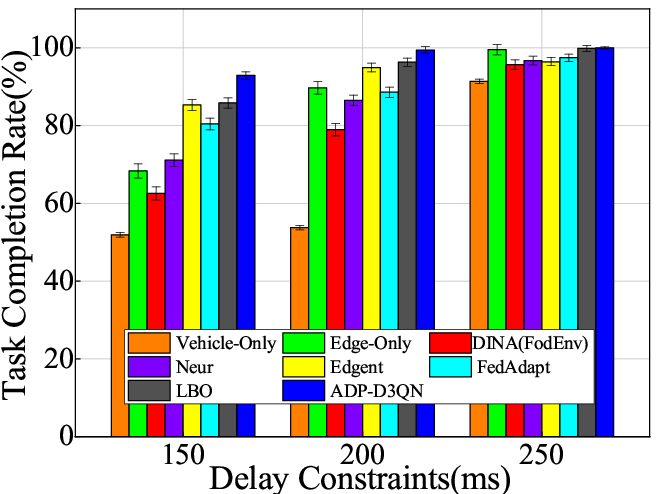 (d) Task completion rate in VGG16 |
Fig. 14. Effect of delay constraints.
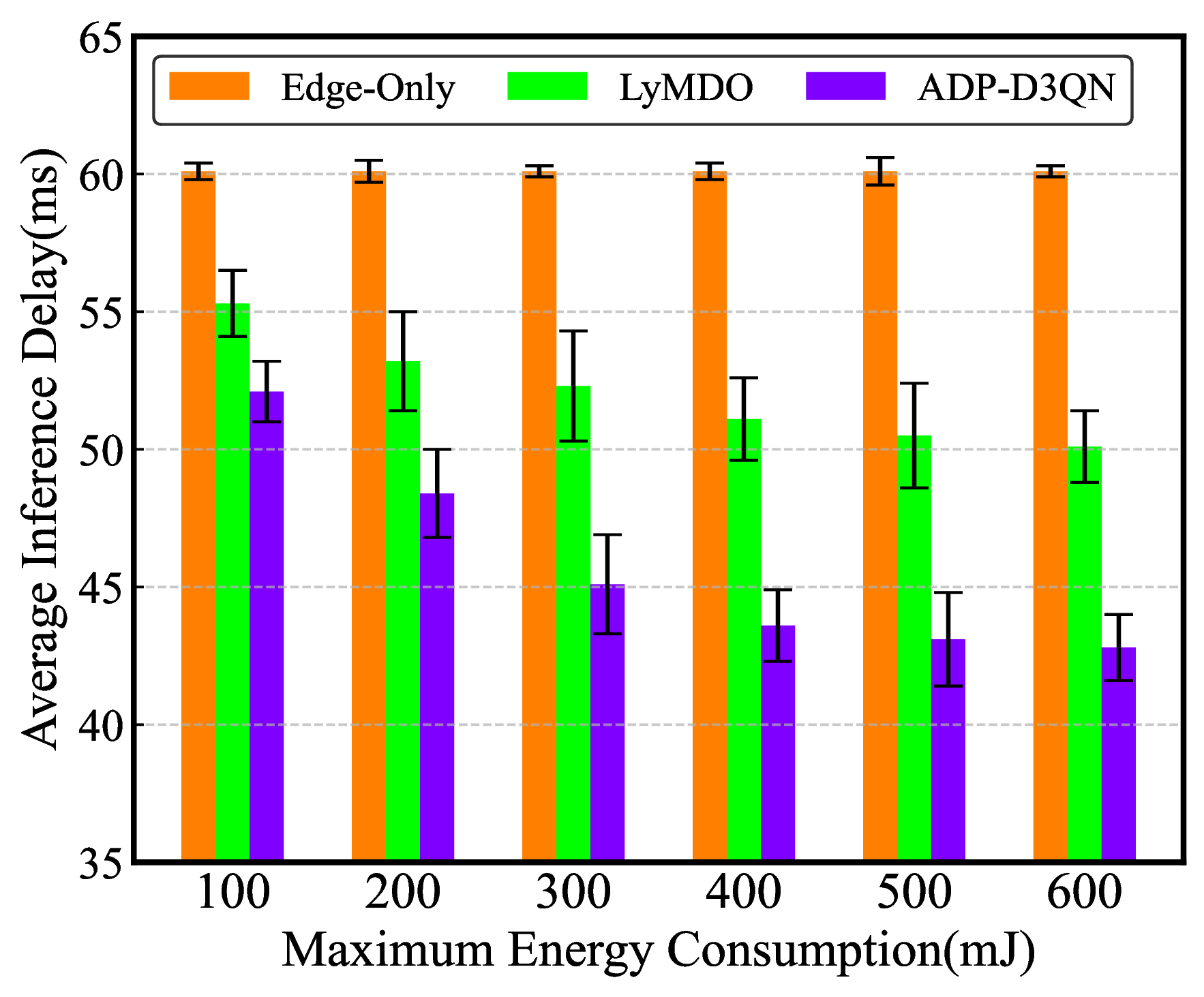 (a) Inference delay in Resnet50 |
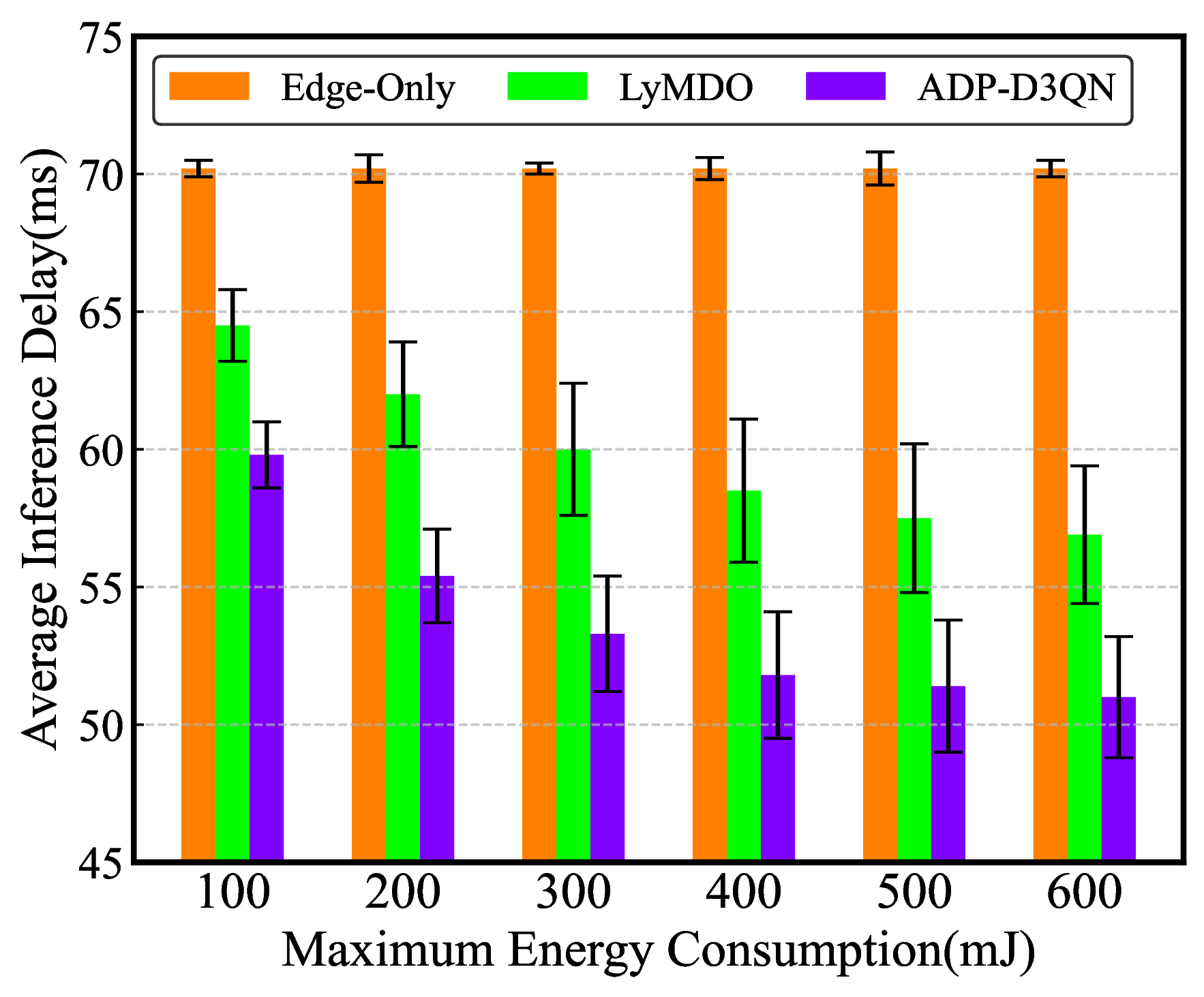 (b) Inference delay in Yolov10n |
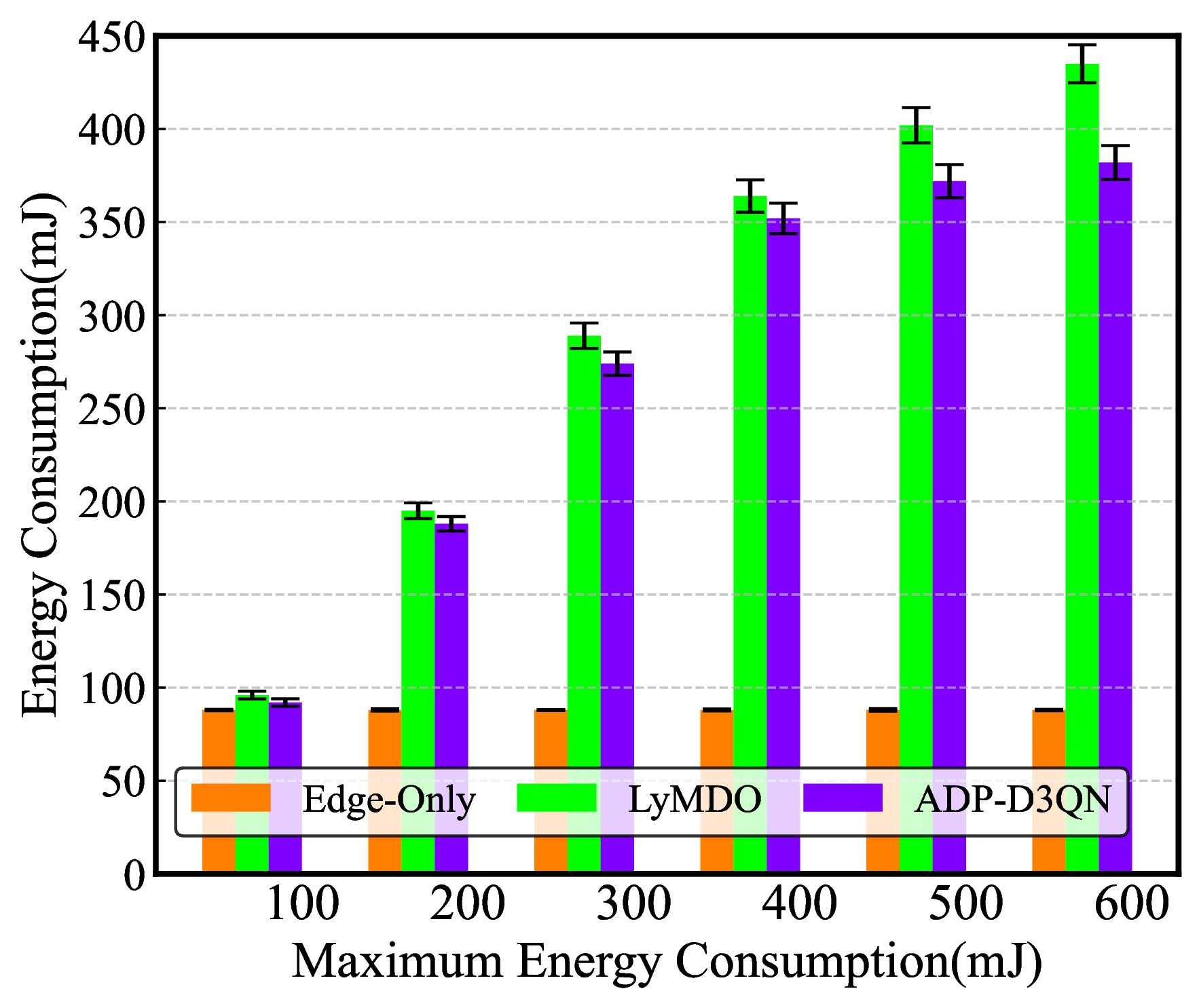 (c) Energy consumption in Resnet50 |
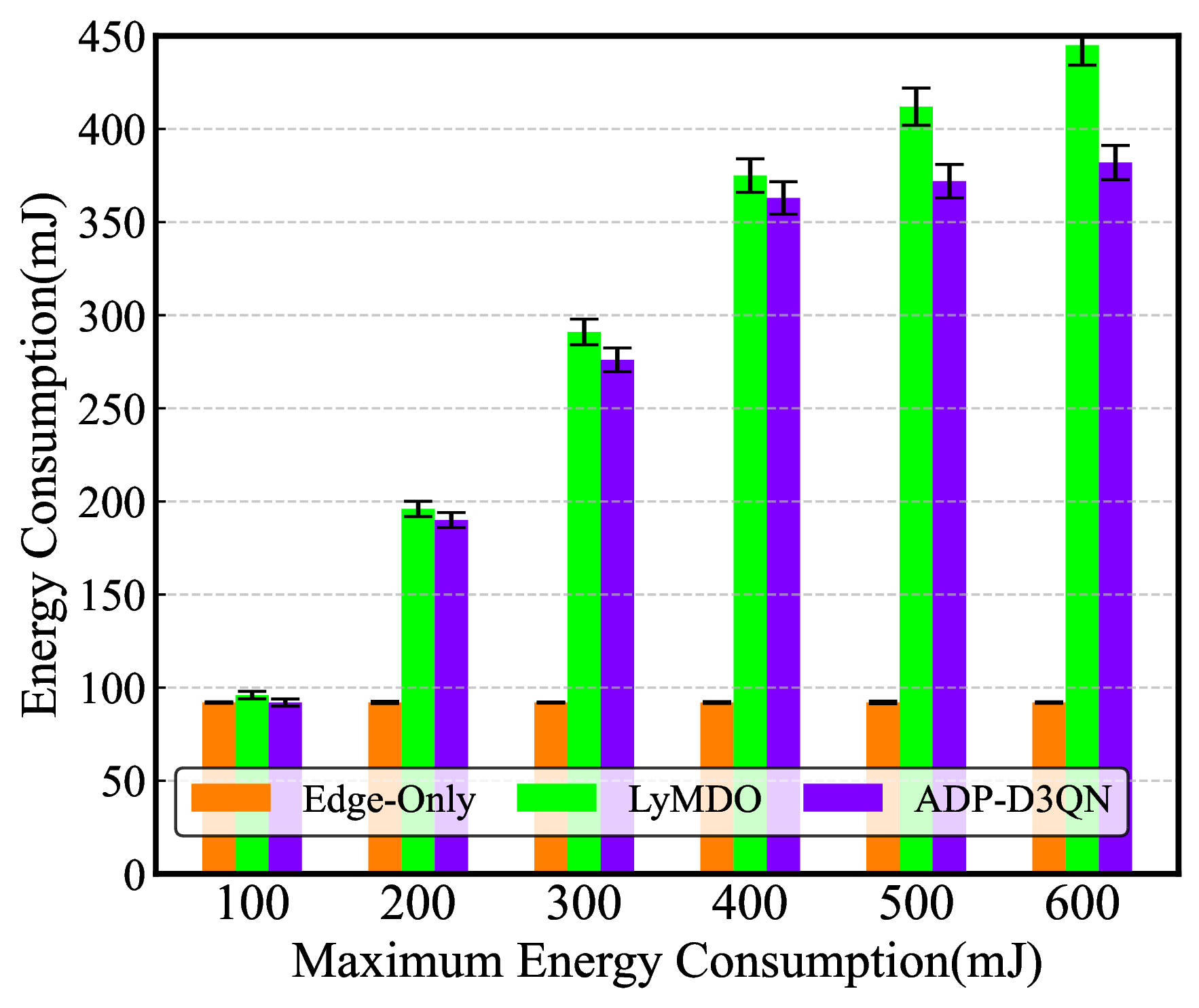 (d) Energy consumption in Yolov10n |
Fig. 15. Effect of energy consumption constraints.
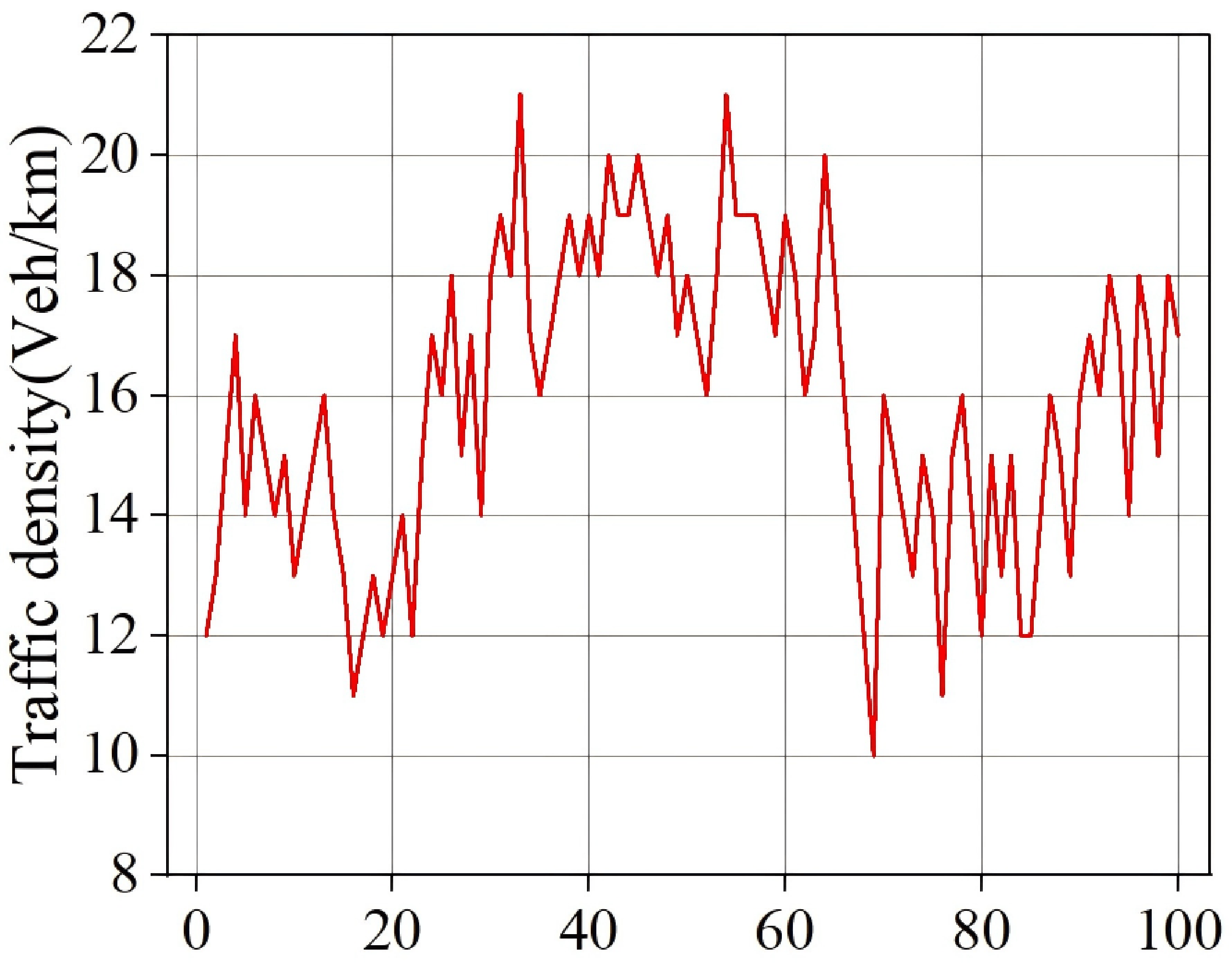 (a) Dynamic variations in traffic density over 100 time sequences |
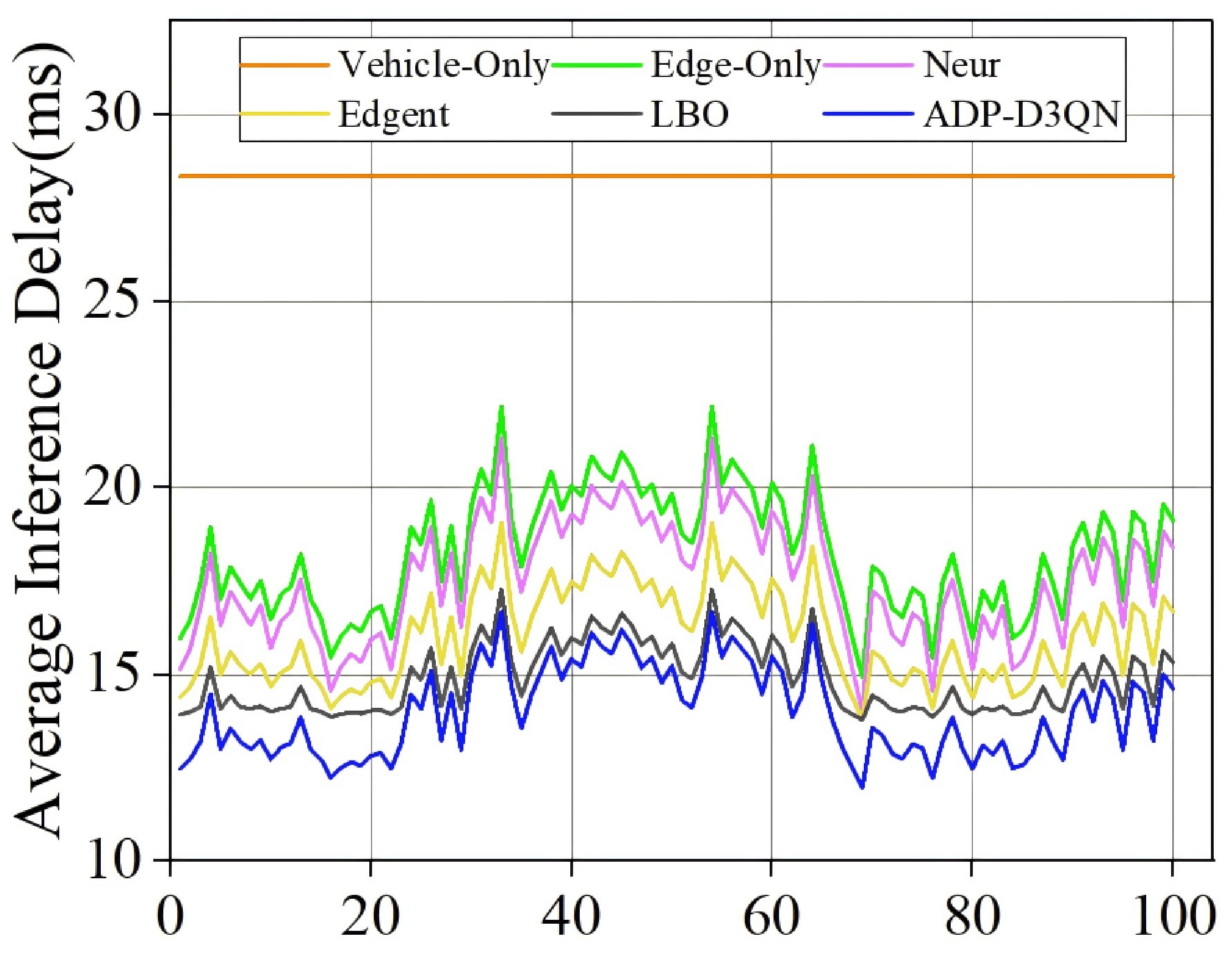 (b) Impact of dynamic traffic density |
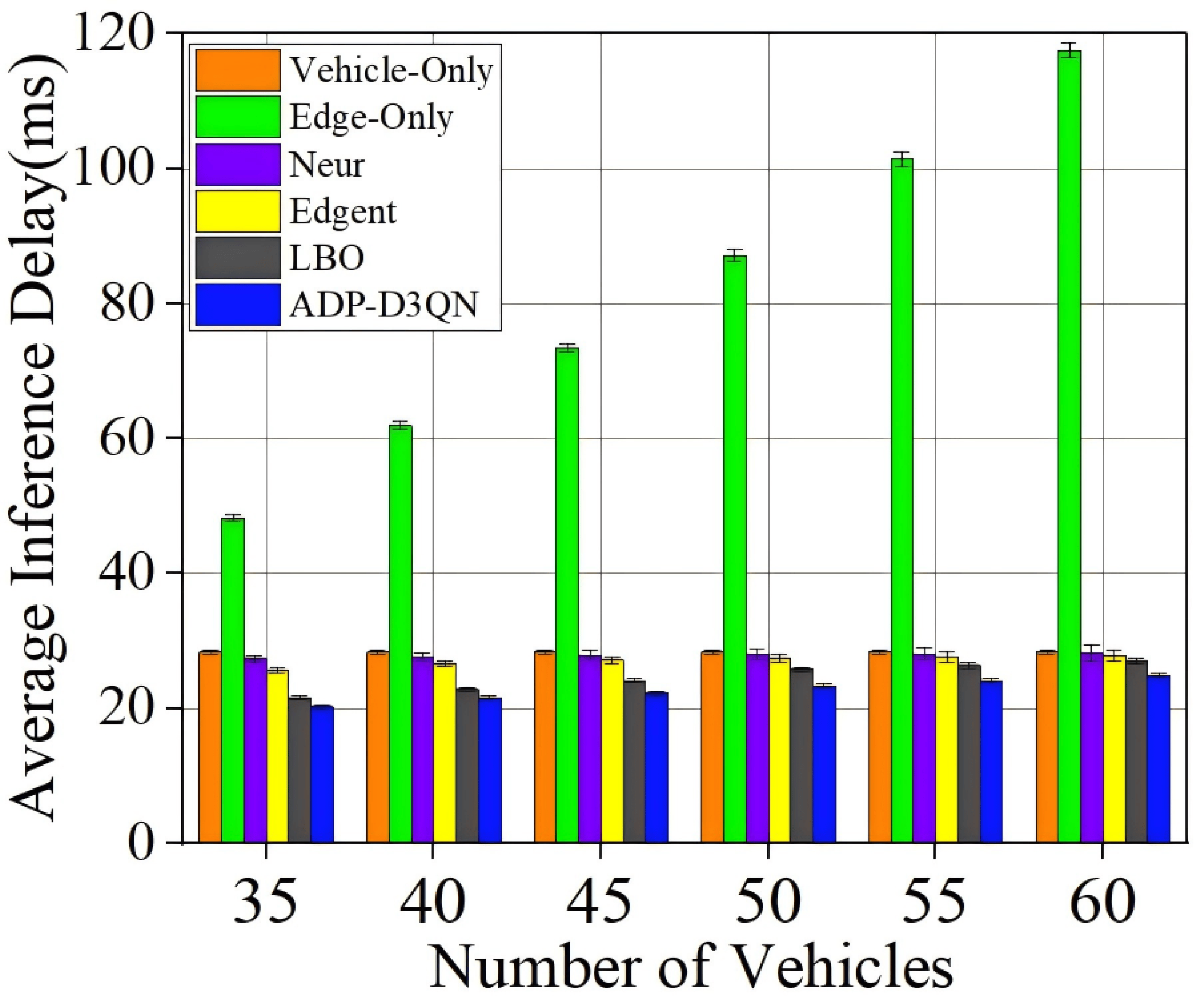 (c) Impact of number of vehicles |
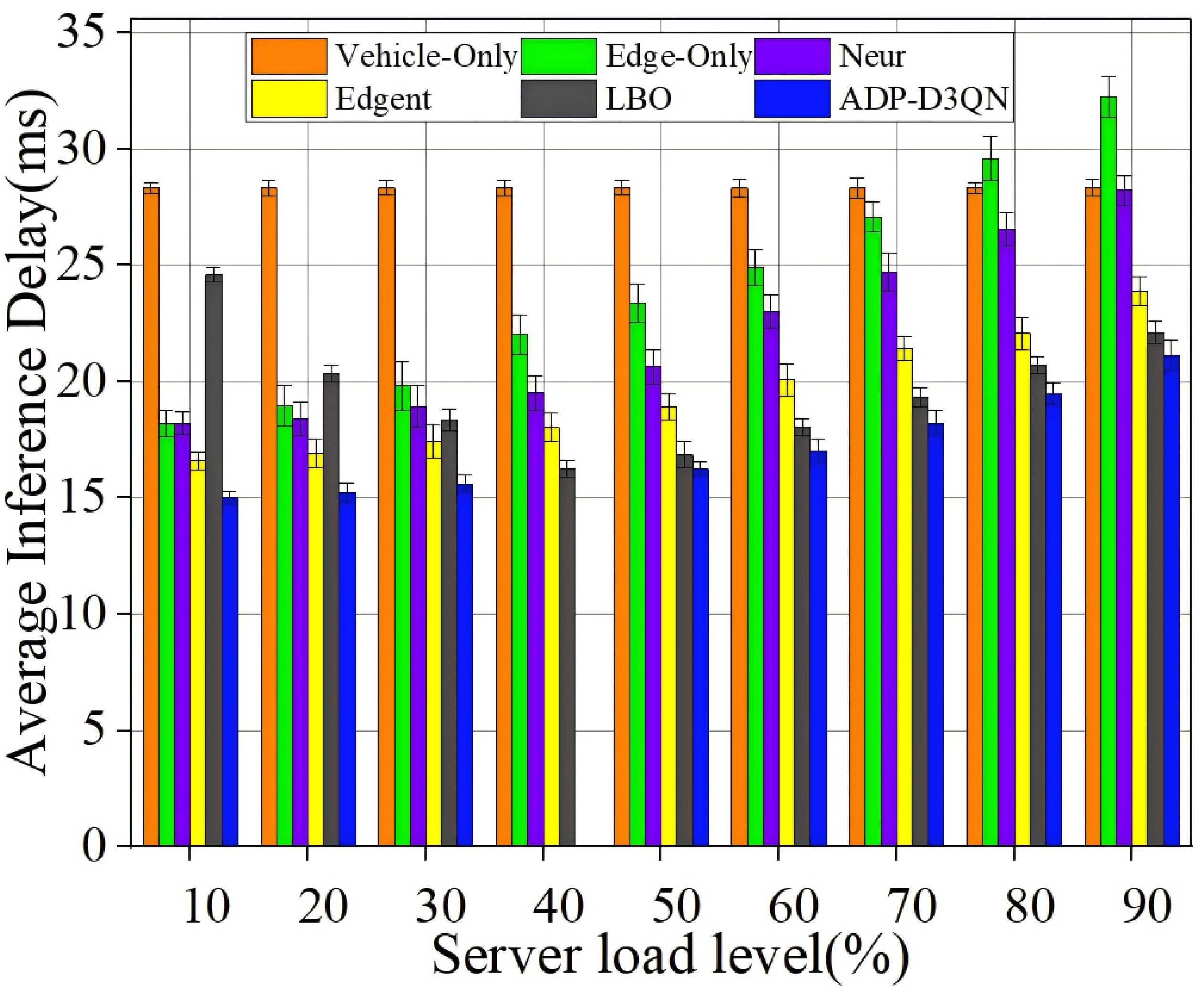 (d) Impact of computational stress |
Fig. 16 Scalability experiment.
cd deployment/docker
docker-compose up -dpython -m deployment.monitoring.dashboardpython -m deployment.monitoring.prometheus_exporter- Deterministic training ensured via global seeding
- Modular design for agent, environment, and optimization logic
- YAML-configured experiment pipeline for reproducibility
- Integrated visualization and monitoring for result interpretation
MEOCI offers a unified, extensible, and reproducible foundation for studying collaborative inference in vehicular edge intelligence systems.