git clone git@github.com:1BitPay/apidocs.gitbundle installSlate 使用 Markdown 语法编写 API 文档。默认情况下,文档源文件位于 source/index.html.md。使用您喜欢的文本编辑器打开此文件,并根据您的 API 修改内容。您可以在此文件中添加各种编程语言示例、请求和响应示例以及详细说明。
在文档中,您可以使用以下格式添加代码示例:
```python
import requests

response = requests.get("https://api.example.com/pets")
print(response.json())
```
```javascript
fetch("https://api.example.com/pets")
  .then(response => response.json())
  .then(data => console.log(data))
  .catch(error => console.error(error));
```
```
这将在文档中显示一个带有选项卡的代码块,用户可以在 Python 和 JavaScript 示例之间切换。
要在本地预览您的 API 文档,请运行以下命令启动一个开发服务器:
bundle exec middleman server
默认情况下,服务器将监听 localhost:4567。在浏览器中访问此地址以查看您的 API 文档。当您更改源文件时,服务器将自动重新加载,因此您可以实时查看更改。
Slate 允许您自定义文档的外观。要更改样式,编辑位于 source/stylesheets 目录中的 CSS 文件。例如,您可以更改主题颜色、字体等。
当您对文档内容和样式满意时,运行以下命令构建静态 HTML 文件:
bundle exec middleman build --clean这将在 build 目录中生成静态 HTML 文件和相关资源。您可以将这些文件部署到任何支持静态站点托管的服务,如 GitHub Pages、Netlify、Vercel 等。
Slate 本身不直接支持 Swagger(即 OpenAPI 规范),但您可以使用第三方工具将 Swagger(OpenAPI)规范转换为 Slate 使用的 Markdown 格式。一个流行的工具是 widdershins,它可以将 OpenAPI 规范转换为兼容 Slate 的 Markdown 文件。
以下是使用 widdershins 将 Swagger(OpenAPI)规范转换为 Slate Markdown 文件的步骤:
- 安装 Node.js 和 npm(如果尚未安装)。 全局安装 widdershins:
npm install -g widdershins- 使用 widdershins 将您的 Swagger(OpenAPI)规范转换为 Slate 兼容的 Markdown 文件:
widdershins your_openapi.yaml -o slate_compatible_output.md-
请将 your_openapi.yaml 替换为您的 OpenAPI 规范文件,slate_compatible_output.md 则是转换后的 Markdown 文件。
-
使用生成的 Markdown 文件替换 Slate 项目中的 source/index.html.md。
-
按照之前的 Slate 使用教程构建和部署


Slate helps you create beautiful, intelligent, responsive API documentation.
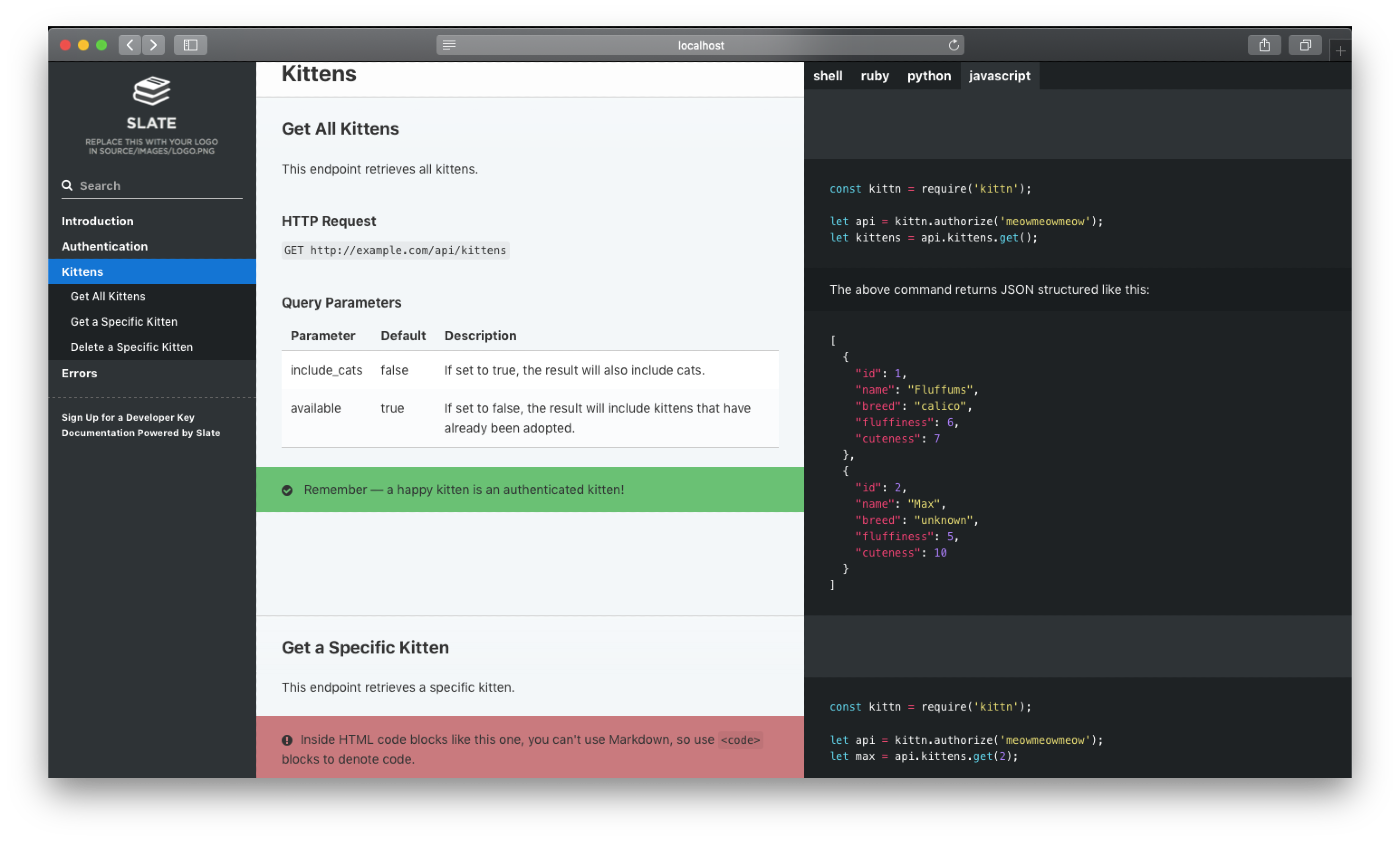
The example above was created with Slate. Check it out at slatedocs.github.io/slate.
-
Clean, intuitive design — With Slate, the description of your API is on the left side of your documentation, and all the code examples are on the right side. Inspired by Stripe's and PayPal's API docs. Slate is responsive, so it looks great on tablets, phones, and even in print.
-
Everything on a single page — Gone are the days when your users had to search through a million pages to find what they wanted. Slate puts the entire documentation on a single page. We haven't sacrificed linkability, though. As you scroll, your browser's hash will update to the nearest header, so linking to a particular point in the documentation is still natural and easy.
-
Slate is just Markdown — When you write docs with Slate, you're just writing Markdown, which makes it simple to edit and understand. Everything is written in Markdown — even the code samples are just Markdown code blocks.
-
Write code samples in multiple languages — If your API has bindings in multiple programming languages, you can easily put in tabs to switch between them. In your document, you'll distinguish different languages by specifying the language name at the top of each code block, just like with GitHub Flavored Markdown.
-
Out-of-the-box syntax highlighting for over 100 languages, no configuration required.
-
Automatic, smoothly scrolling table of contents on the far left of the page. As you scroll, it displays your current position in the document. It's fast, too. We're using Slate at TripIt to build documentation for our new API, where our table of contents has over 180 entries. We've made sure that the performance remains excellent, even for larger documents.
-
Let your users update your documentation for you — By default, your Slate-generated documentation is hosted in a public GitHub repository. Not only does this mean you get free hosting for your docs with GitHub Pages, but it also makes it simple for other developers to make pull requests to your docs if they find typos or other problems. Of course, if you don't want to use GitHub, you're also welcome to host your docs elsewhere.
-
RTL Support Full right-to-left layout for RTL languages such as Arabic, Persian (Farsi), Hebrew etc.
Getting started with Slate is super easy! Simply press the green "use this template" button above and follow the instructions below. Or, if you'd like to check out what Slate is capable of, take a look at the sample docs.
To get started with Slate, please check out the Getting Started section in our wiki.
We support running Slate in three different ways:
You can view more in the list on the wiki.
If you've got questions about setup, deploying, special feature implementation in your fork, or just want to chat with the developer, please feel free to start a thread in our Discussions tab!
Found a bug with upstream Slate? Go ahead and submit an issue. And, of course, feel free to submit pull requests with bug fixes or changes to the dev branch.
Slate was built by Robert Lord while at TripIt. The project is now maintained by Matthew Peveler and Mike Ralphson.
Thanks to the following people who have submitted major pull requests:
Also, thanks to Sauce Labs for sponsoring the development of the responsive styles.