Home
A Minecraft Datapack designed for the Create Mod, specifically tailored for worlds that were generated before the Create mod was installed.
Since the Create mod introduces new blocks to world generation (like Asurine, Crimsite, Ochrum, Veridium, and Zinc Ores), players usually have to explore far-off, ungenerated chunks to find them. This datapack solves that issue by adding custom crafting recipes for all of Create's natural generation blocks!
You don't need to generate new chunks anymore; you can simply craft what you need using existing resources.
This datapack includes crafting recipes for the following Create mod materials:
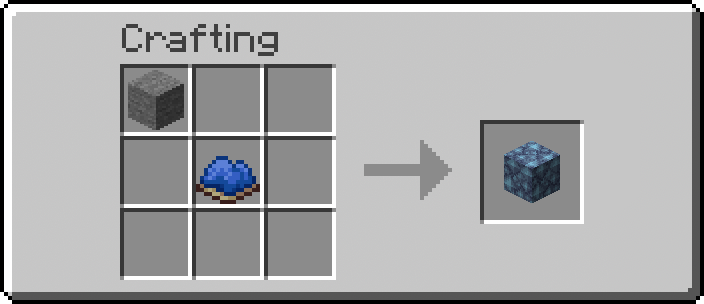 Asurine |
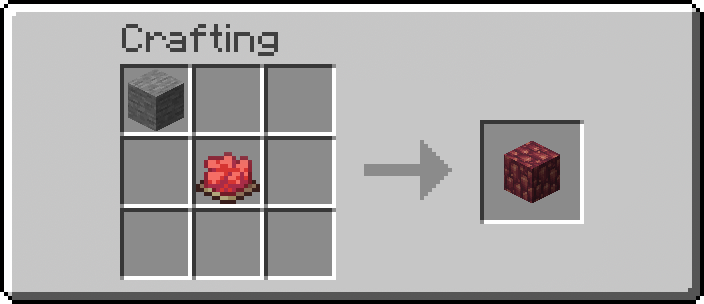 Crimsite |
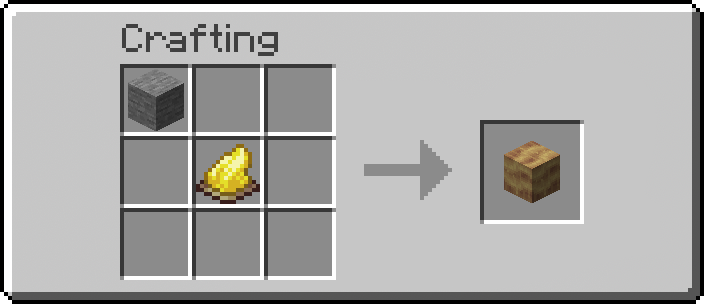 Ochrum |
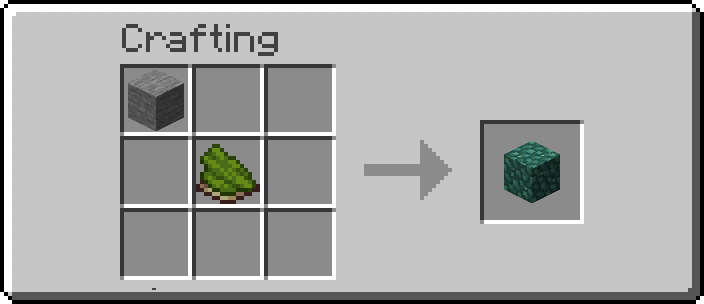 Veridium |
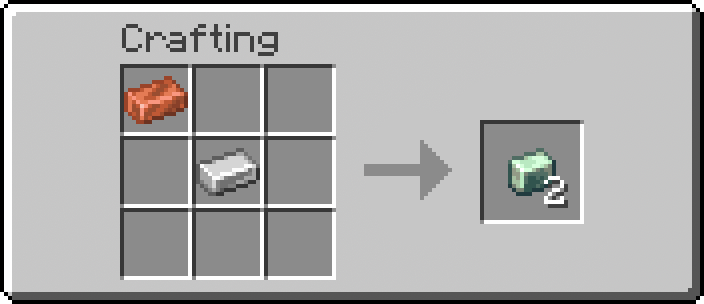 Zinc Ingot |
|
- Download or clone this repository.
- Locate your Minecraft world folder.
- Open the
datapacksfolder inside your world folder (saves/<WorldName>/datapacks/). - Drop the
createtweaksfolder there. - In-game, run the command
/reloadto apply the datapack.
By default in Minecraft, custom recipes act like "secret recipes"—they will not show up in your Recipe Book until you successfully craft them at least once.
To ensure you can easily look up these new recipes in-game without having to guess the patterns, this datapack handles the unlocking automatically! Inside the initialization structure, a /recipe give command is executed whenever the datapack is loaded (such as when you type /reload). This instantly grants the new recipes to all players, making them visible in the crafting book immediately.
The datapack is structured in a standard Minecraft data format. If you want to change what items are required for crafting and what they yield, you can easily tweak it.
All recipes are stored as simple JSON files. To change them:
- Navigate to
data/createtweaks/recipe/. - Open the JSON file for the recipe you want to tweak (e.g.,
zinc_ingot.json,asurine.json, etc.). - You will see an
ingredientssection (what you need to craft it) and aresultsection (what you get). - Replace the item IDs (like
minecraft:stoneorminecraft:iron_nugget) with whatever items you prefer!
Example Structure:
{
  "type": "minecraft:crafting_shapeless",
  "ingredients": [
    {
      "item": "minecraft:iron_ingot"
    },
    {
      "item": "minecraft:copper_ingot"
    }
  ],
  "result": {
    "item": "create:zinc_ingot",
    "count": 1
  }
}This datapack also hooks into the #minecraft:load and #minecraft:tick events:
-
data/createtweaks/function/load.mcfunction: Runs exactly once when the server/client loads the datapack or/reloadis run. This is where the/recipe givecommand lives to automatically unlock the recipes for players. It's also useful for setting up scoreboards or initial game rules. -
data/createtweaks/function/tick.mcfunction: Runs once every single tick (20 times a second). Useful for checking player conditions or ongoing events. By default, this is mostly empty to preserve performance, but you can add your custom commands here if needed.
I am not very jobless to port this datapack to every version of minecraft, but I try my best to keep it updated from every version from now on. The versions also depend on the versions the Create Mod is available for, since the original mod is only available till versions 1.21.8. But a solo indie dev forked the project and since been releasing the same mod ported for newer versions under the name Create Fly, in modrinth.