Location: demo/interfaces Create ILed.hal (HIDL code) to description HAL interface
Use the tool provided by AOSP is hidl-gen for ILed.hal to generate the necessary files of HAL. This tool will generate files to specific location. In the example, it will generate files in interfaces/led/1.0/default
List of the generated files by hidl-gen:
- Android.bp
- Led.cpp
- Led.h All of files need to be modified by the customer
Using the update-makefiles-helper.sh from AOSP to generate Android.bp in interfaces/led/1.0. The Android.bp will control
the compilation, generation of HIDL interface (demo.hardware.led@1.0) and the software package will also export some necessary middleware
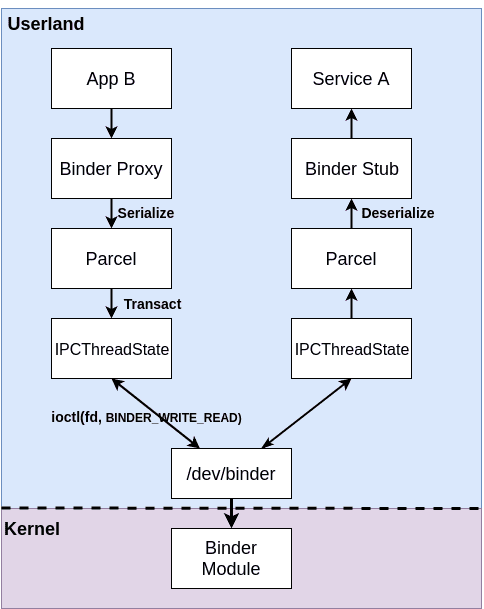
In the above image, app B is HAL client and service A is HAL server that provide one or more features for app B via binder
For pure binding HAL, the caller of HAL will HwBinder RPC indirectly call the HAL interface through communication, so we need to build a daemon process to handle these HwBinder communication requests.
Location: demo/interfaces/led/1.0/default/service.cpp
Create and edit demo/interfaces/led/1.0/default/my_demo.hardware.led@1.0-service.rc to realize the mentioned daemon process starting automatically at boot.
interfaces/led/1.0/default/Android.bp generated by hidl-gen is only appplicable to the straight-through HAL and need to be modified.
Build and deploy the control for the machine's /vendor/bin/hw/my_demo.hardware.led@1.0-service and /vendor/etc/init/my_demo.hardware.led@1.0-service.rc
Location: demo/jni/LedHidl_jni
-
Create LedNative.cpp to implement the HAL client in the JNI code
-
Create Android.bp and fill the
libhidlbase. This lib is the dynamic library styles that the HAL client module must be connected todemo.hardware.led@1.0(HIDL interface)
In the app, you need to routinely call the JNI interface to indirectly control LED
-
Use Android studio to create a project name is LedControl and create a native interface mapping class
LedControl/app/src/main/java/com/example/lowlevel/LedNative.java -
Create the main program
LedControl/app/src/main/java/com/example/ledcontrol/MainActivity.java -
Create an app layout file
LedControl/app/src/main/res/layout/activity_main.xml. This layout is very simple with only one button to control the Led on/off -
Copy the entire
LedControlproject intodemo/jni/ledHidl_jni/app. Refer to android studio project embedded into Android system source code
Some board-level project configuration and SELinux configuration are needed to run the test program normally
- Add the HIDL interface, server executable program , led jni library and app to the board-level project confiuration
PRODUCT_PACKAGESand these modules are actually compliled into the Android image. Location of configuration file isdevice/linaro/hikey/hikey960/device-hikey960.mk
Using sysfs to control the led by /sys/devices/platform/leds/leds/user_led3/brightness which implemented in HAL interface.
By default, only the root user has permission to access the property file so you need to set on post-fs to access the device properties file.
-> Modify device/linaro/hikey/hikey960/init.hikey960.rc
Create or modify device/fsl/imx8m/evk_8mm/manifest.xml to declare the HAL instance. Refer to Determining supported HALs

Create or modify if it existed and configure SELinux in device/linaro/hikey/sepolicy/attributes
Create device/linaro/hikey/sepolicy/hal_led_default.te. A new type of domain is created hal_led_default for the purpose od identifying the HAL server later /vendor/bin/hw/my_demo.hardware.led@1.0-service
Modify /home/letter/myir-android/myir_android9.0.0_2.3.0/android_build/device/fsl/imx8m/evk_8mm/sepolicy/file_contexts to declare the daemon process /vendor/bin/hw/my_demo.hardware.led@1.0-serviceas the newly defined hal_led_default_exectype, so that the process belongs to hal_led_defaultthe security context.

Modify or create device/linaro/hikey/sepolicy/hwservice.te file
Modify or create device/linaro/hikey/sepolicy/hwservice_contexts
Modify or create device/linaro/hikey/sepolicy/platform_app.te
Refer: https://blog.csdn.net/weixin_39655765/article/details/100871332