
VNS19f2.mp4
- For the latest version, simply clone the repo or download the Unitypackage.
- The Red Sports Car Demo for the NWH Vehicle Physics 2 scene is not properly set up and therefore outputs subpar audio.
- If you do not own an NWH Physics asset for your project, delete the two related scripts in the Input folder.
VNS is an open-source, free audio addon primarily designed for Unity to simulate vehicle sounds based on engine RPM, similar to a granulator, without dependencies such as FMOD.

Vehicle Sound Synthesizer • Enhanced Loop-based Vehicle Noise Simulator • v1.9f
This release delivers a significant editor UX overhaul, fixes critical workflow issues with the clip ReorderableList, adds dual Input System compatibility, migrates throttle-body and DCT shift effects to an event-driven architecture, and performs a full codebase cleanup.
New & Improved:
- Event-Driven Throttle Body & DCT Shift Effects: Throttle roar (
OnThrottleTipIn), throttle flutter (OnThrottleTipOut), and DCT shift burble (OnGearShift) are now triggered via public methods called from the integration script - not by fragiledeltaLoadthresholds. The old threshold fields (intakeRoarLoadDeltaThreshold,throttleFlutterLoadDeltaThreshold) are deprecated and no longer read. ThedctShiftBurbleFiredThisDecreaseflag has been removed. See the Developer Reference and Migration Guide for details. - Editor UX Overhaul: RPM field is now a plain integer text box (the old Range slider made precise values impossible to enter). Per-clip pitch sliders include numeric readouts and a labeled range bar so users can see exact min/max values at a glance.
- Accurate Blend Visualization: The volume envelope graph now highlights only the two active neighbour clips (the runtime only ever blends two). Inactive clips are dimmed to 13% alpha, eliminating confusion about how many layers blend at once. An active-pair label shows exactly which clips are blending.
- Debug RPM Tracking: The graph marker and combustion preview now correctly follow
debugrpmin both edit and play modes when debug mode is enabled. - ReorderableList Fix: Auto-sorting has been removed from the editor-time path. The inspector ReorderableList now preserves the user's manual clip order. Sorting is performed internally by
BuildRpmTablesandBuildBankLayersat runtime only, so the neighbour-pair algorithm always receives correctly ordered data. - Dual Input System: The
AudioGranulatorSimpleUItest harness now supports both Unity's New Input System (Keyboard.current) and the Legacy Input Manager (Input.GetKey), selected automatically viaENABLE_INPUT_SYSTEM/ENABLE_LEGACY_INPUT_MANAGERpreprocessor guards. - Codebase Cleanup: All source files have been standardized - section-header comments,
[fix]annotations, and inline notes removed. Only/// <summary>XML doc comments and[Tooltip]attributes remain. All scripts tagged with v1.9f version headers.
Installation:
- Requirements: Unity 2021.3 or newer. The
Unity.MathematicsandUnity.Burstpackages are required for the non-WebGL path. - Download: Clone this repository directly into your Unity project's
Assetsfolder. Do not use the old.unitypackagereleases as they are outdated. - Setup: Add the
VehicleNoiseSynthesizercomponent to your vehicle's audio root GameObject. - Custom input scripts: If you use a custom integration (not
AudioGranulatorNWHVehiclePhysics2), you must callOnThrottleTipIn,OnThrottleTipOut, andOnGearShiftat the appropriate moments, or the throttle-body and DCT shift burble effects will never play. Refer to the Developer Reference for the full API.
📚 Full Developer Reference: docs.atg-simulator.com/vehiclenoisesimulator
The developer reference includes:
- Complete parameter reference with defaults and ranges
- 3-tier pitch tuning guide
- Live inspector simulator (interactive)
- Public Event API documentation
- NWH Vehicle Physics 2 integration guide
- Setup instructions and common pitfalls
Previous: v1.8f2 (May 2026)
This release brought a major performance upgrade with multi-threading support, alongside deep stability and accuracy improvements. The Non-WebGL (Burst) audio path now produces identical, correct results to the WebGL path. Every core subsystem - blend math, pitch mapping, crossfade panning, hysteresis, and editor tooling - was audited and fixed against actual runtime behaviour.
Can be used for:
☑️ Engine
☑️ Intake
☑️ Exhausts
☑️ Transmission⁰
:ballot*box_with_check: Differential⁰ *(and alike)_
ℹ️ Uses real audio clips per Engine RPM and Engine Load to create realistic sound/noise. Two-neighbour constant-power crossfade with cylinder-aware pair hold timing.
Pros: Some of the main reasons for devising this asset:
✅ Lightweight - async Burst-compiled calculations per fixed delta time (non-WebGL), synchronous fallback for WebGL.
✅ Uses only Unity, optionally supports Unity Audio Mixer. Full WebGL compatibility.
✅ Advanced parameters to fine-tune the audio effect - per-clip min/max pitch, volume offset, pitch offset.
✅ Accurate constant-power crossfade blending between neighbouring RPM clips (cos² + sin² = 1).
✅ Refreshed custom inspector with active-pair volume envelope visualization and per-clip pitch range readouts.
✅ Cylinder-aware pair hold timing for realistic combustion-engine character.
Cons:
❌ Needs separate audio files per RPM¹
❌ Needs careful tweaking and spending time adjusting parameters to properly simulate a realistic vehicle sound with it
🔁 How to loop?
These are useful to compose loop audio for your vehicle sound simulation.
- There describes how to seamlessly loop audio using a free audio tool manually:
- Intermediate Approach: https://gamedevbeginner.com/create-looping-sound-effects-for-games-for-free-with-audacity/
- Advanced Approach: https://youtu.be/lMZXjCeAUPM
- This one is even easier, you don't need to download a tool, and it is online, but a bit more limited: https://www.drumbot.com/projects/looper/
- This uses paid software to correct the pitch and make a cleaner, seamless audio clip: https://youtu.be/1bnasSQbBqk
Although this asset was done with the idea of using it in my passion project ATG Simulator, the paid ones might be easier to work with. Below is a list of assets and plugins you can use instead - prices valid at the time of writing:
- FMOD Indie (Free under some limitations, needs your audio clips)
- Unity Asset: Realistic Engine Sounds (from 23 US$ to +260 USD with most needed audio clips)
- Unity/Unreal/... Plugin: Crankcase Rev (from 1,500 USD)
- DAW Plugin (Can mix both engine and exhaust sounds of different vehicles): Igniter (430 USD)
- DAW Plugin (Recommended for engine sounds only): Audio Motors
- Unity Asset: Granular Synthesis for Engine Audio (Free)
- Unity/Unreal (Procedural Engine Sounds): Nemisindo Engine (44 USD)
- Standalone (Procedural Realistic Car Sounds, very CPU intensive): Engine Simulator (Free)
- Android App (Limited predefined audio files, basic non-seamless loop): RevHeadz (free but w/ in-app purchases)
Note that with DAW or standalone apps and plugins, you may record looped audio clips for this (or other assets) for simulating your audio in real-time.
ℹ️ How to use it?
Either download the UnityPackage or a zipped archive of this repo and import it into a new Unity project. This asset has demo scenes that need NWH Vehicle Physics and NWH Dynamic Water Physics. To use any demo scene, you will need those assets imported first. You may have none, one, or all of the NWH assets - just delete the scripts that are not relevant to your project (e.g., NWH Input demo samples if no NWH Asset is used).
- Add the
VehicleNoiseSynthesizercomponent to a GameObject - Assign an AudioSource Template and populate the Acceleration (and optionally Deceleration) clip banks
- Set per-clip RPM values and min/max pitch ranges
- Use the inspector blend visualization to verify your curves - the graph highlights the two active clips and dims inactive ones
- Feed RPM and Load values via script (see
AudioGranulatorSimpleUIfor a test harness with dual Input System support, or the NWH adapters for real vehicle integration) - Important: If using a custom input script, call
OnThrottleTipIn,OnThrottleTipOut, andOnGearShiftto enable throttle-body and DCT effects. See the Developer Reference for the full API.
ℹ️ How does it work?
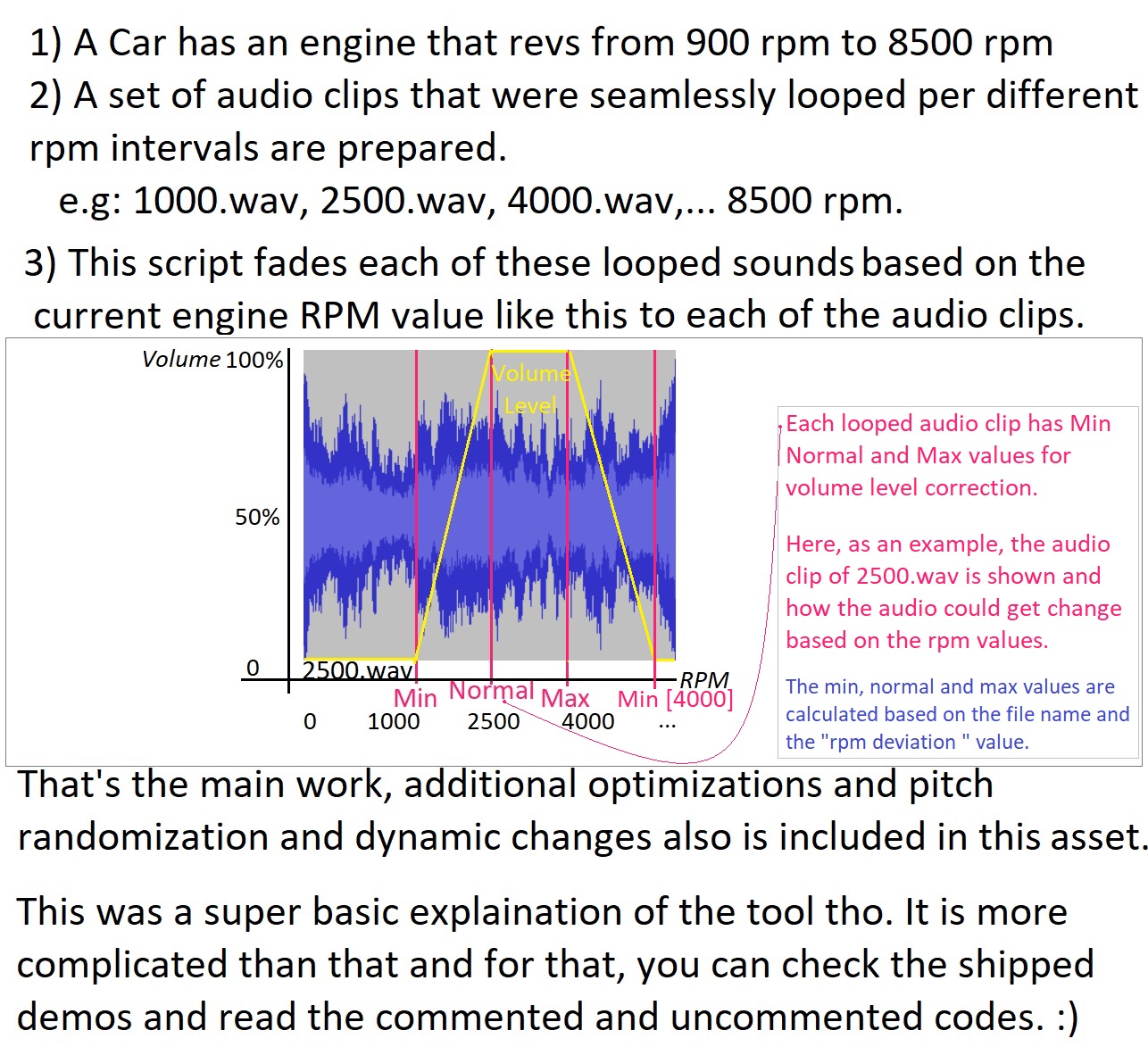
Two neighbouring audio clips (lo / hi) are crossfaded at any given RPM using a constant-power cosine/sine pan law (cos² + sin² = 1). The active pair is selected by a hysteresis-buffered nearest-neighbour search with cylinder-aware hold timing. Per-clip pitch follows a continuous RPM-progress mapping. A Burst-compiled job system (non-WebGL) batches all synthesizer instances for maximum performance.
ℹ️ Why the heck am I sharing this freely?
I expect people to use this happily, but also to improve it and share an enhanced version with others. Happy coding! :)
©️ Dan. Several internet sources and GitHub Repositories like Keijiro Takahashi, CombatWombatZockchster, manueleisl, and others inspired the original script and its idea. The original idea was published as a GitHub repo to recreate a Forza Motorsport 4 type of audio simulation for cars, which unfortunately I lost its URL².
Thanks for your attention.
Check the social media of my passion project called ATG Simulator, please:
- https://twitter.com/atg_simulator
- https://www.instagram.com/atg_simulator/
- https://atg-simulator.com/
- https://youtube.com/@atg-simulator
- https://youtube.com/c/imdanoush
Footnotes:
⁰ Transmission and differential sounds from the video are not included in this script. Also, blow-off and other sounds are not part of this asset as they are not intended to be.
¹ This script is also inspired by this video of the Turn10 Audio Engineer: https://youtu.be/UNvka9GL-9k. Same as Forza Horizon 3 or Forza Motorsport 7, it needs audio clips based on different rpm speeds. E.g. Ferrari458Engine_Accelerating_at_the_rpm_speed_of_5000.wav. It needs at least one accelerating audio clip; very few or too many clips may result in subpar quality.
² In case you know the repository, feel free to let everyone know by adding a comment in the main GitHub repository.