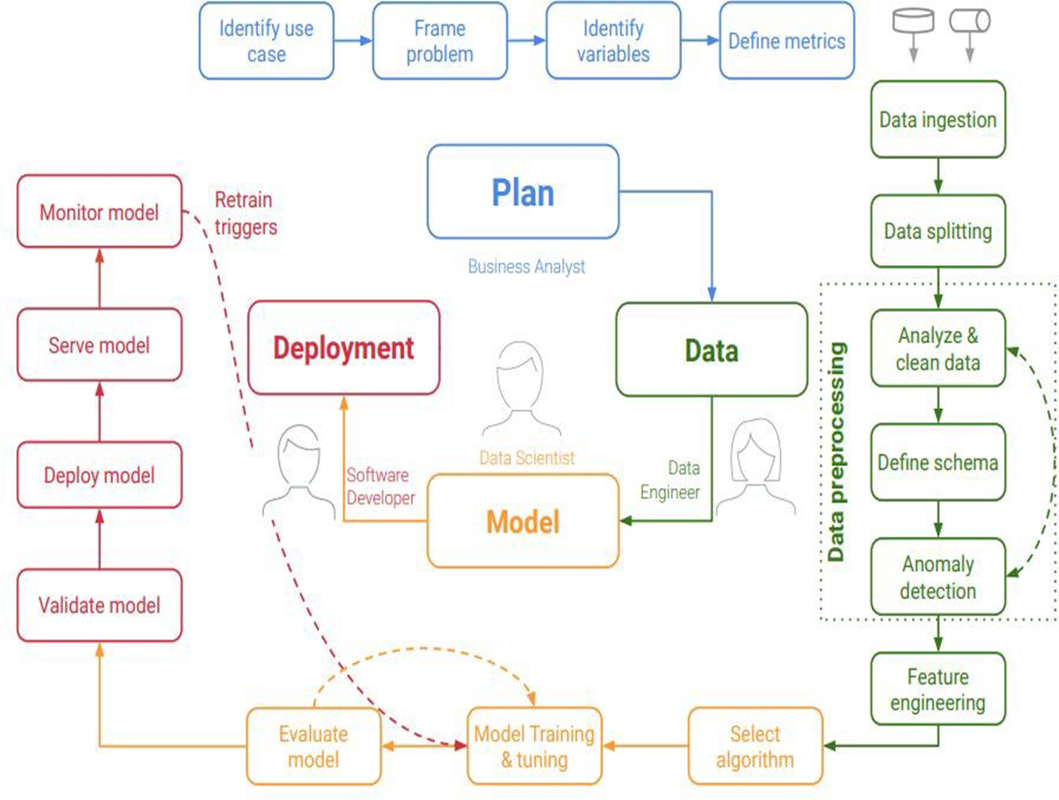
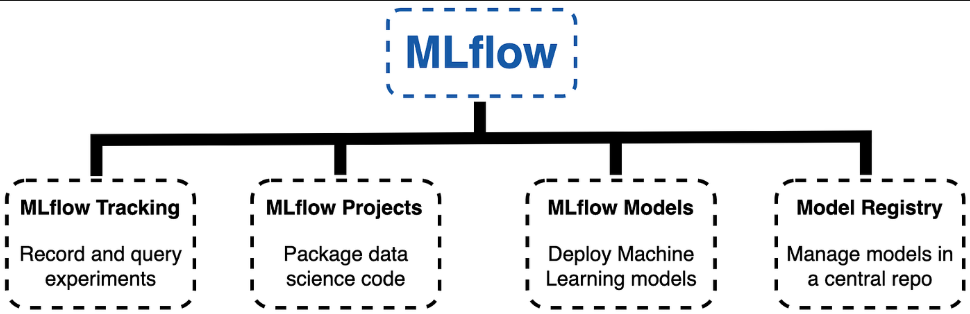
- MLflow is an open-source platform designed to manage the end-to-end machine learning lifecycle.
- It is integrated with various ML & DevOps tools and frameworks. [because we are using agile methodology]
- It provides tools for tracking experiments, packaging code into reproducible runs, and sharing and deploying models.
- MLflow aims to simplify the process of developing, deploying, and maintaining machine learning models by providing a unified interface for various stages of the machine learning workflow.
- Open your terminal or command prompt.
conda create -n deploy python=3.9.23conda activate deploy- to check version of python
python --version
- to check version of python
- to install requirements.txt file run below command
pip install -r requirements.txt- to check mlflow version
mlflow --version
- to start mlflow ui run below command
mlflow ui- Open your web browser and go to
http://localhost:5000to access the MLflow UI. - VIP: Make sure to keep the terminal running while using the UI.
⚠️
- open another terminal and activate the environment
conda activate mlflow_envto run your python scripts.
experiments  (0)   'it's unique for each project'
    ├── runs (0)
    ├── runs (1)
    ├── runs (2)
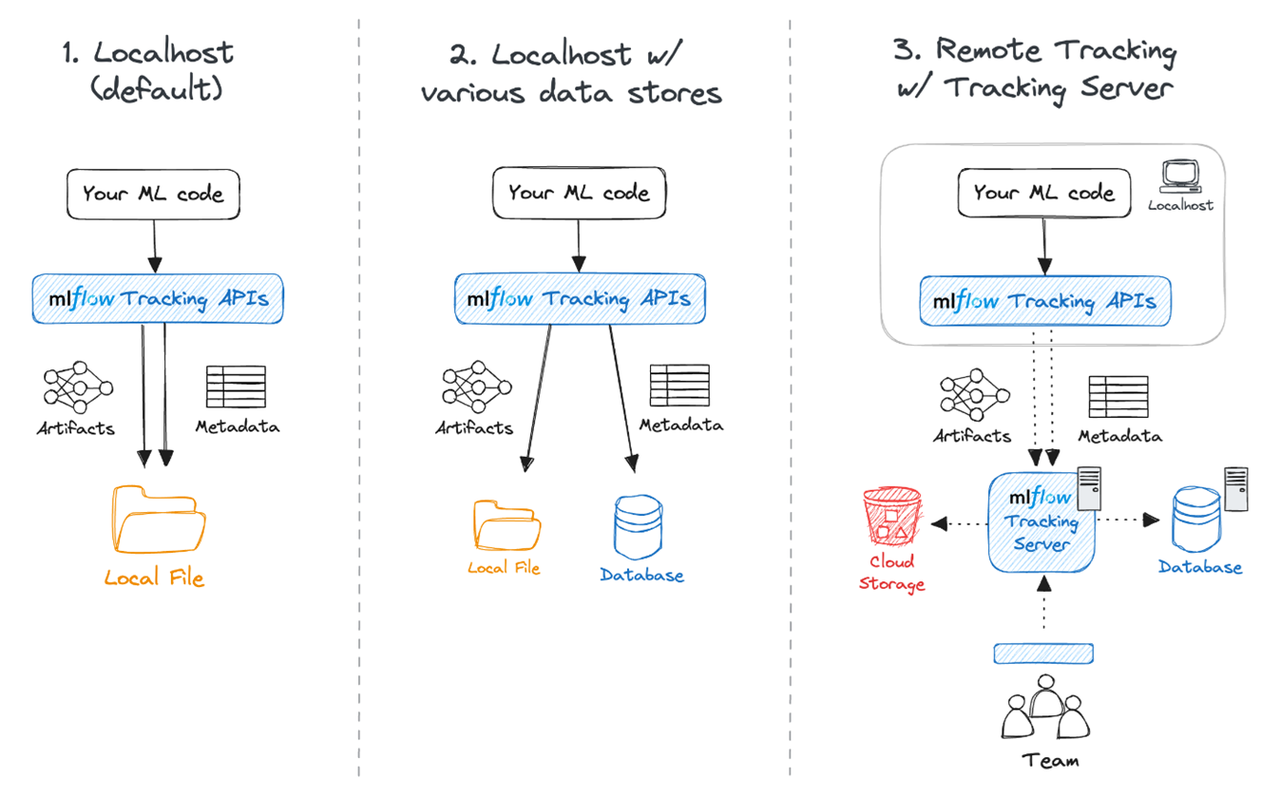
├── ...mlflow.set_tracking_uri()- Sets the tracking URI for MLflow, which can be a [remote server, database connection string, local directory]. Defaults to local directory 'mlruns' directory.mlflow.get_tracking_uri()- Retrieves the current tracking URI.
mlflow.create_experiment(name)- Creates a new experiment and returns its ID. If an experiment with the same name exists, will return error.mlflow.set_experiment()- Sets an experiment as active, creating it if it doesn't exist.
mlflow.start_run()- Starts a new run or returns the active one. Automatically called by logging functions if no active run exists.mlflow.end_run(status)- Ends the current run with an optional status.
mlflow.log_param()- Logs a single key-value parameter in the active run.mlflow.log_params()- Logs a dictionary key-value parameters in the active run.mlflow.log_metric()- Logs a single key-value metric in the active run.mlflow.log_metrics()- Logs a dictionary key-value metrics in the active run.mlflow.log_artifact()- Logs a local file or directory as an artifact, optionally specifying the path within the run's artifact URI.mlflow.log_artifacts()- Logs all files in a directory as artifacts, optionally specifying the artifact path.mlflow.log_model()- Logs a machine learning model, specifying the model object, artifact path, and optional serialization format.mlflow.log_figure()- Logs a matplotlib figure as an artifact in the active run.
mlflow.set_tag(key, value)- Sets a single key-value tag in the active run. 'metadata' information.
mlflow models serve -m "path_to_model" --port 8000 --env-manager=localExample:
mlflow models serve -m "file:///D:/Data_Science/Deployment/mlruns/266720109967700531/870c9a74719f438fb4cc192815e066ba/artifacts/RandomForestClassifier_SMOTE" --port 8000 --env-manager=local-
The server runs at:
http://localhost:8000 -
The root (
/) endpoint is empty → that’s normal. -
Use
/invocationsfor predictions.
- ✅ Keep the terminal running while serving.
⚠️ - ✅ Test using Postman,
curl, or Pythonrequests. in Step 4.
Prediction Endpoint:
POST http://localhost:8000/invocations
- New HTTP Request
- Method: POST
- URL:
http://localhost:8000/invocations - Body: raw 'JSON'
- paste the below JSON data in the body section.
# example of data to be sent [postman]

{
    "dataframe_split": {
        "columns": [
            "Age",
            "CreditScore",
            "Balance",
            "EstimatedSalary",
            "Gender_Male",
            "Geography_Germany",
            "Geography_Spain",
            "HasCrCard",
            "Tenure",
            "IsActiveMember",
            "NumOfProducts"
        ],
        "data": [
            [-0.7541830079917924,
            0.5780143566720919,
            0.11375998165198585,
            -0.14673040749854463,
            0.0,
            0.0,
            0.0,
            0.0,
            2.0,
            0.0,
            2.0]
        ]
    }
}
# ----------------------------------------------------------------------------
# multiple samples [postman]

{
    "dataframe_split": {
        "columns": [
            "Age",
            "CreditScore",
            "Balance",
            "EstimatedSalary",
            "Gender_Male",
            "Geography_Germany",
            "Geography_Spain",
            "HasCrCard",
            "Tenure",
            "IsActiveMember",
            "NumOfProducts"
        ],
        "data": [
            [-0.7541830079917924, 0.5780143566720919, 0.11375998165198585, -0.14673040749854463, 0.0, 0.0, 0.0, 0.0, 2.0, 0.0, 2.0],
            [-0.5605884106597949, 0.753908347743766, 0.7003528882054108, 1.6923927520037099, 0.0, 1.0, 0.0, 1.0, 9.0, 1.0, 1.0],
            [0.11699268000219652, -0.3221490094005933, 0.5222180917013974, -0.8721429873346316, 1.0, 1.0, 0.0, 1.0, 5.0, 0.0, 2.0],
            [0.6977764719981892, -0.7256705183297281, -1.2170740485175422, 0.07677206232885857, 0.0, 0.0, 1.0, 1.0, 1.0, 0.0, 2.0]
        ]
    }
}
# ----------------------------------------------------------------------------
# if you want to use curl [git bash]

curl -X POST \
  http://localhost:8000/invocations \
  -H 'Content-Type: application/json' \
  -d '{
    "dataframe_split": {
        "columns": [
            "Age",
            "CreditScore",
            "Balance",
            "EstimatedSalary",
            "Gender_Male",
            "Geography_Germany",
            "Geography_Spain",
            "HasCrCard",
            "Tenure",
            "IsActiveMember",
            "NumOfProducts"
        ],
        "data": [
            [-0.7541830079917924, 0.5780143566720919, 0.11375998165198585, -0.14673040749854463, 0.0, 0.0, 0.0, 0.0, 2.0, 0.0, 2.0],
            [-0.5605884106597949, 0.753908347743766, 0.7003528882054108, 1.6923927520037099, 0.0, 1.0, 0.0, 1.0, 9.0, 1.0, 1.0],
            [0.11699268000219652, -0.3221490094005933, 0.5222180917013974, -0.8721429873346316, 1.0, 1.0, 0.0, 1.0, 5.0, 0.0, 2.0],
            [0.6977764719981892, -0.7256705183297281, -1.2170740485175422, 0.07677206232885857, 0.0, 0.0, 1.0, 1.0, 1.0, 0.0, 2.0]
        ]
    }
}'
# ----------------------------------------------------------------------------
# if you want to use [Powershell]

Invoke-RestMethod -Uri "http://localhost:8000/invocations" -Method Post -Headers @{"Content-Type" = "application/json"} -Body '{
    "dataframe_split": {
        "columns": [
            "Age",
            "CreditScore",
            "Balance",
            "EstimatedSalary",
            "Gender_Male",
            "Geography_Germany",
            "Geography_Spain",
            "HasCrCard",
            "Tenure",
            "IsActiveMember",
            "NumOfProducts"
        ],
        "data": [
            [-0.7541830079917924, 0.5780143566720919, 0.11375998165198585, -0.14673040749854463, 0.0, 0.0, 0.0, 0.0, 2.0, 0.0, 2.0],
            [-0.5605884106597949, 0.753908347743766, 0.7003528882054108, 1.6923927520037099, 0.0, 1.0, 0.0, 1.0, 9.0, 1.0, 1.0],
            [0.11699268000219652, -0.3221490094005933, 0.5222180917013974, -0.8721429873346316, 1.0, 1.0, 0.0, 1.0, 5.0, 0.0, 2.0],
            [0.6977764719981892, -0.7256705183297281, -1.2170740485175422, 0.07677206232885857, 0.0, 0.0, 1.0, 1.0, 1.0, 0.0, 2.0]
        ]
    }
}'1-go to github repo and create repo 2- copy the repo link 3- go to your local machine and run the following command
git clone "repo_link"4- go to the repo folder and reaad the README.md file i will complete notes on that file.