Chat with Claude Code directly from WeChat using the Electron desktop app.
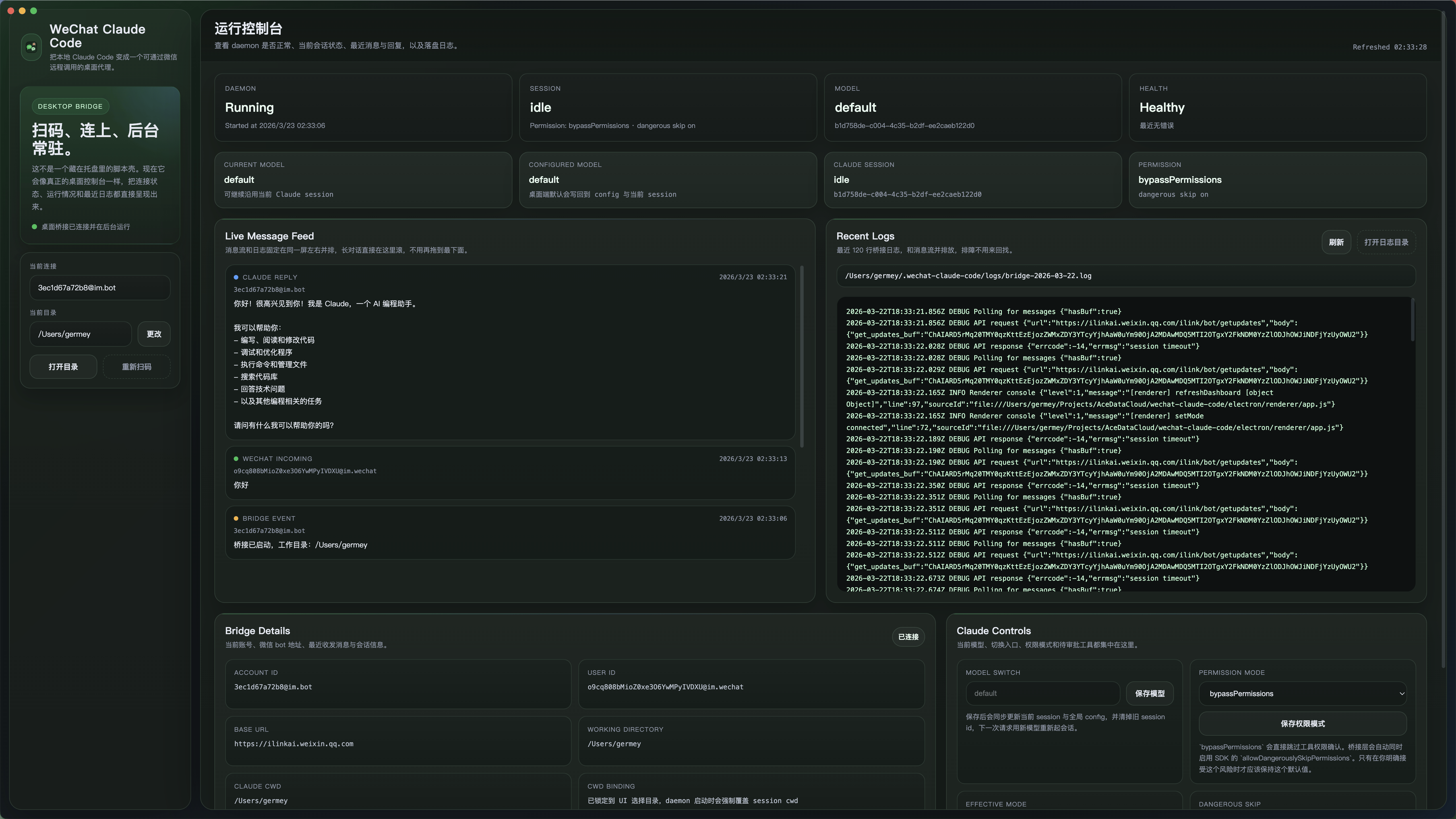
- QR code login in the desktop app.
- Message bridge: text and image input to Claude Code.
- Runtime permission approval (
y/yesandn/no). - Session controls (
/help,/clear,/status,/model). - System tray for status, logs, and quick actions.
- Built-in localization with persisted UI language selection.
- Automated locale generation pipeline based on
transmart.
- Node.js 18+
- macOS, Windows, or Linux
- A personal WeChat account
- Claude Code SDK support (
@anthropic-ai/claude-agent-sdk)
npm installThe postinstall script compiles TypeScript automatically.
- Build and launch the desktop app:
npm run dev-
Scan QR code to bind your WeChat account in the app's login dialog.
-
Start sending messages to Claude Code from WeChat!
npm run build: Compile all TypeScript sources (Node.js + Electron).npm run dev: Build and run the Electron app in development mode.npm run pack: Build distributable packages withelectron-builder.npm run typecheck: Run TypeScript checks for both CLI and Electron code.npm run lint: Run ESLint checks.npm run lint:fix: Auto-fix lint issues when possible.npm run format: Format files using Prettier.npm run format:check: Verify formatting without changing files.npm run test: Run unit tests with Vitest.npm run test:coverage: Run tests with coverage report.npm run translate: Generate target locale files fromsrc/i18n/locales/zh-CN.jsonusingtransmart.npm run check: Runtypecheck + lint + testin one command.
This project now includes a standard engineering toolchain:
- ESLint (
eslint.config.mjs) for code quality checks. - Prettier (
.prettierrc.json) for consistent formatting. - Vitest (
vitest.config.ts) for unit testing. - Husky + lint-staged for local Git hooks:
pre-commit: runslint-stagedon staged files.pre-push: runsnpm run test.
- CI quality gate (
.github/workflows/quality.yml):- Runs
npm ci,npm run typecheck,npm run lint,npm run teston PR/push.
- Runs
- Script convention: daily development only needs the top-level commands:
dev,build,pack.
This project now includes GitHub Actions release automation at .github/workflows/release.yml.
- Trigger: every push to
mainautomatically creates a release. - Version scheme:
YYYY.M.D-RUN_NUMBER, for example2026.3.23-142. - Workflow behavior:
- bumps
package.json+package-lock.jsonto the computed version - commits the version bump back to
main - creates tag
vYYYY.M.D-RUN_NUMBER - builds desktop installers
- publishes a GitHub Release
- publishes the npm package
- bumps
- Required secret:
NPM_TOKENwith publish permission for the target npm package. - Note: npm publish will only succeed if the package name
wechat-claude-codeis available to your npm account, or if you later move to a scoped package name.
Build matrix outputs:
- Windows x64 installer (
.exevia NSIS) - macOS universal installer (
.dmg, supports Intel + Apple Silicon) - Linux x64 package (
.AppImage)
After the workflow completes, the GitHub Release will contain the generated installers and npm will receive the same version.
UI and runtime strings now live under src/i18n/locales/.
- Base locale:
src/i18n/locales/zh-CN.json - Shipped manual locale:
src/i18n/locales/en.json - Runtime locale is persisted in
~/.wechat-claude-code/config.env - The desktop renderer, Electron main process, daemon, CLI setup flow, and slash commands all read from the same message catalog
npm run translateThis uses transmart.config.js and requires OPENAI_API_KEY in your shell environment.
The repository includes .github/workflows/translate.yml.
- Trigger: push to
mainwhensrc/i18n/locales/zh-CN.jsonchanges - Behavior: installs dependencies, runs
npm run translate, opens a PR with the generated locale updates, auto-approves that PR, and enables squash auto-merge - Required secrets:
OPENAI_API_KEYandBOT_TOKEN
Available slash commands:
/help: Show command help./clear: Clear current Claude session./status: Show session status./model <name>: Switch Claude model for the current session.
Runtime data is stored under ~/.wechat-claude-code/:
accounts/: Bound account metadata.config.env: Global runtime configuration.sessions/: Per-account session data.get_updates_buf: Polling sync buffer.logs/: Rotating logs.
wechat-claude-code/
├── electron/               # Electron main/preload/renderer
├── src/
│   ├── claude/             # Claude SDK wrappers
│   ├── commands/           # Slash command router and handlers
│   ├── wechat/             # WeChat API/auth/media/message modules
│   └── config.ts           # Configuration
├── dist/                   # Compiled Node.js output
├── dist-electron/          # Compiled Electron output
└── package.json
- If login fails, check your QR code scanner and ensure the app is up to date.
- If permissions appear stuck, reply
yornin WeChat within 60 seconds. - If the app doesn't reflect changes, restart it with
npm run dev.
MIT