The Hydrologist's Terminal Assistant Advanced open-channel flow modeling, Monte Carlo risk analysis, and hydraulic auto-design.
(A Digital Twin of the Ona River Basin generated directly in the terminal)


Hydro-Flow CLI is an AI-augmented command-line tool designed to bring HEC-RAS caliber hydrology to the terminal.
Hydrologic modeling usually requires expensive, heavy GUI software. Hydro-Flow breaks this barrier by providing a "Headless" engineering engine that helps engineers design channels, visualize flood risks, and stress-test infrastructure using statistical simulations—all from a simple CLI.
Battle-tested on the Ona River Basin (Nigeria), it empowers engineers to perform complex geospatial and hydraulic analysis using Scipy, NumPy, and Docker.
Watch how Hydro-Flow solves complex inverse hydraulic problems with GitHub Copilot CLI.
The Problem: Usually, engineers guess channel dimensions until they find one that works (Trial & Error).
The Solution: Hydro-Flow solves the Inverse Hydraulic Problem using Scipy Optimization (Newton-Raphson Method). It calculates the exact minimum channel width required to handle a target flood while minimizing excavation costs.
hydro design --target-q 500 --max-depth 5.0

# Output:
# ✅ OPTIMAL DESIGN FOUND
# Recommended Width: 8.79 m
# Excavation Volume: 118.97 m²/unitThe Problem: Standard calculators assume perfect conditions. They fail to account for real-world variability.
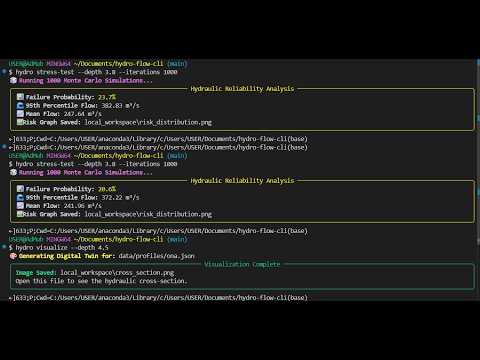
The Solution: Hydro-Flow runs 1,000 parallel simulations with randomized variables (Roughness
hydro stress-test --depth 3.8 --iterations 1000
# Output:
# 📊 Failure Probability: 24.5%
# 🖼️ Risk Graph Saved: local_workspace/risk_distribution.pngThe Solution: Instantly generates professional hydraulic cross-sections (.png) showing water levels against channel banks using procedural Matplotlib plotting.
hydro visualize --depth 4.5
# Output: Image Saved: local_workspace/cross_section.pngThe Solution: Calculates the Backwater Effect (Afflux) caused by bridge constrictions using Bernoulli's Energy Principle, predicting upstream flooding caused by infrastructure.
hydro bridge-check --contraction 0.7
# Rise in Water Level: +1.11 mBuilt for the GitHub Copilot CLI Challenge, this project pushes the boundaries of what's possible in a BASH environment. I used Copilot as a Domain Expert and DevOps Engineer:
-
Solving Inverse Problems: I asked Copilot to help me map engineering constraints (Max Depth) into a Python cost function that
scipy.optimize.minimize_scalarcould understand. -
Containerization Hurdles: When Dockerizing the application, I hit a critical
ModuleNotFoundErrordue to Python path resolution. Copilot CLI helped me debug thePYTHONPATHenvironment variables and structure the__init__.pyfiles to make the tool truly portable. -
Visual Engineering: Copilot generated the complex coordinate geometry logic required to plot the trapezoidal banks and water surface fills in Matplotlib.
Hydro-Flow is fully containerized. You don't need to install heavy libraries manually.
# Build the image
docker build -t hydro-flow .

# Run the Auto-Designer inside Docker
docker run --rm hydro-flow design --target-q 300 --max-depth 4.0# Clone the repository
git clone [https://github.com/AdMub/hydro-flow-cli.git](https://github.com/AdMub/hydro-flow-cli.git)
cd hydro-flow-cli
# Install dependencies
pip install -e .| Command | Description |
|---|---|
hydro wizard |
Create a new Basin Profile interactively. |
hydro visualize |
Generate a Cross-Section Image (PNG). |
hydro design |
Calculate optimal channel dimensions (Inverse Solver). |
hydro stress-test |
Run Monte Carlo Risk Analysis. |
hydro bridge-check |
Calculate Afflux (Backwater Effect). |
hydro scan-dem |
Sample elevation from Satellite Data (TIFF). |
hydro test-suite |
Run automated Unit Tests. |
hydro-flow-cli/
├── hydro/
│   ├── simulation/    # Monte Carlo & Scipy Optimization Engines
│   ├── visualization/ # Matplotlib Plotter
│   ├── hazard/        # AI Engineering Advisor
│   └── cli.py         # Typer Application
├── tests/             # Automated Unit Tests
├── Dockerfile         # Production Container
└── requirements.txt   # Dependencies
Built with Python, Typer, Rich, Scipy, Matplotlib, and GitHub Copilot.
Mubarak Adisa
- 🎓 Civil Engineering + Computer Science (Data Science & AI Focus)
- 🔗 GitHub: AdMub
- 💼 LinkedIn: Mubarak Adisa
Distributed under the MIT License. See LICENSE for more information.
- Built for the GitHub Copilot CLI Challenge 2026.
- Powered by GitHub Copilot, Typer, Rich, Scipy, and Matplotlib.
- Special thanks to the open-source Python hydrology community.