Architecture Overview
Module-by-module map of the Fracturing Fog codebase. Companion to PHASE2_AVALONIA_MIGRATION.md (which is project history). This doc is what to read first when modifying the program.
Companion pages: Technical Index · CalculatorGen Architecture · Performance Development Plan · Cross-Platform Roadmap · Resources & Bibliography
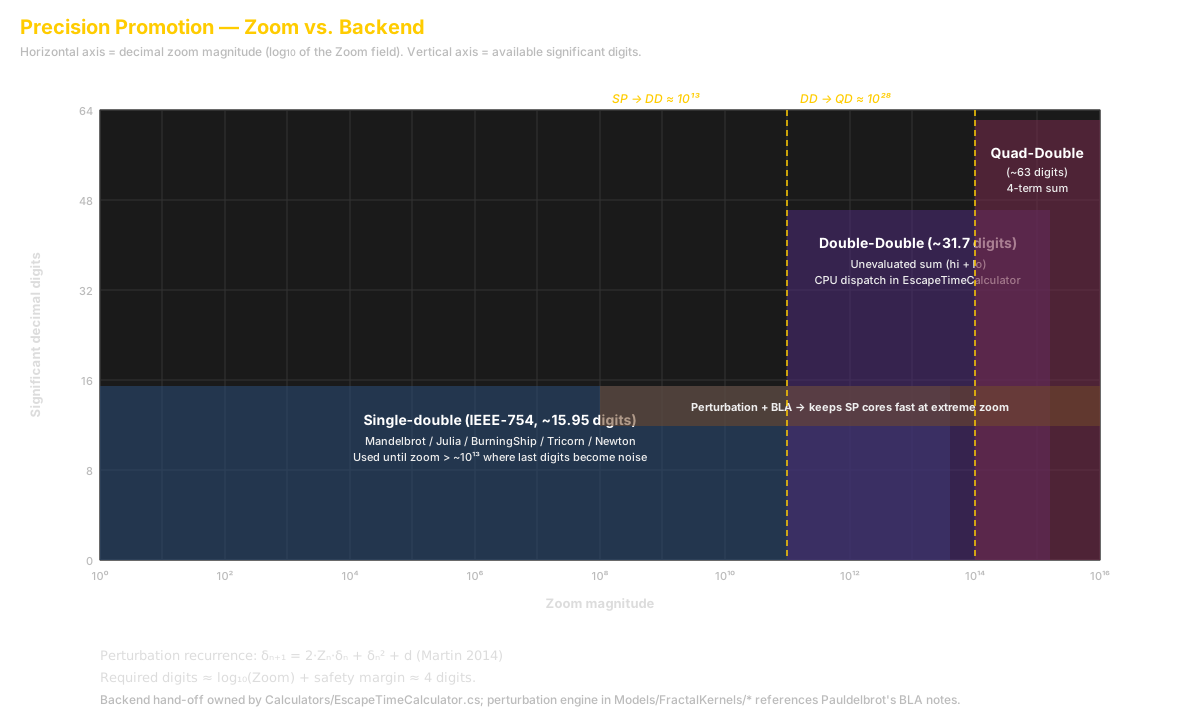
Three numeric backends carry the calculator pipeline. The promotion thresholds between them are not arbitrary — each one derives from how many decimal digits the underlying format can resolve and how many digits the active zoom level demands.
The render maps a pixel grid to a complex window centred on (C_x, C_y). With viewport dimensions
W × H and a scalar zoom Z, the pixel pitch is:
The 3.5 is the historical Mandelbrot window width ([-2.5, 1.0] real, padded). For a 1080p view
at zoom Z = 10^{12}, this gives Δ ≈ 1.7 × 10^{-15} — right at the edge of IEEE-754 double.
| Format | Mantissa bits | Decimal digits | Pitch resolvable |
|---|---|---|---|
double |
53 | ||
| Double-Double | 106 | ||
| Quad-Double | 212 |
The DD / QD types are unevaluated sums of IEEE-754 doubles (Hida, Li, Bailey 2000). Per double you gain 53 mantissa
bits free of cost; carry costs about ~20× per multiplication (DD) and ~75× per multiplication
(QD) relative to scalar double.
Compare each format's resolvable pitch against the live Δ:
The shell uses 1e12 and 1e25 as the practical promotion gates. Below Z_{SP→DD} we run hot
SIMD scalar lanes (Vector256<double> × 4 pixels). Between Z_{SP→DD} and Z_{DD→QD} we route
to DD with the perturbation reference orbit in DD or QD (depending on iteration budget). Above
Z_{DD→QD} we promote to QD per-orbit-step.
Note
Perturbation theory (Martin 2014)
lets us push a single reference orbit through DD/QD while per-pixel deltas stay in double — that
is the only reason Z = 10^{25} is interactive at all. See
CalculatorGen-Architecture.md for the symbolic δ-update derivation.
| Constant | Location | Default |
|---|---|---|
DD_PROMOTION_ZOOM |
Calculators/PrecisionRegime.cs |
1e12 |
QD_PROMOTION_ZOOM |
Calculators/PrecisionRegime.cs |
1e25 |
PERTURBATION_THRESHOLD |
Calculators/PerturbationDecision.cs |
1e8 |
SERIES_APPROX_THRESHOLD |
Calculators/SeriesApproximation.cs |
1e15 |
The Quality preset (Draft → Extreme) overrides these on a per-tier basis — see the Quality Presets table in User/Avalonia-UserGuide.md.
FracturingFogCLD.sln
├── FracturingFog.Abstractions          (netstandard / net10.0) UI-free contracts
├── FracturingFog (WinExe)              (net10.0-windows) WinExe shell + bootstrap
├── FracturingFog.UI.Avalonia           (net10.0) Avalonia 12 cross-platform shell
├── FracturingFog.Rendering             (DirectX 11/12 via Vortice)
├── FracturingFog.Rendering.Silk        (Silk.NET scaffolding — Vulkan / OpenGL placeholder)
├── FracturingFog.Rendering.Skia        (pure-managed cross-platform fallback)
├── FracturingFog.Rendering.Silk.Smoke  (smoke-test harness)
├── FracturingFog.Server.Tests          (xUnit — protocol + server validators)
└── FracturingFog.CalculatorGen         (compile-time code generator console exe)
The WinExe project is the bootstrap. It composes:
- Calculators (in-tree, not a separate project — too much shared state)
- Color schemes (in-tree)
- Audio (in-tree)
- Server / Client (in-tree)
- Slideshow / Video (in-tree)
- Hosting bridges that adapt UI-free interfaces to concrete impls
UI.Avalonia depends only on Abstractions. It has no System.Drawing reference, no Vortice reference, no Win32 P/Invoke. All UI types route through neutral DTOs.
The cross-platform contract assembly. Anything Avalonia / future macOS / Linux shells need to talk to the host lives here.
Abstractions/
├── Help/
│   ├── IHelpContentProvider.cs       Interface for the Help window's static text + system info
│   └── HelpTextBundle.cs              The verbatim help text (3000+ lines)
├── Imaging/
│   ├── IPaletteExtractionService.cs  Image → 5-stop k-means palette
│   └── PaletteDTOs.cs                 Neutral DTOs (no System.Drawing)
├── Input/
│   ├── IFractalInputController.cs    Neutral mouse / key adapter
│   └── InputCursorRequest.cs          Cursor change requests
├── Models/
│   ├── FractalViewState.cs            POCO holding every render input
│   ├── Region.cs                      Region bookmark POCO
│   ├── ColorThemeDef.cs               Color theme DTO (no System.Drawing)
│   ├── LightSourceDef.cs              Phong/PBR light DTO
│   ├── PbrMaterialBandDef.cs          PBR material band DTO
│   ├── InSetColorDef.cs               In-set color DTO
│   ├── ColorTheme/
│   │   └── IColorThemeService.cs      Bridge to ColorPalette + UserColorThemeLibrary
│   ├── FractalParameters.cs           Per-family params
│   ├── AffineMap.cs                   IFS map
│   ├── UserBulbParam.cs               Named-scalar param row
│   ├── UserBulbChainStep.cs           Chain editor step
│   ├── UserBulbStore.cs               UserBulb JSON model
│   ├── UserEquationStore.cs           UserEquation JSON model
│   ├── SandboxEquationStore.cs        Sandbox DSL JSON model
│   ├── SlideshowSettings.cs           Slideshow timing + audio JSON
│   ├── AudioSettings.cs               Audio-reactive engine config
│   ├── IBeatSource.cs                 Beat-detector abstraction
│   ├── MiniMapDefaults.cs             Mini map sizing
│   └── Enums.cs                       FractalType / QualityLevel / RenderProfile
├── Render/
│   ├── IFractalRenderHost.cs         Host owns the renderer + every calculator
│   ├── IFractalRenderer.cs            Pre-existing renderer interface
│   ├── IGpuSurface.cs                 Abstracts HWND / CAMetalLayer / VkSurface
│   ├── IVideoZoomController.cs        Single-shot + slideshow video animator
│   └── QualityPreset.cs               Draft / Standard / High / Ultra / Extreme
└── ViewState/
    └── (helpers)
Rule: UI.Avalonia / UI.Mac (future) / UI.GTK (future) reference only Abstractions and tiny utility libs. They MUST NOT reference the main WinExe project.
The cross-platform Avalonia 12 shell.
UI.Avalonia/
├── App.axaml + App.axaml.cs           Fluent theme + global resources
├── AvaloniaShell.cs                   IShell impl — surface ready hook, lifecycle
├── Controls/
│   ├── GpuSurfaceControl.cs           NativeControlHost wrapping IGpuSurface
│   ├── MiniMapControl.cs              Inset whole-set mini map
│   └── SlideshowVcrControl.cs         ◀◀ ◀ ▮▮ ▶ ▶▶ transport row
├── Input/
│   └── AvaloniaInputAdapter.cs        Pointer / key → IFractalInputController
├── Slideshow/
│   └── SlideshowEngine.cs             Avalonia-side region+theme cycler
├── ViewModels/
│   ├── ShellViewModel.cs              Top-level composition VM
│   ├── MainViewModel.cs               Thin facade over IFractalRenderHost + input
│   ├── FloatingMenuViewModel.cs       Main floating control panel
│   ├── FloatingHelpViewModel.cs       Help window VM (reads IHelpContentProvider)
│   ├── ColorThemeEditorViewModel.cs   Live-preview theme editor
│   ├── ColorGenEditorViewModel.cs     Algorithmic DSL editor
│   ├── FractalParamsViewModel.cs      Per-type params dialog
│   ├── UserEquationViewModel.cs       Roslyn-compiled equation editor
│   ├── UserBulbViewModel.cs           3D Roslyn equation editor + chain
│   ├── SandboxViewModel.cs            Sandbox DSL editor
│   ├── AudioSettingsViewModel.cs      Audio-reactive config
│   ├── SlideshowSettingsViewModel.cs  Slideshow timing config
│   ├── SlideshowVcrViewModel.cs       VCR transport state
│   ├── ImagePaletteViewModel.cs       Image → palette helper
│   ├── ServerAdminViewModel.cs        Local server admin dialog
│   ├── FFClientViewModel.cs           Remote-render client dialog
│   ├── MiniMapViewModel.cs            Mini map state
│   ├── MiniDepthViewModel.cs          Mini depth heatmap state
│   ├── FractalTypeEntry.cs            Toolbar Type combo entry
│   ├── ComboMenuItem.cs               Sort-menu item record
│   ├── ViewModelBase.cs               ReactiveObject base
│   └── (event arg types)
└── Views/
    ├── MainWindow.axaml + .cs         Top-level shell window
    ├── FloatingMenuView.axaml         Main control panel
    ├── FloatingHelpView.axaml         Help tabs
    ├── ColorThemeEditorView.axaml     Live-preview theme editor
    ├── ColorGenEditorView.axaml       Algorithmic DSL editor
    ├── FractalParamsView.axaml        Per-type params
    ├── UserEquationView.axaml         Equation editor
    ├── UserBulbView.axaml             3D equation editor
    ├── SandboxView.axaml              Sandbox DSL editor
    ├── AudioSettingsView.axaml        Audio config
    ├── SlideshowSettingsView.axaml    Slideshow config
    ├── ImagePaletteView.axaml         Image palette helper
    ├── ServerAdminView.axaml          Local server admin
    ├── FFClientView.axaml             Remote-render client
    ├── MiniMapWindow.axaml            Mini map inset
    └── MiniDepthWindow.axaml          Mini depth inset
Style: ReactiveUI for property change notification + ReactiveCommand for commands. View → ViewModel binding via x:DataType. No code-behind beyond window-chrome + parent-VM event wiring.
Native HWND child gotcha: the Direct3D swap-chain is a NativeControlHost wrapping a Win32 HWND. On Windows the OS composites that HWND on top of all Avalonia content regardless of XAML Z-order — so any overlay above the render surface must be a separate top-level window (MiniMap, FloatingMenu, FloatingHelp, ColorThemeEditor, …). The slideshow VCR row sits in its own layout band (Grid.Row=2) instead of overlaying the render, for the same reason.
Grid + watermark are CPU-composited into the BGRA buffer by FractalRenderHost before swap-chain upload — that's how they appear over the render surface despite the HWND occlusion rule.
Bridges UI-free interfaces to concrete impls. Lives in the WinExe project.
Hosting/
├── HostFractalRenderEngine.cs   IFractalRenderHost impl owning renderer + every calculator
├── HostFractalInputController.cs IFractalInputController impl
├── HostColorThemeService.cs     IColorThemeService impl bridging ColorPalette + UserColorThemeLibrary
├── HostHelpContentProvider.cs   IHelpContentProvider impl reading HelpTextBundle + DXGI / D3D11
├── HostPaletteExtractionService.cs IPaletteExtractionService impl using KMeans + BitmapSampler
└── AvaloniaBootstrap.cs         Builds App + Shell, wires the Hosting services
When the Avalonia shell needs to talk to the renderer, it goes through one of these Host* services — never directly.
Per-fractal-family compute kernels. All implement IFractalCalculator.
Calculators/
├── MandelbrotCalculator.cs         SP/DD/QD + Pert + BLA
├── JuliaCalculator.cs              SP/DD/QD
├── BurningShipCalculator.cs        SP/DD/QD
├── TricornCalculator.cs            SP/DD/QD
├── MultibrotCalculator.cs          SP/DD/QD
├── PhoenixCalculator.cs            SP (2-step memory disables DD/QD)
├── NewtonCalculator.cs             SP
├── BuddhabrotCalculator.cs         SP density
├── IFSCalculator.cs                Affine chaos game
├── LSystemCalculator.cs            Turtle graphics
├── StrangeAttractorCalculator.cs   Clifford / De Jong / Lorenz density
├── MandelbulbCalculator.cs         Raymarched triplex power
├── UserEquationCalculator.cs       Roslyn-compiled per-pixel
├── SandboxCalculator.cs            Restricted DSL interpreter
├── UserBulbCalculator.cs           Roslyn-compiled raymarched
├── TearDropCalculator.cs           Wikipedia teardrop variant
└── Generated/
    ├── MandelbrotZ2Calculator.cs   CalcGen output (scalar + AVX2 + GPU + Pert + BLA)
    ├── MandelbrotZ3Calculator.cs
    ├── MandelbrotZ4Calculator.cs
    ├── MandelbrotZ5Calculator.cs
    ├── TricornCalculator.cs
    └── BurningShipCalculator.cs
Generated calculators are emitted by the CalculatorGen tool from a single-line equation. Each generated class implements scalar (reference), AVX2+FMA (vectorised), ILGPU GPU (lazy-init), perturbation, and BLA paths. A self-test validates all paths agree against the scalar reference.
Compile-time code generator (separate console exe).
CalculatorGen/
├── Parser/                AST nodes + lexer + parser + simplifier + Taylor expander
├── Emitters/              Scalar / AVX2 / Perturbation emitters
├── Templates/             Calculator.template.cs + SelfTest.template.cs
└── SampleOutput/          Reference output for diffing
CLI:
dotnet run --project CalculatorGen -c Release -- ^
    --equation ""z*z + c"" --name MandelbrotZ2 ^
    --out Calculators\Generated --selftest
See CalculatorGen-Architecture.md and CalcGen-Authoring.md.
Models/
├── ColorPalette.cs                The runtime palette registry
├── UserColorThemeLibrary.cs       %APPDATA% theme JSON loader
├── DataDrivenColorThemes.cs       JSON → IColorMap factory
├── ColorThemeData.cs              Theme metadata record
├── ColorThemeCsExporter.cs        Theme → compilable C# class
└── ColorSchemes/
    ├── (200+ built-in IColorMap implementations)
    └── Generated/
        └── (ColorGen-emitted IColorMap classes)
ColorGen is the algorithmic palette generator. A tiny DSL parser + Roslyn emitter writes IColorMap implementations. ""Compile & Load"" registers in memory; ""Generate via ColorGen"" writes a permanent .cs file to Generated/. See ColorGen-UserGuide.md.
Audio/                          NAudio capture + spectral-flux beat detector
AudioReactive.cs                Audio-reactive coordinator
Slideshow.cs                    Slideshow engine (WinForms-era residual; Avalonia has its own)
SlideshowConfig.cs              Settings POCO
VideoZoom.cs                    Single-shot video animator (IVideoZoomController impl)
Imaging/                        BMP / PNG / TIFF writers + watermark + multi-tile compositor
ImageCapture.cs                 Screenshot + Poster orchestration
Export/                         Mp4Writer (Media Foundation) + FfmpegEncoder
Batch/                          CLI parser + batch render driver
Server/
├── ServerConfig.cs              JSON-serialised config
├── FFServer.cs                  TLS listener + protocol loop
├── Protocol/                    Request / response DTOs (mTLS framed)
├── Guard/
│   ├── FractalTypeAllowlist.cs  Blocks UserEquation / Sandbox / UserBulb
│   ├── RegionPayloadValidator.cs   Bounds-check region requests
│   ├── ThemePayloadValidator.cs    Bounds-check theme payloads
│   ├── RequestLimits.cs            Hard caps (32k px, 64 MP, 600s, 240 fps)
│   └── EndpointRateLimiter.cs   Per-IP rate / burst limiter
└── (other server-side classes)

ServerHost/
├── ServerEntry.cs               --server CLI entry point
└── HostFractalRenderEngine.cs   Server-flavored render engine (no UI dependencies)

Client/
├── FFClient.cs                  Client-side protocol
├── ConnectionVault.cs           AES-GCM sealed connection store
└── (client-side classes)
See ClientServer-UserGuide.md + ServerAdmin-Guide.md.
dotnet build FracturingFogCLD.sln
dotnet test Server.Tests/Server.Tests.csproj
dotnet run --project CalculatorGen -c Release -- --equation ""z*z*z + c"" --name MandelbrotZ3 ...
Target framework: net10.0 (WinExe is net10.0-windows). UI.Avalonia is net10.0 — cross-platform-ready.
| Mode | Invocation |
|---|---|
| UI shell | FracturingFog.exe |
| Headless render | FracturingFog.exe --batch [opts] |
| Render server | FracturingFog.exe --server [opts] |
| Remote batch | FracturingFog.exe --batch --remote … |
| Self-test | FracturingFog.exe --gentest MandelbrotZ2 |
Phase 2 (this branch) cuts WinForms in favor of Avalonia. The architecture now supports later macOS / Linux ports:
| Layer | Status |
|---|---|
| Abstractions | Cross-platform |
| UI.Avalonia | Cross-platform (Windows ships first) |
| Rendering (D3D11/12) | Windows only |
| Rendering.Skia | Cross-platform stub (pure-managed; no GPU yet) |
| Rendering.Silk | Cross-platform stub (Vulkan / OpenGL placeholder) |
| Audio (NAudio) | Windows only |
| Server / Client | Cross-platform (uses System.Net.Security mTLS) |
| Calculators | Cross-platform (except AVX2 paths, which fall back to scalar) |
- PHASE2_AVALONIA_MIGRATION.md — migration history (project plan, not user-facing doc)
- Avalonia-UserGuide.md — UX walkthrough
- CalculatorGen-Architecture.md — generator internals
- CalculatorGen-Authoring.md — adding new generated calcs
- Capture-Guide.md — screenshot + poster + video reference
Architecture Overview · Fracturing Fog · © 2026