ServerAdmin Guide
Deploying, hardening, and managing the Fracturing Fog headless render server.
- Overview
- First Server Launch
- Server Admin Dialog
- CLI Flags
- Self-Signed Cert Bundle
- Production PKI Deployment
- TLS Hardening
- Rate Limiting + Concurrency
- Resource Limits
- Stale Work Sweep
- Forbidden Fractal Types
- Protocol Layer Validators
- Logs + Monitoring
- Status Bar Indicator
- Troubleshooting
FracturingFog.exe --server runs a headless render worker that accepts mTLS-protected render jobs and streams results back over the same TLS channel. The same EXE serves three roles:
| Mode | Invocation |
|---|---|
| UI |
FracturingFog.exe (default Avalonia shell) |
| Server | FracturingFog.exe --server [opts] |
| Remote batch client | FracturingFog.exe --batch --remote … |
The server has no UI surface of its own — it logs to stdout + %APPDATA%\FracturingFog\server-logs\ and is managed via the Server Admin dialog in the UI shell (for local servers) or via SSH + CLI flags (for remote hosts).
FracturingFog.exe --server
On first run, with no explicit cert paths:
- Creates
%APPDATA%\FracturingFog\server-certs\if missing. - Generates a self-signed
ca.pfx,server.pfx,client.pfxbundle (passwordless). - Writes a default
server-config.jsonnext to the certs dir. - Binds 127.0.0.1:47823 (loopback only — fresh installs are NOT LAN-exposed by default).
- Logs
listening on 127.0.0.1:47823 (loopback only — use --bind 0.0.0.0 to expose).
The Avalonia shell's status bar shows a green ● Server pill on the right edge once the server is up.
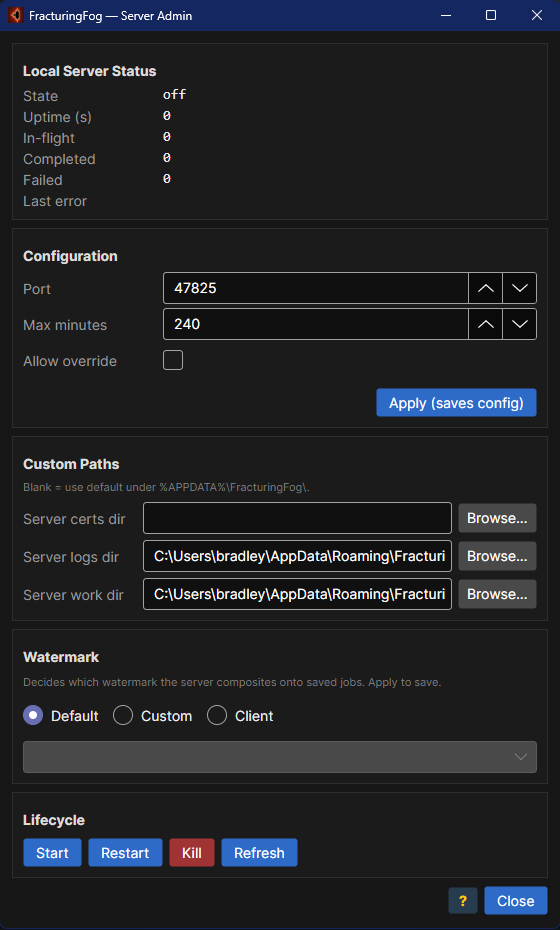
Floating Menu → Server… opens the admin dialog. The dialog manages only the local --server process; remote servers must be managed on their own hosts.
Status
- Uptime
- In-flight job count
- Completed job count (this session)
- Last error string (hover for full message)
- Current bind / port / queue depth
Lifecycle
- Start — spawn a child
FracturingFog.exe --serverprocess using the saved config. - Restart — request a soft-restart on the next idle window. Pending config edits apply.
- Kill — terminate the child process immediately (drops in-flight jobs).
Bind / Port
- Bind address (default
127.0.0.1). Set to0.0.0.0for LAN, or to a specific NIC. - Port (default
47823).
Limits
- Max minutes per job (default 240).
- Allow client to request a longer timeout (capped server-side regardless).
- Queue depth (default 1; excess connections receive
busy). - Max concurrent TLS sessions (default 32).
Rate limit (per-IP)
- Accepted-connection rate per minute (default 0 = disabled).
- Burst allowance (default 10).
TLS hardening
- Require TLS 1.3 only (default off).
- Revocation check mode:
none(default; appropriate for self-signed dev bundle) /online/offline. - Allowed client cert thumbprints — when non-empty, presented client cert must additionally match one of these (chain trust is still required).
Paths
- Server cert PFX path (override the auto-generated
server.pfx). - Client CA PFX path (override the auto-generated
ca.pfx). - Cert directory (lower precedence than the per-file paths).
- Log directory.
- Work directory.
Stale sweep
- Work-dir auto-purge age (default 1 h; 0 disables). Leftover
job-*subdirs older than this delete on startup.
Apply rewrites server-config.json and signals the running server to soft-restart on the next idle window. Cancel discards in-memory edits.
All admin dialog fields are reachable via flags so the server runs unattended on machines without UI access.
| Flag | Default | Meaning |
|---|---|---|
--bind ADDR |
127.0.0.1 |
Listen interface |
--port N |
47823 |
TCP port |
--max-minutes N |
240 |
Per-job time ceiling |
--allow-override |
off | Client may request longer timeout (still capped) |
--queue-depth N |
1 |
Queue depth (excess connections receive busy) |
--cert PATH |
auto | Server identity PFX path |
--client-ca PATH |
auto | CA used to validate client certs |
--log-dir PATH |
%APPDATA%\FracturingFog\server-logs\ |
Log dir |
--work-dir PATH |
%APPDATA%\FracturingFog\server-work\ |
Job scratch dir |
--config PATH |
%APPDATA%\FracturingFog\server-config.json |
Override config-file path |
Flags override file values for the current process. Restart uses the file values again unless flags are passed.
Example for a public render host:
FracturingFog.exe --server ^
    --bind 0.0.0.0 ^
    --port 47823 ^
    --max-minutes 60 ^
    --queue-depth 4 ^
    --cert C:\pki\server-myhost.pfx ^
    --client-ca C:\pki\client-ca.pfx ^
    --log-dir D:\fflog
The auto-generated bundle is convenient for loopback + small LAN deployments. Three files in %APPDATA%\FracturingFog\server-certs\:
| File | Purpose | Distribute to |
|---|---|---|
ca.pfx |
Trust root | Every client (placed as ""Server CA"" in Client dialog) |
server.pfx |
Server identity | The server only |
client.pfx |
Default client identity | Every client (placed as ""Client cert"") |
Dev certs have no password — Cert password field is blank.
For loopback (single machine):
- Run
FracturingFog.exe --serveronce. - Client dialog → Client cert →
%APPDATA%\FracturingFog\server-certs\client.pfx. - Client dialog → Server CA →
%APPDATA%\FracturingFog\server-certs\ca.pfx. - Save the connection.
For LAN (different machines):
- On the server host:
FracturingFog.exe --server --bind 0.0.0.0. - Copy
client.pfx+ca.pfxto each client over a trusted channel (encrypted USB, SCP, Bitlocker share — never email). - On each client, browse to the copies in the Client dialog.
For multi-user deployments, replace the self-signed bundle with certs issued by your own CA.
openssl req -new -newkey rsa:4096 -nodes \
    -keyout alice.key -out alice.csr \
    -subj ""/CN=alice@example.com""

openssl x509 -req -in alice.csr \
    -CA ca.crt -CAkey ca.key -CAcreateserial \
    -out alice.crt -days 365 -sha256

openssl pkcs12 -export \
    -inkey alice.key -in alice.crt -certfile ca.crt \
    -out alice.pfx -name ""Fracturing Fog client (alice)"" \
    -passout pass:""STRONG-PASSWORD""
Repeat for each user. Distribute alice.pfx only to Alice; give every user ca.pfx (or just the public ca.crt).
openssl req -new -newkey rsa:4096 -nodes \
    -keyout fog-server.key -out fog-server.csr \
    -subj ""/CN=fog.example.com""

openssl x509 -req -in fog-server.csr \
    -CA ca.crt -CAkey ca.key -CAcreateserial \
    -out fog-server.crt -days 365 -sha256 \
    -extfile <(printf ""subjectAltName=DNS:fog.example.com,IP:10.0.0.42"")

openssl pkcs12 -export \
    -inkey fog-server.key -in fog-server.crt -certfile ca.crt \
    -out fog-server.pfx -name ""Fracturing Fog server"" \
    -passout pass:""STRONG-PASSWORD""
FracturingFog.exe --server ^
    --bind 0.0.0.0 ^
    --cert C:\pki\fog-server.pfx ^
    --client-ca C:\pki\ca.pfx
Cert password handling for password-protected PFX files: pass the password via the Windows Credential Manager (preferred) or as a separate config field — never hard-code in plaintext config.
In the Client dialog:
- Client cert →
alice.pfx. - Server CA →
ca.pfx. - Cert password → the password used during
openssl pkcs12 -export. - The first save of a connection with a non-empty cert password sets the master password for the local vault. All subsequent sessions must enter the same master password to decrypt.
The server defaults to TLS 1.2+1.3, revocation check none. Hardening options:
""requireTls13"": true
Drops support for TLS 1.2's deprecated ciphersuites + RSA key exchange. Modern clients support 1.3 since 2018; older Windows-only deployments may need 1.2 for legacy .NET clients.
""revocationCheckMode"": ""online""    // CRL / OCSP fetched per handshake
""revocationCheckMode"": ""offline""   // Cached CRL only
""revocationCheckMode"": ""none""      // No check (self-signed dev default)
online requires the server to reach the CRL distribution point during handshake. Slower but catches revoked certs immediately.
""allowedClientThumbprints"": [
    ""3A:7B:1C:..."",
    ""5F:DE:90:...""
]
When non-empty, the presented client cert thumbprint must match one of these in addition to chaining to the configured CA. Lets you issue many certs from one CA but only authorize a subset.
Thumbprint comparison is hex, case-insensitive, with spaces / dashes ignored.
Sustained accepted-TCP-connection rate per remote IP per minute. 0 disables.
""rateLimitPerMinute"": 30,
""rateLimitBurst"": 10
Burst lets a legitimate reconnect loop / UI startup wave through without penalty. Sustained = stricter; burst = forgiving short spikes.
Hits over the rate cause the TCP accept to close immediately with no TLS handshake — costs the attacker resources, costs you almost nothing.
""maxConcurrentConnections"": 32
Hard ceiling regardless of rate-limit state. Default 32 — comfortable for small LAN deployments. Public-facing servers should raise it to a sustainable level (depends on CPU / RAM headroom).
""queueDepth"": 4
How many render jobs may be queued behind the in-flight one. Excess connections receive a protocol-level busy reply. Default 1 — one in-flight + zero queued. Match to per-job render time and expected throughput.
""maxMinutes"": 60,
""allowOverride"": false
A render exceeding maxMinutes is cancelled. allowOverride lets the client request a longer cap (still capped server-side at maxMinutes).
Hard-coded at the protocol validation layer:
| Dimension | Hard cap |
|---|---|
| Width / Height | 32768 px |
| Total pixels | 64 megapixels |
| Video seconds | 0.5 – 600 |
| Video fps | 1 – 240 |
Requests exceeding these are rejected with bad-request.
The server allocates an int[Width * Height] escape buffer per job + a byte[Width*Height*4] BGRA output buffer + per-thread DD/QD scratch. A 32k × 32k render at Extreme quality holds ~5 GB resident plus working set. Match queueDepth to your headroom.
""workDirStaleHours"": 1.0
On startup, the server walks %APPDATA%\FracturingFog\server-work\, deletes any job-* subdir older than this age. 0 disables the sweep.
Default 1 hour — anything older than that is from a previous crash or kill and is safe to discard.
If a job is in progress when the server is killed, its work dir is left intact for forensic inspection until the next startup's sweep.
The protocol layer blocks three fractal types from server-side rendering:
-
UserEquation— Roslyn-compiled C# = RCE. -
Sandbox— restricted DSL, but still user code. -
UserBulb— Roslyn-compiled C# = RCE.
Requests for these types receive forbidden-fractal. Workaround: use a CalcGen-generated calculator (e.g., MandelbrotZ2 / Tricorn (Generated)) which is compiled into the EXE at build time and behaves identically to an authored equation.
To loosen this restriction (NOT recommended for any public-facing deployment), edit Server\Guard\FractalTypeAllowlist.cs and rebuild. The default allowlist excludes all three for a reason — accept the risk consciously.
Two validators run on every request before any render kicks off:
Bounds-checks the inbound region payload:
-
centerX/centerYfinite (no NaN / Inf) -
zoomin(1e-30, 1e60) -
iterationsin[64, 4_000_000] - Pipe-separated limb format parsed only when
quality >= High(DD path) - Theme + region names alphanumeric + spaces + dashes only (no path-traversal)
Server-supplied themes must:
- Have ≤ 64 stops
- Have stop positions in
[0, 1] - Have RGB values in
[0, 255] - Be one of
Gradient/Cycling/Phong3D/Pbr3D - Reject any field exceeding documented limits
Both validators fail fast with a bad-request reply containing a hint string, so clients can diagnose without server logs.
Per-session log files in %APPDATA%\FracturingFog\server-logs\:
server-20260603-141215.log
server-20260603-141215.err
Log lines:
2026-06-03T14:12:15 INFO  listening 0.0.0.0:47823
2026-06-03T14:13:02 INFO  accept 10.0.0.5:54321 thumb=3A7B1C…
2026-06-03T14:13:02 INFO  job ""poster-eagle"" Mandelbrot 7680x4320 q=Ultra
2026-06-03T14:13:48 INFO  job complete 7680x4320 elapsed=46213ms bytes=12.4MB
2026-06-03T14:13:48 INFO  close 10.0.0.5:54321 ok
For a production deployment, tail the log into your log-aggregation pipeline (Elastic / Loki / Splunk). Errors include the offending request hash so you can trace specific clients without storing PII.
The Avalonia MainWindow status bar shows a colored ● Server pill on the right edge:
| Color | Meaning |
|---|---|
| Green | Local server is up + listening on the configured port |
| Grey | Local server is down |
| Red | Local server reported an error or the management socket is unreachable |
Hover for the last error string. Click the pill to open the Server Admin dialog.
Only the local server is reflected — remote server health must be checked on its own host.
Server starts, status bar stays grey. The status-bar probe is gated to the configured local port. If you changed the port via the admin dialog without restarting, the probe still polls the old port. Restart the UI shell.
Client gets tls handshake failed or chain validation error.
- Confirm both sides use certs from the same CA.
- Confirm the server cert SAN includes the hostname / IP the client is dialing.
- Confirm the system time is in sync (cert validity is time-based).
- Try
revocationCheckMode: ""none""temporarily to rule out CRL fetch failures.
Client gets forbidden-fractal. The preset targets UserEquation / Sandbox / UserBulb. Pick a built-in family.
Server hits OutOfMemoryException on big posters. Lower queue depth, raise maxMinutes (so the renderer can use disk-spill paths), or schedule big posters during off-peak.
Server log full of accept … thumb=… rate-limited. A client is hammering you. Raise rateLimitPerMinute slightly if it's a legitimate VJ session; lower it (or block at firewall) if it's hostile.
Server log full of bad-request. A client is sending malformed requests — possibly running an older build. Check RegionPayloadValidator / ThemePayloadValidator logs for the specific field that failed.
Server doesn't restart cleanly via the admin dialog. Make sure the local server was spawned BY the admin dialog (Start button). The admin dialog tracks PIDs it started; servers launched from a separate shell are not under its lifecycle control.
Cert revocation online mode hangs at handshake. Your CRL distribution point is unreachable. Switch to offline (uses cached CRLs) or back to none while you fix the upstream issue.
Server Admin Guide · Fracturing Fog · © 2026