View examples · jscad · tscircuit · jscad-electronics
This package allows you to create 3D CAD objects with React and JSCAD.

npm install jscad-fiber @jscad/modeling three @react-three/fiberCreate JSCAD components with React:
import { JsCadView } from "jscad-fiber"
import { Cube, Sphere, Subtract } from "jscad-fiber"

export default () => (
  <JsCadView>
    <Subtract>
      <Cube size={10} />
      <Sphere radius={6.8} />
    </Subtract>
  </JsCadView>
)All components support these common props:
| Prop | Type | Description |
|---|---|---|
color |
string | [number,number,number] |
CSS color string or RGB array |
center |
[number,number,number] | {x,y,z} |
Position in 3D space |
offset |
[number,number,number] | {x,y,z} |
Alternative to center |
| Prop | Type | Description |
|---|---|---|
size |
number | [number,number,number] |
Single number for all dimensions or [width, height, depth] |
<Cube size={10} /> // Single number for all dimensions
<Cube size={[width, height, depth]} /> // Array for different dimensions| Prop | Type | Description |
|---|---|---|
radius |
number |
Sphere radius |
segments |
number |
Optional detail level (default: 32) |
<Sphere radius={10} segments={32} />| Prop | Type | Description |
|---|---|---|
radius |
number |
Cylinder radius |
height |
number |
Cylinder height |
<Cylinder radius={5} height={10} />| Prop | Type | Description |
|---|---|---|
innerRadius |
number |
Inner ring radius |
outerRadius |
number |
Outer ring radius |
innerSegments |
number |
Optional inner detail level (default: 32) |
outerSegments |
number |
Optional outer detail level (default: 32) |
<Torus
  innerRadius={10}
  outerRadius={15}
  innerSegments={32}
  outerSegments={32}
/>| Prop | Type | Description |
|---|---|---|
children |
React.ReactNode[] |
First child is base shape, others are subtracted |
<Subtract>
  <Cube size={10} /> {/* Base shape */}
  <Sphere radius={6} /> {/* Subtracted from base */}
</Subtract>| Prop | Type | Description |
|---|---|---|
children |
React.ReactNode[] |
Shapes to combine |
<Union>
  <Cube size={10} />
  <Sphere radius={6} center={[0,0,10]} />
</Union>| Prop | Type | Description |
|---|---|---|
children |
React.ReactNode[] |
Shapes to create hull from |
<Hull>
  <Cube size={10} />
  <Sphere radius={6} center={[0,0,10]} />
</Hull>| Prop | Type | Description |
|---|---|---|
offset |
[number,number,number] |
Translation in [x,y,z] |
<Translate offset={[x,y,z]}>
  <Cube size={10} />
</Translate>| Prop | Type | Description |
|---|---|---|
angles |
[number,number,number] |
Rotation angles in radians [x,y,z] |
<Rotate angles={[x,y,z]}>
  <Cube size={10} />
</Rotate>| Prop | Type | Description |
|---|---|---|
height |
number |
Extrusion height |
twistAngle |
number |
Optional twist during extrusion |
<ExtrudeLinear height={10}>
  <Polygon points={[[0,0], [10,0], [5,10]]} />
</ExtrudeLinear>| Prop | Type | Description |
|---|---|---|
angle |
number |
Rotation angle in radians |
segments |
number |
Optional number of segments |
<ExtrudeRotate angle={Math.PI * 2}>
  <Polygon points={[[0,0], [10,0], [5,10]]} />
</ExtrudeRotate>| Component | Props | Description |
|---|---|---|
| Cube | size: number | [number,number,number] |
Size in each dimension |
| Sphere | radius: number, segments?: number |
Radius and detail level |
| Cylinder | radius: number, height: number |
Basic cylinder dimensions |
| Torus | innerRadius: number, outerRadius: number, segments?: number |
Ring dimensions |
| ExtrudeLinear | height: number, twistAngle?: number |
Linear extrusion with optional twist |
| ExtrudeRotate | angle: number, segments?: number |
Rotational sweep |
| Polygon | points: [number,number][] |
2D points array |
| Translate | offset: [number,number,number] |
3D translation |
| Rotate | angles: [number,number,number] |
Rotation angles in radians |
| Hull | children: React.ReactNode |
Convex hull of children |
| Union | children: React.ReactNode |
Boolean union of children |
| Subtract | children: React.ReactNode |
Boolean subtraction |
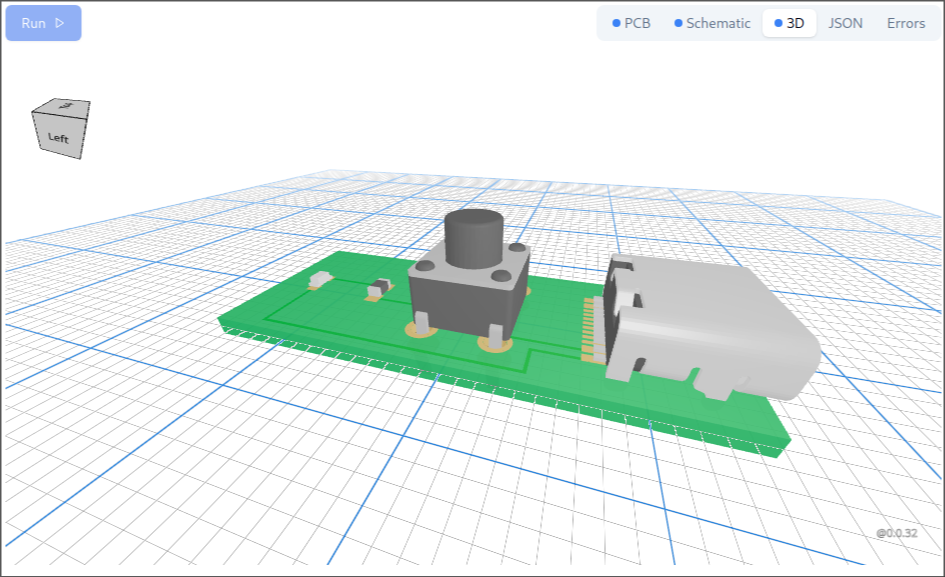
JSCAD allows you to create detailed 3D objects using boolean operations. This is how modern CAD tools create precise 3D models. jscad-fiber is used to create the 3D electronics library for tscircuit called jscad-electronics
The library includes an ExampleWrapper component that provides a convenient way to display both the rendered 3D object and its source code:

import { ExampleWrapper } from "jscad-fiber"

export default () => (
  <ExampleWrapper fileName={import.meta.url}>
    <JsCadView>
      <Sphere radius={10} color="orange" />
    </JsCadView>
  </ExampleWrapper>
)
This wrapper:
- Shows the rendered 3D object
- Provides a "Show Code" button that reveals the source code
- Automatically syntax highlights the code
- Makes examples more interactive and educational
See the examples directory for more usage examples.
Pull requests welcome! Please check existing issues or create a new one to discuss major changes.