Repository navigation
Assignment 4,2
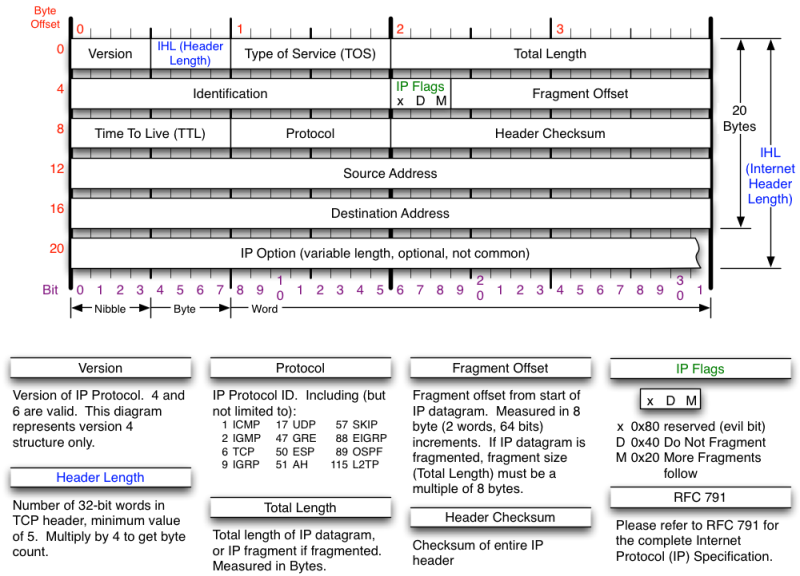
- Source Address Dotted Decimal (e.g. 129.170.18.3): 151.101.118.248
- Source Address Hexadecimal (In the middle pane of Wireshark-highlight "Source" and the hex will be highlighted in the lower pane): 97 65 76 f8
- Destination Address Dotted Decimal: 192.168.0.131
- Destination Address Hexadecimal: c0 a8 00 83
- The Version Field is the first 4 bits of the IP header
- What is the IP Version of your packet in decimal?: 4
- What is the version in binary (4 bits)?: 0100
- The Header Length Field is the next 4 bits and indicates the number of
- What is the Header Length in binary (4 bits)?: 0101
- What is that binary value converted to decimal?: 5
- What is that decimal value multiplied by 4? It should equal the number of bytes in the header: 20 bytes
- What is the protocol field value of the IP packet header in hexadecimal?: 06
- What protocol does that stand for?: TCP
- What is the Time-to-Live (TTL) value of the packet in hexadecimal?: 3b
- What is the Time-to-Live (TTL) value of the packet in decimal?: 59
- What is the primary purpose of the TTL field? In other words, what is it intended to prevent? (a sentence or two): The TTL field prevents a packet from looping infinitely.
- How does the TTL value achieve this purpose? (a few sentences): TTL achieves this by setting a value that counts down between hops and causes the packet to expire at 0.
- An IP packet with your computer IP as Source: What is the TTL Value?: 128
- An IP packet with your computer as Destination: What is the TTL Value?: 59
- Are they different? If so, why?: They are different because the distance is know so the TTl can be reduced