Repository navigation
Releases
Songate 2.0

Songate 2.0 is here: the music player that began as Gatefold NX, now on the Nintendo Switch, Windows and Android. Automix, your own music server, your devices playing together, lyrics found and searched, and everything else since 1.1.0.
songate-2.0.mp4
On the Switch, tests were only made on HOS 22.5.0 and 23.0.0, with the latest HATS pack from sthetix. On Windows, tests were only made on Windows 11. **On Android, tests were only made on a Xiaomi 11 Lite 5G with Android 15; Android 10 or newer is needed.**Only MP3, M4A and FLAC are supported; other formats are untested.
🎮 Install or update on the Switch
From 2.0.0 BETA 1 or BETA 2: Settings › Updates installs it, your settings backed up first. Then restart the console, so the new background player starts.
By hand, or from Gatefold NX 1.x:
- Download SongateNX-2.0.0.zip below and unzip it onto the root of the SD card, replacing the old files.
- Restart the console. Songate, the background player and the overlay must all be this version: all three files go on the card together.
- Launch Songate by holding R while starting a game (applet mode, from the Album, has too little memory).
| In the zip | What |
|---|---|
switch/Songate/Songate.nro |
🎵 the app |
atmosphere/contents/4200000047464E58/ |
🎧 the background player (sysmodule, starts at boot) |
switch/.overlays/Songate.ovl |
🧩 the Ultrahand overlay |
🙈 Can't find the overlay? switch/.overlays is a hidden folder (its name starts with a dot): macOS and many phone file and zip apps hide it, and some leave it out when copying. Copy the whole switch and atmosphere folders from the zip, and on a Mac press ⌘ ⇧ . in Finder to see hidden folders. The overlay needs Ultrahand.
Coming from Gatefold NX 1.x? At its first start Songate moves your settings, playlists, Liked and edits from sdmc:/config/gatefold-nx/ to sdmc:/config/songate-nx/. Nothing is lost.
💻 Install or update on Windows
From a beta: Settings › Updates installs it.
Or by hand: download SongateWIN-2.0.0.exe below and run it. It needs no administrator rights. Your settings stay in %APPDATA%\Songate.
🛡️ "Windows protected your PC"? The installer isn't signed, so Windows doesn't know it yet. Click More info, then Run anyway. To check the file first, compare its SHA-256 with the one at the bottom of this page.
📱 Install on Android
Note
The Android version is still very early, above all its upright (portrait) layout. Future updates will bring it many quality-of-life improvements.
Download SongateAND-2.0.0.apk below and open it. Android asks once to allow your browser or file app to install apps. Songate needs Android 10 or newer, and asks for access to your music at its first start. Later versions install from Settings › Updates.
✨ Songate 2.0
- ✨ Gatefold NX is now Songate, on the Switch, on Windows and on Android, with everything below since 1.1.0
- 🎚️ Automix: playlists that play like a DJ set, in the app and in the background player
- 🌐 Your own music server: Navidrome, Airsonic or any Subsonic server, beside your local library
- 🔗 Your devices, together: sync, Listen together and Handoff between a Switch, a PC and an Android phone
- 🎤 Lyrics found online for a song with none, and search by the words of your songs
- 🎭 Mood playlists: your library sorted by how it sounds, in nine moods
🎚️ Automix and moods
- 🎚️ Automix playlists: Songate listens to each song once, puts them in the order where they join best, and blends each into the next on the drop, on the beat, through a bridge or by a fade
- ✨ The join on screen: the cover glides to the middle and frosts over with Automix's hint. Settings › Appearance › Automix chooses how it shows, on Now playing and on the Canvas
- 📋 Order again, Play this first, and Move by hand: your order stays. Automix playlists never shuffle
- ⬆️ Automix V1.2.0 comes with Songate; Settings › Updates brings new models and goes back to earlier ones
- 🥁 A song's Details show its tempo and key
- 🎭 Mood playlists, measured on your device: Happy, Party, Relaxed, Sad, Aggressive, Workout, Focus, Dark and Epic
- 🎭 Your own mood for a song, or which mood it is not: the song menu's Mood row. Songs that sound like it follow
- ✨ Genres as playlists: Add as playlist on a genre, Add all as playlists on Genres
🌐 Your server, lyrics and tags
- 🌐 Sign in once to your own Subsonic server in Settings › Library. Local | Server moves the whole app between your music and the server's, apart or mixed in
- 💽 The server's albums, artists, genres, folders and playlists, on pages like your library's. Download an album to play without the server
- ❤️ Hearts and plays go back to the server; its playlists can be made, edited, saved to this device or sent to the server
- 🎤 Find lyrics online, off until you allow it: play them at once or see them first; Keep, Not these or Remove
- 🔍 Search on six tabs: Songs, Albums, Artists, Genres, Playlists and Lyrics. A synced line plays from that moment
- 🎤 Lyrics running early or late? Earlier and Later fix them for that song, and .lrc files' [offset:] is honoured
- 🏷️ Tag and cover edits can be written into your MP3, M4A and FLAC files, when you choose. Restore the file's original tags puts them back
🔗 Devices, AirPlay and Last.fm
- 🔗 Pair two Songates once with a code, in Settings › Devices: encrypted, on your own network, with no account
- 🔄 Sync: Liked, playlists, tag edits, play counts, moods and kept lyrics stay the same on every device. Music files can be copied to the device that lacks them
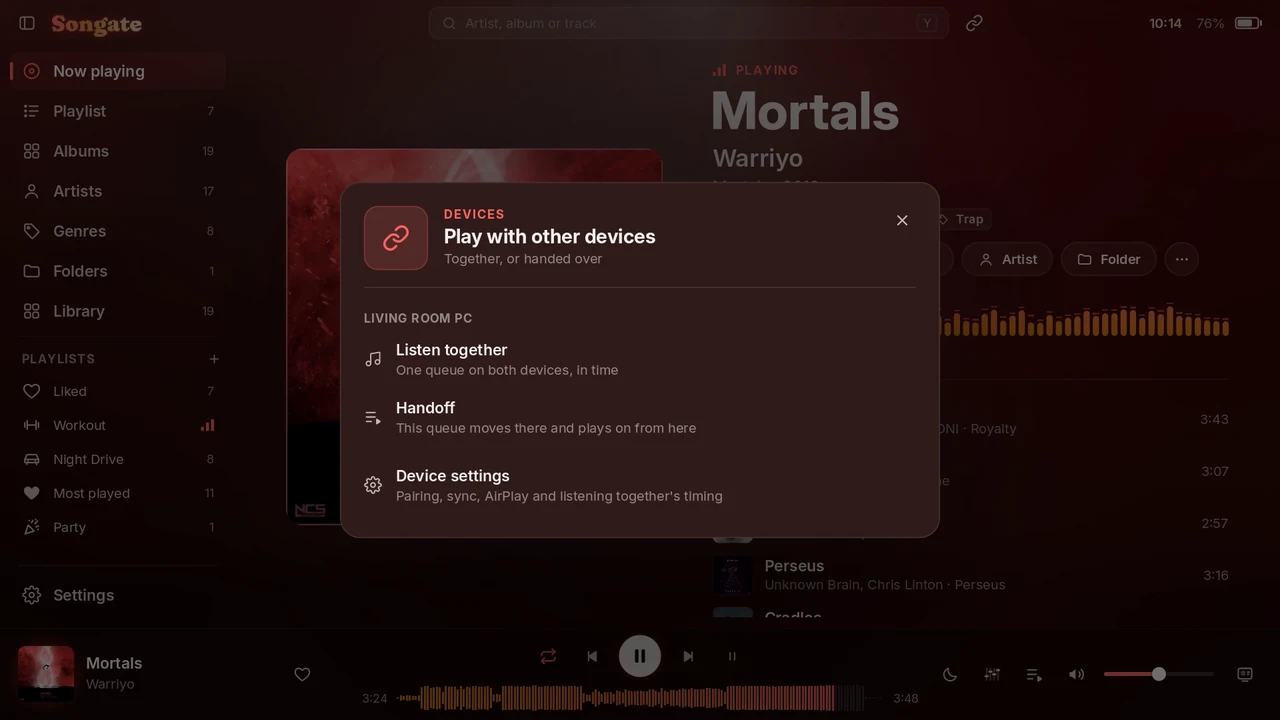
- 🎧 Listen together: one queue on two or more devices, playing in time. The one that starts decides who may change what plays
- 🎚️ Timing for speakers, headphones and Bluetooth, so the devices sound as one
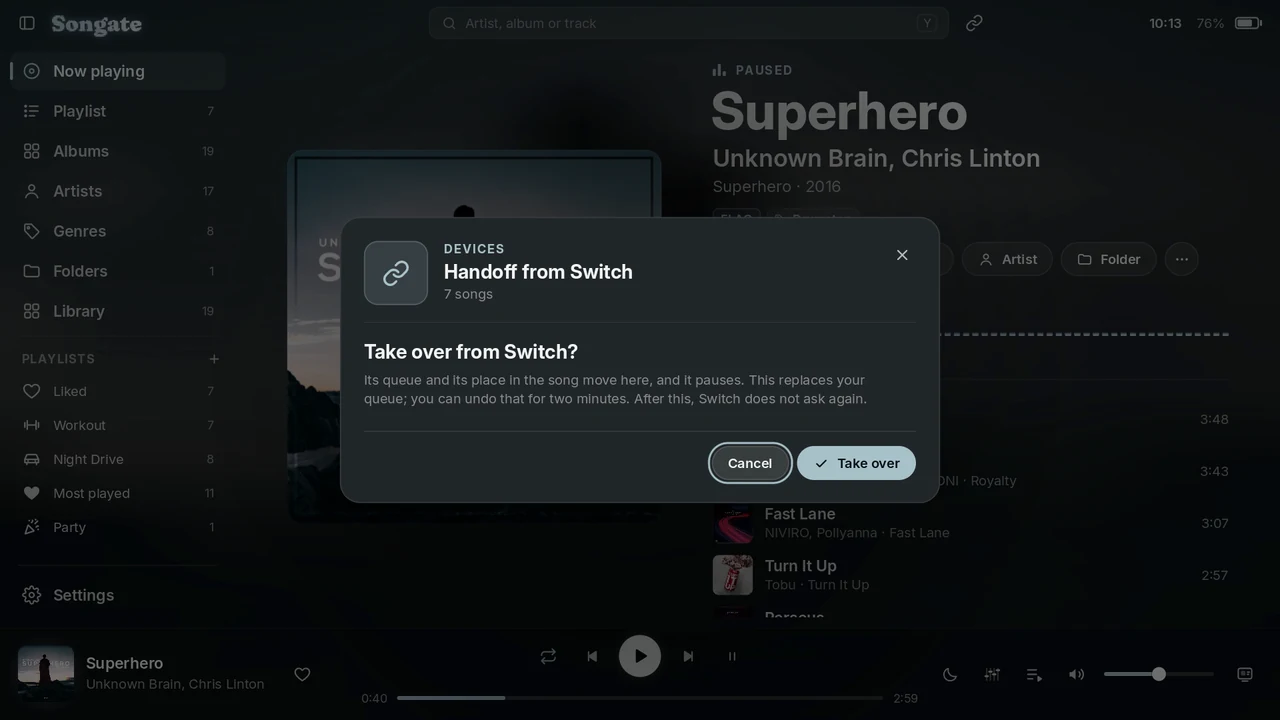
- ⏩ Handoff: your queue and your place in the song move to the other device, with two minutes to undo
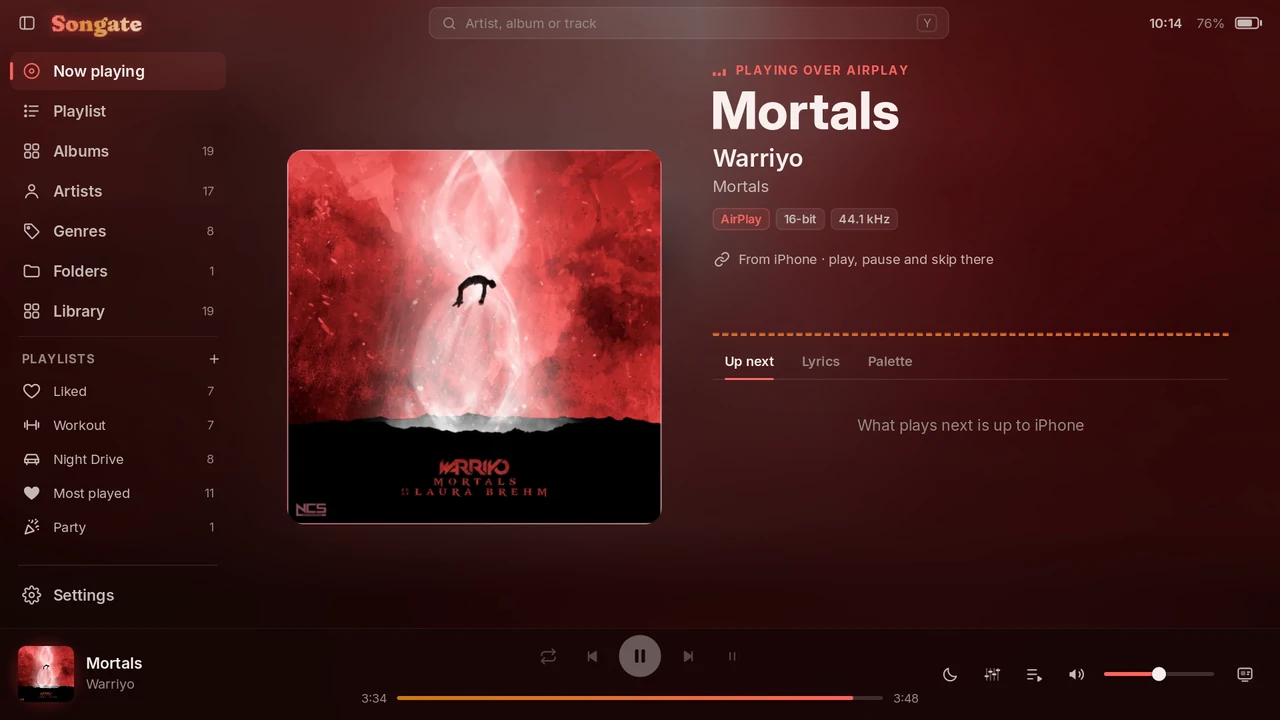
- 📲 AirPlay: pick Songate in an iPhone's AirPlay list, or play Songate on AirPlay speakers
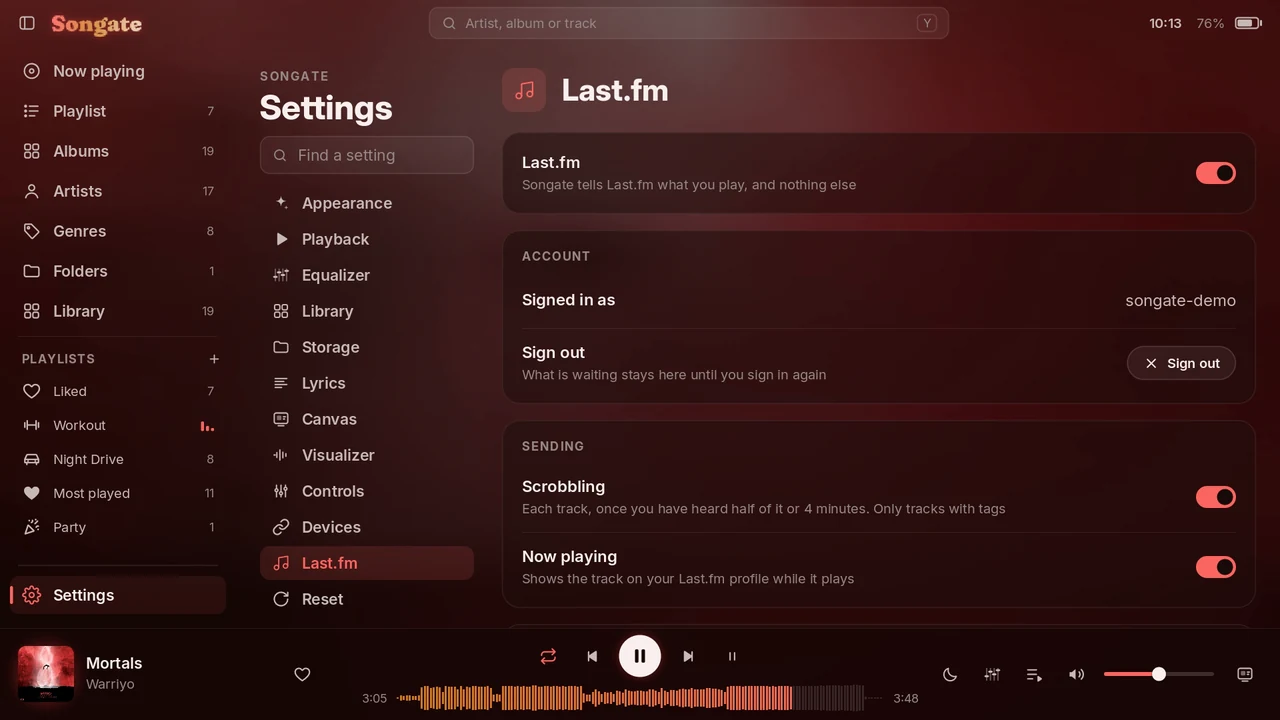
- 📻 Last.fm: scrobbles and what is playing, signed in on Last.fm's own page. What cannot be sent waits until it can
🎛️ Sound, playlists and library
- 🎛️ Equalizer: Simple (a preset, bass and treble) or Advanced (ten bands and a preamp), twelve presets and your own. Its button turns it on and off; hold it for its settings
- 🌊 Crossfade, 2 to 12 seconds, and optionally not between the songs of one album
- 📋 The Playlists page: every playlist, in three views, in your own order, each with one of 78 icons
- 📁 Import a playlist from an .m3u or .m3u8 file, and export any list
- 📁 Folders as playlists: Add as playlist, or Add all as playlists
- 📁 Files: a browser of the whole card or drive, hidden until you show it. Rename, copy, move and delete; an image becomes a cover, an .lrc a song's lyrics
- 💽 Library has Songs, Albums, Artists, Genres and Folders as tabs
🎨 Looks and controls
- 🔋 The battery: a colour and an animation for each state, what shows beside it in your order, and a card with everything your device can read. Settings › Appearance › Battery
- 🎨 Custom colours with a colour picker
- 📋 Every order of your own is dragged by a handle, with a finger or a mouse: the sidebar's tabs, playlists, the queue. Move with the D-pad works as before
- 📋 The sidebar: its tabs in your order, dividing lines, and an animation as it folds
- ✨ An opening as Songate starts, with a chime, never over music already playing. Both can be turned off
- ⏳ Background work shows as stacked cards, each with Stop and Resume
- 🔗 A guided tour on Songate's own screens: Basic, Advanced or Complete. Settings › About
🎮 On the Switch
- 🎮 The overlay has two volumes: Music, and Game for whatever game is running
- 📁 The overlay's Browse: folders, or playlists by kind. Y plays a playlist, X shuffles it; R opens its settings and L comes back
- 🎮 A playlist for a game event: when a game opens, on the HOME menu, back in the game or when it closes, continued or shuffled afresh
- 🎚️ The background player plays Automix joins, the equalizer and crossfade with Songate closed
- 🔒 Pocket lock: Lock, under the cover, turns the screen off and ignores every button and touch while the music plays. Settings › Controls › Pocket lock
- 📁 Your settings moved to config/songate-nx, once, at the first start
💻 Windows and Android
- 💻 Songate for Windows: the whole app in its own window, with keyboard, mouse and game pads, media keys, and music that keeps playing when the window closes
- 💻 Songate for Android: a layout for one hand upright, the console's layout sideways, and music that keeps playing with the notification's and the lock screen's controls
- ℹ️ The Android version is still very early, above all its upright layout: future updates will bring it many quality-of-life improvements
- ℹ️ On Windows the window now gives more room before it magnifies, so everything is a little smaller than in BETA 2
⬆️ Updates, backups and support
- ⬆️ Updates from inside Songate, only if you turn them on: every release with what changed, install or go back, and a banner when a new version is out
- 🛟 Back up the settings whenever you like; Songate backs up by itself before every update. Reset settings, and a Factory reset part by part
- 🐞 Settings › Support: report a bug or suggest a feature from inside Songate
- 🛡️ Settings, Liked, playlists and edits are saved so that a power cut or a full card cannot lose them
🔧 Fixed
- 🛡️ A crash on the HOME menu (2021-0003) that some consoles had with the background player
- 🔧 An occasional crash when closing Songate, which now also closes much faster
- 🔧 FLAC covers that did not load on the console
- 🔧 The first queue on a fresh install racing through every song
- 🔧 The screen dimming by it...
Songate 2.0.0 BETA 2
Songate 2.0.0 BETA 2: your devices, together. A Switch and a PC listen as one, hand the music over, play from an iPhone with AirPlay, and scrobble to Last.fm.
Warning
Beta versions can be unstable and have bugs. Please report them: open an issue, or use Settings › Support in the app.
songate-beta2.mp4
On the Switch, tests were only made on HOS 22.5.0 and 23.0.0, with the latest HATS pack from sthetix. On Windows, tests were only made on Windows 11. Only MP3, M4A and FLAC are supported; other formats are untested.
🎮 Install or update on the Switch
From 2.0.0 BETA 1: Settings › Updates, with Beta versions on, installs it, your settings backed up first. Then restart the console, so the new background player starts.
By hand, or from Gatefold NX 1.x:
- Download SongateNX-2.0.0-beta.2.zip below and unzip it onto the root of the SD card, replacing the old files.
- Restart the console, so the new background player starts. Songate, the background player and the overlay must all be this version.
- Launch Songate by holding R while starting a game (applet mode, from the Album, has too little memory).
Your settings move. At its first start, Songate moves your settings, playlists, Liked and edits from sdmc:/config/gatefold-nx/ to sdmc:/config/songate-nx/, and your backups beside them. Nothing is copied or lost: it is one rename on the card. If you go back to an earlier version from Settings › Updates, they move back.
| In the zip | What |
|---|---|
switch/Songate/Songate.nro |
🎵 the app |
atmosphere/contents/4200000047464E58/ |
🎧 the background player (sysmodule, starts at boot) |
switch/.overlays/Songate.ovl |
🧩 the Ultrahand overlay |
🙈 Can't find the overlay? switch/.overlays is a hidden folder (its name starts with a dot): macOS and many phone file and zip apps hide it, and some leave it out when copying. Copy the whole switch and atmosphere folders from the zip, and on a Mac press ⌘ ⇧ . in Finder to see hidden folders. The overlay needs Ultrahand: open it with L + D-pad down + R3, a click of the right stick, unless you changed it.
💻 Install or update on Windows
From 2.0.0 BETA 1: Settings › Updates, with Beta versions on, installs it.
Or by hand: download SongateWIN-2.0.0-beta.2.exe below and run it. It needs no administrator rights: choose a folder and your shortcuts, and tick Open Songate at the end if you like. Your settings stay in %APPDATA%\Songate.
🛡️ "Windows protected your PC"? The installer isn't signed, so Windows doesn't know it yet. Click More info, then Run anyway. If you'd rather check the file first, compare its SHA-256 with the one at the bottom of this page.
🔗 Devices and AirPlay use your network: the first time they are on, Windows asks once to let Songate through its firewall. Allow it, on private networks, or other devices and iPhones can't reach it.
🔗 Your devices, together
- 🔄 Devices. Pair a Switch and a PC once, in Settings › Devices: one shows a code, the other types it. Liked, your playlists, tag edits and play counts then stay the same on both, over your own network, encrypted, with no account.
- 📁 Music files. A device can copy the songs the other has and it lacks, into the same folders. It never replaces anything, and Follow deletions removes a song from both. Each device has its own switch.
- 🎧 Listen together. One queue on two devices, playing in time. The device that starts decides who changes what plays: both, or only itself, and then the other's controls are greyed out. Even two different files of one song are lined up.
- 🎚️ Timing for speakers, headphones and Bluetooth, set once for each pair, so the two sound as one.
- ⏩ Handoff. Your queue and your place in the song move to the other device, and this one pauses. Undo the handoff brings your own queue back for two minutes.
- 🔗 The Devices button at the top of the screen: Listen together, Handoff and AirPlay from anywhere. Little arrows at the top left turn while a sync runs.
✨ What's new
- 📲 AirPlay, on the Switch and the PC: pick Songate in an iPhone's AirPlay list. The song, its cover and its progress show in Songate, with levelling and the equalizer. A new iPhone is asked about once. Settings › Devices › Receive AirPlay.
- 📻 Last.fm. Scrobbles, and what is playing on your profile. Sign in on Last.fm's own page: with a QR code on the Switch, in your browser on the PC. What can't be sent waits until it can. Off until you turn it on, in Settings › Last.fm.
- 🎚️ Automix V1.2.0 comes with Songate, and plans every join from the start: on drops and on joins by the songs' structure, the next song comes in stabs on every beat, and joins on the beat blend for longer. No download needed; Settings › Updates can still go back to V1.1.0.
- ✨ An opening as Songate starts, with a chime, never over music the background player is already playing. Both can be turned off in Settings › Appearance.
- 📚 The tour has a Devices chapter.
🔧 Fixes
- 🛡️ The HOME menu crash (2021-0003 in am) that some consoles had with the background player. It held two system services from boot; it now opens them only while it uses them. This fix went quietly into BETA 1 on 30 October, and is now official: thanks to everyone who reported and tested it.
- 🖱️ On the PC, Move in the sidebar and in lists no longer stops when the mouse moves a little.
| Listen together | Handoff | AirPlay | Last.fm |
|---|---|---|---|
 |
 |
 |
 |
See the README for everything else.
SHA-256
SongateNX-2.0.0-beta.2.zip:f62943bdacd2782b88cc9a7c1937e05d1e0293b9d8a0721c911d9ca94338ea50SongateWIN-2.0.0-beta.2.exe:0fd9bfcc422729c62b51df6a1e73ee38b0f642e5de03fc147a7fce6aff1d7d28
Songate 2.0.0 BETA 1
Songate 2.0.0 BETA 1: Gatefold NX has a new name, Automix playlists that play like a DJ set, and Songate now runs on Windows too.
Warning
Beta versions can be unstable and have bugs. Please report them: open an issue, or use Settings › Support in the app.
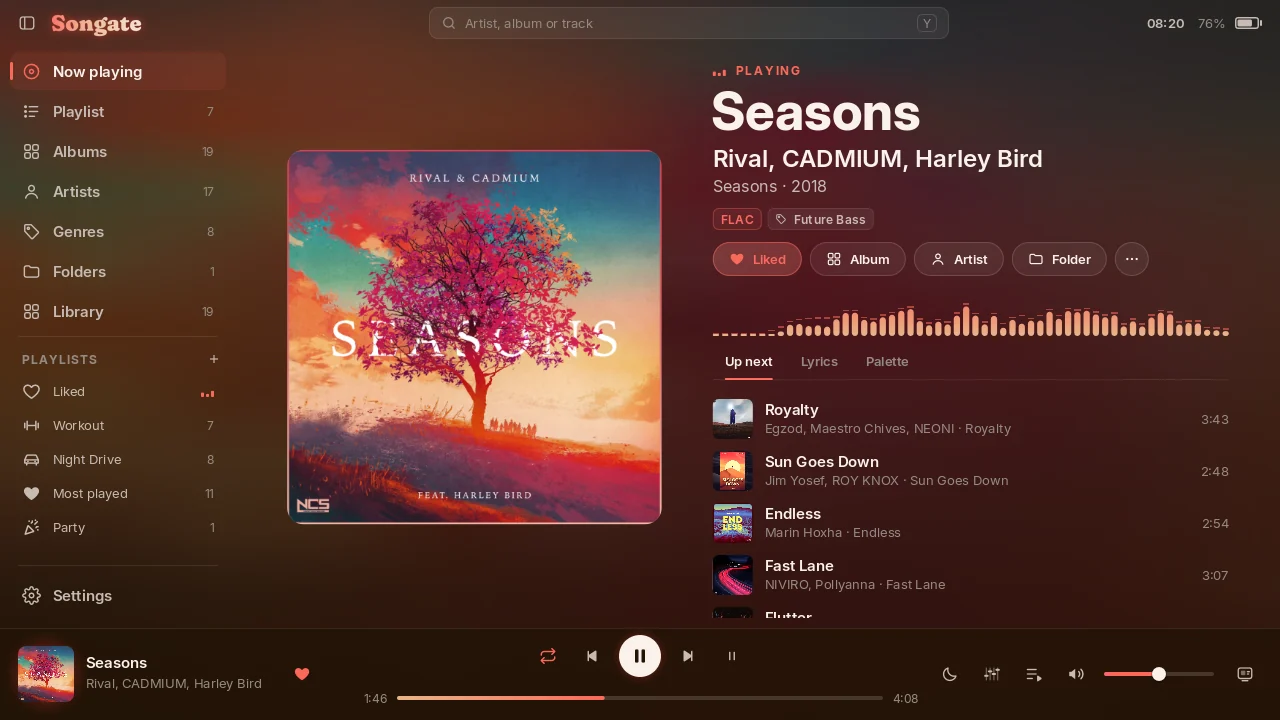
On the Switch, tests were only made on HOS 22.5.0 and 23.0.0, with the latest HATS pack from sthetix. On Windows, tests were only made on Windows 11. Only MP3, M4A and FLAC are supported; other formats are untested.
🎮 Install or update on the Switch
Gatefold NX 1.1.0 has no updater, so this one is installed by hand:
- Download SongateNX-2.0.0-beta.1.zip below and unzip it onto the root of the SD card, replacing the old files.
- Restart the console, so the new background player starts. Songate, the background player and the overlay must all be this version: they do not talk to 1.1.0.
- Launch Songate by holding R while starting a game (applet mode, from the Album, has too little memory).
Your settings, playlists, Liked and edits are kept, in the same place. The first start removes the old Gatefold.nro and Gatefold.ovl. You need Atmosphère, and Ultrahand for the overlay.
From now on, Settings › Updates can install new versions and go back to earlier ones. Turn on Beta versions there to be offered betas.
| In the zip | What |
|---|---|
switch/Songate/Songate.nro |
🎵 the app |
atmosphere/contents/4200000047464E58/ |
🎧 the background player (sysmodule, starts at boot) |
switch/.overlays/Songate.ovl |
🧩 the Ultrahand overlay |
🙈 Can't find the overlay? switch/.overlays is a hidden folder (its name starts with a dot): macOS and many phone file and zip apps hide it, and some leave it out when copying. Copy the whole switch and atmosphere folders from the zip, and on a Mac press ⌘ ⇧ . in Finder to see hidden folders. Open the overlay with Ultrahand's combo: L + D-pad down + R3, a click of the right stick, unless you changed it.
💻 Install on Windows
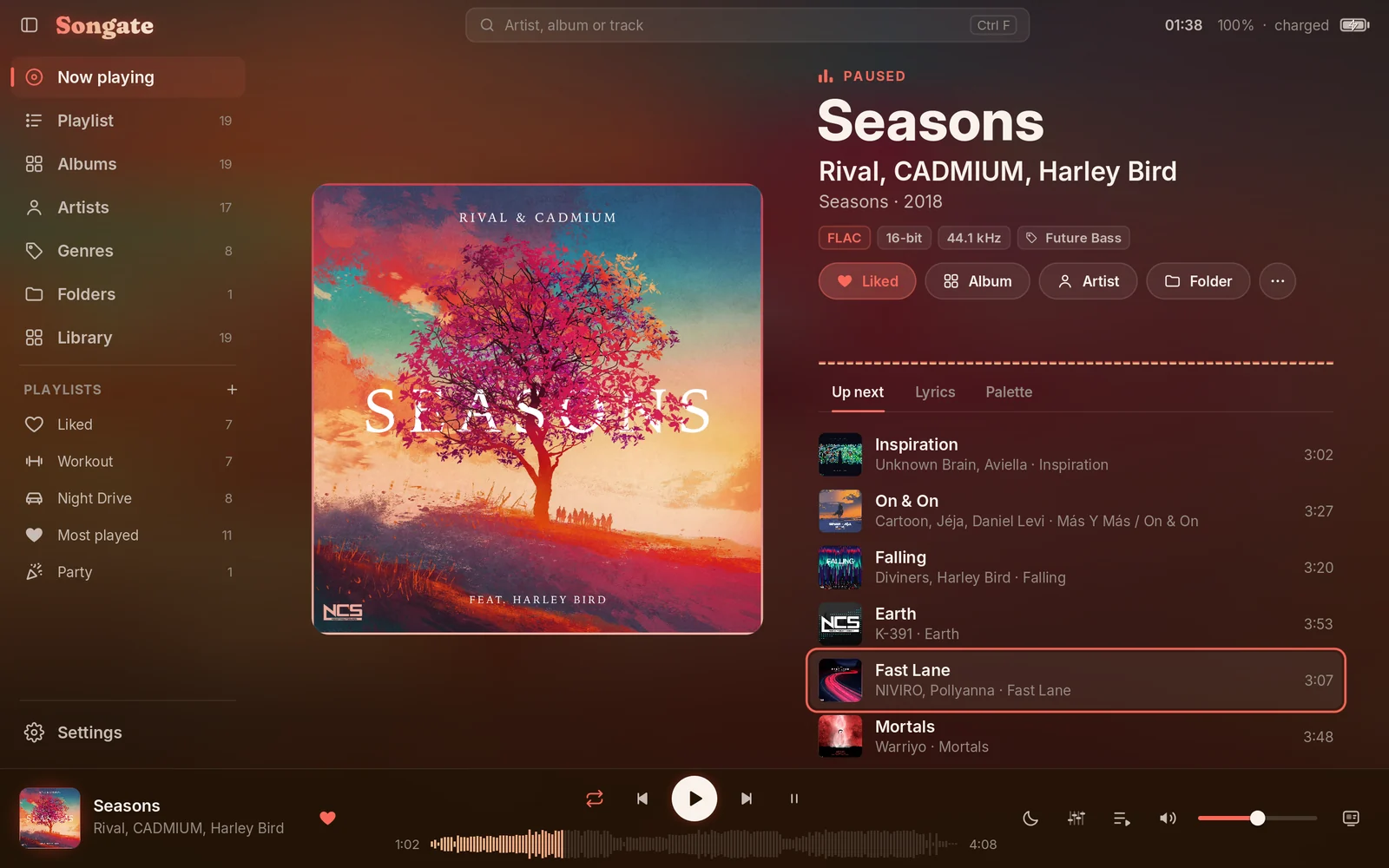
The same app, on a 64-bit PC. Tests were only made on Windows 11.
- Download SongateWIN-2.0.0-beta.1.exe below and run it. It needs no administrator rights.
- Choose a folder and which shortcuts you want. Windows' protected folders, like Program Files, can't be used.
- Tick Open Songate at the end, or leave it for later, and choose your music folder at the first start.
🛡️ "Windows protected your PC"? The installer isn't signed, so Windows doesn't know it yet. Click More info, then Run anyway. Your browser may also ask whether to keep the download. If you'd rather check the file first, compare its SHA-256 with the one at the bottom of this page.
What's different from the Switch:
- ⌨️ Keyboard and mouse. Settings › Controls lists the keys.
- 🪟 A real window, full screen with F11, and the Canvas always full screen.
- 🔽 Closing the window can keep the music playing beside the clock, from Settings › Playback.
▶️ The media keys and Windows' media controls work.
Not on the PC: the background player, the overlay, game actions and per-game volumes. They belong to the console.
Not tested yet: game pads, a second monitor, taskbar buttons, Sleep now, the colour picker, and an in-app update from a real release. Please report what you find.
Your settings are in %APPDATA%\Songate. Uninstalling leaves them there.
🎵 Gatefold NX is now Songate
It started as a recreation of Gatefold, DEVIROYrus's interface for foobar2000, and it has grown into a player of its own: a new name, and its own name in the sidebar.
✨ What's new
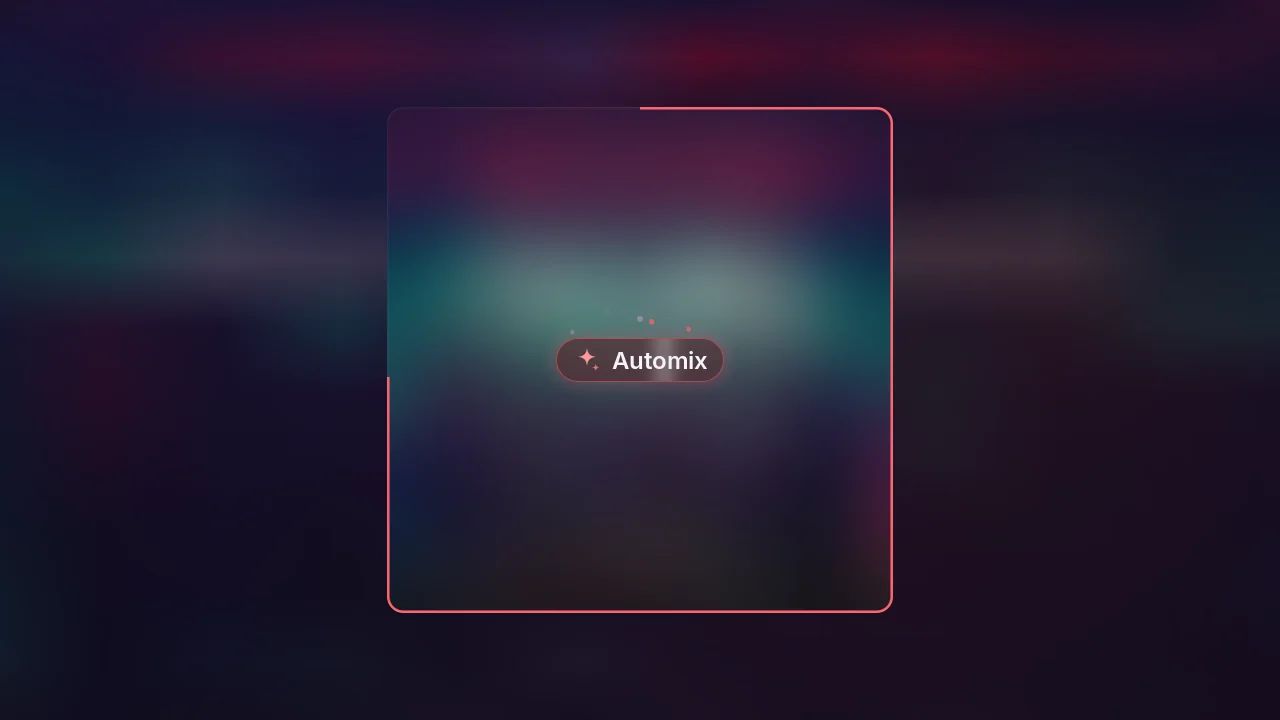
- 🎚️ Automix. Playlists that play like a DJ set: Songate listens to each song once, orders them for the best joins, and blends each into the next on the beat, on the drop, or through its fade. In the app and in the background player. + in the sidebar → Automix playlist…
- 📦 Automix models over the air. New ways of joining songs, from Settings › Updates. V1.2.0 is already out, and the models are open source in songate-automix.
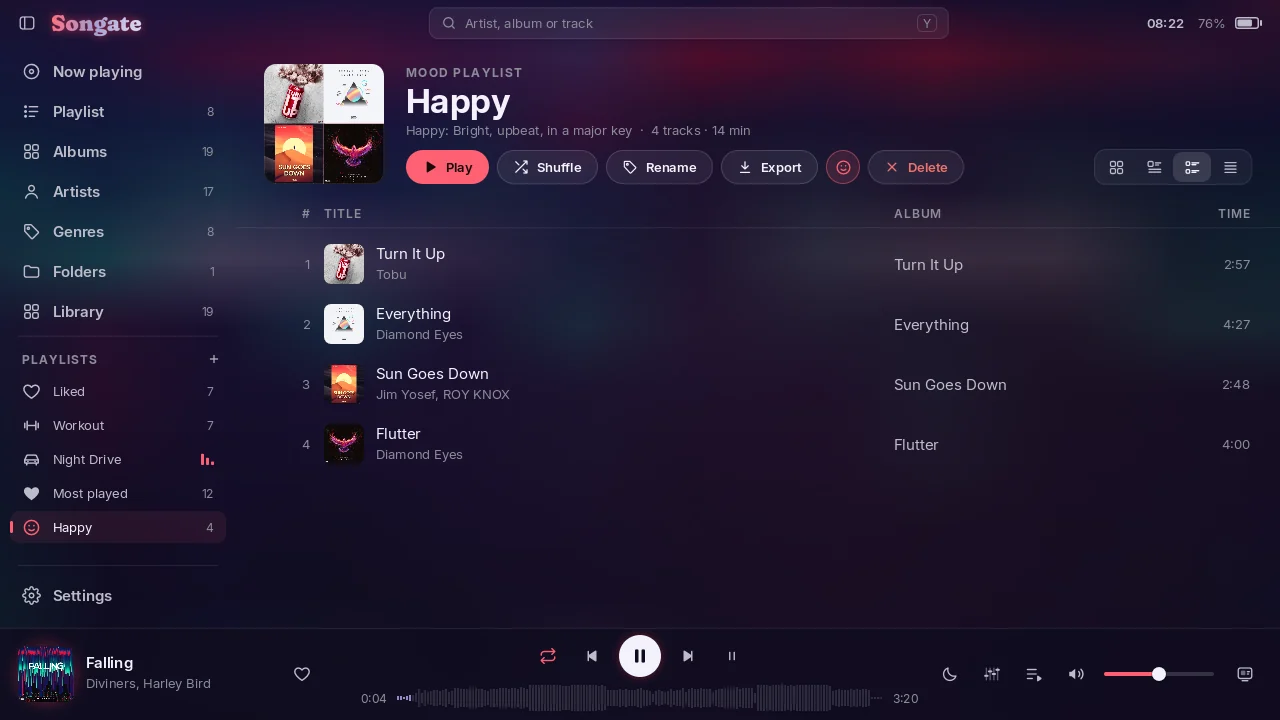
- 🎭 Mood playlists. Happy, Party, Relaxed, Sad or Aggressive, measured on the console.
- 🎛️ Equalizer. Presets, your own saved sounds, Simple or Advanced (ten bands and a preamp), in Songate and the background player.
- 🔀 Crossfade. 2 to 12 seconds, and it can leave the joins of an album alone.
- 🎮 A playlist for a game event. When a game opens, on the HOME menu, back in the game or when it closes, continued or shuffled.
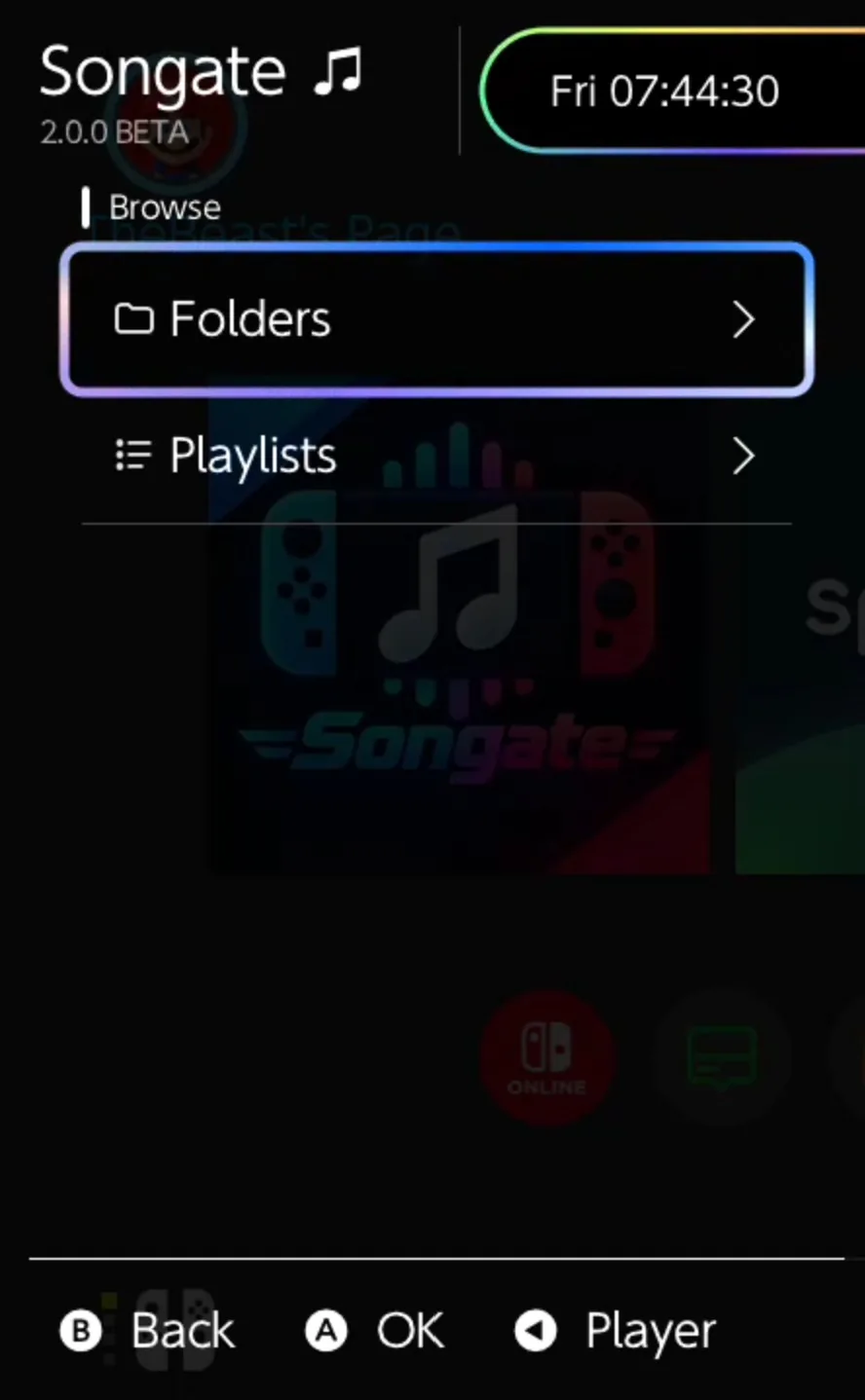
- 🧩 The overlay browses your folders, and your playlists by kind (Normal, Smart, Mood, Automix), with Songate's icons.
- 📄 .m3u and .m3u8. Play or import one from anywhere on the SD card, and export any playlist.
- 💾 Files. The whole SD card in a tab of its own, hidden until you show it in Settings › Appearance › Sidebar.
- 📋 A Playlists page, with your own order, and 78 icons for playlists.
- 🔄 Updates in the app. Every release with what changed, install a newer one or go back, your settings backed up first. Off until you allow it.
- 🐞 Support. Report a bug or suggest a feature from the console. Off until you turn it on.
- 🧭 A guided tour on Songate's own screens: Basic, Advanced or Complete, in Settings › About.
- 🎨 Any colour for Custom, lyrics timing for each track, and Storage and reset pages in Settings.
🔧 Fixes
- 🖼️ FLAC covers now load on the console.
- 🔆 With Keep the console awake on and Dim the screen off, the screen no longer dims by itself.
- 📊 The background work's cards stack, and stopping one no longer makes the stack blink.
- 🎵 Long titles and artists in the player bar scroll slowly instead of being cut.
- 🗑️ Deleting any playlist asks first.
- 🎶 The first queue on a fresh install no longer races through every track.
| Automix | A Mood playlist | The overlay |
|---|---|---|
 |
 |
 |
See the README for everything else.
SHA-256
SongateNX-2.0.0-beta.1.zip:0a068e9f36db56cafe14093829f41f6bcac96a221aedba858c4e8ae7c94a9483SongateWIN-2.0.0-beta.1.exe:36798868324ba8fed8a709685dd354a3a87e2635d325138012b3bc36fa2924de
Gatefold NX 1.1.0
Gatefold NX 1.1.0: the queue you can edit, play statistics and smart playlists, a sleep timer, and volume levelling.
⬇️ Install or update
- Download GatefoldNX-1.1.0.zip below and unzip it onto the root of the SD card, replacing the old files.
- Restart the console, so the new background player starts. Gatefold, the background player and the overlay must all be 1.1.0: they no longer talk to 1.0.0.
- Launch Gatefold by holding R while starting a game (applet mode, from the Album, has too little memory).
Your settings, playlists, Liked and edits are kept. You need Atmosphère, and Ultrahand for the overlay.
| In the zip | What |
|---|---|
switch/Gatefold/Gatefold.nro |
🎵 the app |
atmosphere/contents/4200000047464E58/ |
🎧 the background player (sysmodule, starts at boot) |
switch/.overlays/Gatefold.ovl |
🧩 the Ultrahand overlay |
🙈 Can't find the overlay? switch/.overlays is a hidden folder (its name starts with a dot): macOS and many phone file and zip apps hide it, and some leave it out when copying. Copy the whole switch and atmosphere folders from the zip, and on a Mac press ⌘ ⇧ . in Finder to see hidden folders. The overlay shows up in Ultrahand, which must be installed.
✨ What's new
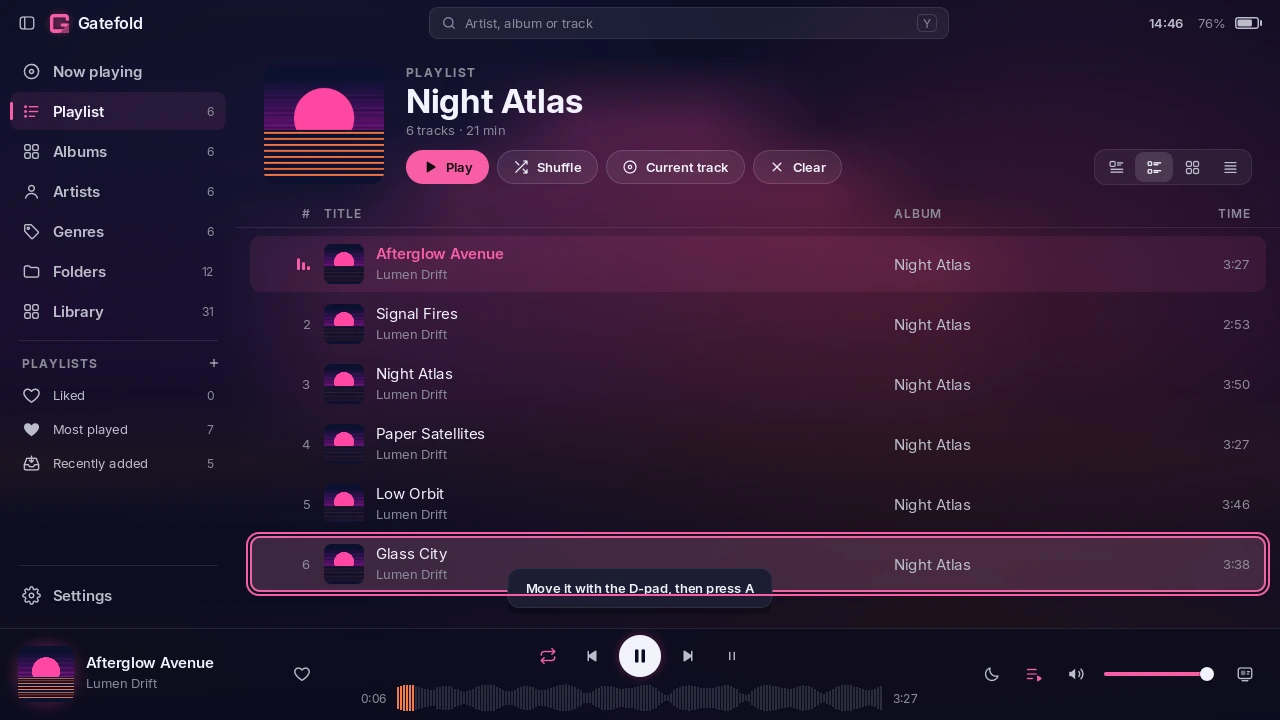
- 🧾 Edit the queue. On the Playlist view and in Up next, the track menu (+) has Play next, Move and Remove: Move picks the row up and the D-pad carries it. Clear empties the queue but for the track playing.
- 📊 Play statistics. A track counts as played after a minute, in Gatefold and in the background player, also while Gatefold is closed. Plays, last played and date added are in the track's Details.
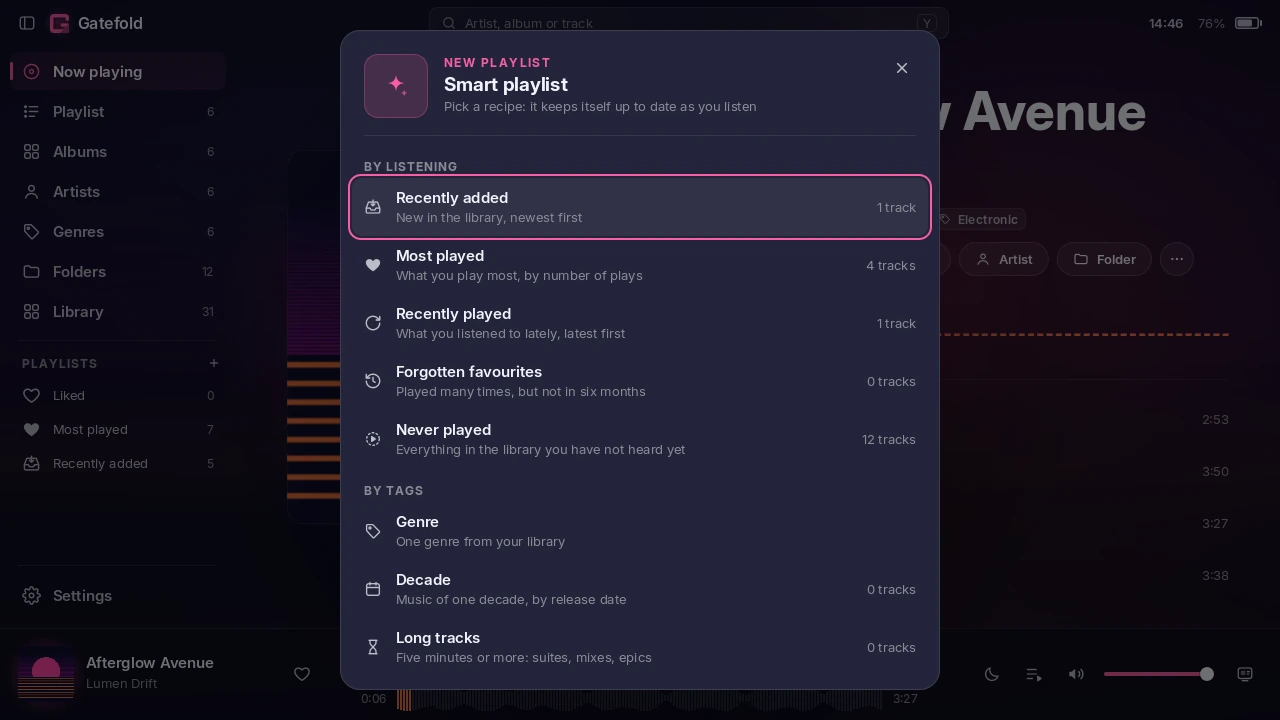
- ✨ Smart playlists, as in Gatefold 1.4: + in the sidebar → Smart playlist… Recently added, Most played, Recently played, Forgotten favourites, Never played, a genre, a decade, long tracks. Each shows how many tracks match before you create it, and keeps itself up to date.
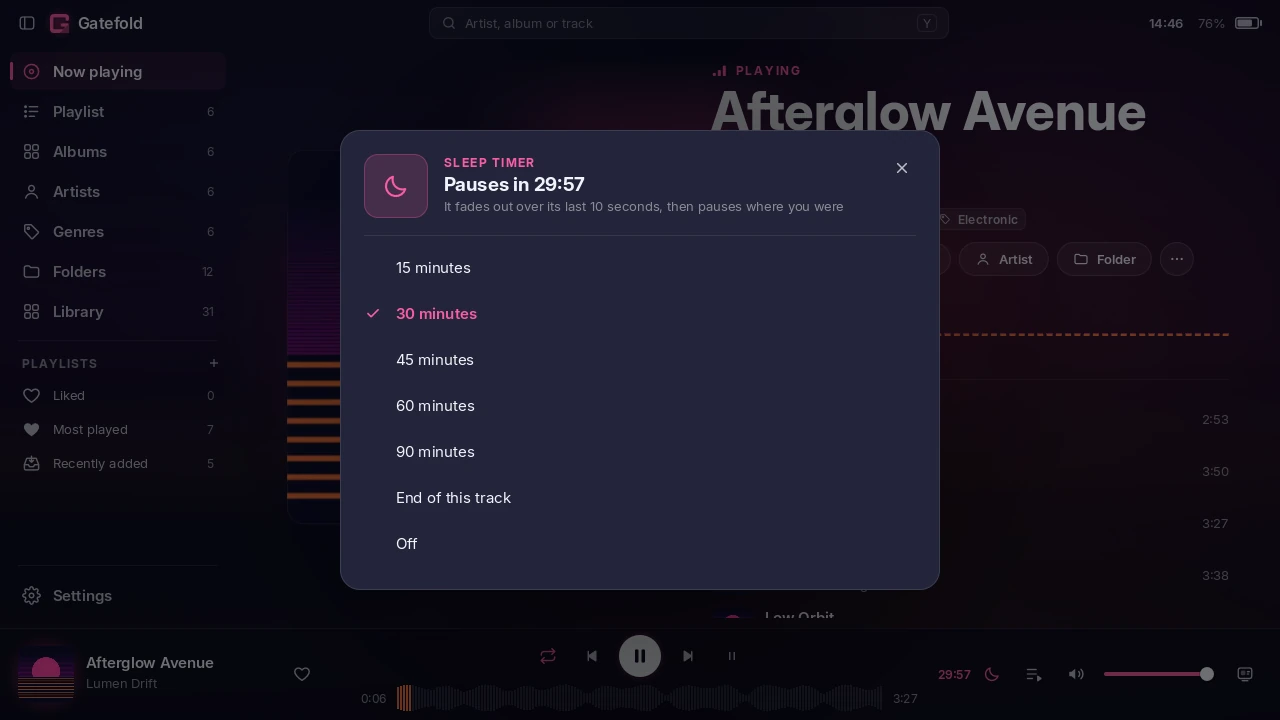
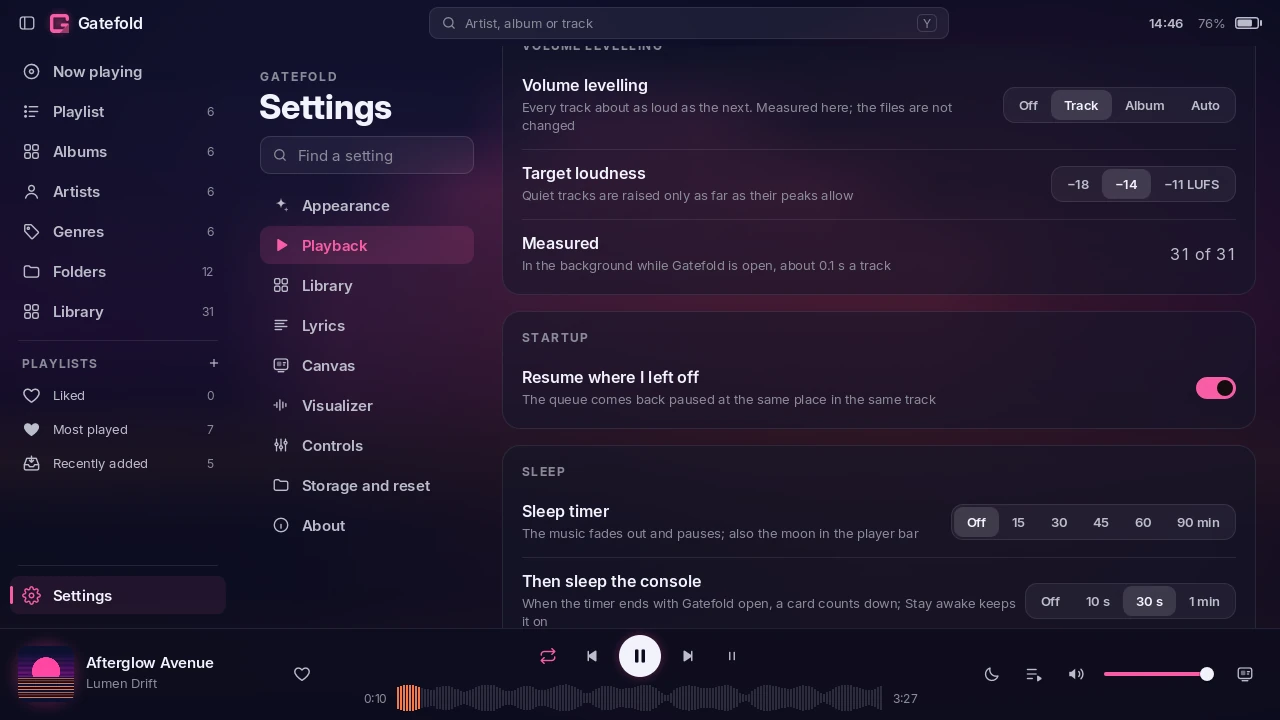
- 🌙 Sleep timer. 15 to 90 minutes or the end of the track, from the moon in the player bar, the Canvas, Settings or the overlay. The music fades out and pauses; with Gatefold open, a card then puts the console to sleep unless you stay awake.
- 🔆 Keep the console awake while Gatefold is open, with optional dimming of the screen after a few minutes without input.
- 🔊 Volume levelling (off by default, Settings → Playback): every track about as loud as the next, Track, Album or Auto, to −18, −14 or −11 LUFS. Loudness is measured on the console (EBU R128, from Gatefold 1.4's own meter), once, in the background; your files are never changed.
- 🔋 Battery: a bolt while charging, and how long to full or to empty, in the title bar (both can be hidden).
🔧 Fixes
- 🔀 The overlay shuffles a folder it plays or adds while shuffle is on, instead of playing it in order until shuffle was switched off and on.
- 🗂️ A folder opened from Library → Folders keeps Library lit in the sidebar (and something stays lit when the Folders tab is hidden).
- 🎮 The D-pad no longer leaves a Settings page for the player bar when the next row's controls do not line up.
| Editing the queue | The sleep timer | Volume levelling and sleep |
|---|---|---|
 |
 |
 |
See the README for everything else.
SHA-256 of GatefoldNX-1.1.0.zip: 13b2cb7efd70af0242350b85bd8de6ea9e0922a67dd471dd69d21dcad86aab3d
Gatefold NX 1.0.0
The first release of Gatefold NX: Gatefold, the foobar2000 interface, as a native music player for the Nintendo Switch.
⬇️ Install
- Download GatefoldNX-1.0.0.zip below and unzip it onto the root of the SD card.
- Restart the console, so the background player starts.
- Launch Gatefold by holding R while starting a game (applet mode, from the Album, has too little memory).
You need Atmosphère, and Ultrahand for the overlay. Your music can be anywhere on the card: a folder called Music at the top is found by itself, or choose one in Settings → Library.
| In the zip | What |
|---|---|
switch/Gatefold/Gatefold.nro |
🎵 the app |
atmosphere/contents/4200000047464E58/ |
🎧 the background player (sysmodule, starts at boot) |
switch/.overlays/Gatefold.ovl |
🧩 the Ultrahand overlay |
🙈 Can't find the overlay? switch/.overlays is a hidden folder (its name starts with a dot): macOS and many phone file and zip apps hide it, and some leave it out when copying. Copy the whole switch and atmosphere folders from the zip, and on a Mac press ⌘ ⇧ . in Finder to see hidden folders. The overlay shows up in Ultrahand, which must be installed.
✨ What's in it
- 🎨 Colours from every cover, with Gatefold's own palette algorithm, or a fixed Dark, Light or Custom theme.
- 🎤 Synced lyrics in Now playing and the Canvas. They scroll by hand and return to the line playing, and instrumental breaks show three pulsing dots.
- 🖼️ The Canvas: full-screen Cover, Lyrics and Minimal layouts. When idle, the controls fade and the progress line grows into a spectrum.
- 📚 Albums, Artists, Genres, Folders and Library → Tracks with a letter index, built from tags, however your folders are organised.
- ✏️ A track menu: edit tags and covers without touching your files, playlists, queue, delete.
- 🎧 A background player for the HOME menu, games and after Gatefold closes: gapless, its own volume, per-game volume, and game actions for open, HOME, back to the game and close.
- 🧩 An Ultrahand overlay with the cover, transport, queue, folders, volumes and game actions.
- ⚡ Fast on the console: about a second to the first frame with a 3,000-track library, cached covers, and work spread over three cores.
See the README for everything else.
SHA-256 of GatefoldNX-1.0.0.zip: 7f90fad29c0ceb2cdde061067a8d360b9f2a473d037a7a4fcef1e80f30fdebf0