Automatically Loading Profiles
AntiMicro has the ability to automatically load profiles either based on what was last used or based on what the active window is. This makes life much easier for use on a multimedia machine or for those of with a lot of profiles.
Automatically loading the last profile on start up is simply a matter of enabling Auto Load Last Opened Profile under Options -> Settings -> General and clicking OK.
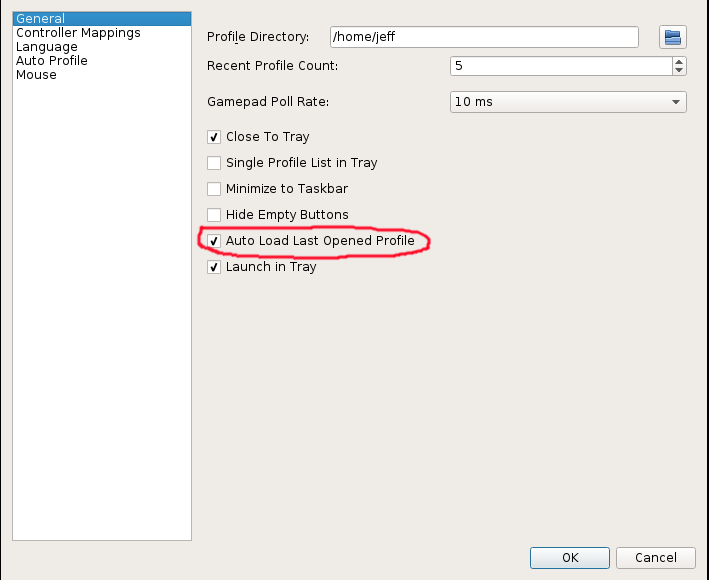
To set up autoloading of profiles by active window, go to Options -> Settings -> Auto Profile. Here, you can specify as many recipes as you'd like. To add a new recipe:
- Click Add
- Highlight the new recipe.
- Click Edit
- Browse to the profile you would like to use.
- Specify one or more of the Window Title, the Program Executable, or the Window Class (Linux only).
You can optionally restrict the profile to specific devices using the devices field.
Note: Just one of the Title, Program, or Class fields has to match in order to load a profile, but it has to match exactly. For example, if the window title has the ® or ™ symbol, you need to include that in the Title field.
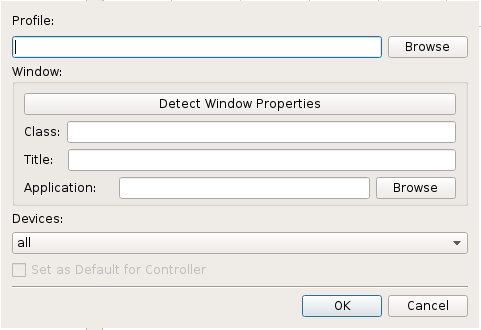
Correctly determining the window information to use in the above dialog can be a bit tricky. Below are a couple of options for determining the correct information.
Starting with version 2.23, AntiMicro will log window information to the debug log whenever it detects a window change. Debug logging is enabled by specifying the --log-level debug on the commandline. Debug messages are sent to the console, so you will want to redirect the console output to a file. In Windows, open a command shell, cd to where antimicro.exe is and type the following:
antimicro --log-level debug >> antimicro.log
xprop is a Linux tool that grabs various X11 properties for a given window. It is available in most distributions. To use it, open up a terminal and type xprop and hit enter. After hitting enter, click on the window you want to gather information about. This will dump quite a bit of information to the terminal. The entries that you are interested in are:
- WM_CLASS (take the name after the comma)
- WM_NAME (this is the Title field)