Repository navigation
Releases
ImKit 4.1.0 — Node editor redesign, TileMap, Theme::layout

ImKit 4.1.0 — Node editor redesign, TileMap, Theme::layout
4.1.0 redesigns the node editor and adds show::TileMap, Theme::layout, Sprite, ProgressTrackView::thumb and PtzView::capabilities. Public structures grew at their end, so rebuild your application and every linked ImKit library with the 4.1 headers. Only the node editor changes its default look. The Dear ImGui revision and the dependencies are unchanged.
Documentation: 4.1 additions (new symbols by header), migration guide, changelog. Try it: extract the package for your platform and run bin/imkit_gallery.exe (Windows) or imkit_gallery.app (macOS). The package also holds the Node Editor Gallery. The introduction film is on the documentation site.
Changes
- Node editor
- Link colour follows the output socket's type. Sockets carry glyphs for role (
Data,Flow), container (Single,Array,Set,Map) and flags (Reference,Wildcard,Field,Optional,Unavailable). - Nodes have shapes (
NodeView::shape) and states: running, waiting, success, error, bypassed, disabled, cached, breakpoint and locked. - While a wire is dragged, sockets that can accept it get a ring and the others dim. The draft wire snaps to the nearest candidate within
snapDistance, and the host's verdict reason appears beside the cursor. MakeNodeStylePreset(Classic,Studio,Logic) andNodeStyle::hooks(NodeDrawHooks) change how nodes, sockets and links are drawn. Input stays with the editor.- Alt-click removes a socket's links, and Ctrl-drag moves them to another socket.
LinkView::validitydraws the host's verdict on existing links.EditorOptions::localetranslates the editor's strings.
- Link colour follows the output socket's type. Sockets carry glyphs for role (
show::TileMap(imkit/show/led.h): draws one cell per panel of a tiled display such as an LED wall. Cells are coloured by group (the data port or power circuit that feeds them) and joined inorderlike the cabling. The host receives the hovered and clicked tile and draws its own tooltip.Theme::layout(LayoutTokens): overrides control height, spacing, padding and component height ratios independently of density. A field left unset keeps the density's value, so existing themes draw as before.Sprite,SpriteSheet,SpriteState(imkit/decor.h): play a sheet of equally sized frames from a host-owned texture (Loop,Once,HoldLast).ProgressTrackView::thumbpasses the track rectangle and the head position to the host, which can draw an image at the leading edge of a progress fill.PtzView::capabilities(PtzCapabilities): hides the controls a camera does not have: pan, tilt, zoom, home, presets, preset store and speed. Every field defaults to true.- Fix: a node whose body submits no item, such as a locked empty node, no longer trips Dear ImGui's cursor-extension assertion.
Upgrading from 4.0
- Rebuild the application and every linked ImKit library with the 4.1 headers. A 4.0 object next to a 4.1 structure reads the wrong layout.
- Request
find_package(imkit 4.1 CONFIG REQUIRED). A request for 4.0 no longer matches 4.1.x. - If you use the node editor, check its new default look.
style.linkColor = LinkColorSource::Accentandstyle.status = StatusDisplay::Alwaysrestore the 4.0 link colour and status line. The other differences have no switch: a 16-unit reroute knot, a mark on unconnected required inputs, pill-shaped link labels and a resize grip that scales with the zoom. The migration guide lists them.
Control sizes, colours and motion are unchanged.
Assets
| File | Contents |
|---|---|
imgui-modern-kit-4.1.0-Windows-x64.zip, -Windows-arm64.zip |
SDK and Gallery for Windows |
imgui-modern-kit-4.1.0-Darwin-arm64.zip, -Darwin-x86_64.zip, -Darwin-universal2.zip |
SDK and Gallery for macOS (unsigned, not notarized) |
imkit-v4.1.0-source.zip |
Source at the release commit |
imkit-v4.1.0-validation-evidence.zip, imkit-v4.1.0-manifest.json, SHA256SUMS |
Evidence, manifest and checksums |
The film's music is "Laserpack" by Kevin MacLeod ft. DarkNES (incompetech.com), licensed under CC BY 4.0.
Verification
CI built, tested and packaged all five packages at the release commit and ran the consumer check on each. The Gallery's public-IO verification (45 checks) passed on Windows x64 Debug. These checks do not cover physical input devices, native IME, screen readers, mixed-DPI setups, third-party hosts or macOS notarization.
ImKit 4.1.0 — ノードエディタの再設計、TileMap、Theme::layout
4.1.0では、ノードエディタを再設計し、show::TileMap、Theme::layout、Sprite、ProgressTrackView::thumb、PtzView::capabilities を追加しました。公開構造体の末尾にメンバーが増えたため、アプリと、リンクするすべてのImKitライブラリを、4.1のヘッダーで再ビルドしてください。既定の見た目が変わるのはノードエディタだけです。Dear ImGuiのrevisionと依存は変わりません。
文書: 4.1追加API(ヘッダー別の追加シンボル)、移行ガイド、変更履歴。試す: お使いの環境向けのパッケージを展開し、bin/imkit_gallery.exe(Windows)または imkit_gallery.app(macOS)を起動してください。パッケージには、ノードエディタ専用のGalleryも含まれます。紹介動画はドキュメントサイトにあります。
変更点
- ノードエディタ
- 配線の色は、出力ソケットの型に従います。ソケットには、役割(
Data、Flow)、入れ物(Single、Array、Set、Map)、修飾(Reference、Wildcard、Field、Optional、Unavailable)を示す記号が付きます。 - ノードには、形(
NodeView::shape)と状態(実行中、待機、成功、エラー、Bypass、無効、キャッシュ、ブレークポイント、ロック)があります。 - 配線のドラッグ中は、受けられるソケットに輪が付き、そのほかは薄くなります。ドラッグ中の配線は、
snapDistance以内で最も近い候補に吸着し、ホストの判定の理由がカーソルの横に出ます。 MakeNodeStylePreset(Classic、Studio、Logic)とNodeStyle::hooks(NodeDrawHooks)で、ノード、ソケット、配線の描画を変えられます。入力はエディタが処理します。- Altクリックでソケットの配線を外し、Ctrlドラッグで別のソケットへ移します。
LinkView::validityで、既存の配線にホストの判定を描けます。EditorOptions::localeで、エディタの文言を翻訳できます。
- 配線の色は、出力ソケットの型に従います。ソケットには、役割(
show::TileMap(imkit/show/led.h): LEDウォールのようなタイル状の表示装置を、パネル1枚を1マスとして描きます。マスは、給電するデータポートや電源回路のグループごとに色分けし、グループ内をorderの順に線で結んでケーブルの順序を示します。ホストは、ポインタが乗ったマスとクリックしたマスを受け取り、ツールチップを自分で描きます。Theme::layout(LayoutTokens): コントロールの高さ、間隔、余白、部品ごとの高さの比率を、密度とは別に上書きします。未指定の項目は密度の値のままなので、既存のテーマの見た目は変わりません。Sprite、SpriteSheet、SpriteState(imkit/decor.h): ホストが所有する1枚のテクスチャに並べた、同じ大きさのコマのシートを再生します(Loop、Once、HoldLast)。ProgressTrackView::thumbは、トラックの矩形と先頭の位置をホストへ渡し、進捗の塗りの先端に画像を描けるようにします。PtzView::capabilities(PtzCapabilities): カメラが持たない操作(パン、チルト、ズーム、ホーム、プリセット、プリセットの保存、速度)を隠します。どのフィールドも、既定値はtrueです。- 修正: 本体に項目を1つも置かないノード(ロックされた空のノードなど)で、Dear ImGuiのカーソル拡張のアサートが出なくなりました。
4.0から更新するとき
- アプリと、リンクするすべてのImKitライブラリを、4.1のヘッダーで再ビルドします。4.0のオブジェクトと4.1の構造体を混ぜると、構造体の配置が食い違います。
find_package(imkit 4.1 CONFIG REQUIRED)を指定します。4.0を要求しても、4.1.xにはマッチしません。- ノードエディタを使う場合は、新しい既定の見た目を確認します。
style.linkColor = LinkColorSource::Accentとstyle.status = StatusDisplay::Alwaysで、4.0の配線の色とステータス行に戻せます。そのほかの違いには、切り替えがありません。16単位のRerouteのノット、未接続の必須入力の印、ピル形の配線ラベル、ズームに合わせて大きさが変わるリサイズのつまみです。移行ガイドに一覧があります。
コントロールの寸法、色、動きは変わりません。
配布物
| ファイル | 内容 |
|---|---|
imgui-modern-kit-4.1.0-Windows-x64.zip、-Windows-arm64.zip |
Windows向けのSDKとGallery |
imgui-modern-kit-4.1.0-Darwin-arm64.zip、-Darwin-x86_64.zip、-Darwin-universal2.zip |
macOS向けのSDKとGallery(署名・公証なし) |
imkit-v4.1.0-source.zip |
リリースコミットのソース |
imkit-v4.1.0-validation-evidence.zip、imkit-v4.1.0-manifest.json、SHA256SUMS |
検証の記録、マニフェスト、チェックサム |
動画の音楽は、Kevin MacLeod ft. DarkNES「Laserpack」(incompetech.com)で、CC BY 4.0です。
検証
CIが、リリースコミットで、5つのパッケージすべてのビルド、テスト、パッケージ化を行い、それぞれで利用側の確認を実行しました。GalleryのpublicなIOの検証(45項目)は、Windows x64 Debugで通りました。これらの検査は、物理の入力機器、ネイティブIME、スクリーンリーダー、複数DPI、他社ホスト、macOSの公証を対象にしていません。
ImKit 4.0.0 — Modern UI. Familiar workflow.
ImKit 4.0.0 — Modern UI. Familiar workflow.
Give your Dear ImGui app a modern look with one theme call, then add the parts a real tool needs. Your context, backends, fonts, data and undo history stay in your application.
See it: the three-minute film (English and Japanese) is on the documentation site. Try it: download the package for your platform, extract it and run bin/imkit_gallery.exe (Windows) or imkit_gallery.app (macOS).
What is new
- A new default look. Larger radii, real shadows, smooth 0.14 s motion, tonal buttons, pill segments, fill sliders and redrawn progress, toasts and charts.
- Make it yours.
MakeBrandThemebuilds a complete theme from four colours. Add corners, an outline and a hard shadow, or replace component frames with a skin. Theme Studio and Skins in the Gallery show it live. - Inspector parts. A three-axis vector field, compact icon buttons, collapsible inspector cards and tinted hierarchy rows for tool panels.
- New modules. Charts, PTZ control, range sliders, and the optional
imkit::showmodule for media servers: cue list, mixer, control surface, LED and DMX address tools, scheduling and beat tools. - A redesigned Gallery with a Start page that flips between plain Dear ImGui and ImKit, searchable navigation, and 321 icons.
Upgrading from 3.x
Rebuild your application and every linked ImKit library with the 4.0 headers, and do not mix 3.x objects with 4.0 structures. The default radii, shadows, motion and control height changed; the migration guide lists the old and new values and how to keep the 3.3 look. The Dear ImGui revision is unchanged. The changelog has the full list.
Assets
| File | Contents |
|---|---|
imgui-modern-kit-4.0.0-Windows-x64.zip, -Windows-arm64.zip |
SDK and Gallery for Windows |
imgui-modern-kit-4.0.0-Darwin-arm64.zip, -Darwin-x86_64.zip, -Darwin-universal2.zip |
SDK and Gallery for macOS (unsigned, not notarized) |
imkit-v4.0.0-source.zip |
Source at the release commit |
imkit-v4.0.0-validation-evidence.zip, imkit-v4.0.0-manifest.json, SHA256SUMS |
Evidence, manifest and checksums |
The film's music is "Laserpack" by Kevin MacLeod ft. DarkNES (incompetech.com), licensed under CC BY 4.0.
CI built, tested, packaged and ran a consumer check for all five packages at the release commit. Automated checks do not establish physical input, native IME, screen-reader, mixed-DPI, third-party host or notarization acceptance.
ImKit 4.0.0 — Dear ImGuiのまま、現代的なUIへ。
テーマを1つ足すだけで、Dear ImGuiアプリが現代的な見た目になります。実用のツールに要る部品も、あとから足せます。Context、バックエンド、フォント、データ、Undo履歴は、これまでどおりアプリが持ちます。
見る: 約3分の紹介動画(日本語・英語)はドキュメントサイトにあります。試す: お使いの環境向けのパッケージをダウンロードして展開し、bin/imkit_gallery.exe(Windows)または imkit_gallery.app(macOS)を起動してください。
新しくなったこと
- 新しい既定の見た目。 角丸を大きく、影を実際に落とし、動きを0.14秒のなめらかな遷移に。トーン塗りのボタン、ピル形のセグメント、塗りつぶし表示のスライダーを備え、進捗・トースト・グラフを描き直しました。
- 自分の世界観に。
MakeBrandThemeが4色から完成したテーマを作ります。角、枠線、硬い影を足したり、スキンで部品の枠を差し替えたりできます。GalleryのTheme StudioとSkinsで、その場で試せます。 - インスペクター用の部品。 三軸入力、小型アイコンボタン、開閉式のインスペクターカード、種類色つきの階層行を追加しました。
- 新しいモジュール。 グラフ、PTZ操作、範囲スライダー、そしてメディアサーバー向けの任意モジュール
imkit::show(キューリスト、ミキサー、コントロールサーフェス、LEDとDMXアドレスの道具、スケジュールとビートの部品)。 - 作り直したGallery。 素のDear ImGuiとImKitを切り替えられるStart画面、検索できるナビゲーション、321個のアイコン。
3.xから更新するとき
アプリと、リンクするすべてのImKitライブラリを、4.0のヘッダーで再ビルドしてください。3.xのオブジェクトと4.0の構造体は混ぜられません。角丸、影、動き、コントロールの高さの既定値が変わっています。旧い値と新しい値、3.3の見た目を保つ方法は、移行ガイドにあります。Dear ImGuiのrevisionは変わりません。変更の全体は変更履歴を参照してください。
配布物
| ファイル | 内容 |
|---|---|
imgui-modern-kit-4.0.0-Windows-x64.zip、-Windows-arm64.zip |
Windows向けのSDKとGallery |
imgui-modern-kit-4.0.0-Darwin-arm64.zip、-Darwin-x86_64.zip、-Darwin-universal2.zip |
macOS向けのSDKとGallery(署名・公証なし) |
imkit-v4.0.0-source.zip |
リリースコミットのソース |
imkit-v4.0.0-validation-evidence.zip、imkit-v4.0.0-manifest.json、SHA256SUMS |
検証の記録、マニフェスト、チェックサム |
動画の音楽は、Kevin MacLeod ft. DarkNES「Laserpack」(incompetech.com)で、CC BY 4.0です。
CIが、リリースコミットで、5つのパッケージすべてのビルド、テスト、パッケージ化、利用側の確認を行いました。自動検査では、実機の入力、ネイティブIME、スクリーンリーダー、複数DPI、他社ホスト、公証の受入は確かめていません。
ImKit 3.3.0 — Make progress clear
ImKit 3.3.0 — Make progress clear
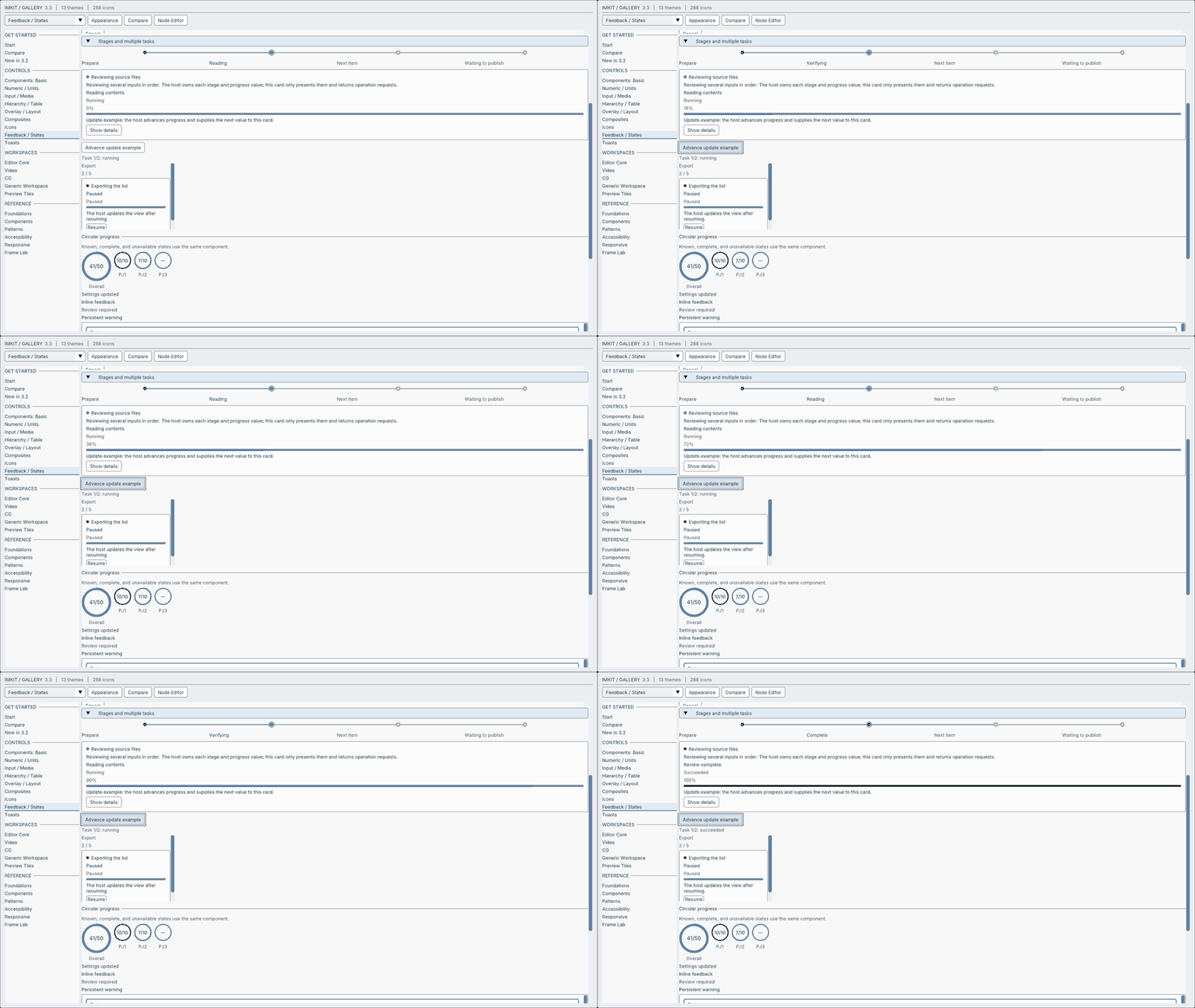
Show how far a task has progressed, which stage is active and what the user can do next, while your application continues to own the work.
What is new
- Shared progress tracks:
ProgressTrack/ProgressTrackViewshow determinate or indeterminate values, labels and supplemental text withQueued,Running,Paused,Succeeded,FailedandCancelledstates. - Stages at a glance:
StageProgressshows completed, current and queued stages, switching to the current stage and count at narrow widths. - Task cards with operations:
TaskProgressCardcombines title, stage, progress and buttons. It returns a command ID; the application performs the operation and supplies the next state. - Richer loading toasts: update the same
ToastViewwithstage,progressTextandstatus, then move it to a success/error message when the work finishes.
Examples and exact API · Public manual.
Compatibility
ToastView appends fields and changes its layout. Recompile your application and linked ImKit static libraries with matching 3.3 headers. Do not mix 3.2 objects and 3.3 structures. Existing function arguments/defaults and dependencies remain unchanged. Dear ImGui remains pinned to docking commit 367b2c24f399988ddafc0bb4628da0106bcc09be (1.93.0 WIP, version number 19297); matching configuration is required. Your application owns context, backends, renderer, fonts, textures, state, workers and persistence.
Downloads
- Windows: x64 · Arm64
- macOS: Apple Silicon · Intel · Universal 2
- Source · Validation evidence
- Manifest · SHA256SUMS
Verification and limits
The release source is 8a649d84c8d9997788596e7bf76d06e4e906b30f, merged through PR #13. All five main CI configurations passed build, test, package and packaged SDK consumer verification. The assembly also checked each SDK consumer source commit, public headers, license files, bilingual 3.3 guides and capture against the release source. Pages CI passed.
Local Windows x64 Debug Workflow/Workflow API/Toast/Toast API regressions passed (4/4). Native OpenGL checks cover toast mouse action/dismiss, keyboard Space, same-ID loading completion, six positions in light/dark and Japanese indeterminate progress. The new GIF records 80 native frames and six public-IO clicks advancing the host-owned task to completion: 960×540, 10 fps, 8 seconds. The existing 3.2 film is labeled historical; it is not 3.3 validation evidence. Documentation pairs/local links and Pages generation/type checking/static build/link checks passed.
Universal 2 tests execute on arm64; Intel executes in a separate job. macOS archives are unsigned and not notarized: signing credentials were unavailable and the CI signing steps were skipped. Physical OS input, native IME, real screen readers, mixed-DPI/multi-monitor, external-host and hardware acceptance have not been performed.
日本語
処理がどこまで進み、今どの工程にいるか、次に何を操作できるかを表示するリリースです。
共通のProgressTrack、工程を並べるStageProgress、操作ボタンを持つTaskProgressCardを追加しました。トーストにも工程・進捗テキスト・処理状態を表示できます。部品は表示と操作要求を受け持ち、処理の実行と状態管理はアプリ側に残します。
コード例と公開API · 日本語マニュアル。上のGIFは3.3のnative Galleryを公開IOで操作して撮影したものです。既存の3.2紹介動画は、旧版の紹介と明記して残しています。
互換性
ToastViewの構造体レイアウトが変わるため、ホストとリンクするImKit静的ライブラリを同じ3.3ヘッダーで再コンパイルしてください。3.2のobjectと3.3の構造体は混在させないでください。 既存関数の引数・既定値、依存、Dear ImGuiの固定revisionと設定一致の要件は維持しています。Context・描画・font・texture・状態・worker・保存の管理も引き続きアプリ側が行います。
配布と検証
上のDownloadsに5構成のSDK、ソース、検証ZIP、manifest、チェックサムを掲載しています。実際のCIとソースコミット、SDK consumerの結果、native検証ファイルのハッシュはmanifestと検証ZIPに記録します。
ローカルの直接回帰4件、nativeトースト操作・Space操作・同じIDでの完了・6配置の明暗・日本語の未確定進捗を確認しました。新しいGIFでは6回のクリック後のホスト値1.0を検査し、実行中と完了の画面を確認しています。日英文書とPagesの生成・型チェック・静的build・リンク検査も成功しました。
Universal 2はarm64で実行し、Intelは別jobです。macOS署名・notarizationは資格情報がなく、CIの該当stepはスキップされています。物理OS入力、native IME、実screen reader、複数モニターDPI、外部ホスト・実機受入は未実施です。
ImKit 3.2.0 — Modern UI. Familiar workflow.
ImKit 3.2.0 — Modern UI. Familiar workflow.
Modernize an existing Dear ImGui application with a theme, then add useful controls with the immediate-mode workflow you already know.
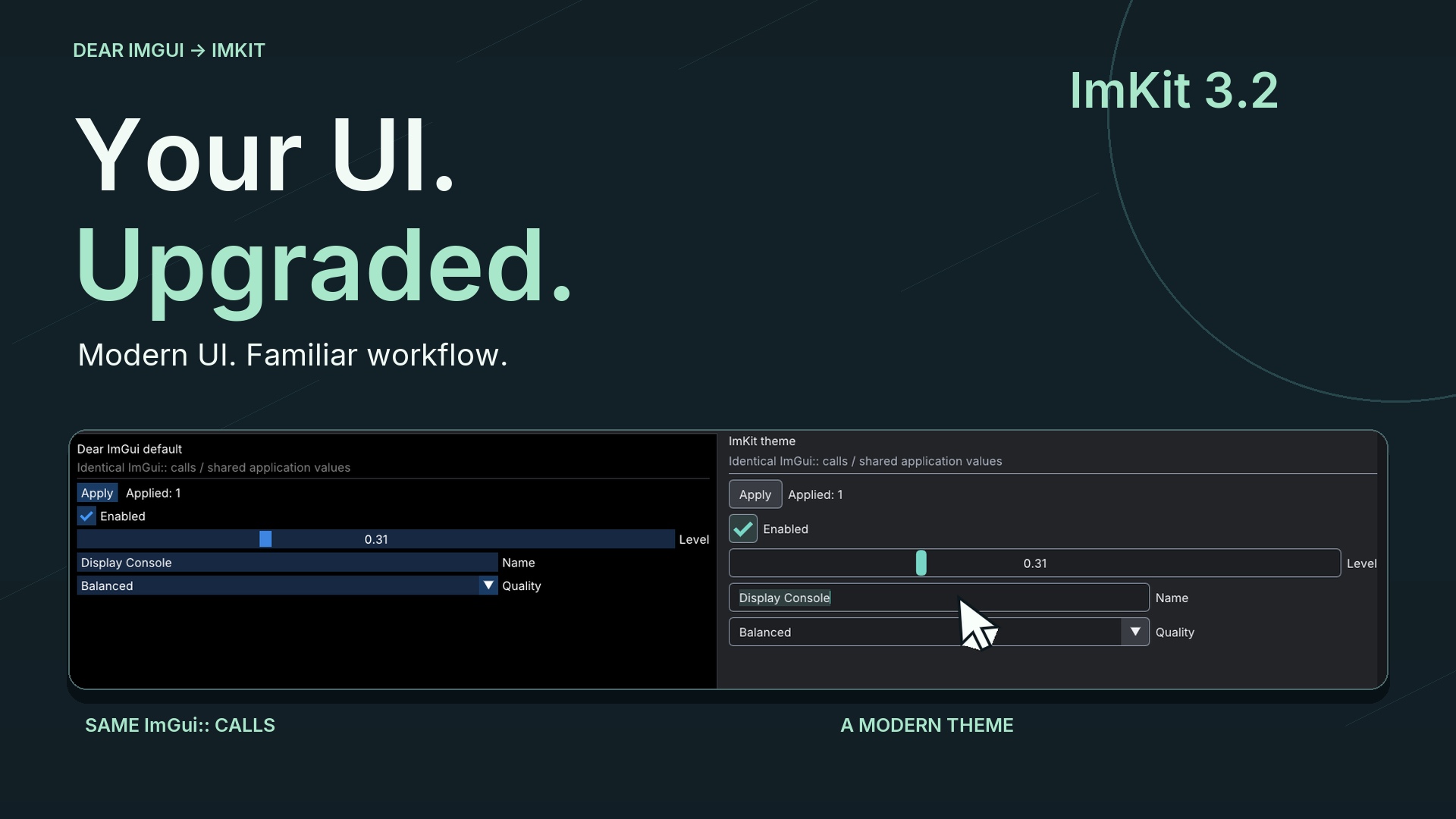
Watch the 60-second film — English motion graphics, native UI interaction, original electronic music, 1080p / 60 fps. Public manual and film player.
Media revision 2 — 2026-10-05
The English 60-second film and twelve native GIFs have been rebuilt from continuous public-IO operations. Large synchronized cursors, drag/typing intermediates, actual socket connections, 25 cuts, kinetic typography, masks and icon expansion are paired with an original 128 BPM electro-house score.
- Film: 1920×1080, 60 fps / 3,600 frames, H.264/AAC stereo 48 kHz, 8,557,071 bytes, −16.06 LUFS, −1.84 dBTP.
- GIFs: 960×540, 20 fps, 6–8 seconds, each below 2 MiB.
- Production commit and regeneration scripts · Production PR #11.
- Film SHA-256:
68e9ce75e4c510d13dac1100e61c3b5796535d552b3c945d0eaa66eb517dbc70.
The v3.2.0 library tag, source archive, five SDK archives and original release CI identity remain unchanged. Only the film, manifest, validation evidence and SHA256SUMS are replaced. The manifest records the separate media production commit, timestamp and hashes; revised scripts and event/still evidence are in the media-revision/ directory of the evidence ZIP. The original packaged documents and media remain the original release snapshots.
All five production-CI build/test/package/consumer jobs passed. Local visual review covered timecoded stills, complete normal and silent playback, both site languages/themes, desktop/mobile and GIF controls. Measurements and visual checks do not establish perceptual listening quality or independent commercial buyer acceptance. Physical OS/IME and hardware acceptance are also untested.
映像改訂2
操作開始・途中・結果を連続して撮り直し、大きな同期カーソル、ドラッグ・文字入力、実際のノード接続を25カットの英語モーショングラフィックスにまとめました。BGMはオリジナルの128 BPMエレクトロハウスです。GIF12本も960×540・20 fps・6〜8秒・各2 MiB以下へ更新しました。
v3.2.0のライブラリタグ・source・5構成のSDK・元のCI識別情報は維持しています。 動画・manifest・検証記録・SHA256SUMSを更新し、制作コミットと日時・ハッシュを記録しました。配布済みSDK内の文書と素材は元のリリース時点のものです。改訂版の再生成スクリプトと操作ログ・静止画は検証ZIPのmedia-revision/に含めています。
制作コミットの5構成CI、native状態検査、動画/GIF仕様、日英・明暗・PC/スマートフォン表示、全編の通常・無音再生を確認しました。音楽の聴感評価、第三者の商用品質受入、物理OS入力・IME・実機受入は未実施です。
What’s new
- A focused Gallery: category navigation, a live Start screen, responsive workspaces and an independent comparison. Theme only uses identical
ImGui::calls; Components shows optional ImKit controls. Both edit the same application values. - More building blocks: WorkspaceTabs, hierarchy visibility/lock/action requests, inspector cards, SettingToggleRow, DragVector3WithUnit, titled ChoiceGroup, CompactActionRow and ToastViewport. The application owns the values and applies requests.
- 288 icons, 13 themes: new connection/device icons, the Slate theme and a subtle destructive action style.
- Guides you can follow: English/Japanese README, integration examples, component contracts, exact 3.2 declarations/defaults, return values, lifetime and Begin/End rules. Toast guides and API references are included in Pages and the SDK.
- Fresh native GIFs: 12 Gallery/Node Editor captures at 960×540, each under 2 MiB. The revised film uses continuous real operation with original motion graphics; revised production scripts are linked below. The original source and SDK archives are unchanged.
Compatibility
WindowFrameContent::iconTexture extends the public structure. Recompile your application and all linked ImKit static libraries using the 3.2 headers. Do not mix 3.1 object files with 3.2 structures.
The Dear ImGui baseline remains pinned to docking commit 367b2c24f399988ddafc0bb4628da0106bcc09be (1.93.0 WIP, version number 19297), with matching configuration required. No new library dependency is introduced. Your application continues to own its context, backends, renderer, fonts, textures, model, undo, persistence and workers.
Downloads
- Windows: x64 · Arm64
- macOS: Apple Silicon · Intel · Universal 2
- Source archive
- Validation evidence
- 60-second film
- Manifest · SHA-256 checksums
Verification
The release manifest identifies the exact source commit and successful five-platform CI run. All five configurations build, test, package, then compile/link the existing consumer fixtures against the produced SDK ZIP and run the host-ImGui consumer. Universal 2 tests run on the arm64 host; Intel also has a separate x86_64 job.
Focused local API/Workflow/Toast/Theme regressions passed. Native public-IO and backbuffer checks cover both comparison modes, shared edits, keyboard activation, disabled controls, style restoration, application-applied requests and compact screens. Pages passes generation, type checking, static build and local links; browser review covers both languages, light/dark, desktop/mobile, search, GIF controls and complete film playback.
The film is 60.000 seconds, 3600 frames, H.264/AAC stereo, −16.06 LUFS and −1.84 dBTP. Three review passes addressed the message, timecoded compositions/full playback and consistency across public materials.
macOS packages are unsigned and not notarized when signing credentials are unavailable. Automated checks do not establish physical OS input, native IME, real screen-reader, multi-monitor DPI, external-host integration or hardware acceptance.
日本語
既存のDear ImGuiアプリにテーマを適用し、必要な追加部品を同じ即時モードの使い方で組み込めるリリースです。
追加内容
- Galleryのカテゴリ案内、実操作できるStart、狭い画面で折り返す作業欄、独立した比較ページを整えました。Theme onlyは同じ
ImGui::呼び出し、Componentsは追加部品を使い、左右で同じアプリ所有の値を編集します。 - 作業タブ、階層の可視・ロック・操作要求、設定カード、設定行、単位付き三軸入力、見出し付き選択、状態と操作の行、ToastViewportを追加しました。値と操作結果はアプリが管理します。
- 接続・デバイスの新アイコン、Slateテーマ、控えめな破壊的操作のスタイルを加え、288アイコン・13テーマになりました。
- 英日README、導入例、部品仕様、3.2の正確な宣言・既定値・戻り値・寿命・Begin/End規則を更新しました。トーストとAPI参照はPages・SDKにも含まれます。
- native Gallery/Node Editorから12点のGIFを更新しました。960×540、各2 MiB以下です。約60秒の英語動画には実操作映像、モーショングラフィックス、オリジナル電子音楽を使用しています。改訂版の再生成スクリプトは下記の制作コミットにあります。元のsourceとSDKアーカイブは変更していません。
互換性
WindowFrameContent::iconTextureの追加で構造体が拡張されています。アプリとリンクするImKit静的ライブラリを3.2ヘッダーで再コンパイルしてください。3.1のobjectは混在させないでください。 Dear ImGuiの固定revisionと設定一致の要件は変わりません。新しいライブラリ依存はありません。Context、backend、renderer、font、texture、モデル、Undo、保存、workerは引き続きアプリが所有します。
検証と配布
上記のDownloadsにWindows x64/Arm64、macOS arm64/x86_64/Universal 2、source、検証記録、動画、manifest、チェックサムを掲載しています。最終コミットの5構成でbuild・test・packageを通し、配布ZIPに対するconsumerのcompile/linkと実行を確認しました。Universal 2の実行環境はarm64で、Intelは別jobです。詳細はmanifestと検証記録に保存しています。
ローカルのAPI・Workflow・Toast・Theme回帰、比較両モードの公開IO操作とbackbuffer、左右編集・キーボード・disabled・スタイル復元・要求反映・狭い画面を確認しました。Pagesは生成・型チェック・静的build・リンク検査と、ブラウザーの日英・明暗・PC/スマートフォン・検索・GIF・動画全編再生を確認しています。映像の訴求、時間付き構図と全編、公開物の一致を3段階でレビューしました。
署名用資格情報がないmacOS packageは未署名・未notarizeです。自動確認は物理OS入力、native IME、実screen reader、複数モニターDPI、外部アプリ統合・実機受入の合格を意味しません。
ImKit v3.1.0 — a clearer path from the Gallery to integration
ImKit 3.1.0 — from the Gallery to integration
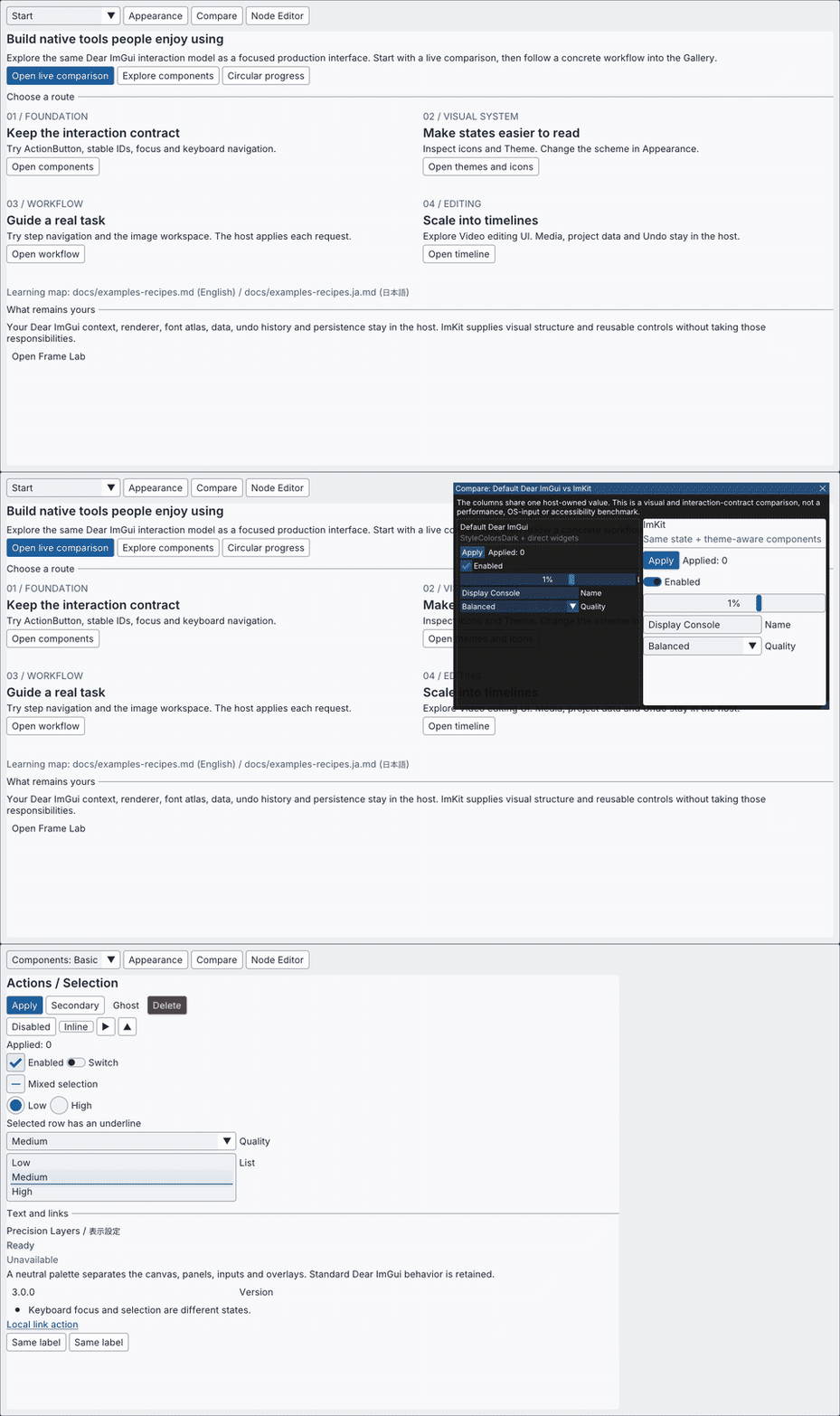
This release improves how developers move from a Gallery example to the documentation and integration steps for that module.
What’s new
- A bilingual documentation catalog maps each guide to its audience, related API, Gallery page, implementation source, and SDK package path.
- Module recipes cover Components, Themes, Workflow, Node Editor, Editor Suite, Timeline, and WindowFrame. Each recipe identifies the frame call and the behavior owned by the host.
- Gallery Start adds task-focused routes and a direct link to the recipe map.
Compatibility
There are no public API or ABI changes. The Dear ImGui 1.93.0 WIP docking baseline remains unchanged from v3.0.0.
Downloads
- Windows: x64 · Arm64
- macOS: Apple Silicon · Intel · Universal 2
- Source archive
- Validation evidence
- 52-second Gallery and Node Editor showcase
- Manifest · SHA-256 checksums
macOS packages are unsigned and not notarized. Automated checks do not establish physical input, native IME, screen-reader, mixed-DPI, or external-host acceptance.
日本語
Galleryの実例から、その部品をアプリへ組み込む手順まで進みやすくするリリースです。
追加内容
- 英日文書カタログを追加し、各ガイドの対象読者、関連API、Gallery画面、実装source、SDK package内の配置先を対応付けました。
- Components、Theme、Workflow、Node Editor、Editor Suite、Timeline、WindowFrameの実装例を追加しました。フレーム内で呼び出す位置と、ホスト側に残る責務を確認できます。
- GalleryのStart画面に目的別の案内を設け、実装例一覧へ直接進めるようにしました。
互換性
公開API・ABIに変更はありません。Dear ImGui 1.93.0 WIP dockingの基準はv3.0.0から変わっていません。
ダウンロード
- Windows: x64 · Arm64
- macOS: Apple Silicon · Intel · Universal 2
- Source archive
- 検証記録
- 52秒のGallery/Node Editor showcase
- Manifest · SHA-256 checksums
macOS packageは未署名・未notarizeです。自動確認は実機入力、native IME、screen reader、mixed-DPI、外部アプリへの統合を保証しません。
ImKit v3.0.0 — build modern native tools faster
ImKit 3.0.0 — build modern native tools faster
ImKit 3.0 adds an independent Node Editor and expands the Workflow and Editor Suite surfaces for production tools.
New features
- A standalone Node Editor target provides typed links, dynamic sockets, inline values, grouping, search, minimap, previews, deterministic layout helpers, and revision-checked edit requests. The host owns the graph model, validation, evaluation, undo, and persistence.
- Workflow and Editor Suite additions include circular progress, a resizable Inspector, Timeline drop previews, and a host toolbar layout contract.
- Native Metal Gallery and preview support, macOS WindowFrame and accessibility bridges, and packages for Windows and macOS.
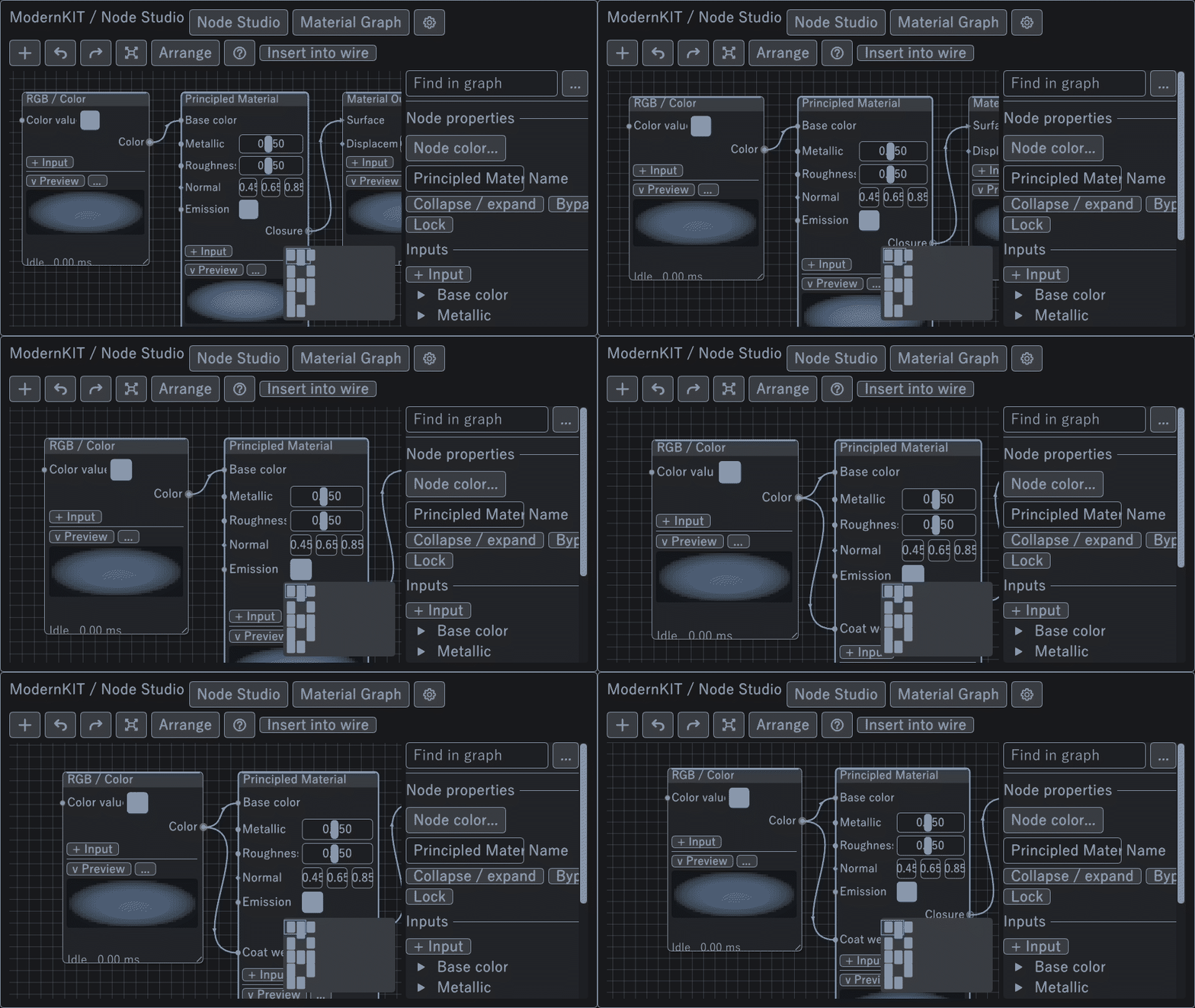
Fixes
- Invalid Timeline drop candidates are rejected before commit.
- Node Editor collapse handling and minimap input were corrected.
- macOS WindowFrame coordinate conversion and bundle resource handling were corrected.
Breaking changes and migration
- The ABI is pinned to Dear ImGui 1.93.0 WIP docking commit 367b2c24f399988ddafc0bb4628da0106bcc09be. Rebuild all ImKit-dependent translation units against that revision.
- OpenGL preview declarations moved to preview_opengl3.h. Replace Win32ActionSink with NativeActionSink.
- Dear ImGui 1.88 compatibility targets and legacy WindowFrame ABI paths were removed.
- Follow the v3 migration guide before upgrading.
Downloads
- Windows: x64 · Arm64
- macOS: Apple Silicon · Intel · Universal 2
- Source archive
- Validation evidence
- 52-second Gallery and Node Editor showcase
- Manifest · SHA-256 checksums
macOS packages are unsigned and not notarized. Automated checks do not establish physical input, native IME, screen-reader, mixed-DPI, or external-host acceptance.
日本語
v3.0では独立したNode Editorを追加し、制作ツール向けのWorkflowとEditor Suiteを拡張しました。
新機能
- 独立したNode Editor targetに、型付きlink、動的socket、値の直接編集、group、検索、minimap、preview、決定的なlayout helper、revision検証付きの編集要求を追加しました。graph model、検証、評価、Undo、保存はホスト側で管理します。
- WorkflowとEditor Suiteに、円形進捗、幅を変更できるInspector、Timelineのdrop候補preview、ホストtoolbarの配置契約を追加しました。
- Metal対応Gallery/preview、macOS WindowFrame/accessibility bridge、Windows/macOS向けpackageを追加しました。
修正
- Timelineで無効なdrop候補を確定できないようにしました。
- Node Editorの折りたたみ処理とminimapの入力を修正しました。
- macOS WindowFrameの座標変換とbundle内の資産配置を修正しました。
破壊的変更と移行
- ABIをDear ImGui 1.93.0 WIP docking commit 367b2c24f399988ddafc0bb4628da0106bcc09beに固定しました。ImKit依存translation unitをすべてこのrevisionに合わせて再buildしてください。
- OpenGL previewの宣言をpreview_opengl3.hへ分離しました。Win32ActionSinkはNativeActionSinkへ置き換わります。
- Dear ImGui 1.88互換targetと旧WindowFrame ABI pathを削除しました。
- 更新前にv3移行ガイドを確認してください。
ダウンロード
- Windows: x64 · Arm64
- macOS: Apple Silicon · Intel · Universal 2
- Source archive
- 検証記録
- 52秒のGallery/Node Editor showcase
- Manifest · SHA-256 checksums
macOS packageは未署名・未notarizeです。自動確認は実機入力、native IME、screen reader、mixed-DPI、外部アプリへの統合を保証しません。
ImKit v2.2.0 — try it before you integrate it
ImKit 2.2.0 — try it before you integrate it
Preview placement that communicates intent
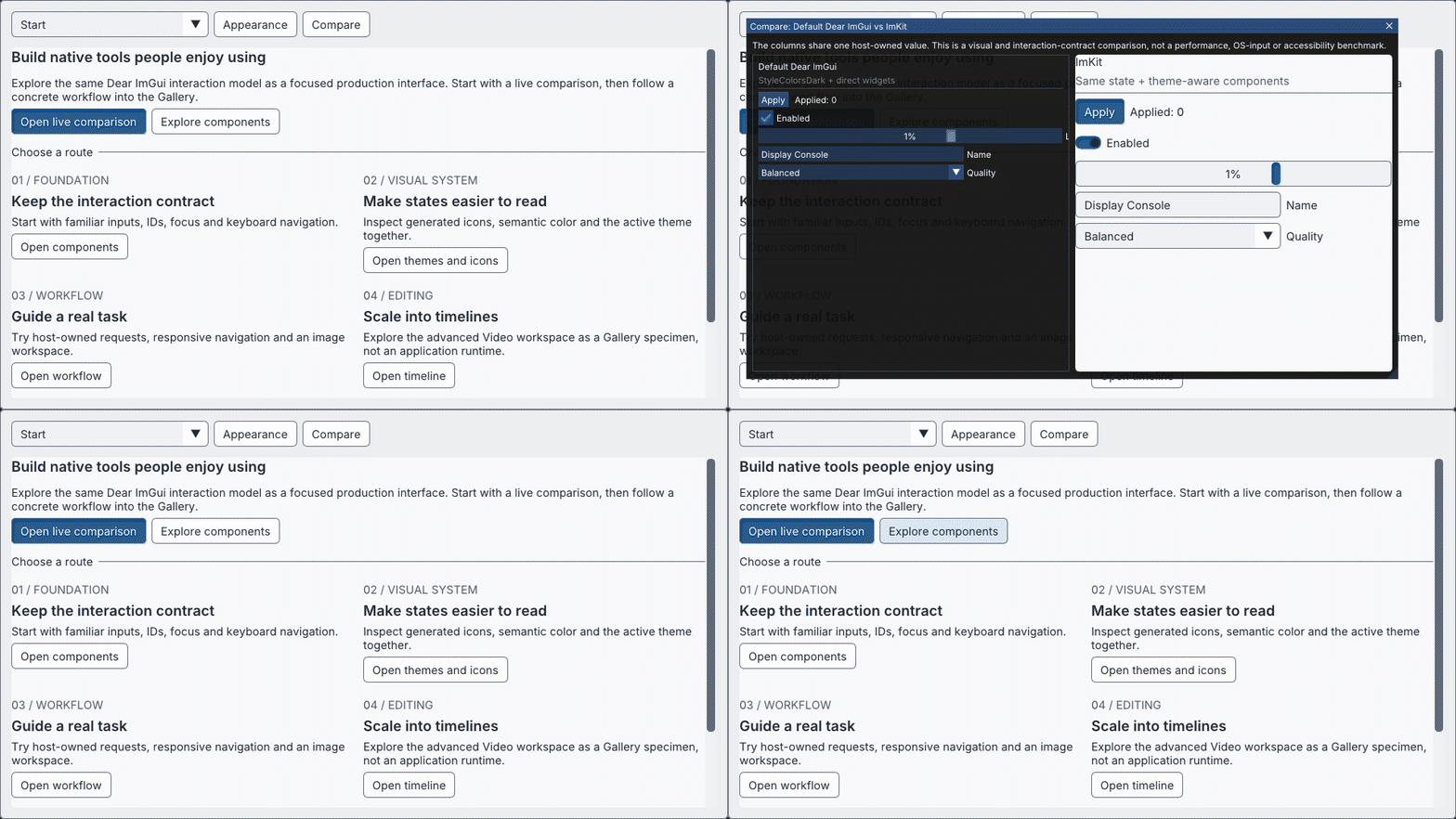
Choose Fit, Fill, or Stretch for each preview. Monitor presentation adds crop and vertical flip. Five explicit states—Ready, Loading, Empty, Offline, and Error—show whether media is ready, missing, or needs attention.
Workflow and Timeline
The release brings the guided Gallery comparison together with responsive Workflow controls and Timeline interaction. Gallery examples cover representative source and viewport aspect ratios.
Download and try
- Windows x64 Gallery
- Windows x64 MSVC v145 SDK
- Source archive
- Validation evidence
- Manifest · SHA-256 checksums
The release validation covered the target Debug/Release library and Gallery, API fixture, source and SDK consumers, and the Gallery shared-state comparison. Native OS/IME, physical DPI, live camera/media, and acceptance in individual host applications were outside that validation.
日本語
意図が伝わるPreview配置
PreviewごとにFit、Fill、Stretchを選べます。Monitorはcropと上下反転にも対応しました。Ready、Loading、Empty、Offline、Errorの5状態により、素材の準備状況やエラーを画面に示せます。
WorkflowとTimeline
目的別のGallery案内に、responsiveなWorkflow操作とTimeline操作をまとめました。Galleryではsourceとviewportの代表的なアスペクト比も確認できます。
ダウンロードして試す
検証対象はDebug/Release libraryとGallery、API fixture、source/SDK consumer、Galleryの共有状態比較です。native OS/IME、実機DPI、実camera/media、個別アプリへの統合受け入れは対象外です。
ImKit v2.1.0 — compare it live
ImKit 2.1.0 — compare it live
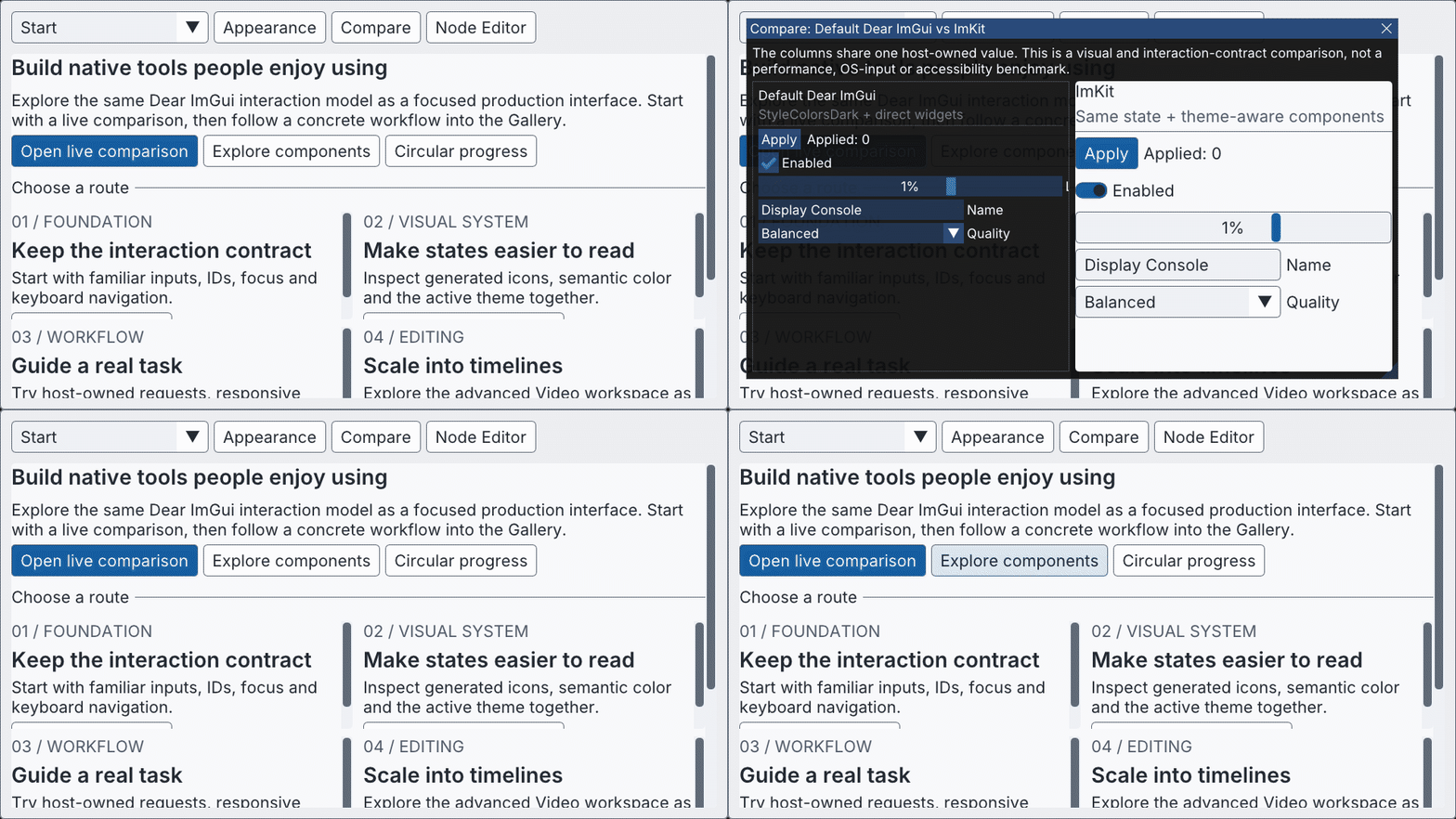
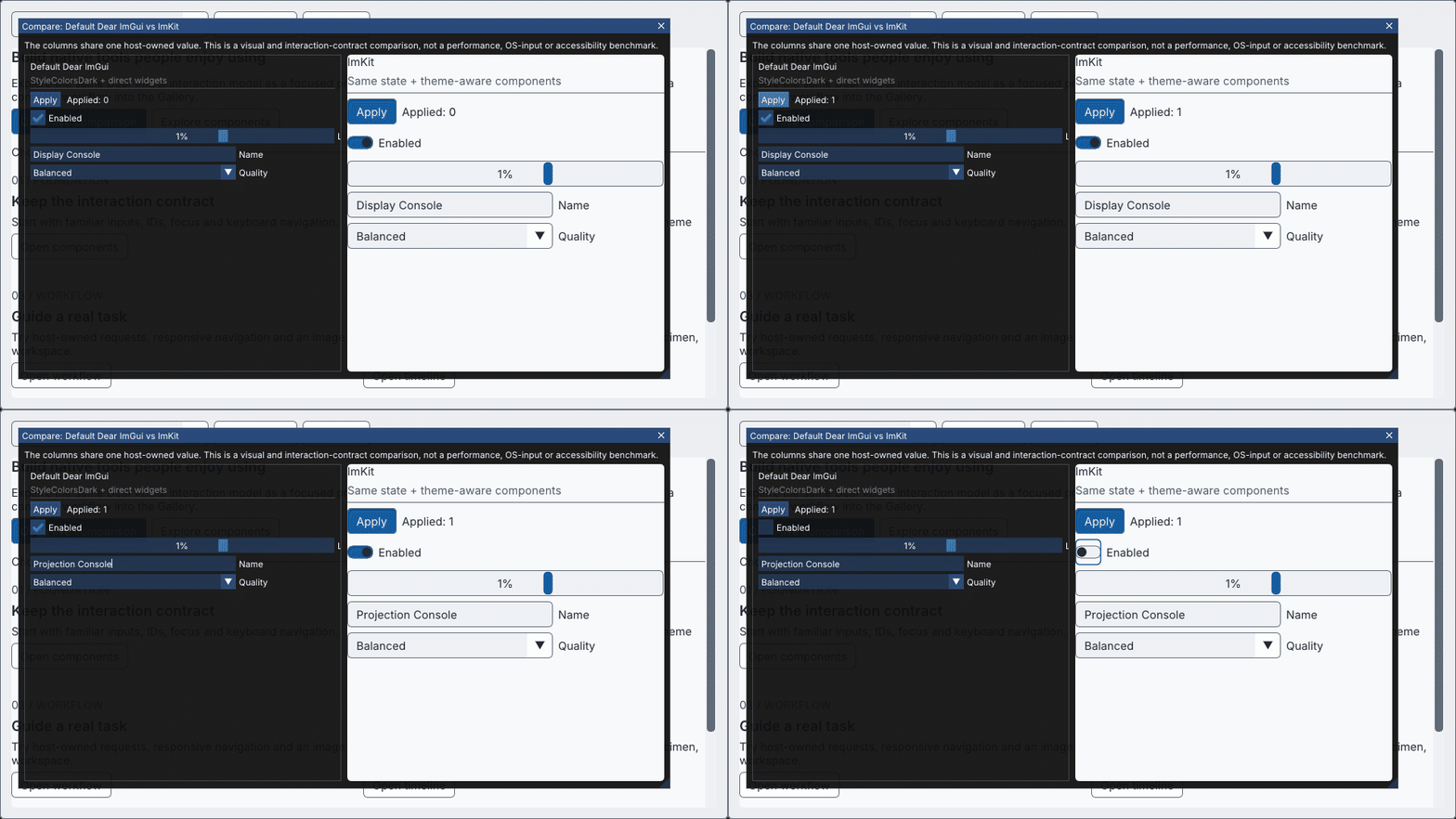
Start in the Gallery, put Default Dear ImGui and ImKit side by side, and operate both against the same host-owned values.
What’s new
- A guided Gallery Start screen opens a movable, resizable live comparison.
- Native capture routes cover the overview, comparison, theme palettes, Workflow feedback, and Timeline editing.
- The Windows x64 Gallery archive includes its required design assets, runtime dependency inventory, license, and third-party notices.
The comparison demonstrates appearance and interaction; it is not a performance, native OS/IME, or accessibility benchmark.
Download and try
- Windows x64 Gallery
- Windows x64 MSVC v145 SDK
- Source archive
- Validation evidence
- Manifest · SHA-256 checksums
日本語
GalleryからDefault Dear ImGuiとImKitを並べて、同じホスト所有値を操作できるリリースです。
追加機能
- GalleryのStart画面から、移動・resizeできるライブ比較を開けます。
- 概要、比較、Theme palette、Workflowのfeedback、Timeline編集を再生成可能なnative capture routeとして用意しました。
- Windows x64 Gallery archiveには、必要なdesign asset、runtime dependency一覧、license、第三者noticeを含めています。
比較は見た目と操作の例です。性能測定やnative OS/IME、accessibilityの検証ではありません。
ダウンロードして試す
imgui-modern-kit v2.0.0
ImKit 2.0.0
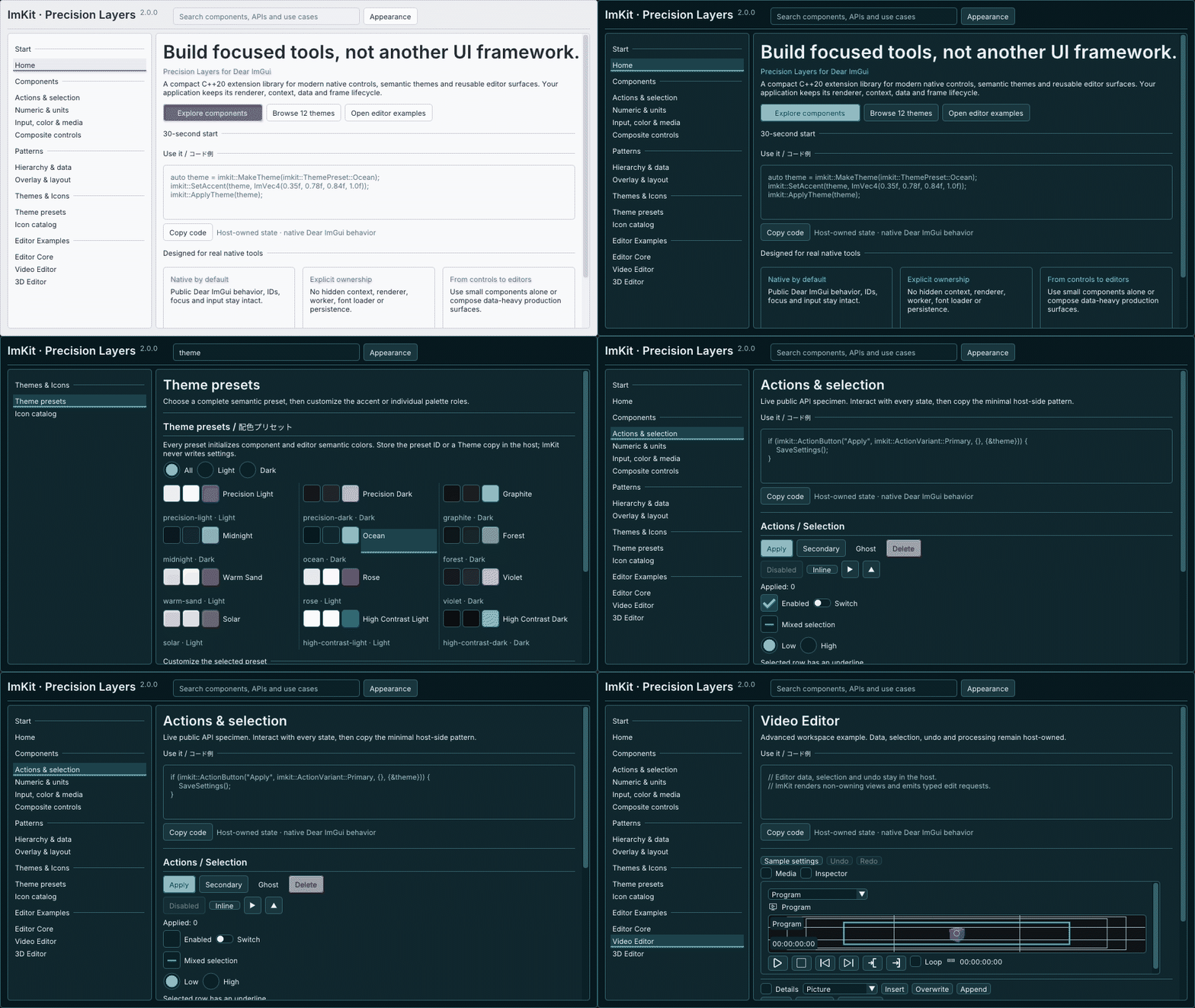
Version 2.0 combines a host-owned application shell with a broader Editor Suite and a refreshed native Gallery.
Added
- Reusable shell components: AppBar, WorkspaceHeader, InspectorSection, BottomActionBar, AdvancedSection, DiagnosticsDrawer, and ThemePicker.
- Expanded Editor Suite surfaces for timeline overview, source placement, host-owned undo/redo, waveform and pixel-envelope providers, property curves, and batch reservations.
- Twelve named themes with stable IDs, plus ThemePresetFromId for restoring a host-persisted preset. Gallery now opens on Components and offers searchable examples.
- Versioned Inter and Noto Sans JP assets with OFL notices, hashes, and a CMake copy helper. The host still owns the font atlas and GPU resource lifetime.
- Expanded source and Windows SDK packaging with installed-consumer verification.
Fixed
- Multi-clip Timeline edits validate the full selection before commit, preventing partial application when limits are reached.
- Clip and transition hit regions follow Dear ImGui layout and scale. Editing a deselected keyframe is rejected, and Inspector reset behavior is corrected.
Try it
The SDK is specifically built for Windows x64 / MSVC v145. Use the source archive when your platform or toolchain differs.
日本語
v2.0では、ホスト側で構成するアプリシェルとEditor Suiteを拡張し、ネイティブGalleryを刷新しました。
追加機能
- AppBar、WorkspaceHeader、InspectorSection、BottomActionBar、AdvancedSection、DiagnosticsDrawer、ThemePickerを追加しました。
- Timeline overview、素材配置、ホスト所有のUndo/Redo、waveformとpixel envelopeのprovider、property curve、batch reservationを追加しました。
- 安定ID付きの名前付きThemeを12種類用意し、ホスト側に保存したpresetを復元するThemePresetFromIdを追加しました。GalleryはComponents画面から開き、実例を検索できます。
- InterとNoto Sans JPのversion固定font資産に、OFL notice、hash、CMake配置helperを追加しました。font atlasとGPU資源の寿命は引き続きホストが管理します。
- 拡張したlibraryに合わせてsource/Windows SDK packageと、install後のconsumer確認を整えました。
修正
- 複数clipのTimeline編集はcommit前に選択範囲全体を検証し、上限に達した場合の部分適用を防ぐようにしました。
- clipとtransitionの入力領域をDear ImGuiのlayoutと倍率に合わせました。選択解除済みkeyframeの編集開始を拒否し、Inspectorのreset動作も修正しました。
試す・ダウンロード
SDKはWindows x64/MSVC v145向けです。異なるOSやcompilerではsource archiveを使用してください。
Precision Layers 0.2.0
Precision Layers 0.2.0
A C++20 static extension for Dear ImGui, with consistent theming and a broad set of reusable GUI controls.
Added
- Precision Layers applies light and dark semantic palettes, explicit UI scale, and font scopes across the public GUI families.
- 365 public GUI and helper overloads are tracked with signature and link coverage; the six original wrappers remain available.
- New controls include selection marks, action variants, switches, mixed selection, segments, searchable choices, units, settings rows, badges, notifications, and toolbars.
- An optional six-category live catalog demonstrates the controls, palette editing, Japanese glyph fallback, and public-input behavior.
Compatibility and downloads
This release targets Dear ImGui 1.92.9b docking, commit b48d1afbe8ee8b238e2961dc363a949dd7304e23. The Windows SDK is for x64 / MSVC v145 with Debug and Release variants. ImGui core is not included; use a matching host target. For other platforms, compilers, or ABI configurations, start from the source archive.
Debug/Release builds, API signatures, source and SDK consumers, representative public-input interactions, and native GPU captures were checked. Native OS/IME input, other platforms, and integration into another application were not tested.
日本語
Dear ImGui向けのC++20静的ライブラリです。統一したテーマと、再利用できるGUI部品を追加します。
追加機能
- 公開GUI部品群にPrecision Layersを適用し、light/darkの意味別palette、UI倍率、font scopeを追加しました。
- 公開GUI/helperの365 overloadをsignatureとlinkの両面から追跡し、従来の6 wrapperを維持しました。
- 選択mark、action variant、switch、mixed selection、segment、検索可能な選択欄、単位表示、設定行、badge、notification、toolbarを追加しました。
- 任意で起動できる6カテゴリのlive catalogで、部品、palette編集、日本語glyph fallback、公開入力の動作を確認できます。
互換性とダウンロード
Dear ImGui 1.92.9b docking commit b48d1afbe8ee8b238e2961dc363a949dd7304e23を対象とします。Windows SDKはx64/MSVC v145向けで、Debug/Release構成を収録しています。ImGui coreは含まないため、ホスト側に用意した対応targetを使用してください。ほかのOS、compiler、ABI構成ではsource archiveから導入してください。
Debug/Release build、API signature、source/SDK consumer、代表的な公開入力操作、native GPU captureを確認しました。native OS/IME入力、ほかのOS、別アプリへの組み込みは未検証です。