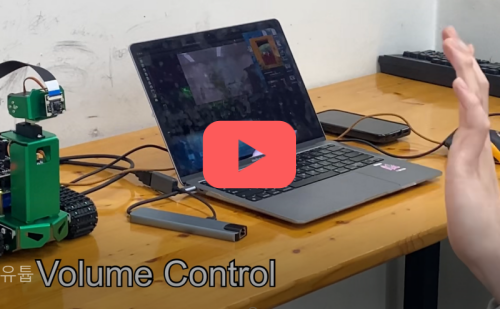
This project aims to build an AI machine that recognizes user gestures to control users' home appliances (e.g., laptop, TV, Audio) in real-life scenarios. Based on this code, Jetson Nano can recognize the user's hand and manipulates the operating system through gestures. The function of gestures are as follows:
- Volume Control
- Mute
- Unmute
- Capture
- Shutdown





- Update and Upgrade the APT and PIP
sudo apt-get update
sudo apt-get upgrade
pip3 install --upgrade pip- Download jetpack from Nvidia JetPack SDK
- We used version 4.6 / https://developer.nvidia.com/embedded/jetpack-sdk-46
- Create Boot image from Jetpack (We used Balena Etcher)
- Install Pytorch and Torchvision(https://forums.developer.nvidia.com/t/pytorch-for-jetson/72048)
- We used PyTorch v1.10.0 and torchvision v0.10.0
- if error with PIL deprecated, install Pillow < v7
- Pytorch Install
sudo apt-get install python3-pip libopenblas-base libopenmpi-dev libomp-dev
pip3 install Cython
pip3 install numpy torch-1.11.0-cp36-cp36m-linux_aarch64.whl- Torchvision Install
sudo apt-get install libjpeg-dev zlib1g-dev libpython3-dev libavcodec-dev libavformat-dev libswscale-dev
git clone --branch v0.11.0 https://github.com/pytorch/vision torchvision
cd torchvision
export BUILD_VERSION=0.11.0
python3 setup.py install --user
pip3 install 'pillow<7'- Install Mediapipe
sudo apt-get install libhdf5-serial-dev hdf5-tools libhdf5-dev \
zlib1g-dev zip libjpeg8-dev liblapack-dev libblas-dev gfortran
sudo pip3 install -U pip testresources setuptools==49.6.0sudo pip3 install -U --no-deps numpy==1.19.4 future==0.18.2 mock==3.0.5 \
keras_preprocessing==1.1.2 keras_applications==1.0.8 gast==0.4.0 \
protobuf pybind11 cython pkgconfigsudo env H5PY_SETUP_REQUIRES=0 pip3 install -U h5py==3.1.0Install OpenCV
sudo apt-get install python3-opencvTest the OpenCV
import cv2
print(cv2.getBuildInformation())
Check for GSTREAMER support in VIDEO I/O section
GStreamer: YES (1.14.5)tree/master/scriptIncrease swap for more swap ram
git clone https://github.com/JetsonHacksNano/installSwapfile.git
cd installSwapfile
./installSwapfile.sh
Install Mediapipe
sudo apt-get install -y libopencv-core-dev  libopencv-highgui-dev libopencv-calib3d-dev libopencv-features2d-dev libopencv-imgproc-dev libopencv-video-dev
sudo chmod 744 setup_opencv.sh
./setup_opencv.sh
sudo pip3 install opencv_contrib_python
Download Files https://drive.google.com/file/d/1lHr9Krznst1ugLF_ElWGCNi_Y4AmEexx/view?usp=sharing
unzip mediapipe-bin.zip
cd mediapipe-bin
sudo pip3 install numpy-1.19.4-cp36-none-manylinux2014_aarch64.whl mediapipe-0.8.5_cuda102-cp36-none-linux_aarch64.whl
pip3 install dataclasses
5-1. (Optional) If you wanna input CSI Camera video source, install OpenCV using this method
- Reference : https://github.com/AastaNV/JEP/
wget https://raw.githubusercontent.com/AastaNV/JEP/master/script/install_opencv4.5.0_Jetson.sh
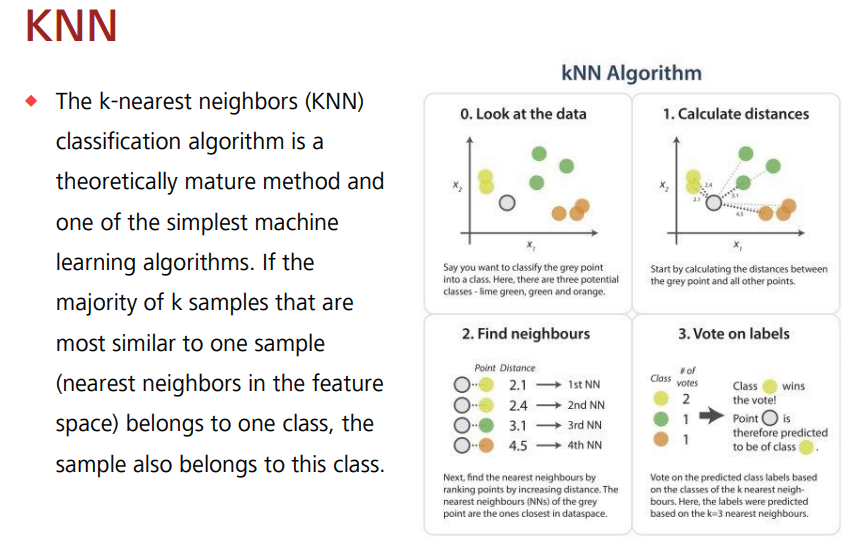
./install_opencv4.5.0_Jetson.sh- The K-Nearest Neighbor (K-NN) algorithm is the simplest machine learning algorithm, classification algorithm. Data with similar characteristics are used under the assumption that they tend to fall into similar categories.
- Code for socket communication with server
clientSock = socket(AF_INET, SOCK_STREAM)
clientSock.connect(('172.20.10.3', 7777))
rps_gesture = {0:'mute', 5:'unmute', 9:'capture', 10:'fix'}- Code for Live Video Capture
cap = cv2.VideoCapture('nvarguscamerasrc ! video/x-raw(memory:NVMM), width=1280, height=720, format=(string)NV12, framerate=(fraction)20/1 ! nvvidconv ! video/x-raw, format=(string)BGRx ! videoconvert ! video/x-raw, format=(string)BGR ! appsink', cv2.CAP_GSTREAMER)- Run while live capture continues
while live capture
while cap.isOpened():
        success, image = cap.read()

        if not success:
            print("can't open video")
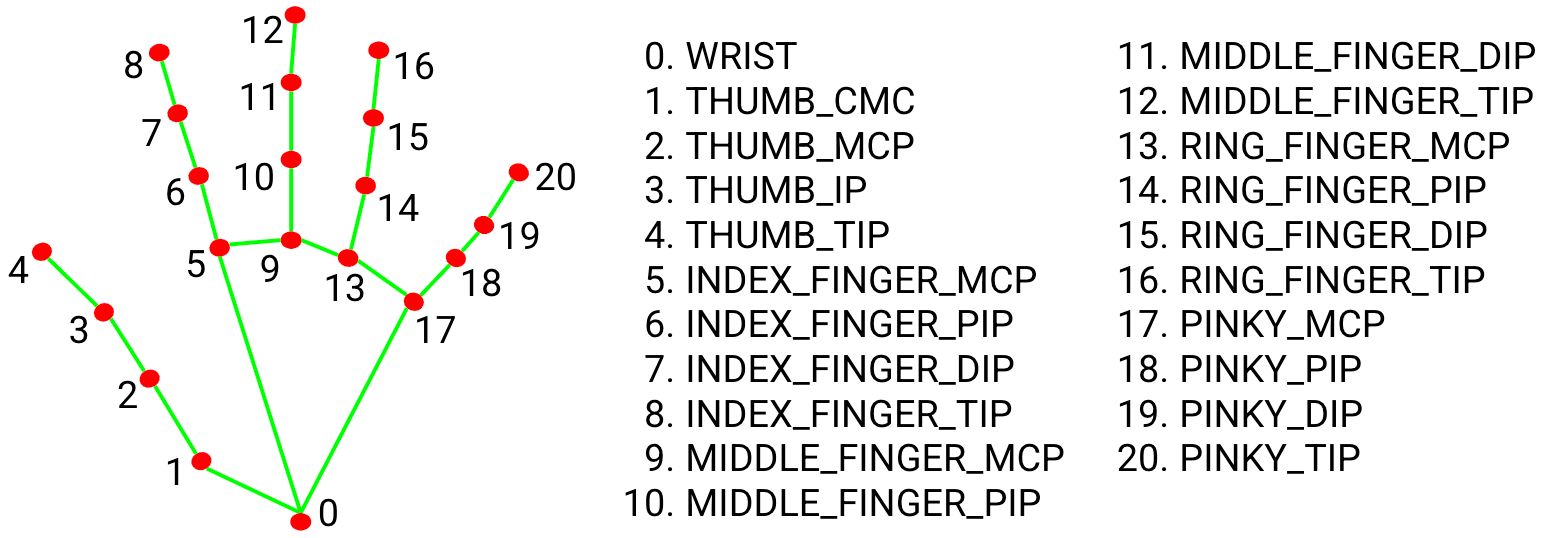
continue- Compute angles between joints, Get angle using arcos of dot product, then Translate certain numeric codes to the server in utf-8 and send them to Socat communication
Code for socket communication with server
 if results.multi_hand_landmarks is not None:
            for res in results.multi_hand_landmarks:
                joint = np.zeros((21, 3))
                for j, lm in enumerate(res.landmark):
                    joint[j] = [lm.x, lm.y, lm.z]

                # Compute angles between joints
                v1 = joint[[0,1,2,3,0,5,6,7,0,9,10,11,0,13,14,15,0,17,18,19],:] # Parent joint
                v2 = joint[[1,2,3,4,5,6,7,8,9,10,11,12,13,14,15,16,17,18,19,20],:] # Child joint
                v = v2 - v1 # [20,3]
                # Normalize v
                v = v / np.linalg.norm(v, axis=1)[:, np.newaxis]

                # Get angle using arcos of dot product
                angle = np.arccos(np.einsum('nt,nt->n',
                    v[[0,1,2,4,5,6,8,9,10,12,13,14,16,17,18],:],
                    v[[1,2,3,5,6,7,9,10,11,13,14,15,17,18,19],:])) # [15,]

                angle = np.degrees(angle) # Convert radian to degree

                # Inference gesture
                data = np.array([angle], dtype=np.float32)
                ret, result, neighbours, dist = knn.findNearest(data, 4)
                idx = int(result[0][0])

                # Draw gesture result
                if idx in rps_gesture.keys():

                    print("idx : ", idx)
                    if idx == 0:
                        print("mute")
                        clientSock.send(str(1111).encode('utf-8')) //Translate certain numeric codes to the server in utf-8 and send them to Socat communication

                    elif idx == 5:
                        print("unmute")
                        clientSock.send(str(2222).encode('utf-8'))

                    elif idx == 9 :
                        print("capture")
                        clientSock.send(str(3333).encode('utf-8'))

                    elif idx == 10 :
                        print("shutdown")
                        clientSock.send(str(4444).encode('utf-8'))

                    cv2.putText(image, text=rps_gesture[idx].upper(), org=(int(res.landmark[0].x * image.shape[1]), int(res.landmark[0].y * image.shape[0] + 20)), fontFace=cv2.FONT_HERSHEY_SIMPLEX, fontScale=1, color=(255, 255, 255), thickness=2)

                # Other gestures
                # cv2.putText(img, text=gesture[idx].upper(), org=(int(res.landmark[0].x * img.shape[1]), int(res.landmark[0].y * img.shape[0] + 20)), fontFace=cv2.FONT_HERSHEY_SIMPLEX, fontScale=1, color=(255, 255, 255), thickness=2)

mp_drawing.draw_landmarks(image, res, mp_hands.HAND_CONNECTIONS)- Code for socket communication with client
def recieve_data(val):
    serverSock = socket(AF_INET, SOCK_STREAM)
    serverSock.bind(('', 7777))
    serverSock.listen(1)
    connectionSock, addr = serverSock.accept()
print("Client address : ", str(addr))- Decode specific numeric codes passed from the client to perform corresponding actions
while True:
        print("val : ", val.value)
        try :
            vol = int(connectionSock.recv(4).decode('utf-8'))
            if vol == 1111:
                print("mute")
                osascript.osascript('set volume output muted TRUE')
                val.value = 0
                while True:
                    vol = int(connectionSock.recv(4).decode('utf-8'))
                    if vol == 2222:
                        osascript.osascript('set volume output muted FALSE')
                        break

            if vol == 3333:
                print("screenshot")
                os.system("screencapture screen.png")
                vol = 0

            if vol == 4444:
                print("fix volume")
                osascript.osascript('tell app "System Events" to shut down')
                time.sleep(5)
            if vol < 300:
                val.value = vol
        except:
            pass