Repository navigation
Jasypt usage guide & security principles explained
Jasypt is a library which allows us to add basic encryption capabilities to our projects with the minimum effort.
I'll explain briefly how the algorithm works as well as the principles it follows.
In almost every case, there's absolutely no reason for a password being decrypted. If you use password-based encryption (which is a two-way technique) and anyone gets to know your encryption password, all the passwords you've encrypted that way will be revealed. If you don't have such key to be able to decrypt, the risk simply dissapears (an attacker will then have to use different and less effective strategies, like brute force).
If a user loses his password, you can reset it to a new value and send him an email, but never remind it to them. You shouldn't even have a way to get your user's passwords, no matter what.
Several digesting algorithms can be applied, like MD5, or SHA family variants.
When a user enters his password at login, the input will be digested in the same way we did when storing the password, and then compare both digests. Two equal inputs will have equal digests, but it doesn't work in the opposite direction.
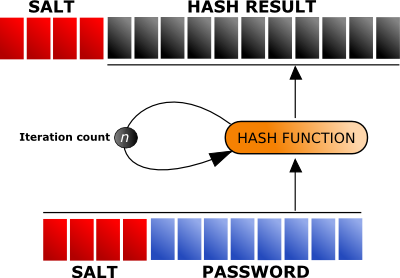
The salt is a sequence of bits added to the password before being digested. This makes digests to be different to what they would be if we encrypted the password alone, giving us protection against dictionary attacks.
Two different types of salt can be used: fixed or variable. In the case of using fixed salt, we would have to protect and store it, making it vulnerable to possible attacks. Variable salt is a better idea.
If we use a variable salt, its being random will force us to store it unencrypted along with the digest, so that we can recover it. This makes it trivial for attackers to know it, but our user's passwords would still remain decoupled from the rest, so that they would have to be attacked separately.
The minimum recommended size of salt is 8 bytes. If a mixed approach is used (a portion of the salt being fixed, and a portion being random), at least 8 of its bytes should be random.
The iteration count refers to the number of times that the hash function with which we are digesting is applied to its own results.
| Performed on | Description | Defense | |
|---|---|---|---|
| Brute force attacks | Single user password | The attacker tries to get the user's password by exhaustively generating all possible passwords, digesting them and testing if they match with the user's password digest | By iterating the hash function i.e. 1000 times, the extra cost of creating the digest at sign up is not significant, but the accumulated cost for an attacker is huge |
| Dictionary attacks | Single user password or database of user passwords as a whole | The attacker tries to get the user's password by matching its digest against a set of most possible password digests, typically generated from a list of words in a dictionary | By adding a random salt, the weakness of dictionary-based passwords many people use is reduced |
| Birthday attacks | Databse of users passwords as a whole | Having a large set of user password digests, the probability of generating a password which digest collides with at least one of the digests in the set is relatively high, and increases with the number of users | By adding a random salt, its possiblities to succeed are minimum, since the attacker would have to attack each password separately, and not the set as a whole |
Using Jasypt is very easy. We're going to see the code needed to encrypt and to check a password.
StrongPasswordEncryptor passwordEncryptor = new StrongPasswordEncryptor();
String encryptedPassword = passwordEncryptor.encryptPassword(userPassword);
if (passwordEncryptor.checkPassword(inputPassword, encryptedPassword)) {
  // correct!
} else {
  // bad login!
Official Jasypt documentation