Add Internote Linking #1145
Add Internote Linking #1145
Conversation


# Conflicts:
#	Simplenote/src/main/java/com/automattic/simplenote/InfoBottomSheetDialog.java
#	Simplenote/src/main/java/com/automattic/simplenote/NoteListFragment.java
#	Simplenote/src/main/java/com/automattic/simplenote/NoteMarkdownFragment.java
 theck13
added
[Type] Enhancement
theck13
requested review from
AmandaRiu,
SylvesterWilmott,
anitaa1990 and
mchowning
theck13
added
[Type] Enhancement
theck13
requested review from
AmandaRiu,
SylvesterWilmott,
anitaa1990 and
mchowning

|
All looks great to me. A couple of things:
|

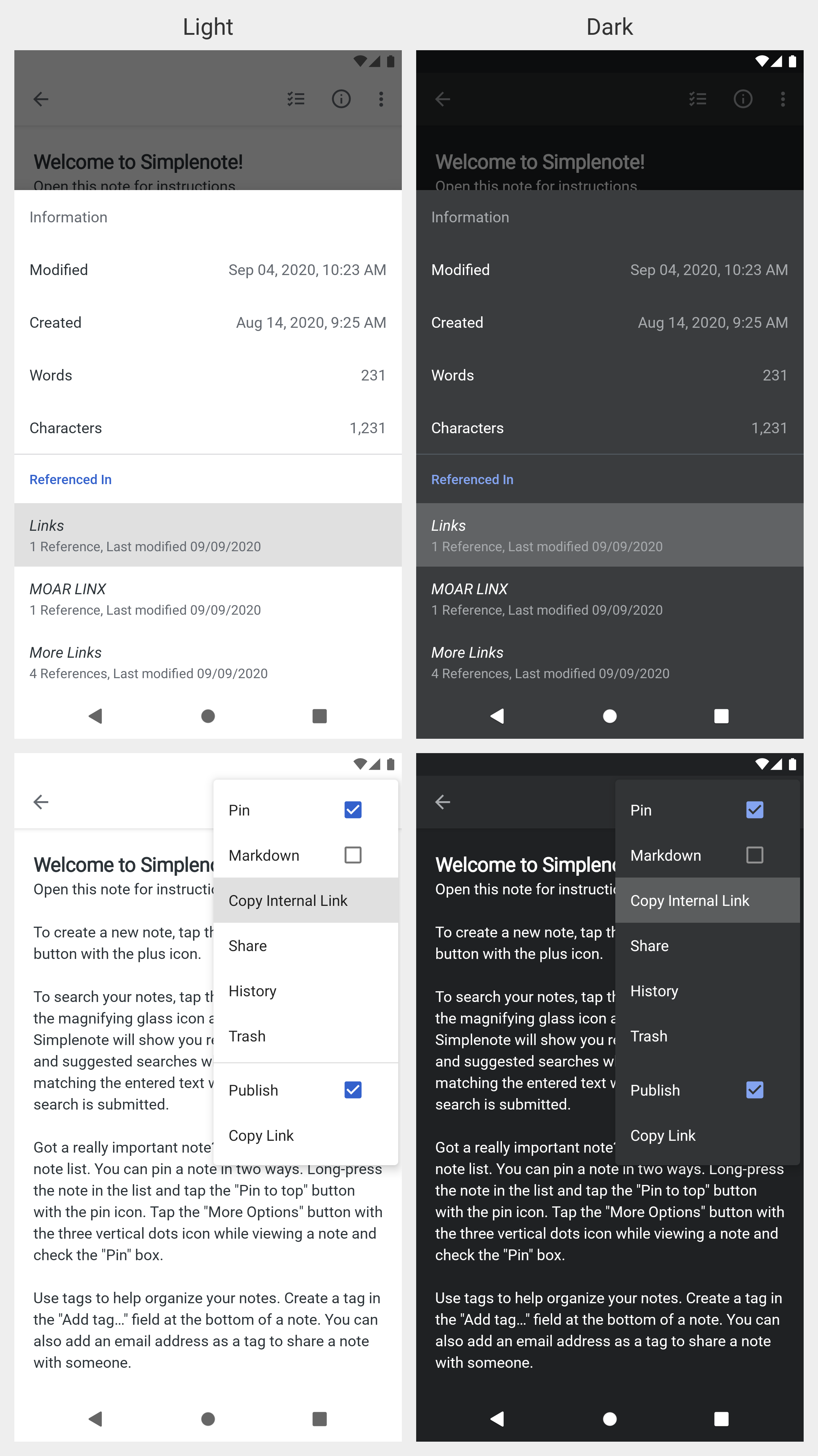
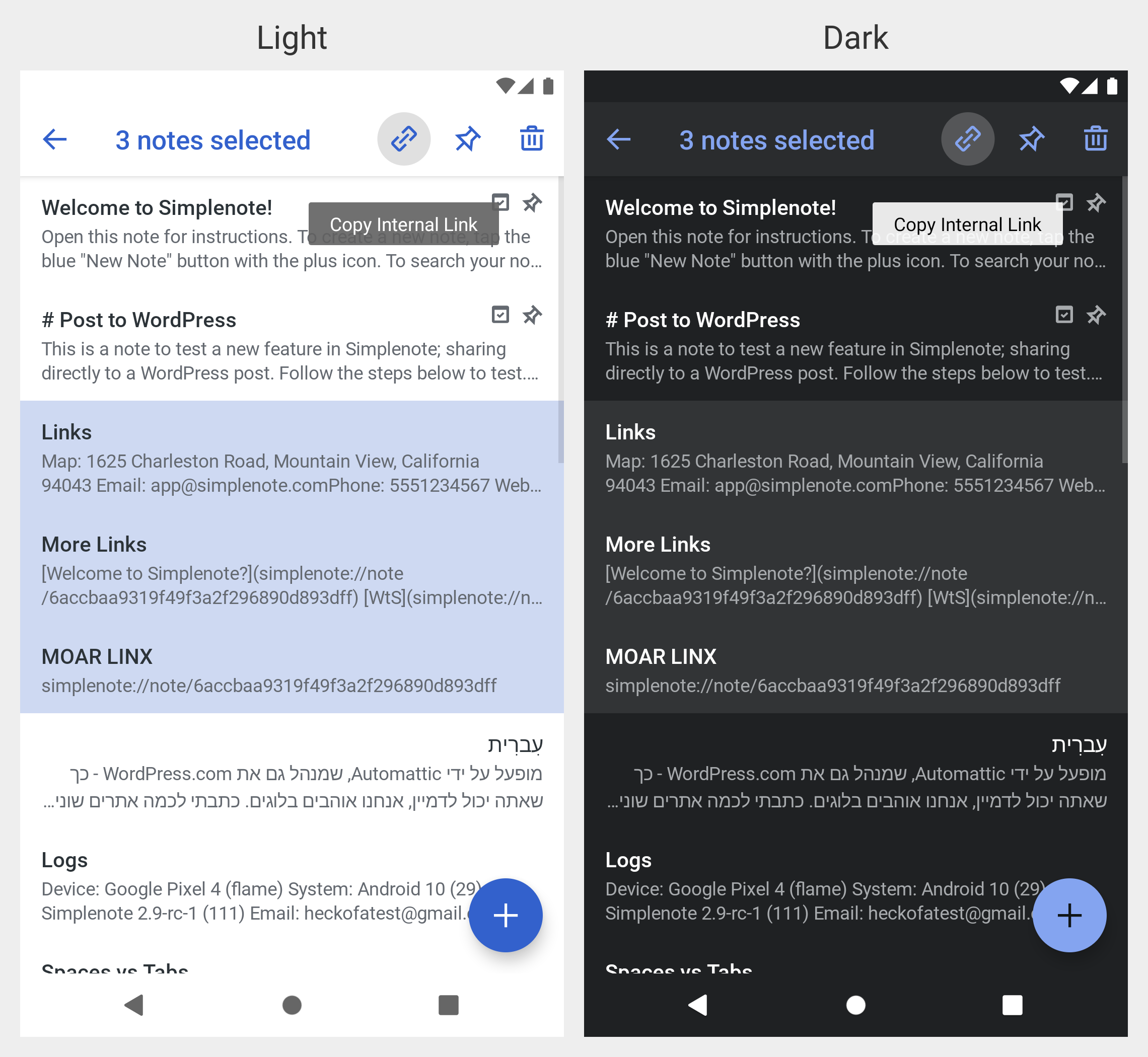
I updated the touch feedback in 891981c. See the screenshots below for illustration.
I updated the action hint in ac8d09f. See the screenshots below for illustration.
|


 mchowning
left a comment
mchowning
left a comment
mchowning
left a comment
There was a problem hiding this comment.
Manually editing a "selected" link does not change the behavior of the open link app bar button
I think there is an edge case involving manually editing a link that could confuse some users. In particular, the link's "behavior" does not appear to update as you edit it. I think the easiest way to describe the issue is just via the steps to reproduce:
- Open a note in markdown mode with a correct internal link
- Tap anywhere in the internal link so the app bar updates with the link info
- Edit the internal link to make it invalid (i.e., delete a character in the id)
- Tap the open internal link icon on the app bar
- Observe that the link succeeds and opens the linked-to note even though the as-edited link that is actually in the note is no longer valid
- Check "information->referenced in" for the just-opened-via-internal-link note and observe that the previous note (with the invalid link that just worked) is not included (which makes sense in light of the fact that the link is invalid)
- Return to the note with the now-incorrect internal link
- Tap anywhere in the internal link so the app bar updates with the (incorrect) link info
- Edit the internal link to be correct
- Tap the open internal link icon on the app bar
- Observe that the internal link fails even though the just-edited internal link that is in the note is actually correct.
- Tap anywhere in the note other than the now-valid internal link
- Tap the now-valid internal link
- Observe that tapping the app bar button to open the internal link now works
It does appear that this is a pre-existing issue because I observed the same behavior with external links, so let me know if you'd prefer to address this in a separate PR and I can log an issue for it.
Going back after following an internal link
I was a bit surprised that opening a new note via a link and then going back via the back gesture didn't take me back to the previous note I had just come from. This was particularly noticeable to me when I was previewing a markdown note (so opening a link only required tapping it) because I was just sort of assuming that it would act like a web browser. I realize this is probably the intended behavior--I just wanted to note that it was a bit surprising/unexpected to me.
Strangeness I experienced unrelated to this PR
Uninstalling Simplenote
When attempting to build this branch and install it I got the standard install-failed-because-downgrade type of error, so I uninstalled both the debug and release versions of the app. I still go the same error though when I tried to build and install again. I verified that there weren't any simplenote icons in my app drawer, so I went into settings and opened the apps and there I saw that there was a Simplenote app. Uninstalling that cleared everything up. I'm sure this is just some weird consequence of me having different versions of the app installed, but it's not something I've seen before (and of course there's always the possibility that I didn't really uninstall both of the apps when I thought I did), but I was just curious if this is something you've ever seen before. I also wanted to note this as relevant background for the following issue I observed...
Links not being detected
When initially testing this, internal links were not being linkified in the note. In fact, no links were being linkified (i.e., not even something like Some link). So then I went into the settings and verified that detect links was toggled on. Since that setting was right I did the standard unplug-and-plug-it-back-in move (i.e., toggled it off and then back on). Then I opened up the same note I was looking at before and the links were properly detected (both internal links and external links). I doubt this issue has anything to do with the PR, and I don't know how I got into this bad state, but I wanted to note it in case it rings any bells or you get more reports like this.
If you'd like me to file an issue for this, just let me know. I held off on doing that yet because I wasn't sure how useful it would be since I don't have steps to reproduce.
Simplenote/src/main/java/com/automattic/simplenote/models/Reference.java
Show resolved
Hide resolved
| android:background="?attr/selectableItemBackground" | ||
| android:layout_height="wrap_content" | ||
| android:layout_width="match_parent" | ||
| android:orientation="vertical" |
There was a problem hiding this comment.
A RelativeLayout doesn't use orientation, right? I'm guessing this is just a leftover from a time when this was a LinearLayout.
There was a problem hiding this comment.
Correct. That was probably just a copy/paste error. I remove the attribute in 1be0b02.

There was a problem hiding this comment.
Manually editing a "selected" link does not change the behavior of the open link app bar button
I updated the link text in 178a5f17.
Going back after following an internal link
That is expected behavior. If we added a note instance to a stack rather than replacing the current note with the linked note, we could get into two scenarios which may be confusing.
If an internote link is tapped on every note instance ten times, you would have to tap back ten times to get to the note list. That's not so bad when you tap a few internote links, but it may become more frustrating the more internote links you tap. Similarly, if Note A has an internote link to Note B and Note B has an internote link to Note A, tapping the internote links multiple times could make you lose track of where you are. Take the steps below for example.
- Open Note A.
- Tap internote link to Note B.
- Tap internote link to Note A.
- Tap internote link to Note B.
- Tap internote link to Note A.
- Tap internote link to Note B.
- Tap internote link to Note A.
You may not remember how many times you tapped an internote link, which would require you to tap back indefinitely. It would be even more confusing since the same two notes would be shown on every tap. It would appear more like a bug than the intended behavior. We decided that's not the best user experience and opted to always show the note list when back is tapped.
Uninstalling Simplenote
I've never seen that even though I always have both debug and release apps installed on my device. If that happens again, we should investigate it some more.
Links not being detected
I haven't seen that behavior either. If the Detect links setting is enabled, links are always shown in the editor. I'm wondering if it's related to the uninstalling issue you had above. Maybe the build variant was set to release rather than debug and your settings were crossing somehow? One thing I have seen with links is that it may take a second or two to set the link spans when a note is first opened. That is due to two things; the note content is saved after a two-second debounce and linkifying large notes takes time. The linking after a two-second debounce usually happens when the note content is edited outside of the Android app and the server pushes the changes to Android. In that case, the content is updated in the editor and the links are refreshed with the content. The linking of large notes is a known issue without a known solution. Parsing a large amount of content and linkifying it has been a performance issue for a long time.
Simplenote/src/main/java/com/automattic/simplenote/models/Reference.java
Show resolved
Hide resolved
| android:background="?attr/selectableItemBackground" | ||
| android:layout_height="wrap_content" | ||
| android:layout_width="match_parent" | ||
| android:orientation="vertical" |
There was a problem hiding this comment.
Correct. That was probably just a copy/paste error. I remove the attribute in 1be0b02.
mchowning
left a comment
mchowning
left a comment
There was a problem hiding this comment.
Updates look good, and everything is working as expected! 🎉
We decided that's not the best user experience and opted to always show the note list when back is tapped.
I figured that was an intentional decision. Thanks for sharing the thinking behind it. 👍
I'm wondering if [the links not being linkified is] related to the uninstalling issue you had above.
That wouldn't surprise me.
One thing I have seen with links is that it may take a second or two to set the link spans when a note is first opened.
I've observed that, but I'm pretty confident that's not what I saw in this case.


Fix
Add internote linking with markdown syntax (e.g.
[Title](simplenote://note/d34db3ef)). These changes include:Test
In the steps below, the
simplenote://note/d34db3efinternote link is used as an example. Thed34db3efpart of the internote link will be the unique identification number for the note.Copy Internal Note Links
simplenote://note/d34db3efpart of note is linkified.Open Linked Notes
simplenote://note/d34db3efpart of internote link.simplenote://note/d34db3efsubtitle in app bar.d34db3efidentification number is opened.simplenote://note/d34db3efpart is hidden.d34db3efidentification number is opened.d34db3efpart of internote link to1234abcd.simplenote://note/1234abcdpart of internote link.List Inbound Linked Notes
Review
Only one developer and one designer are required to review these changes, but anyone can perform the review.
Release
RELEASE-NOTES.txtwas updated in a7ccc74 with: