Describe the bug
When using AzOps template repo, the default Workflow permissions settings might not be correct.
The default setting are set to read for all scopes:
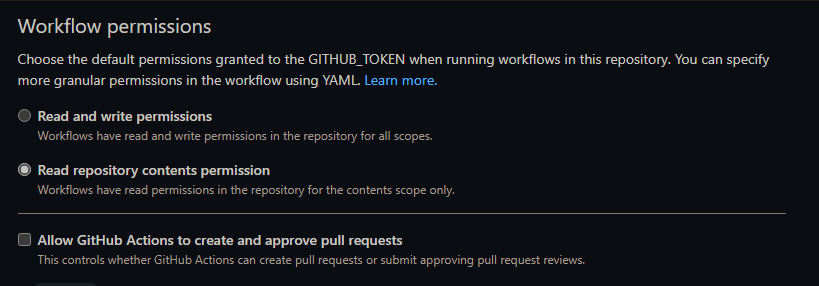
Tested using the adventureworks accelerator template, the first pull action fails with:
Run git push origin automated -f
remote: Write access to repository not granted.
fatal: unable to access ' https://github.com/rahul-ve/eslzxx/': The requested URL returned error: 403
Error: Process completed with exit code 128.
I played around with the permissions on different scopes, this changed the error to:
Run gh pr create --title "Automated State" --body "-" --base 'main' --head automated
pull request create failed: GraphQL: GitHub Actions is not permitted to create or approve pull requests (createPullRequest)
Error: Process completed with exit code 1.
I used below permissions based on this file sample workflow:
permissions:
  id-token: write
  contents: write
  pull-requests: write
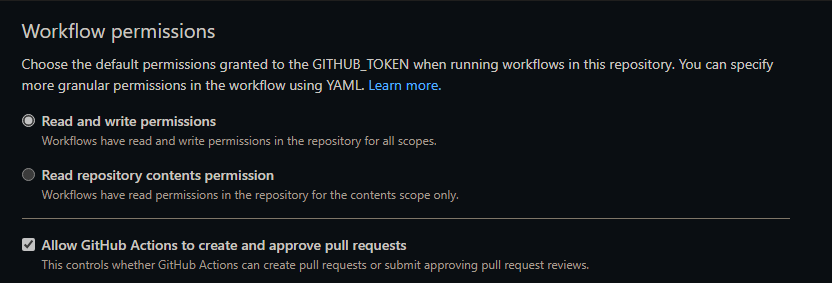
Above error was resolved after checking the option "Allow GitHub Actions to create and approve pull requests".
This option cannot be enabled if it is disabled at the GitHub organization level. This change was introduced recently to plug a security issue.
I looked at one of the previous deployments and the workflow settings there were:
Steps to reproduce
- Use the adventureworks accelerator template to deploy
- First pull should fail with permission issues.
The AzOps GitHub Actions wiki page might be missing some details.
Thanks
Rahul

Describe the bug
When using AzOps template repo, the default Workflow permissions settings might not be correct.

The default setting are set to read for all scopes:
Tested using the adventureworks accelerator template, the first pull action fails with:
I played around with the permissions on different scopes, this changed the error to:
I used below permissions based on this file sample workflow:
Above error was resolved after checking the option "Allow GitHub Actions to create and approve pull requests".
This option cannot be enabled if it is disabled at the GitHub organization level. This change was introduced recently to plug a security issue.
I looked at one of the previous deployments and the workflow settings there were:

Steps to reproduce
The AzOps GitHub Actions wiki page might be missing some details.
Thanks
Rahul