From the Blender plugin, i call:
ms-batchlabs://route/pools?session=90d5d98a-5906-4cb3-b1bf-ce091c57782c
Which opens the pools page. Now, if i want to open the jobs page i call:
ms-batchlabs://route/jobs?session=90d5d98a-5906-4cb3-b1bf-ce091c57782c
This executes the route in the same application instance, which is great, but the application doesn't load the new page correctly.
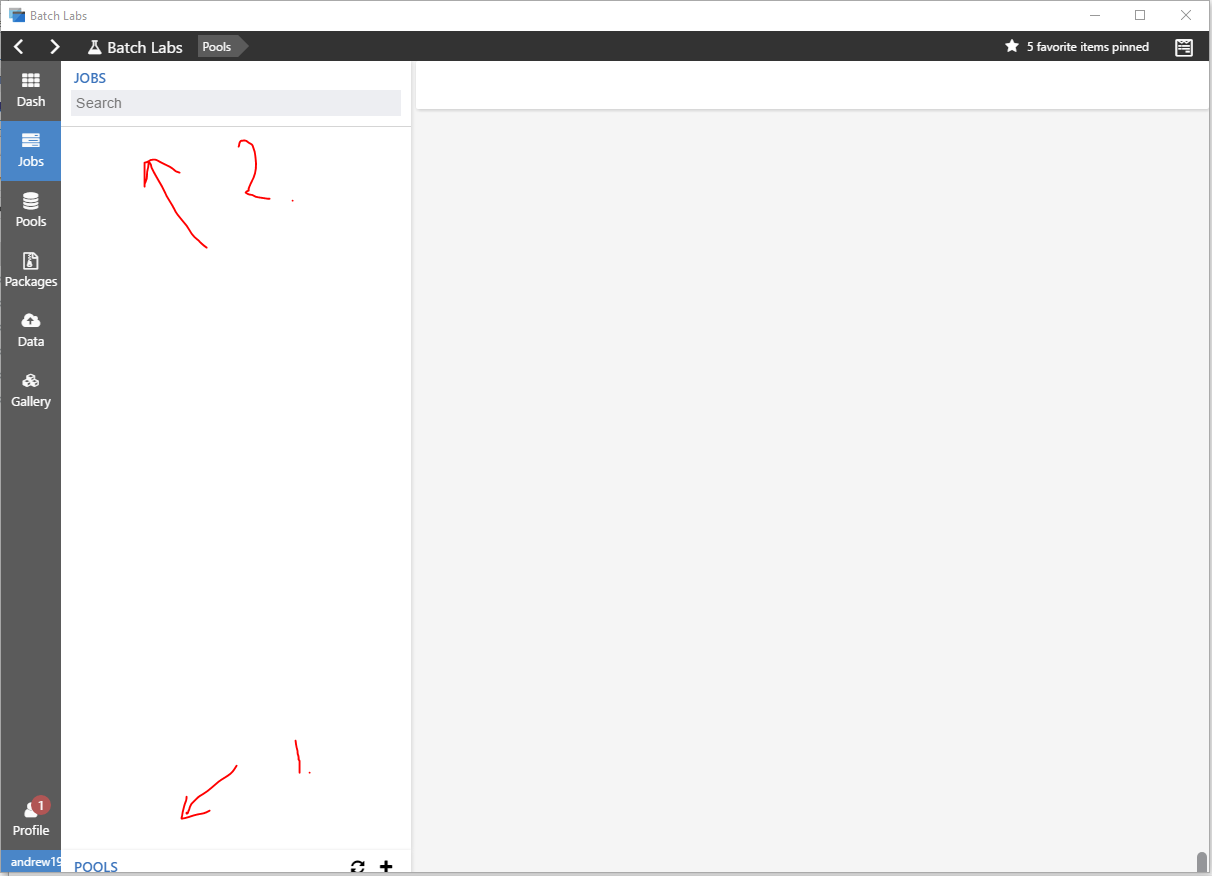
You can see by the screenshot that the jobs page loads and just pushes the pools page down. There is no content and no errors in the console.
The issue fixes itself as soon as you either hover over the minimize toolbar button, or resize the application window. So it would seem that its a re-draw issue.
Andrew
Edit: this happens when you load any page, not just the pages i outlined above. The first one is always fine and the second causes the issue.


From the Blender plugin, i call:
ms-batchlabs://route/pools?session=90d5d98a-5906-4cb3-b1bf-ce091c57782c
Which opens the pools page. Now, if i want to open the jobs page i call:
ms-batchlabs://route/jobs?session=90d5d98a-5906-4cb3-b1bf-ce091c57782c
This executes the route in the same application instance, which is great, but the application doesn't load the new page correctly.
You can see by the screenshot that the jobs page loads and just pushes the pools page down. There is no content and no errors in the console.
The issue fixes itself as soon as you either hover over the minimize toolbar button, or resize the application window. So it would seem that its a re-draw issue.
Andrew
Edit: this happens when you load any page, not just the pages i outlined above. The first one is always fine and the second causes the issue.