[BUG] Listing or creating AKS clusters fails with certificate error for some users #160

Description

Describe the bug
Some AKS HCI powershell commands fails with error transport: authentication handshake failed: x509: certificate signed by unknown authority
Get-AksHciCluster returns
C:\Program Files\AksHci\kvactl.exe cluster get --clustername=970f5bc6-4e69-4f1e-b4d7-873fef596887
--kubeconfig="c:\ClusterStorage\Volume01\1.0.6.11122\kubeconfig-mgmt" System.Collections.Hashtable.generic_non_zero 1
[Error: failed to get new provider: failed to create azurestackhci session: rpc error: code = Unavailable desc =
connection error: desc = "transport: authentication handshake failed: x509: certificate signed by unknown authority"]
At C:\Program Files\WindowsPowerShell\Modules\Kva\1.0.17\Common.psm1:2162 char:9
+         throw $errMessage
+         ~~~~~~~~~~~~~~~~~
    + CategoryInfo          : OperationStopped: (C:\Program File...own authority"]:String) [], RuntimeException
    + FullyQualifiedErrorId : C:\Program Files\AksHci\kvactl.exe cluster get --clustername=970f5bc6-4e69-4f1e-b4d7-873
   fef596887 --kubeconfig="c:\ClusterStorage\Volume01\1.0.6.11122\kubeconfig-mgmt" System.Collections.Hashtable.gener
  ic_non_zero 1 [Error: failed to get new provider: failed to create azurestackhci session: rpc error: code = Unavai
 lable desc = connection error: desc = "transport: authentication handshake failed: x509: certificate signed by unk
nown authority"]
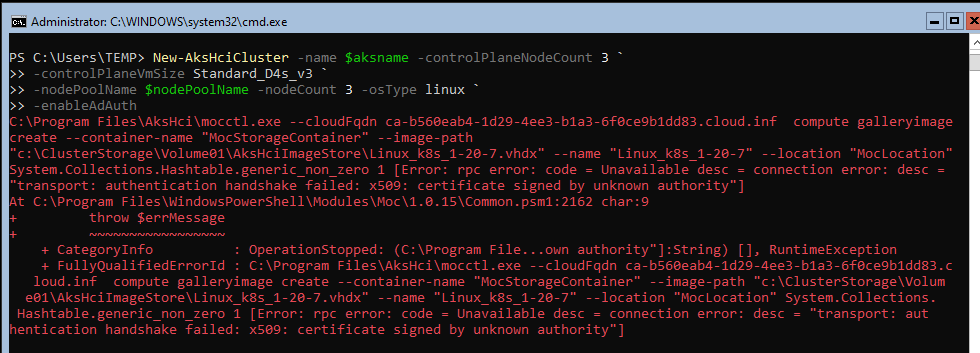
New-AksHciCluster returns
C:\Program Files\AksHci\mocctl.exe --cloudFqdn ca-b560eab4-1d29-4ee3-b1a3-6f0ce9b1dd83.cloud.inf  compute galleryimage
create --container-name "MocStorageContainer" --image-path
"c:\ClusterStorage\Volume01\AksHciImageStore\Linux_k8s_1-20-7.vhdx" --name "Linux_k8s_1-20-7" --location "MocLocation"
System.Collections.Hashtable.generic_non_zero 1 [Error: rpc error: code = Unavailable desc = connection error: desc =
"transport: authentication handshake failed: x509: certificate signed by unknown authority"]
At C:\Program Files\WindowsPowerShell\Modules\Moc\1.0.15\Common.psm1:2162 char:9
+         throw $errMessage
+         ~~~~~~~~~~~~~~~~~
    + CategoryInfo          : OperationStopped: (C:\Program File...own authority"]:String) [], RuntimeException
    + FullyQualifiedErrorId : C:\Program Files\AksHci\mocctl.exe --cloudFqdn ca-b560eab4-1d29-4ee3-b1a3-6f0ce9b1dd83.c
   loud.inf  compute galleryimage create --container-name "MocStorageContainer" --image-path "c:\ClusterStorage\Volum
  e01\AksHciImageStore\Linux_k8s_1-20-7.vhdx" --name "Linux_k8s_1-20-7" --location "MocLocation" System.Collections.
 Hashtable.generic_non_zero 1 [Error: rpc error: code = Unavailable desc = connection error: desc = "transport: authentication handshake failed: x509: certificate signed by unknown authority"]
To Reproduce
Steps to reproduce the behavior:
- Remote log into any node of the HCI cluster.
- Start a powershell prompt
Expected behavior
The command runs without error.
Get-AksHciCluster returns the list of AKS clusters (or nothing if no AKS clusters are present on this HCI cluster)
New-AksHciCluster creates a new AKS cluster
Actual behavior
Screenshots


Environment (please complete the following information):
- OS: Windows Server Core
- Browser [e.g. chrome, safari] N/A
- Version 10.0.20348.350
- AKS-HCI Version 1.0.6.11122 (November 2021)
- Kubernetes Version N/A
Additional context
This issue affects only some users on the same system. When this issue appears, deleting the user profile and re-creating it seems to fix the issue temporarily. But the issue re-appears later (in our case, on the next day).
Collect log files
- From a PowerShell Admin window run Get-AksHciLogs
Get-AksHciLogsasks for a password. Current user's password is not accepted.