-
Notifications
You must be signed in to change notification settings - Fork 63
Fix folder used for Integration tests #386
New issue
Have a question about this project? Sign up for a free GitHub account to open an issue and contact its maintainers and the community.
By clicking “Sign up for GitHub”, you agree to our terms of service and privacy statement. We’ll occasionally send you account related emails.
Already on GitHub? Sign in to your account
Merged
Merged
Changes from all commits
Commits
Show all changes
2 commits
Select commit
Hold shift + click to select a range
File filter
Filter by extension
Conversations
Failed to load comments.
Loading
Jump to
Jump to file
Failed to load files.
Loading
Diff view
Diff view
There are no files selected for viewing
This file contains hidden or bidirectional Unicode text that may be interpreted or compiled differently than what appears below. To review, open the file in an editor that reveals hidden Unicode characters.
Learn more about bidirectional Unicode characters
This file contains hidden or bidirectional Unicode text that may be interpreted or compiled differently than what appears below. To review, open the file in an editor that reveals hidden Unicode characters.
Learn more about bidirectional Unicode characters
Add this suggestion to a batch that can be applied as a single commit.
This suggestion is invalid because no changes were made to the code.
Suggestions cannot be applied while the pull request is closed.
Suggestions cannot be applied while viewing a subset of changes.
Only one suggestion per line can be applied in a batch.
Add this suggestion to a batch that can be applied as a single commit.
Applying suggestions on deleted lines is not supported.
You must change the existing code in this line in order to create a valid suggestion.
Outdated suggestions cannot be applied.
This suggestion has been applied or marked resolved.
Suggestions cannot be applied from pending reviews.
Suggestions cannot be applied on multi-line comments.
Suggestions cannot be applied while the pull request is queued to merge.
Suggestion cannot be applied right now. Please check back later.
There was a problem hiding this comment.
Choose a reason for hiding this comment
The reason will be displayed to describe this comment to others. Learn more.
Actually - I don't even think we need this anymore if you just update https://github.com/Azure/azure-functions-sql-extension/blob/a20541cfedb4a774395a364454f419f546b5e470/test/Microsoft.Azure.WebJobs.Extensions.Sql.Tests.csproj to also copy the CS bindings from
Integration\test-csinto the SqlExtensionSamples folder. There's a bit of extra duplication there with having multiple copies of the functions, but it makes the test code simpler and running the functions from the same place will make it easier to diagnose issues.I would also suggest when you do that updating the folder to just be generically named
TestFunctionsThere was a problem hiding this comment.
Choose a reason for hiding this comment
The reason will be displayed to describe this comment to others. Learn more.
Yes that makes sense - I'll update that. Thanks Charles!
There was a problem hiding this comment.
Choose a reason for hiding this comment
The reason will be displayed to describe this comment to others. Learn more.
One issue I’m running into is that we need to copy the built function files (ex. AddProductsColumnTypes folder containing the function.json file) and not the .cs files. The built function folders are in bin/Debug/netcoreapp3.1/ but I’m not sure if there is a way to only copy those folders into the TestFunctions folder.
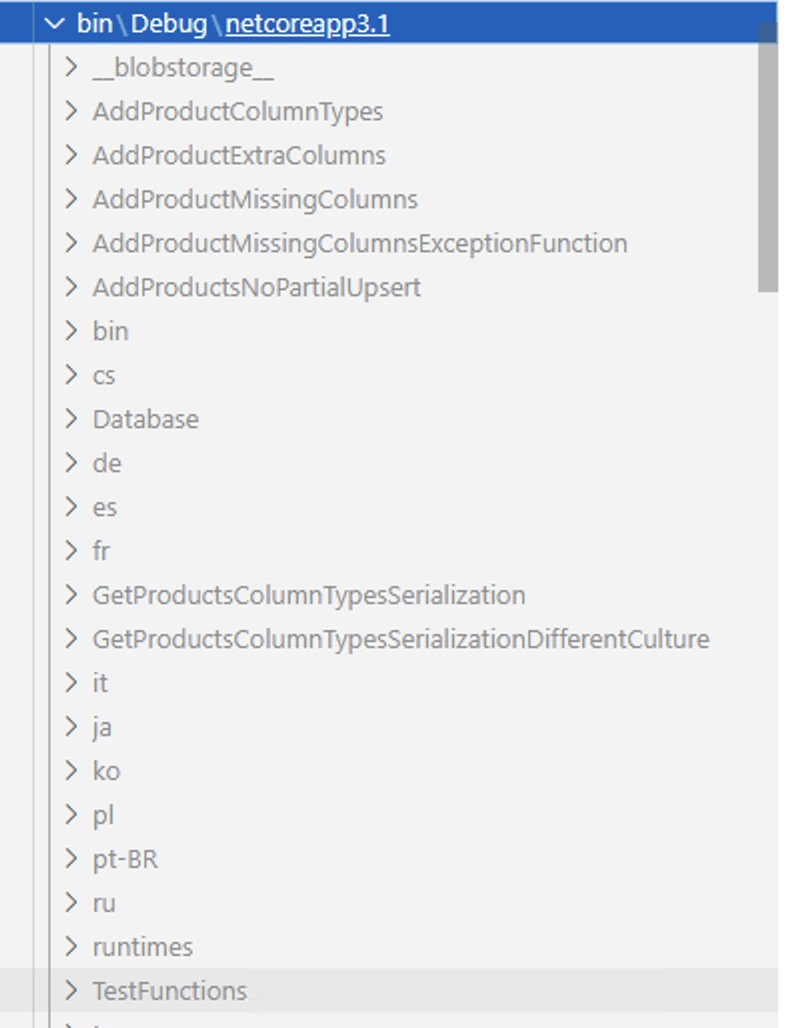
Another option is to move the functions in the test folder into a separate folder in samples ex. Samples/samples-csharp/InvalidSamples. Then all functions can be built in the same project. This will also make it easier for Java so that we don't have to build two java projects: samples/samples-java and test/Integration/test-java. @Charles-Gagnon @MaddyDev thoughts?
Uh oh!
There was an error while loading. Please reload this page.
There was a problem hiding this comment.
Choose a reason for hiding this comment
The reason will be displayed to describe this comment to others. Learn more.
I'd rather avoid having the invalid (test) functions in the samples - that's just confusing for the users and could lead to someone not paying attention and trying to do something that isn't going to work.
You should be able to just use the same logic we have for adding the items from the sample folder - we just need to special case to not copy over the target folder.
It's not the prettiest but it'll work and I can't think of a simpler way to do it right now.
There was a problem hiding this comment.
Choose a reason for hiding this comment
The reason will be displayed to describe this comment to others. Learn more.
I agree, having the test functions in the samples can be confusing.
I tried copying over the function.json files but the issue is that the function.json files for CSharp refers to the dll needed which would be different for the Samples vs Test functions:
"scriptFile": "../bin/Microsoft.Azure.WebJobs.Extensions.Sql.Tests.dll",.I also tried copying over the Test.dll but the functions still don't get loaded correctly. I believe it is because of the
functions.deps.jsonfile which references the target project and would be different for Samples vs Tests.For now we will have to stick to two separate folders for CSharp tests (I think Java will also need to separate folders).
There was a problem hiding this comment.
Choose a reason for hiding this comment
The reason will be displayed to describe this comment to others. Learn more.
Ah dang, yeah ok let's just leave it like it is then with two completely separate folders. Thanks for looking into that.