This project is a script that only runs inside the dreambot client using the dreambot API.
- Client download - https://dreambot.org/
- Java Documents - https://dreambot.org/javadocs/
TaskManager is a dreambot script manager that uses the dreambot API to run multiple scripts under specific conditions without the need to run each script individually. Unlike the old style of manually starting and stopping a single script on dreambot client, this script allows a user to run an endless amount of scripts one after another without manually stopping and starting another. The TaskManager also includes script conditions as a stopping point for each script before starting the next script such as a timer, number of items collected, level acquired or accumulated, etc. This project uses reflection, allowing the user to write and add their own scripts to the project rather than only using the built-in scripts provided with the TaskManager.
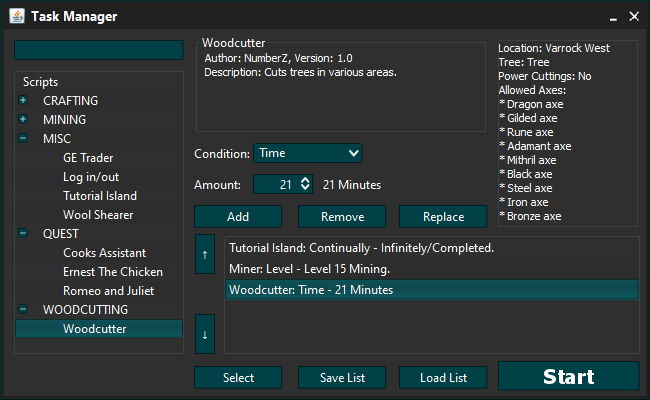
- Mining
- Woodcutting
- Cook's Assistant
- Ernest The Chicken
- Romeo and Juliet
- Grand Exchange Trader
- Log out/in
- Sheep Shearing
- When using Eclipse make sure to include client.jar in your project
- Right click your project and click Properties
- Go to the Java Build Path column and Libraries tab
- Click on the Add External Jar button and go to "C:\Users{your pc name here}\DreamBot\BotData" and open client.jar
- Do the same process as before except you will be adding the jar file gson.jar which should be located in the libs folder in your project
- Now select Apply and Close
- Copy the gson.jar (may have a version number on the jar file) and paste a new copy in "C:\Users{your pc name here}\DreamBot\Libs"
- Once you've copied the gson.jar file to the Libs folder, open the libs file in the project source folder and record all the names of the jar files in the Libs folder into the libs file.
- Using Eclipse go to File > Export...
- Expand Java, select Jar File and then click Next
- Uncheck everything and expand your project (typically named dreambot) and check only the src
- Under Select the export destination: click Browse and go to "C:\Users{your pc name here}\DreamBot\Scripts"
- After selecting the destination, put the name of your script after the destination "C:\Users{your pc name here}\DreamBot\Scripts\Bots.jar"
- Click Finish and click Yes to overwrite and lastly click Ok.