Hardware
Zyklop uses EduArt's iotbot/iot2050 system.
![[top-down view on Zyklop with lid off and numbered components]](TopDownElectro.jpg)
- Wi-Fi Access point
- Fan
- EduArt board
- IOT2050
- USB hub
- Button panel
Zyklop will only drive if these criteria are met:
- Emergency stop is not pressed (often overlooked :P )
- Charging cable is not connected
- An 'enable' message was sent
WiFi is handled by a TL-WR802N nano-router.
It does 300Mbit/s @ 2.4GHz, no 5GHz.
SSID: TP-Link_F496
Passwd: [serial no. on back]
Note
You will experience interference when operating in a noisy environment (e.g. competitions).
consider using an ethernet tether.
Note
The left Ethernet jack on the IOT2050 has a damaged retainer. Cables just flop out of it.
Unfortunately this is the gigabit port. The other one only only does 100Mbit.
It is tied down with cable ties to remedy the issue.
Port Layout:
left: Automatic (DHCP), AP sets it to
192.168.1.200, 1Gbit
right: Automatic (DHCP), 100Mbit
If you want to drive with a tether, connect an ethernet cable to the free port and set the IPs manually.
This board is in charge of connecting everything together and driving the motors.
![[EduArt board]](images/EduArt_board.jpg)
It's documented over at EduArt-Robotik/iotbot.
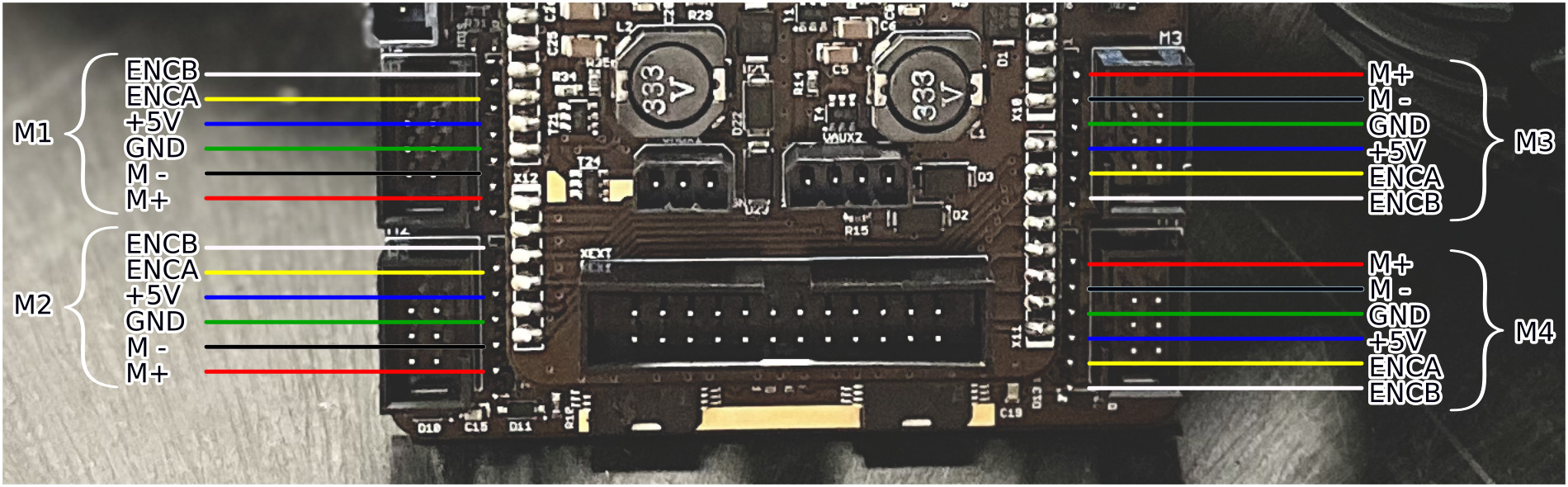
The motor connectors are oriented like so:
Important
Zyklop will power off after 120s if the battery drops under 17.5V
The battery used is a 22.4V NiMH.
It is recommended to give it long charge times periodically, since the battery has no BMS, and NiMHs auto-balance this way.