Reports and Outputs
Report generation has three practical modes. Pick the mode based on the audience and the amount of evidence you need.
| Need | Use | Output |
|---|---|---|
| Strategy, prioritization, and implementation guidance | LLM-first audit in your IDE |
FULL-AUDIT-REPORT.md, ACTION-PLAN.md
|
| Shareable technical dashboard | generate_report.py |
SEO-REPORT.html |
| Repository discoverability plan | github_seo_report.py |
GITHUB-SEO-REPORT.md, GITHUB-ACTION-PLAN.md
|
Use this inside Antigravity, Claude, Codex, or another agent IDE when you want the agent to combine page evidence, script output, and SEO judgment.
Run a full SEO audit for https://example.com.

Use direct page evidence and bundled scripts where available.
Create FULL-AUDIT-REPORT.md and ACTION-PLAN.md.
For every finding, include Evidence, Impact, Fix, Severity, Confidence, and Owner.
Separate confirmed issues from likely issues and checks blocked by API limits, credentials, network, or rendering support.
Prioritize fixes by impact and implementation effort.
Expected outputs:
FULL-AUDIT-REPORT.mdACTION-PLAN.md
This mode is best when you want the agent to combine script evidence with SEO judgment, confidence labels, and prioritized fixes.
Recommended report sections:
- Executive summary
- Scorecard
- Top 10 fixes
- Technical SEO
- Content and E-E-A-T
- Schema
- Performance and Core Web Vitals
- Images
- Links and crawl depth
- GEO and AEO
- Unknowns and blocked checks
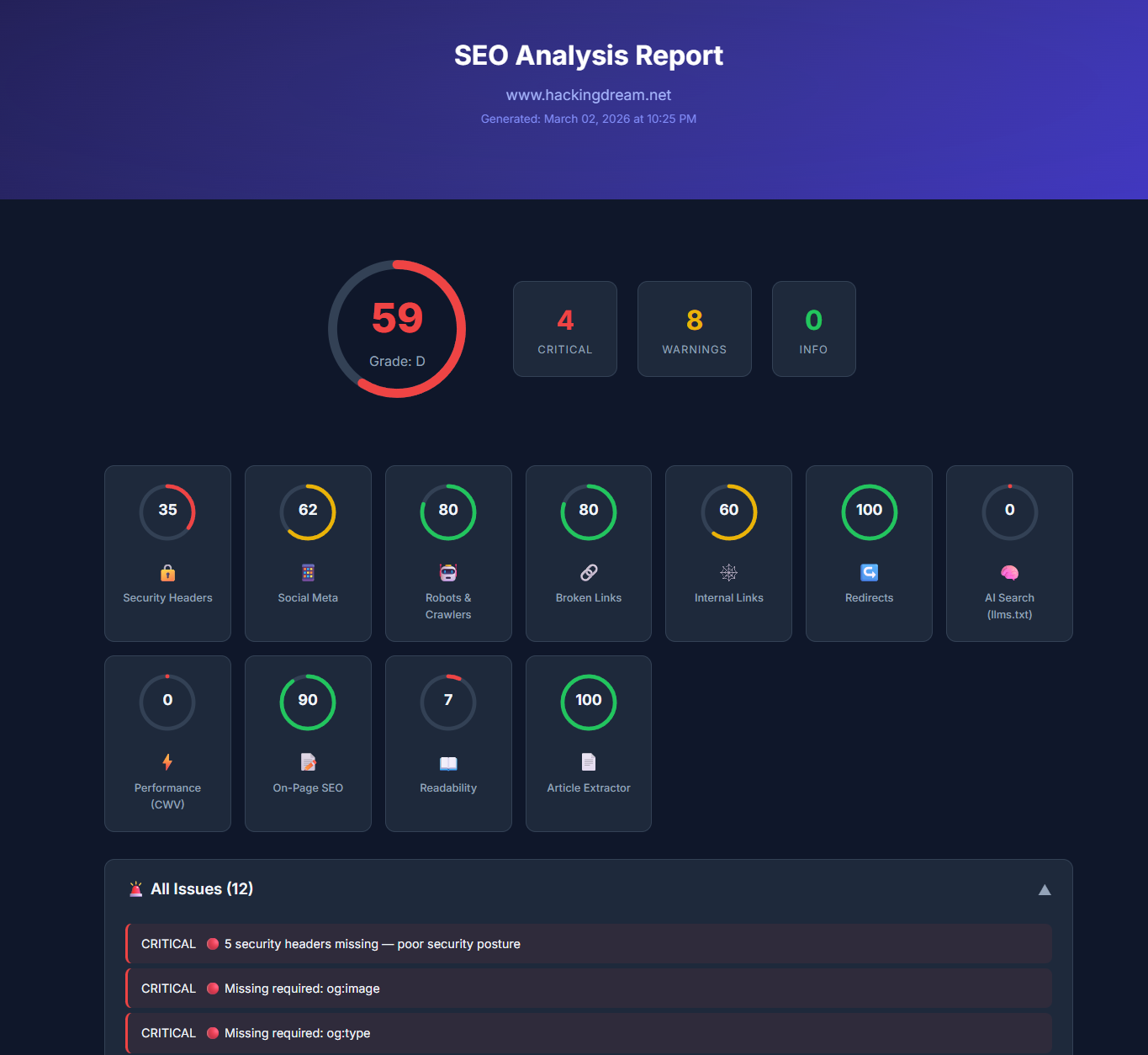
Use the HTML dashboard when you need a shareable technical snapshot that can be opened in a browser.
python3 scripts/generate_report.py "https://example.com" --output SEO-REPORT.htmlFrom an installed skill:
python3 ~/.codex/skills/seo/scripts/generate_report.py "https://example.com" --output SEO-REPORT.htmlThe HTML dashboard includes:
- Overall score and category breakdown
- Environment detection and runtime inference
- Environment-specific fix plan
- Section-level issues and recommendations
- Readability suggestions, including text replacement guidance
Dashboard snapshot from docs/images/report-dashboard.png:
Use the dashboard for:
- Fast stakeholder review
- Before/after snapshots
- Technical handoff to developers
- Quick scan of category scores and obvious issues
Do not use the dashboard alone for final recommendations. Pair it with LLM-first analysis when business priority, search intent, or implementation sequencing matters.
Use the audit runner when you want one command to collect evidence and write report artifacts.
python3 scripts/audit_runner.py "https://example.com" --output-dir audit-outputTypical output directory:
audit-output/
  audit-results.json
  SEO-REPORT.html
  FULL-AUDIT-REPORT.md
  ACTION-PLAN.md
Use audit-results.json as machine-readable evidence and the markdown files as human-readable deliverables.
For repository SEO and marketplace-style discoverability:
python3 scripts/github_seo_report.py \
  --repo owner/repo \
  --provider auto \
  --markdown GITHUB-SEO-REPORT.md \
  --action-plan GITHUB-ACTION-PLAN.md \
  --json
The GitHub report should cover:
- Repository metadata
- README quality
- Install clarity
- Topics and description
- Community profile
- Release quality
- Search benchmark
- Competitor positioning
Before sharing any report, check that it has:
- Evidence for every important finding
- Confidence labels:
Confirmed,Likely, orHypothesis - Clear separation between site issues and environment limitations
- Prioritized fixes, not just raw observations
- Implementation-level recommendations
- Unknowns for blocked checks
- No repeated findings across multiple sections
- No claims based only on failed API calls
Scores are prioritization aids, not absolute truth.
- A low score with strong evidence deserves action.
- A low score caused by API failures or missing credentials should be treated cautiously.
- Category scores should be read alongside the findings table.
- Fix crawlability, indexability, canonical, and rendering issues before lower-impact polish.
| Problem | What to do |
|---|---|
| PageSpeed is rate-limited | Continue with local evidence and mark CWV as Hypothesis or Unknown. |
| Browser rendering fails | Install Playwright/Chromium or mark visual checks as blocked. |
| Output file is empty | Re-run with a simpler URL and check network access. |
| GitHub report lacks traffic data | Authenticate with GITHUB_TOKEN, GH_TOKEN, or gh auth login. |
| Report includes generated local files | Keep generated reports out of commits unless they are intentional examples. |
Detailed audit report for confirmed and likely SEO issues.
Recommended sections:
- Executive summary
- Scorecard
- Technical SEO
- Content and E-E-A-T
- Schema
- Performance and Core Web Vitals
- Links and crawl depth
- AI search, GEO, and AEO
- Evidence table
- Unknowns and blocked checks
Prioritized implementation plan.
Each action should include:
- Priority
- Impact
- Effort
- Owner or implementation area
- Evidence
- Exact fix
Self-contained HTML dashboard generated by:
python3 <SKILL_DIR>/scripts/generate_report.py https://example.com --output SEO-REPORT.htmlUse this for visual review, stakeholder sharing, and quick scanning.
Repository discoverability report generated by GitHub-specific scripts.
Covers:
- Repository metadata
- README quality
- Topics and description
- Community profile
- Search benchmark
- Competitor comparison
- Traffic archival when authenticated data is available
Generated local reports should not be committed unless they are intentionally being used as examples.
Release packages should contain only:
SKILL.mdscripts/resources/