Repository navigation
Releases
BlackwellUI v2.8.1-azs

Two requests from the Discord, thanks for the feedback!
Raid markers from the unit frames
- Right click the hero, target, pet or party frames to open the game's unit menu, including Raid Target Icon.
- Left click targets the unit (target of target is clickable too).
- Raid target icons now show on the hero, target and party frames.
Revive bar
- New round bar for party revives: how far a friend is bringing you back, or how far you are bringing a friend back, in the game's own wording for your language.
- It replaces the game's revive bar while it is on. Switch it off, set its width and colour under
/bw→ Cast Bar → Revive bar. Move it with/bw unlock.
Install
Download BlackwellUI.zip below and extract it to AzerothSurvivors\benilla-config\AddOns\ (replace the old BlackwellUI folder). Your settings are kept.
BlackwellUI v2.8.0-azs
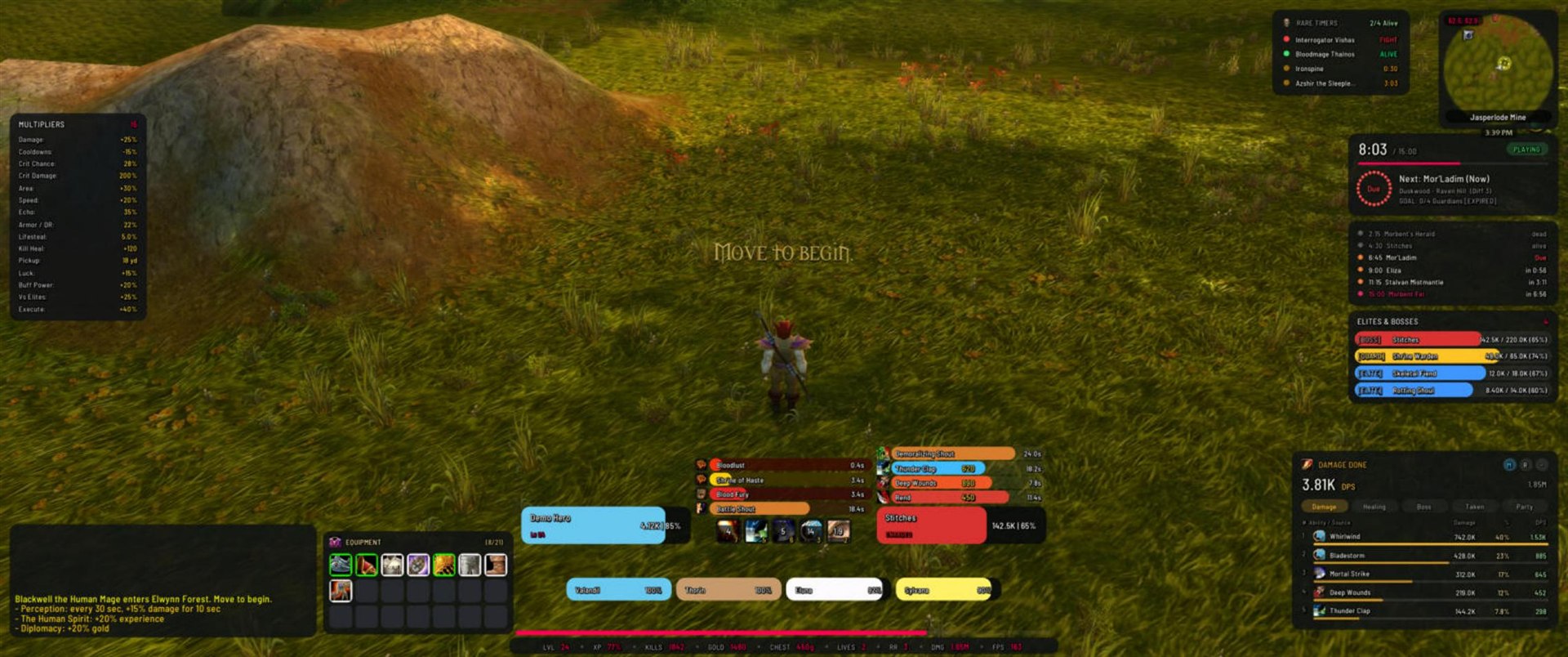
The new round look
Every frame is redrawn: panels, bars, buttons, tooltips, the character window and the control center now have rounded corners and a calmer, modern layout. Prefer the old look? /bw → Appearance → Interface style → Sharp (classic). Both styles share every setting.
Highlights
- Unit frames: one full health bar per frame, in the classic proportions, with name, level or status and health text inside.
- Enemy colours: bosses red, rare guardians yellow, elites blue, normal enemies violet, the final boss crimson, the same on target frame, elites & bosses list and nameplates. All adjustable.
- 200+ settings: every module has its own page with size, opacity and visibility (always, in combat, out of combat, faded until mouse-over) and its own options.
- 14 languages, detected from the game automatically.
- Thicker XP line above the data bar (2 to 12 px).
- Welcome line in your language at login (can be switched off).
/bw selftestand/bw layoutcheckfor bug reports.
Fixes
- The global UI scale applies to all frames again.
- Bars reach the full width at 100 %.
- Hover highlights only show under the mouse.
- Preview mode fills the damage meter.
- The unused ammo slot no longer shows in the character window.
Install
Download BlackwellUI.zip below and extract it to AzerothSurvivors\benilla-config\AddOns\ (replace the old BlackwellUI folder). Your settings are kept.
v2.7.2-azs: License, own spell data, open fonts
BlackwellUI v2.7.2-azs
Ownership and licensing are now fully documented, and BlackwellUI only ships what it is allowed to ship.
Changed
- License: BlackwellUI is free to download and play with, Copyright (c) 2026 Pierre (Blackwellcode), all rights reserved. Re-uploading, bundling or publishing modified versions needs permission. See LICENSE.
- New default font: Barlow Semi Condensed (SIL Open Font License). The previous fonts could not be redistributed. Your font setting moves over automatically.
- Own spell icon data: spell icons now come from BlackwellUI's own table, generated directly from the game client's data. It is also about 75% smaller.
- Bundled fonts and game data are listed in THIRD-PARTY-NOTICES.md.
No other behaviour changes. Tested in-game on the Windows client.
Install / update
Download BlackwellUI.zip below and replace the AzerothSurvivors\benilla-config\AddOns\BlackwellUI folder. Settings are kept. Browser client: install the zip through the in-game AddOns dialog.
If BlackwellUI makes your runs better: buy me a coffee · Bugs: open an issue
v2.7.1-azs: Legacy cleanup
BlackwellUI v2.7.1-azs
Maintenance release on top of v2.7.0.
Changed
- Removed leftover compatibility aliases and unused legacy code paths.
- Legacy slash command aliases were removed.
/bw,/bui,/blackwelland/blackwelluiwork as before. - The TOC now credits Pierre (Blackwellcode).
No settings change; existing profiles load as before. Tested in-game on the Windows client.
Install / update
Download BlackwellUI.zip below and replace the AzerothSurvivors\benilla-config\AddOns\BlackwellUI folder. Browser client: install the zip through the in-game AddOns dialog.
All v2.7.0 changes (redesigned control center, safe game settings, stability fixes) are included: see v2.7.0-azs.
If BlackwellUI makes your runs better: buy me a coffee · Bugs: open an issue
v2.7.0-azs: Stability pass, redesigned control center, safe game settings
BlackwellUI v2.7.0-azs
The biggest update so far: a stability pass over every module, a redesigned control center and a cleaner way to leave your game settings exactly as they were.

New
- Redesigned control center (
/bw): five pages (General, Appearance, HUD, Combat, Map & Run), a plain-language hint under every setting, and options that belong to a module are greyed out while that module is off. - Multipliers can grow upwards (HUD page): the bottom edge stays in place, so the panel fits above the chat.
- Your game settings are safe: every stock setting BlackwellUI changes (floating damage numbers, stock run HUD) is remembered and given back exactly when you turn the feature off, instead of being forced to "on".
- Reset layout now asks before moving every frame back.
Fixed
- Loot log now shows item quality colours.
- The "4 Guardians before 8:00" goal now counts guardian kills.
- Class colour in the character window was always the Warrior colour; armor was always 0.
- Nameplates of neutral and friendly units no longer turn red after a moment.
- Damage meter: spells such as Shadow Word: Pain are no longer split as item procs; meter, buff and nameplate data reset at the start of every run.
- Equipment panel shows all 17 slots, weapons included.
- Multipliers panel no longer shows sample numbers during a real run.
- The cast bar can be moved in edit mode.
- The "Action Bars" toggle works; turning off Chat, Minimap, Unit Frames, Character or Action Bars keeps them working until
/reload(with a prompt) instead of making them vanish. - "Hide loot pop-ups" no longer hides the BlackwellUI loot log.
- The stock HUD flag no longer flips back and forth every 5 seconds.
- One faulty module can no longer stop the whole HUD; errors are reported once instead of ten times a second.
- Less work per frame (minimap, combat text sync).
Changed
- Ability alerts are off for new installs. They do not check your class (a Mage would see "Overpower") and announce spells the game casts by itself. Existing settings are kept.
- The NPOT bar texture "Atrocity" was removed (it does not render in the browser client); affected profiles fall back to "Melli".
Install / update
Download BlackwellUI.zip below and replace the AzerothSurvivors\benilla-config\AddOns\BlackwellUI folder. Settings are kept and migrated automatically. Browser client: install the zip through the in-game AddOns dialog.
Before uninstalling, open /bw, untick Combat text (Combat page) and Replace the stock run HUD (General page), then remove the folder. The game only saves these settings while you play.
Tested in-game on the Windows client (game build of 2026-11-01).
If BlackwellUI makes your runs better: buy me a coffee · Bugs: open an issue
v2.6.7-azs: Hotfix for Pins mod:Update nil Method Call
Release v2.6.7-azs
- Hotfix for Core.lua Tick Update Call:
- Implemented
mod:Update(state)inPins.luaforwarding tomod:UpdateRadar(). - Added defensive
type(mod.Update) == functioncheck inCore.lua:Tick()to prevent runtime nil-method Lua errors on any module.
- Implemented
v2.6.6-azs: Minimap Boss/Chest Radar Fix, Combat Text Restore, Edit Mode Grid & Buff Toggles
Release v2.6.6-azs
- Minimap Boss & Chest Radar Restored:
- Fixed span transformation typo and decoupled phase detection from initial chest table presence.
- Added support for both AZS_LAIRS and AZS_GetLairs(), accurately mapping awake/asleep states and remaining respawn countdowns.
- Active bosses/guardians rendered prominently in high-visibility Neon Crimson with HIGH frame strata.
- Removed internal model purging in Minimap.lua, ensuring player blips and 3D scenes remain crisp and intact.
- Dynamic Combat Text & Floating Damage Restore:
- Blizzard standard floating combat damage numbers (CombatDamage, CombatLogPeriodicSpells, SHOW_COMBAT_TEXT) are no longer permanently locked to zero.
- Disabling BlackwellUI Scrolling Combat Text (MSBT style) instantly restores default Blizzard floating combat damage and event hooks.
- Seamless sync across Options, slash commands (/bw combattext), and login events.
- Edit Mode Alignment Grid:
- Integrated full-screen 32px alignment raster with cyan center axes and major guidelines.
- Automatically activates when moving frames via /bw unlock / /bw move and hides on /bw lock. Toggleable in Options or with /bw grid.
- Customizable Buffs & Cooldown Alerts:
- New toggle for Build: Show Buff & Alert Bars: disable world buff/shout bars above your ability tiles while keeping cooldowns intact.
- Level-Up ready button dynamically re-anchors to fit with or without buff bars.
- Added toggle for SCT ability & cooldown ready alerts.
- Browser (WASM Benilla) Hardening:
- Comprehensive safeguards for WebAssembly runtime globals (AZS_RUN.ph / AZS_RUN.phase), safe CVar pcall handling, and strict Lua 5.0 compatibility.
v2.6.5-azs: Fix Black Health Bar & WebGPU TGA Alpha Headers
Changes in v2.6.5-azs
- Fix Black Health Bar on WebGPU (Mac/WASM): Patched TGA header descriptor on
melli.tga,blank.tga, andlightspark-border.TGAto set alpha bits to 8 (desc = 0x28), resolving the engine panic:depth less alpha bits must be 24. - Dual BLP2 + TGA Support: Generated native DXT1
melli.blpalongside TGA. - Cross-Platform Numeric Class Resolution: Added
CLASS_ID_MAP(1=Warrior, 2=Paladin, 3=Hunter, 4=Rogue, 5=Priest, 7=Shaman, 8=Mage, 9=Warlock, 11=Druid) inResolveClassColorandGetClassColor. - Lobby/Preview Full Bar Fallback: Prevented empty 0-width black bar when out of combat / in lobby when
hp <= 0.
v2.6.3-azs: Damage Share % Fix & Legendary Neck Proc Merging
Release v2.6.3-azs
- Damage Share % Column Fixed: Resolved math floor rounding bug where abilities under 50% total damage share displayed as 0%. Accurately displays true damage share (e.g. 34%, 24%, 4.2%).
- Relative Bar Scaling: Row statusbar fills now scale relative to the top #1 ability (d / maxVal), restoring intuitive visual ranking like Details/Skada.
- Legendary Neck & Proc Merging [M]:
- Added new [M] header button and Options menu toggle to automatically merge compound item procs (e.g. \Amulet of the Inferno: Consecration) into their parent spell.
- Hovering over merged spells displays a full breakdown with direct casts vs proc damage and item sources.
- Quick toggle between compact merged view and detailed separated view anytime.
v2.6.2-azs: Stock Level-Up Button Auto-Suppression
Release v2.6.2-azs
- Stock Level-Up Icon Suppressed: Automatically hides the default engine level-up button (via \hudLevels = 0\ and \AZS_SetHudShown('levels', false)) so only our custom, non-obtrusive Cyberpunk Level-Up button is shown.
- Clean Interface: Prevents duplicate level-up icons from displaying simultaneously.