Error help
Here is some common errors we found using the Excel Plugin.
Please check Latest Logfile (link in Settingsmenu) to find more details about error.
-
Error message on startup excel, that file is corrupt.
This can happen if you select the .xll file directly inside the Zip file.
The .xll inside the Zip file is a compressed file and will not work.
You need to UnZip to a new folder and then select the .xll file. -
Did you pick the correct .xll version? Is your Excel 32bit or 64bit? (Not always same as windows version)
https://github.com/Borsdata-Sweden/ExcelPlugin/wiki/Installation#is-my-excel-32bit-or-64bit -
Try install the latest .Net version. Excel Plugin need .Net to work.
https://dotnet.microsoft.com/download/dotnet-framework
Excel have some security issues with .xll files.
Excel can unload or block .xll files if excel decide its not safe.
After each point restart Excel to check if .xll file loads ok.
Important to restart excel.
-
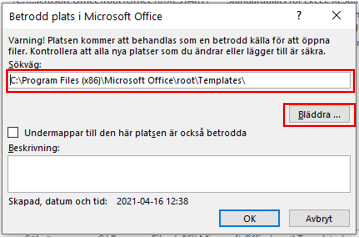
Add the .xll file folder to 'Trusted Locations' in Excel. (See below)
-
Check that Plugin has not been disabled.
Go to Add-Ins list and check that "Börsdata Excel" is checked.
https://github.com/Borsdata-Sweden/ExcelPlugin/wiki/Installation#installation-step-by-step
(Step 7) -
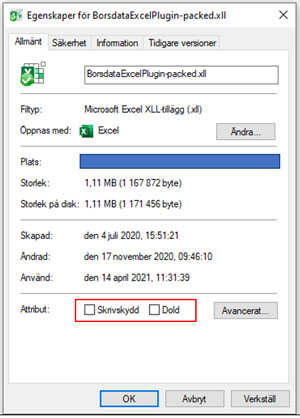
Check if File OR Folder is Locked or Write protected.
Right click on .xll file and select 'properties'.
If its Locked - then Excel can not load .xll file.
-
Try reinstall Excel Plugin to a new folder on your computer.
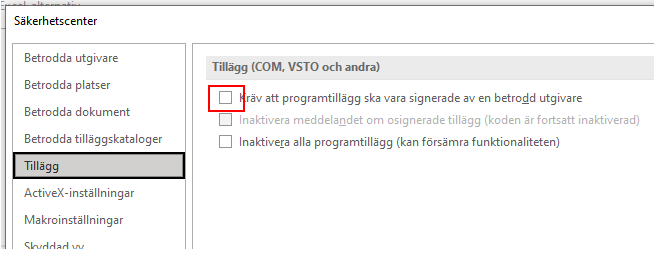
Make sure that Add-ins => Require ApplicationsAdd-ins to be signed by Trusted Publisher is DISABLED.
Excel have some security issues with .xll files.
This tells excel that the .xll folder is safe to use.
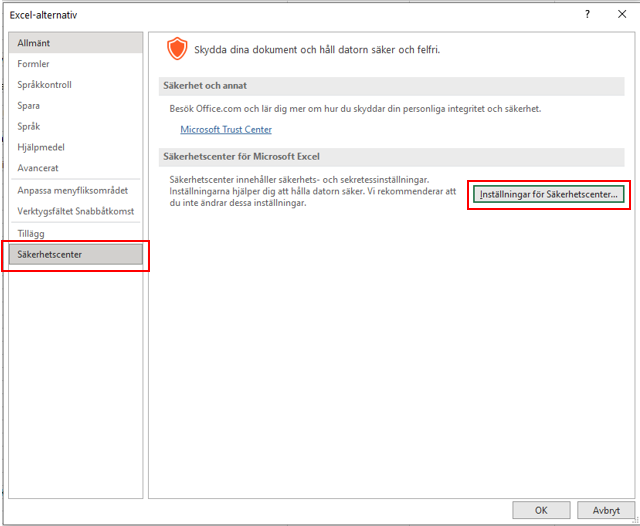
- Excel Options (Alternativ)
- Securitycenter (Säkerhetscenter) ->
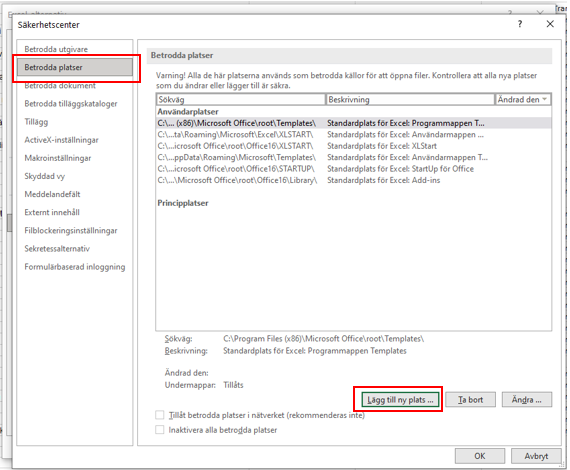
Settings for securitycenter - Trusted Locations->
Add new Location - Browse.. -> Select the folder where you have the .xll files
- Done
- Now Try reinstall .xll file with Add-ons menu.
-
Please check latest Logfile (link in Settingsmenu) to find more details about error.
-
Is API KEY valid? Double check APIKEY on Borsdata MyPage.
-
Can you call API? Maybe antivirus, firewall is blocking API call? Try past this into you webbrowser.
https://apiservice.borsdata.se/v1/instruments?authKey=APIKEY
Replace [APIKEY] with your key.
If you get back alot of json data {"instruments":[{"insId":2,"name":"AAK", }... then API Call is OK.
If not then you need to find what is blocking.
This may be caused by a circular reference.
Two cells is updating and trigger API calls to loop forever.
https://www.ablebits.com/office-addins-blog/2015/12/15/circular-reference-excel/
Try check logfile and see if you find alot if API calls that is the same.
Probably there is hundreds of same calls if you have a circular reference.
This repeted function is a circular reference and you need to fix this.
=Now() is a versile excel function that always trigger new calulation because of the time changes.
Use =Today() function instead to only get Date (without time).