Error help
Here is some common errors we found using the Excel Plugin.
Please check Latest Logfile (link in Settingsmenu) to find more details about error.
-
Error message on startup excel, that file is corrupt.
This can happen if you select the .xll file directly inside the Zip file.
The .xll inside the Zip file is a compressed file and will not work.
You need to UnZip to a new folder and then select the .xll file. -
Did you pick the correct .xll version? Is your Excel 32bit or 64bit? (Not always same as windows version)
https://github.com/Borsdata-Sweden/ExcelPlugin/wiki/Installation#is-my-excel-32bit-or-64bit -
Try install the latest .Net version. Excel Plugin need .Net to work.
https://dotnet.microsoft.com/download/dotnet-framework
After each point restart Excel to check if .xll file loads ok.
Important to restart excel.
-
Check that Plugin has not been disabled.
Go to Add-Ins list and check that "Börsdata Excel" is checked.
https://github.com/Borsdata-Sweden/ExcelPlugin/wiki/Installation#installation-step-by-step
(Step 7) -
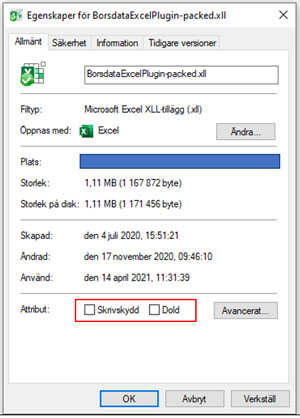
Check if File OR Folder is Locked or Write protected.
Right click on .xll file and select 'properties'.
If its Locked - then Excel can not load .xll file.
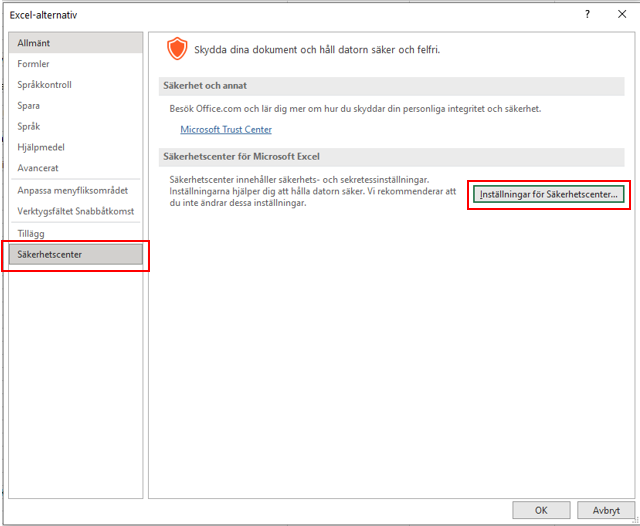
- Excel Options (Alternativ)
- Securitycenter (Säkerhetscenter) ->
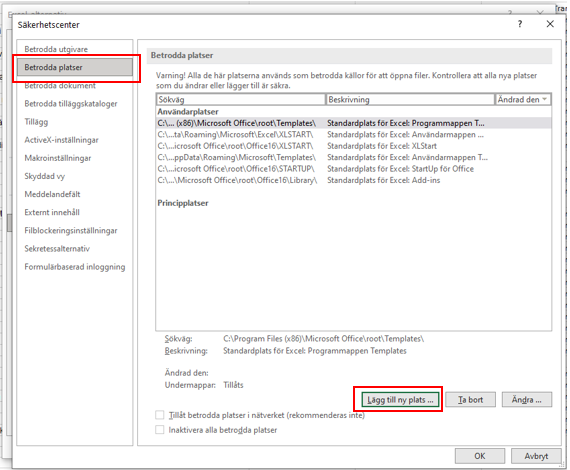
Settings for securitycenter - Trusted Locations->
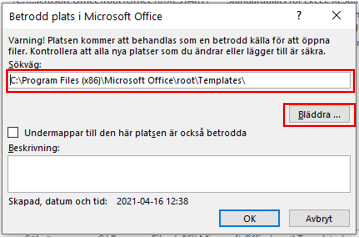
Add new Location - Browse.. -> Select the folder
Done
- Try reinstall Excel Plugin to a new folder on your computer.
-
Please check latest Logfile (link in Settingsmenu) to find more details about error.
-
Is API KEY valid? Double check APIKEY on Borsdata MyPage.
-
Can you call API? Maybe antivirus, firewall is blocking API call? Try past this into you webbrowser.
https://apiservice.borsdata.se/v1/instruments?authKey=APIKEY
Replace [APIKEY] with your key.
If you get back alot of json data {"instruments":[{"insId":2,"name":"AAK", }... then API Call is OK.
If not then you need to find what is blocking.
This may be caused by a circular reference.
Two cells is updating and trigger API calls to loop forever.
https://www.ablebits.com/office-addins-blog/2015/12/15/circular-reference-excel/
Try check logfile and see if you find alot if API calls that is the same.
Probably there is hundreds of same calls if you have a circular reference.
This repeted function is a circular reference and you need to fix this.
=Now() is a versile excel function that always trigger new calulation because of the time changes.
Use =Today() function instead to only get Date (without time).