[Outline]
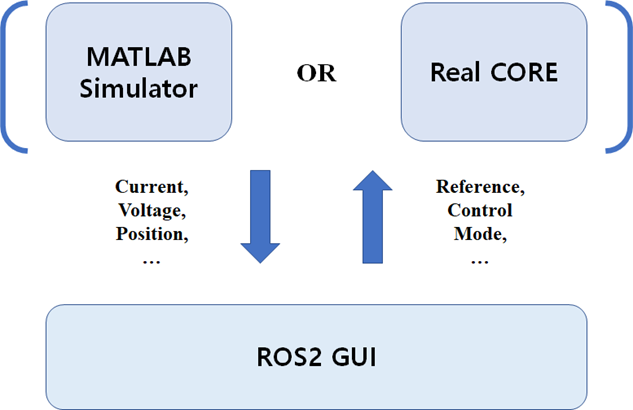
- MATLAB-based PMSM Driver Design for Neuromeka-CORE simulation.
- Connect Matlab to ROS2.
- GUI production using ROS2.
- Window11 && wsl2.
- Ubuntu 64-bit 18.04 && ROS2 Dashing.
- MATLAB R2021b.
- install add-on (ROS Toolbox v1.2).
- install add-on (Robust Control Toolbox).
- install add-on (Control System Toolbox).
- install add-on (Signal Processing Toolbox).
- install Multiparametric toolbox (MPT), using (install_mpt3.m) file.
- Version_0 : Current & Velocity Control.
- Version_1 : Select [Current / Velosity / Position] Control Mode. (Same control frequency)
- Version_2 : Select [Current / Velosity / Position] Control Mode. (Different control frequency)
- Version_3 : Model Predictive Control(MPC).
- Version_4 : Multi-Parametric Toolbox(MPT) based MPC.
- Version_5 : Disturbance Observer(DOB).
- Version_6 : H-infinity Control.
- Version_alpha : Integrated Controller.
- Version_beta : The latest version.
[Block Diagram]
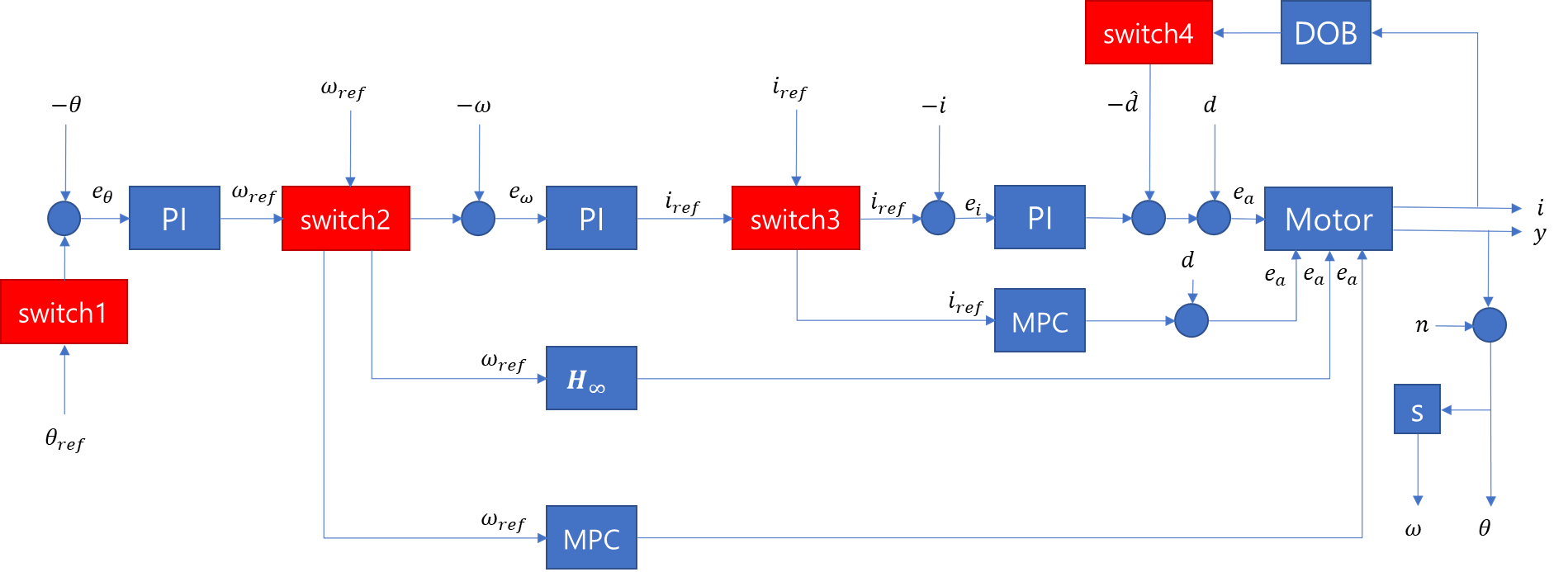
-
You can use a Combination of Control Modes.
- 0: Not use 1: Current(PI) 2: Current(MPC)
- 0: Not use 1: Velocity(PI) 2: Velocity(MPC) 3: Velocity(H-inf)
- 0: Not use 1: Position(PI)
- 0: Not use 1: Current(PI+DOB)
-
Velocity(MPC) & Velocity(H-inf) -> Both controllers control the velocity and current at the same time.
-
Therefore, when you select the corresponding velocity control mode, the lower current control mode must be selected as (0: Not use).
- This meta-packages is for bridging between matlab and local ros2 dashing to control PMSM Driver by using gui interface.
- Ubuntu 64-bit 18.04 && ROS2 Dashing : Follow ROS Installation
- QT5 : Follow QT Installation
- Docker : Follow Docker Installation
- ROS2 PMSM Studio
pmsm_studio ├── CMakeLists.txt ├── include │ ├── main_window.hpp │ ├── qcustomplot.h │ └── qnode.hpp ├── package.xml ├── src │ ├── main.cpp │ ├── main_window.cpp │ ├── plot_window.cpp │ ├── qcustomplot.cpp │ └── qnode.cpp └── ui ├── main_window.ui └── plot.ui 3 directories, 12 files - ROS2 MATLAB Node
matlab_node
├── BOUND_PI.m
├── callback_CurrentMode.m
├── callback_DOBoption.m
├── callback_ModeSelection.m
├── callback_PositionMode.m
├── callback_Reference.m
├── callback_VelocityMode.m
├── mpcgain.m
└── Test_Code_Final.m

0 directories, 9 files
- pmsm_studio
$ cd ~/PBL_RobotControl/matlab2ros/env_settings $ ./build.sh $ ./docker_run.sh $ cd ~/colcon_ws/src $ git clone https://github.com/BreadOak/PBL_RobotControl.git - matlab_node
Open MATLAB
move to ~/PBL_RobotControl/Matlab_PMSM_Drive/Test_Code
Run install_mpt3.m

## in docker workspace
$ docker exec -it gpu_ros2 /bin/bash
$ cm
$ sb
$ ros2 run pmsm_studio pmsm_studio

# matlab workspace
Run ~/PBL_RobotControl/matlab2ros/matlab_node/Test_Code_Final.m


- Improve Performance of the Controller.
- Add More Control Modes.
- Add More GUI Function Tabs.
- ...