
The *faster than your launcher* launcher
A riff on Raycast, @mxstbr's multi-key Karabiner setup, and Vim's <leader> key.
Watch the intro video on YouTube:


Yes, I only have that one thumbnail face.
Fork features walkthrough:
📦 Download from GitHub Releases — grab the LeaderKey-X.X.dmg file
Installation:
- Download the
.dmgfile from the latest release - Open the DMG and drag Leader Key to your Applications folder
- First launch only: Right-click Leader Key.app → "Open" → click "Open" in the dialog
- After that, open normally anytime
Note: This app is unsigned. macOS will show a security warning the first time — this is normal for apps distributed outside the Mac App Store. The right-click method bypasses Gatekeeper for this app only.
-
Open the settings menu with the menu bar icon

-
Choose your
leader(Shortcutthat will open the app)
-
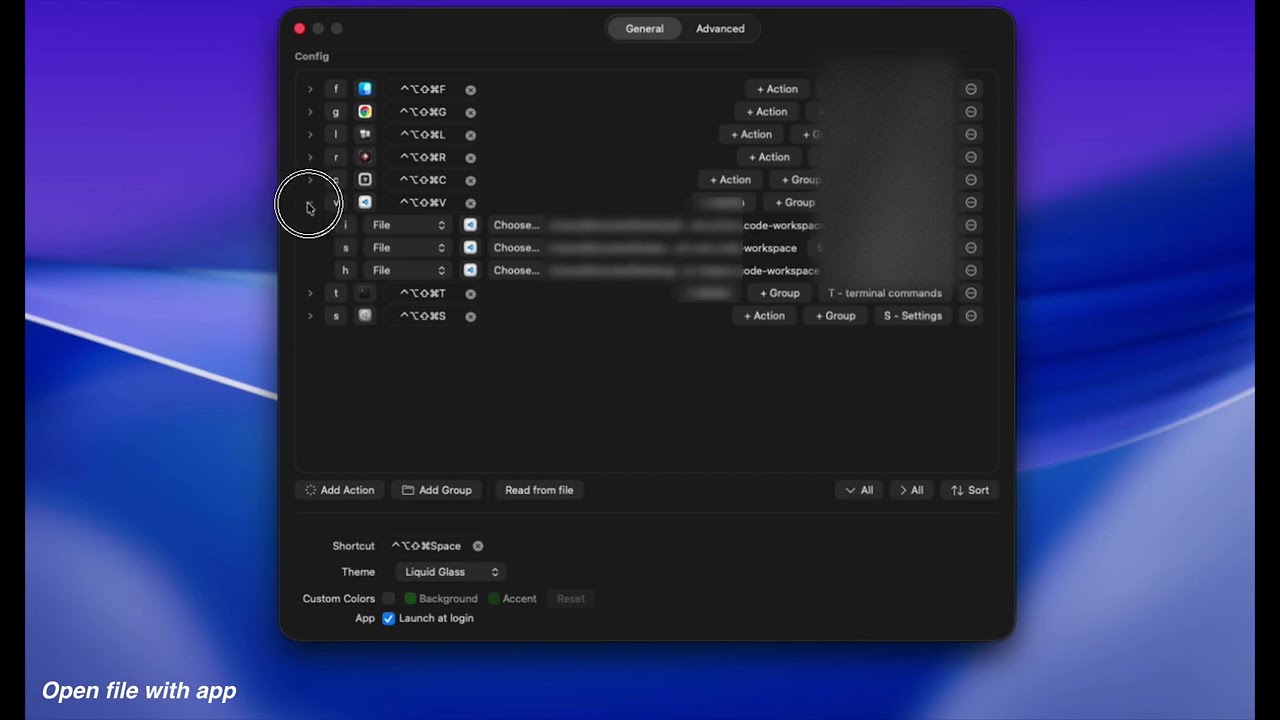
Add your shortcuts to the
Configsettings
Can't find the menu bar icon? Open settings directly from Terminal:
open "leaderkey://settings"
- Typing the name of the thing can be slow and give unpredictable results.
- Global shortcuts have limited combinations.
- Leader Key offers predictable, nested shortcuts -- like combos in a fighting game.
- leaderom → Launch Messages (
open messages) - leadermm → Mute audio (
media mute) - leaderwm → Maximize current window (
window maximize)
Leader Key supports URL scheme automation for integration with tools like Alfred, Raycast, shell scripts, and more.
# Reload configuration from disk
open "leaderkey://config-reload"

# Show config.json in Finder
open "leaderkey://config-reveal"# Show Leader Key window
open "leaderkey://activate"
# Hide Leader Key window
open "leaderkey://hide"
# Clear navigation state (return to root)
open "leaderkey://reset"# Open settings window
open "leaderkey://settings"
# Show about dialog
open "leaderkey://about"# Navigate through keys and execute actions
open "leaderkey://navigate?keys=a,b,c"
# Navigate without executing (preview mode)
open "leaderkey://navigate?keys=a,b,c&execute=false"You can also navigate the menu with ↑ and ↓. Use → to enter groups and ← to go back, then press Enter to launch the selected item.
- Alfred/Raycast workflows: Trigger Leader Key shortcuts programmatically
- Shell scripts: Automate configuration reloads after editing config.json
- Keyboard maestro: Chain Leader Key actions with other automations
- External triggers: Open specific action sequences from other applications
| Key | Action |
|---|---|
| ↑ / ↓ | Move selection up/down |
| → | Enter selected group |
| ← | Go back to parent group |
| Enter | Execute selected item |
| Backspace | Return to root |
| Escape | Go back (or close if at root) |
| ? | Show cheatsheet |
| ⌘ , | Open settings |
Leader Key supports these action types (configure in Settings → Config):
- Application — Launch any app
- URL — Open URLs or URL schemes (e.g.,
raycast://,slack://) - Command — Run shell commands
- Folder — Open folders (optionally with a specific app)
- File — Open files (optionally with a specific app)
- Script — Run shell scripts with optional arguments
Configure in Settings → Advanced
| Modifier | What it does |
|---|---|
| Sticky Mode | Hold while pressing an action to keep Leader Key open afterward |
| Group Sequences | Hold while pressing a group key to run ALL actions in that group at once |
Any key can be your leader key, but only modifiers will not work.
Examples:
- F12
- ⌘ + space
- ⌘⌥ + space
- ⌘⌥⌃⇧ + L (hyper key)
Advanced examples:
Using Karabiner you can do more fancy things like:
- right ⌘ + left ⌘ at once (bound to F12) my personal favorite
- caps lock (bound to hyper when held, F12 when pressed)
See @mikker's config in the wiki for akimbo cmds example.
Activate Leader Key, then cmd + ,.
You need to make sure your shell environment is correctly set up for non-interactive mode, and exports the PATH variable.
For zsh make sure you have your PATH variable exported in ~/.zshenv
For bash make sure you have your PATH variable exported in ~/.bash_profile
MIT