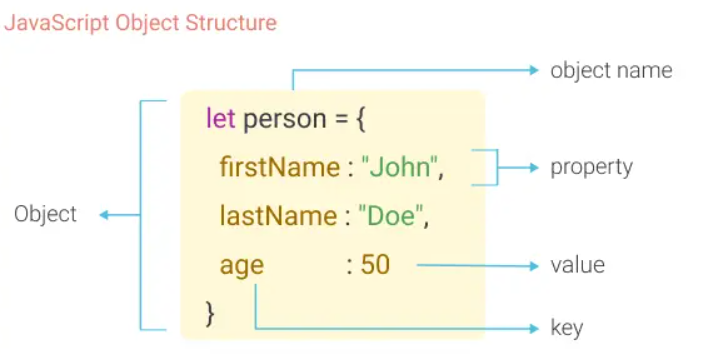
First, look at the picture to understand object properties and methods.

An object in JavaScript is a collection of properties. Each property is made up of a key (also called a name) and a value.
- The key is a string (or a symbol), and the value can be any type, including primitive values (like numbers or strings), other objects, or functions.
- Objects work with defined keys, meaning you can use specific names to access or modify their properties.
In contrast:
An array is a collection of elements where each element has an index (a number starting from 0). Arrays are typically used when you want to store ordered data, and they are dependent on their index.
So, for objects:
Think of them as key-value pairs, like a dictionary.
Example
const person = {
  name: "John",
  age: 30,
  isStudent: false
};
console.log(person.name); // Output: "John"
Objects are flexible and can store multiple types of data, making them great for modeling real-world entities.
Here are three ways to access and display an object in JavaScript using the person object as an example:
- Calling a Function (Method) If the object has a method (a function as a property), you can call it to display the object or its properties.
const person = {
  name: "John",
  age: 30
};

// Accessing properties using dot notation
console.log(person.name); // Output: John
console.log(person.age); // Output: 30- Using Bracket Notation Bracket notation allows you to access properties of an object using a string key. This is useful when the property name contains spaces or is dynamic.
const person = {
  name: "John",
  age: 30
};

// Accessing properties using bracket notation
console.log(person["name"]); // Output: John
console.log(person["age"]); // Output: 30- Destructuring Assignment Destructuring is a convenient way to extract values from an object and assign them to variables. It simplifies accessing multiple properties at once.
const person = {
  name: "John",
  age: 30
};

// Destructuring to get specific properties
const { name, age } = person;

console.log(name); // Output: John
console.log(age);  // Output: 30
Here’s an overview of three commonly used Object methods in JavaScript, along with explanations and examples:
- Description: Returns an array of all the keys (property names) of the object.
- When you want to get a list of the property names in an object.
Example:
const person = { name: "Alice", age: 25, city: "New York" };

const keys = Object.keys(person);
console.log(keys); // Output: ["name", "age", "city"]- Description: Returns an array of all the values of the object.
- When you want to extract only the property values from an object.
Example:
const person = { name: "Alice", age: 25, city: "New York" };

const values = Object.values(person);
console.log(values); // Output: ["Alice", 25, "New York"]- Description: Returns an array of key-value pairs from the object, where each key-value pair is an array.
- When you need both keys and values, often for iterating through the object.
Example:
const person = { name: "Alice", age: 25, city: "New York" };

const entries = Object.entries(person);
console.log(entries);
// Output: [["name", "Alice"], ["age", 25], ["city", "New York"]]

// Iterating through entries
entries.forEach(([key, value]) => {
    console.log(`${key}: ${value}`);
});
// Output:
// name: Alice
// age: 25
// city: New York- Destructuring allows you to extract properties from an object and assign them to variables, making your code cleaner and easier to understand.
const { key1, key2 } = objectName;const person = { name: "Alice", age: 25, city: "New York" };
const { name, age } = person;
console.log(name); // Output: Alice
console.log(age); // Output: 25You can rename the variables while destructuring if you don’t want to use the exact property names:
const person = { name: "Alice", age: 25, city: "New York" };

const { name: fullName, age: yearsOld } = person;

console.log(fullName); // Output: Alice
console.log(yearsOld); // Output: 25If a property doesn’t exist in the object, you can set a default value:
const person = { name: "Alice", age: 25 };

const { name, city = "Unknown" } = person;

console.log(name); // Output: Alice
console.log(city); // Output: UnknownIf an object contains another object, you can destructure the nested properties:
const person = {
    name: "Alice",
    address: { city: "New York", zip: "10001" }
};

const { address: { city, zip } } = person;

console.log(city); // Output: New York
console.log(zip); // Output: 10001The JavaScript for in statement loops through the properties of an Object and It allows you to access each key or property name of an object.:
Example -
for (key in object) {
  // code block to be executed
}
for...of: Goes through values (items) in an array or other collections.
Example: for (let value of [10, 20, 30]) → gives 10, 20, 30.
for...in: Goes through keys (property names) in an object.
Example: for (let key in {a: 1, b: 2}) → gives 'a', 'b'.
The this keyword in JavaScript is a special reference that changes based on how and where it is used. It refers to the context in which the current code is being executed.
this is a dynamic keyword that refers to an object, and its value depends on:
- Where the code is written (global scope, function, or class).
- How the function is called (as a method, standalone, or with
new).
-
Global Scope:
- In the global context (outside any function or object):
- In non-strict mode,
thisrefers to the global object (windowin browsers,globalin Node.js). - In strict mode,
thisisundefined.
- In non-strict mode,
console.log(this); // In browser: Window object
"use strict";
console.log(this); // undefined
- In the global context (outside any function or object):
-
Inside Regular Functions:
- Non-strict mode:
thisrefers to the global object. - Strict mode:
thisisundefined.
function showThis() {
  console.log(this);
}
showThis(); // In browser: Window object (non-strict), undefined (strict)
- Non-strict mode:
-
Object Methods:
- When a function is called as a method of an object,
thisrefers to the object that owns the method.
const obj = {
  name: "JavaScript",
  showThis: function () {
    console.log(this); // Refers to obj
  },
};
obj.showThis(); // Logs obj
- When a function is called as a method of an object,
-
Arrow Functions:
- Arrow functions don’t have their own
this. Instead, they inheritthisfrom the surrounding lexical scope (where the arrow function is defined).
const obj = {
  name: "Arrow",
  showThis: () => {
    console.log(this); // Refers to the outer context (global object or undefined in strict mode)
  },
};
obj.showThis(); // Logs Window (or undefined in strict mode)
- Arrow functions don’t have their own
-
In Anonymous Functions The value of
thisin an anonymous function depends on how the function is called:
- Called in Global Scope:
- Non-strict mode:
thisrefers to the global object (window). - Strict mode:
thisisundefined.
- Non-strict mode:
const anonFunc = function () {
console.log(this); // Logs: Window (non-strict) or undefined (strict)
};
anonFunc();- Used as a Method:
If assigned to an object and then called,thisrefers to the object.
const obj = {
method: function () {
console.log(this); // Logs: obj
},
};
obj.method();